BlackBerry BB 9900

BlackBerry BB 9900 Bold Touch Smartphone User Manual

Model: BB 9900

1. Inngangur

This manual provides essential instructions for setting up, operating, and maintaining your BlackBerry BB 9900 Bold Touch smartphone. Please read this guide thoroughly to ensure proper use and to maximize the device's capabilities. The BlackBerry BB 9900 Bold Touch combines a capacitive touchscreen with a full QWERTY keyboard, running on BlackBerry OS 7.

2. Innihald pakka

Staðfestu að pakkinn þinn inniheldur eftirfarandi hluti:

3. Tæki lokiðview

Familiarize yourself with the physical features of your BlackBerry BB 9900 Bold Touch.

3.1 Framhlið View

BlackBerry BB 9900 Bold Touch front view, showing the screen, QWERTY keyboard, and navigation buttons.

Mynd: Framan view of the BlackBerry BB 9900 Bold Touch, highlighting the 2.8-inch touchscreen and the physical QWERTY keyboard below it. The device also features a trackpad and call/end buttons.

  • Snertiskjár: 2.8-inch capacitive display for interactive navigation.
  • QWERTY lyklaborð: Full physical keyboard for efficient typing.
  • Optical Trackpad: For precise navigation and selection.
  • Hnappar fyrir símtal/lok: Standard telephony controls.

3.2 Aftan View

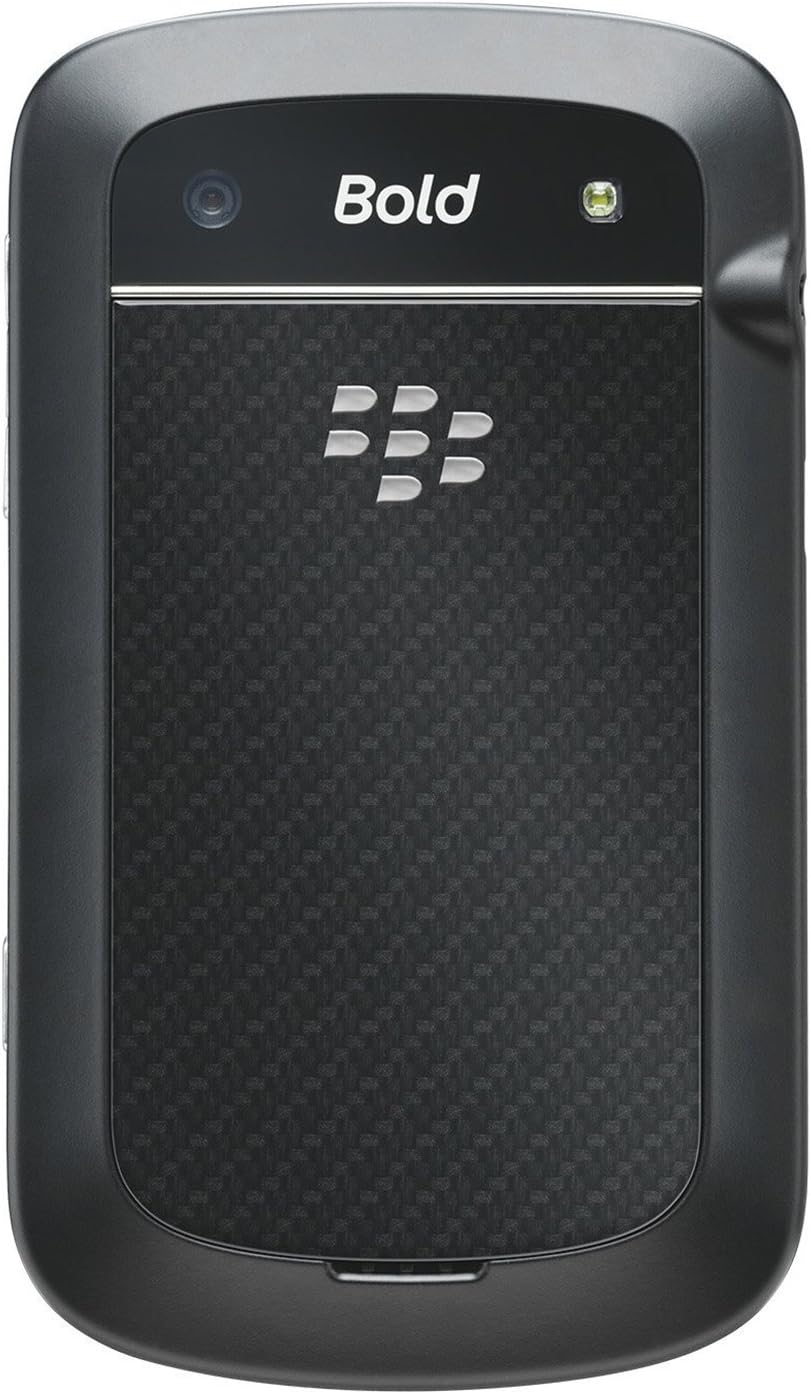
BlackBerry BB 9900 Bold Touch rear view, showing the 5MP camera lens and LED flash.

Mynd: Aftan view of the BlackBerry BB 9900 Bold Touch, featuring the 5-megapixel camera lens, LED flash, and the BlackBerry logo.

  • 5MP myndavél: Primary camera with autofocus and LED flash.
  • Rafhlöðuhlíf: Removable cover for battery and SIM card access.

3.3 hlið View

BlackBerry BB 9900 Bold Touch side view, showing volume buttons and convenience key.

Mynd: Hlið view of the BlackBerry BB 9900 Bold Touch, illustrating the placement of the volume control buttons and a customizable convenience key.

  • Hljóðstyrkshnappar: Stilla hljóðstyrk.
  • Convenience Key: Sérsniðinn flýtileiðarhnappur.

4. Uppsetning

4.1 Að setja SIM-kortið í

  1. Fjarlægðu rafhlöðulokið af bakhlið tækisins.
  2. Finndu SIM -kortaraufina.
  3. Settu SIM-kortið í með gullnu snertingarnar niður og klippta hornið í takt við raufina.
  4. Gakktu úr skugga um að SIM-kortið sé örugglega á sínum stað.

4.2 Rafhlaðan sett í

  1. After inserting the SIM card, align the battery's gold contacts with the contacts in the battery compartment.
  2. Ýttu rafhlöðunni varlega á sinn stað þar til hún smellur.
  3. Skiptu um rafhlöðulokið.

4.3 Hleðsla tækisins

  1. Connect the USB cable to the charging port on your device.
  2. Plug the other end of the USB cable into the wall charger, then into a power outlet.
  3. Leyfðu tækinu að hlaðast að fullu áður en það er notað í fyrsta skipti. Rafhlöðuvísirinn á skjánum sýnir hleðslustöðu.

4.4 Kveikt/slökkt

  • Til að kveikja á: Press and hold the Power/Lock button (usually located on the top edge) until the BlackBerry logo appears.
  • Til að slökkva á: Press and hold the Power/Lock button until the 'Power Off' option appears on the screen. Tap 'Power Off' to confirm.

5. Notkunarleiðbeiningar

5.1 Snertiskjárleiðsögn

  • Bankaðu á: Touch the screen briefly to open applications, select items, or activate buttons.
  • Strjúktu: Drag your finger across the screen to scroll through lists or switch between home screen panels.
  • Klípaðu til aðdráttar: Use two fingers to zoom in or out on photos, web pages, or maps.

5.2 Using the QWERTY Keyboard

The physical QWERTY keyboard allows for fast and accurate text entry. Each key corresponds to a letter, number, or symbol. Use the 'Alt' key for alternate characters and the 'Shift' key for capitalization.

5.3 Að hringja

  1. From the home screen, tap the Phone icon or press the green Call button.
  2. Enter the phone number using the keyboard.
  3. Press the green Call button to initiate the call.
  4. To end a call, press the red End Call button.

5.4 Sending skilaboða

  1. Tap the Messages icon from the home screen.
  2. Select 'Compose New' or similar option.
  3. Sláðu inn símanúmer viðtakandans eða veldu úr tengiliðum.
  4. Type your message using the QWERTY keyboard.
  5. Tap 'Send'.

5.5 Notkun myndavélarinnar

  1. Ýttu á myndavélartáknið til að opna myndavélarforritið.
  2. Rammaðu inn myndina með því að nota skjáinn sem viewfinnandi.
  3. Tap the screen or press the convenience key (if configured) to take a photo.
  4. The 5MP camera features autofocus and an LED flash for improved image quality.

5.6 Tengist við Wi-Fi

  1. Go to 'Options' > 'Networks and Connections' > 'Wi-Fi'.
  2. Kveiktu á Wi-Fi. Tækið mun leita að tiltækum netum.
  3. Veldu netið sem þú vilt og sláðu inn lykilorðið ef þú ert beðinn um það.
  4. Once connected, the Wi-Fi indicator will appear in the status bar.

5.7 Using NFC (Near Field Communication)

The BlackBerry BB 9900 Bold Touch supports NFC for short-range wireless communication. This allows for quick pairing with compatible accessories or sharing data with other NFC-enabled devices by tapping them together.

  1. Gakktu úr skugga um að NFC sé virkt í stillingum tækisins.
  2. Hold your device close to another NFC-enabled device or tag.
  3. Follow on-screen prompts to complete the desired action (e.g., pairing, data transfer).

6. Viðhald

6.1 Þrif á tækinu

  • Use a soft, lint-free cloth to wipe the screen and body of the device.
  • Forðist að nota sterk efni, slípiefni eða úðabrúsa.
  • Ekki útsetja tækið fyrir miklum raka.

6.2 Umhirða rafhlöðu

  • Forðist mikinn hita, sem getur dregið úr afköstum rafhlöðunnar.
  • Use only the original or approved charger.
  • Ekki stinga gat á rafhlöðuna eða skemma hana.

6.3 Hugbúnaðaruppfærslur

Periodically check for software updates to ensure your device has the latest features and security enhancements. Updates can typically be found in the device's 'Options' or 'Settings' menu under 'Software Updates'.

7. Bilanagreining

7.1 Tækið kveikir ekki á sér

  • Gakktu úr skugga um að rafhlaðan sé rétt sett í og ​​hlaðin.
  • Connect the device to the charger and wait a few minutes before attempting to power on again.
  • If the issue persists, try removing and reinserting the battery.

7.2 Vandamál með nettengingu

  • Check if your SIM card is correctly inserted and activated with your carrier.
  • Verify that cellular data or Wi-Fi is enabled in your device settings.
  • Endurræstu tækið.
  • If using Wi-Fi, ensure your router is working and you have entered the correct password.

7.3 Snertiskjár svarar ekki

  • Endurræstu tækið.
  • Gakktu úr skugga um að skjárinn sé hreinn og laus við óhreinindi eða raka.
  • If the issue is intermittent, check for any recent software installations that might be causing conflicts.

8. Tæknilýsing

Eiginleiki Smáatriði
Nafn líkans BB 9900
Stýrikerfi BlackBerry stýrikerfi 7
Skjár 2.8-inch Capacitive Touchscreen, 640 x 480 Resolution
Örgjörvi Not specified (typically 1.2 GHz for this model)
vinnsluminni 768 MB
Innri geymsla 8 GB
Myndavél að aftan 5 MP, Autofocus, LED Flash
Tengingar Wi-Fi 802.11 b/g/n, NFC, Bluetooth, GPS
Stuðningur við netkerfi Quad-band GSM/GPRS/EDGE, Tri-band HSPA+
Mál 4.53 x 2.6 x 0.41 tommur (115 x 66 x 10.5 mm)
Þyngd 4.6 aura (130 grömm)
Hljóð Jack 3.5 mm

9. Stuðningur og ábyrgð

9.1 Þjónustuver

For technical assistance, troubleshooting beyond this manual, or service inquiries, please visit the official BlackBerry support website or contact your local service provider. Refer to the packaging or official websíðuna fyrir nákvæmar upplýsingar um tengiliði.

9.2 Upplýsingar um ábyrgð

Your BlackBerry BB 9900 Bold Touch is covered by a limited warranty. Please refer to the warranty card included in your product packaging or visit the official BlackBerry webSjá nánari skilmála, þar á meðal ábyrgðartíma og upplýsingar um þjónustusvið, á vefsíðunni. Geymið kaupkvittunina vegna ábyrgðarkröfu.

Tengd skjöl - BB 9900

Preview Notendahandbók fyrir BlackBerry Q10 snjallsíma
Ítarleg leiðarvísir um BlackBerry Q10 snjallsímann, sem fjallar um eiginleika eins og BlackBerry Hub, lyklaborð, BBM myndband, myndavél, miðlun margmiðlunar og stillingar tækisins. Lærðu hvernig á að hámarka framleiðni og aðlaga upplifun þína.
Preview Þróunarumhverfi BlackBerry Java: Leiðbeiningar um þróun GPS og BlackBerry Maps
Þessi handbók lýsir samþættingu GPS og BlackBerry Maps virkni innan BlackBerry Java þróunarumhverfisins og þjónar sem tæknileg úrræði fyrir forritara sem smíða staðsetningarvitandi forrit.
Preview Notendahandbók BlackBerry Tasks fyrir Android | Örugg verkefnastjórnun
Opinbera notendahandbókin fyrir BlackBerry Tasks fyrir Android (útgáfa 3.17) veitir ítarlegar leiðbeiningar um uppsetningu, virkjun, verkefnastjórnun, stillingar og bilanaleit fyrir öruggt verkefnastjórnunarforrit BlackBerry fyrir fyrirtæki.
Preview Notendahandbók fyrir BlackBerry Q5 snjallsímann: Uppsetning, eiginleikar og notkun
Þessi ítarlega notendahandbók veitir ítarlegar upplýsingar og leiðbeiningar um notkun BlackBerry Q5 snjallsímans. Hún fjallar um eiginleika og virkni BlackBerry 10 stýrikerfisins, útgáfu 10.2.1, sem er hannað til að auka framleiðni og tengingu.
Preview Notendahandbók fyrir BlackBerry Z30 snjallsímann: Eiginleikar, uppsetning og notkun
Kynntu þér ítarlega notendahandbók fyrir BlackBerry Z30 snjallsímann (útgáfa 10.3.2). Þessi handbók veitir ítarlegar leiðbeiningar um uppsetningu tækisins, val á eiginleikum, stjórnun samskipta, notkun margmiðlunarmöguleika, sérsniðnar stillingar og aukið öryggi til að hámarka notendaupplifun.
Preview BlackBerry Work, Notes, and Tasks Administration Guide
Comprehensive administration guide for BlackBerry Work, Notes, and Tasks, detailing setup, configuration, management, and troubleshooting for IT administrators using BlackBerry UEM.