1. Inngangur
Thank you for choosing the Hama 95236 8-inch LCD Digital Photo Frame. This manual provides important information regarding the safe operation, setup, and maintenance of your device. Please read it thoroughly before using the product and keep it for future reference.
2. Öryggisleiðbeiningar
- Do not open the device. Incorrect assembly or repair can lead to electric shock.
- Ekki nota vöruna ef hún er sýnilega skemmd.
- Verndaðu vöruna gegn óhreinindum, raka og ofhitnun. Notið hana aðeins í þurru umhverfi.
- Ekki missa vöruna eða útsetja hana fyrir miklum titringi.
- Notaðu vöruna eingöngu í þeim tilgangi sem til er ætlast.
- Geymið þessa vöru, eins og allar rafmagnsvörur, þar sem börn ná ekki til.
- Fargið umbúðum strax í samræmi við gildandi reglur á staðnum.
3. Innihald pakka
Vinsamlegast athugið hvort pakkinn innihaldi eftirfarandi hluti:
- Hama 95236 8-inch LCD Digital Photo Frame
- Rafmagns millistykki
- Notendahandbók (þetta skjal)
4. Vöru lokiðview
Familiarize yourself with the components and controls of your digital photo frame.
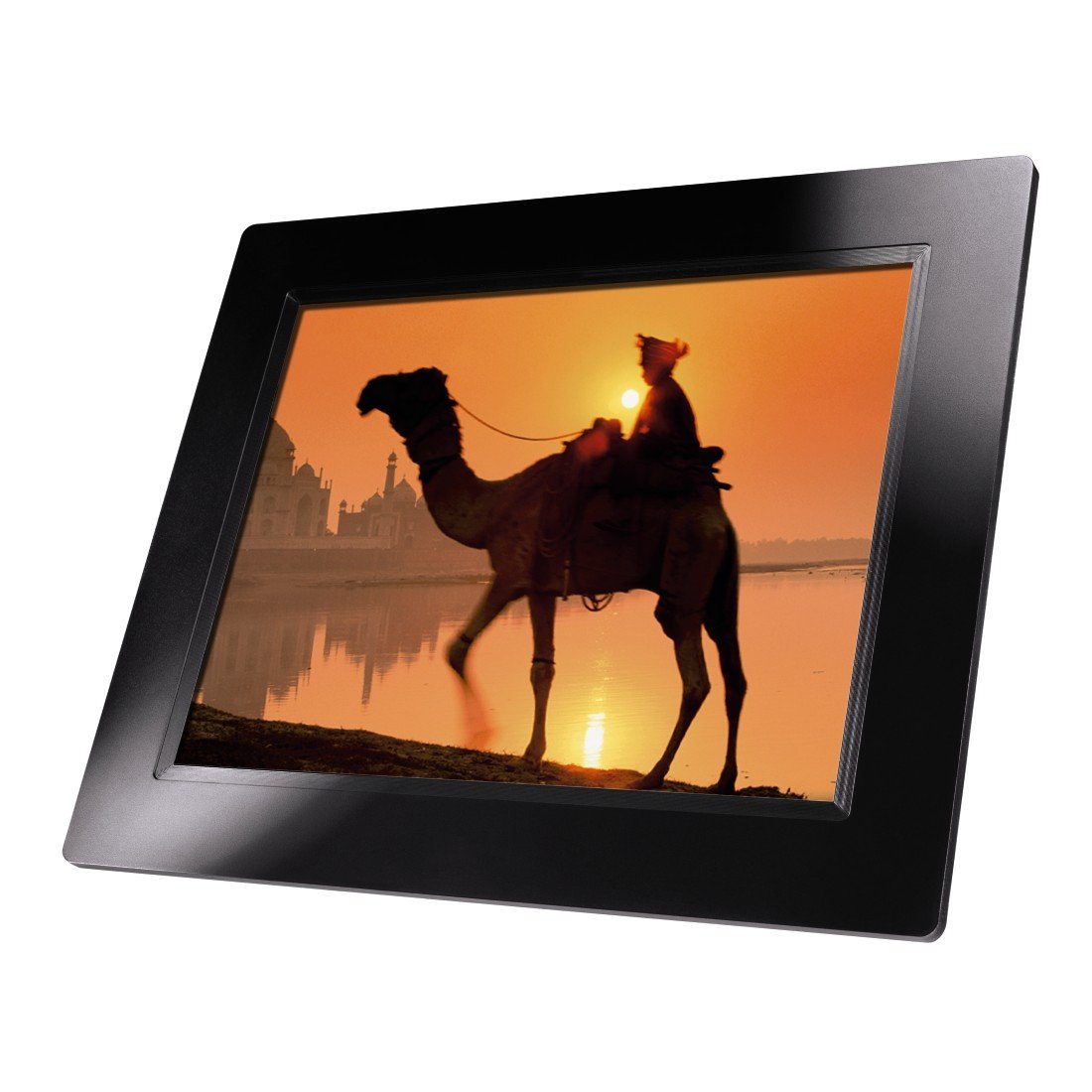
Mynd 4.1: Framan view of the Hama 95236 Digital Photo Frame, showing the 8-inch LCD screen.

Mynd 4.2: Hlið view of the digital photo frame, highlighting the various input ports including the SD/MMC/MS card slot, USB port, and DC IN power port.

Mynd 4.3: Aftan view of the digital photo frame, showing the stand attachment point, ventilation grilles, and the control panel with power, navigation, and menu buttons.
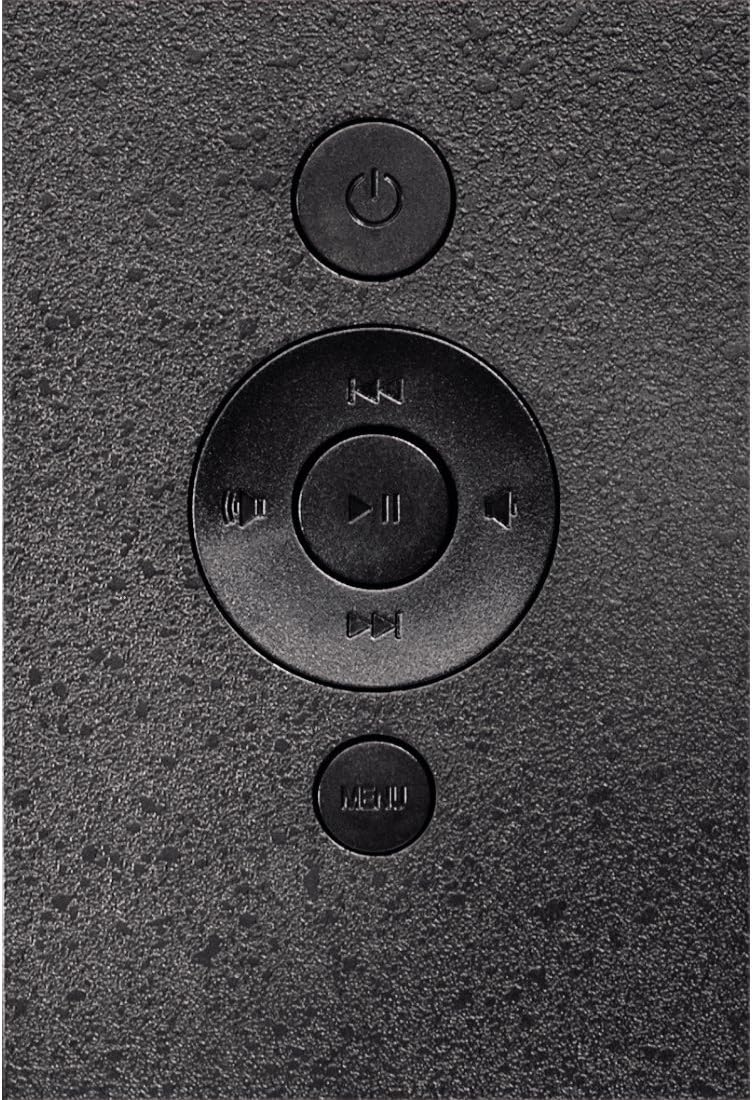
Mynd 4.4: Close-up of the control buttons located on the back of the frame. These include the power button, directional navigation buttons (up, down, left, right), play/pause/enter button, and the menu button.
4.1. Tengi og stýringar
- SD/MMC/MS Card Slot: For inserting memory cards to display photos and videos.
- USB tengi: For connecting USB flash drives or other compatible USB storage devices.
- DC IN: Power input for connecting the provided power adapter.
- Aflhnappur: Kveikir eða slekkur á tækinu.
- Leiðsagnarhnappar (upp/niður/vinstri/hægri): Used to navigate through menus and select options.
- Play/Pause/Enter Button: Confirms selections or controls media playback.
- Valmyndarhnappur: Opnar aðalvalmyndina fyrir stillingar og valkosti.
5. Uppsetning
5.1. Festing standsins
Insert the metal stand into the designated slot on the back of the digital photo frame. Ensure it is securely fastened to provide stable support for the frame.
5.2. Rafmagnstenging
- Connect the power adapter to the DC IN port on the back of the photo frame.
- Stingdu straumbreytinum í viðeigandi rafmagnsinnstungu.
- The frame will typically power on automatically or can be turned on using the power button.
5.3. Inserting a Memory Card or USB Drive
The Hama 95236 supports SD/MMC/MS memory cards and USB flash drives.
- Locate the SD/MMC/MS card slot or the USB port on the side of the frame (refer to Figure 4.2).
- Carefully insert your memory card or USB drive into the corresponding slot/port. Ensure it is inserted correctly to avoid damage.
- The frame should automatically detect the storage device and prompt you to view innihald þess eða hefja myndasýningu.
6. Notkunarleiðbeiningar
6.1. Grunnleiðsögn
Use the navigation buttons on the back of the frame to move through menus and options. The Play/Pause/Enter button confirms your selection.
6.2. Aðalvalmynd
Ýttu á MENU button to access the main menu. From here, you can select different modes and settings:
- Mynd: View photos in a slideshow or individually.
- Tónlist: Spila hljóð files.
- Myndband: Spila myndband files.
- Calendar/Clock: Display the calendar and time.
- Stillingar: Adjust various device parameters.
6.3. Photo Playback
- Í aðalvalmyndinni skaltu velja Mynd.
- Navigate to your desired folder or select all photos.
- Ýttu á Spila/Hlé/Enter button to start the slideshow.
- During a slideshow, you can use the navigation buttons to skip photos or pause playback.
6.4. Kerfisstillingar
Aðgangur að Stillingar menu to customize your photo frame:
- Sýna stillingar: Adjust brightness, contrast, and display mode.
- Stillingar fyrir myndasýningu: Configure transition effects, display time per photo, and repeat mode.
- Dagsetning og tími: Stilltu núverandi dagsetningu og tíma. Note: Some users have reported that date and time settings may reset after power loss.
- Tungumál: Select your preferred language for the menu interface.
- Upplýsingar um geymslu: View details about connected storage devices.
7. Viðhald
7.1. Þrif tækisins
- Taktu tækið alltaf úr sambandi við rafmagnið áður en það er hreinsað.
- Clean the screen and exterior surfaces with a soft, dry, lint-free cloth.
- Do not use aggressive cleaning agents, solvents, or abrasive materials.
7.2. Geymsla
Ef tækið er geymt í langan tíma skal aftengja það frá rafmagni og geyma það á köldum, þurrum stað fjarri beinu sólarljósi og miklum hita.
8. Bilanagreining
| Vandamál | Möguleg orsök | Lausn |
|---|---|---|
| Tækið kveikir ekki. | Rafmagnsbreytir ekki tengdur eða bilaður. | Ensure the power adapter is securely connected to both the frame and the power outlet. Test the outlet with another device. |
| Engar myndir birtast. | No memory card/USB drive inserted or fileer ekki stutt. | Insert a compatible memory card or USB drive with supported image formats (e.g., JPEG). Check if the storage device is properly inserted. |
| Dagsetning og tími endurstillt eftir að slökkt er á tækinu. | Engin innri rafhlöðuafrit fyrir klukkuna. | This model may not retain date/time settings without continuous power. Re-enter settings if necessary after power interruption. |
| Video playback is choppy or distorted. | Unsupported video format or high bitrate. | Tryggja myndband files are in a supported format and resolution. Convert videos to a lower resolution or bitrate if issues persist. |
| Hnappar svara ekki. | Tímabundin hugbúnaðarvilla. | Disconnect the power adapter, wait a few seconds, then reconnect it to restart the device. |
9. Tæknilýsing
| Eiginleiki | Smáatriði |
|---|---|
| Gerðarnúmer | 00095236 |
| Skjástærð | 8 tommur |
| Skjáupplausn | 800 x 600 dílar |
| Hlutfall | 4:3 |
| Innri geymsla | 2 GB (2048 MB) |
| Tengingar | USB, SD/MMC/MS Card Slot |
| Mál (L x B x H) | 2.6 x 22.2 x 17.8 cm |
| Þyngd | 550 g |
| Framleiðandi | Hama |
10. Upplýsingar um ábyrgð
Hama GmbH & Co KG provides a manufacturer's warranty for this product. The specific terms and conditions of the warranty period and coverage are subject to the purchase date and the region of purchase. Please retain your proof of purchase (receipt) for any warranty claims.
For detailed warranty information, please refer to the official Hama websíðuna eða hafðu samband við þjónustuver þeirra beint.
11. Þjónustudeild
Should you have any questions regarding this product, please contact Hama Customer Support:
- Websíða: Heimsæktu opinberu Hama website for FAQs, drivers, and further product information. www.hama.com
- Tengiliður: Refer to the contact section on the Hama websíðu fyrir símanúmer eða tölvupóstþjónustu á þínu svæði.
Vinsamlegast hafið gerðarnúmerið (00095236) og sönnun fyrir kaupum tilbúna þegar þið hafið samband við þjónustuver.


