Inngangur
The Intermatic TN111RM40 is a mechanical 24-hour timer designed for controlling lamps and small appliances. This timer allows for up to two ON and two OFF events per day, making it suitable for automating various electrical devices, including landscape lighting systems. It features a 2-prong polarized outlet and a manual override function. The timer is housed in a 3R enclosure, indicating its suitability for outdoor use.
This manual provides instructions for the safe and effective operation of your Intermatic TN111RM40 timer.
Öryggisupplýsingar
- Lestu allar leiðbeiningar fyrir notkun.
- Ekki dýfa í vatn.
- Ensure the timer is unplugged before making any adjustments or cleaning.
- Do not exceed the electrical ratings of the timer.
- This timer is designed for use with 2-prong polarized plugs only.
Vara lokiðview
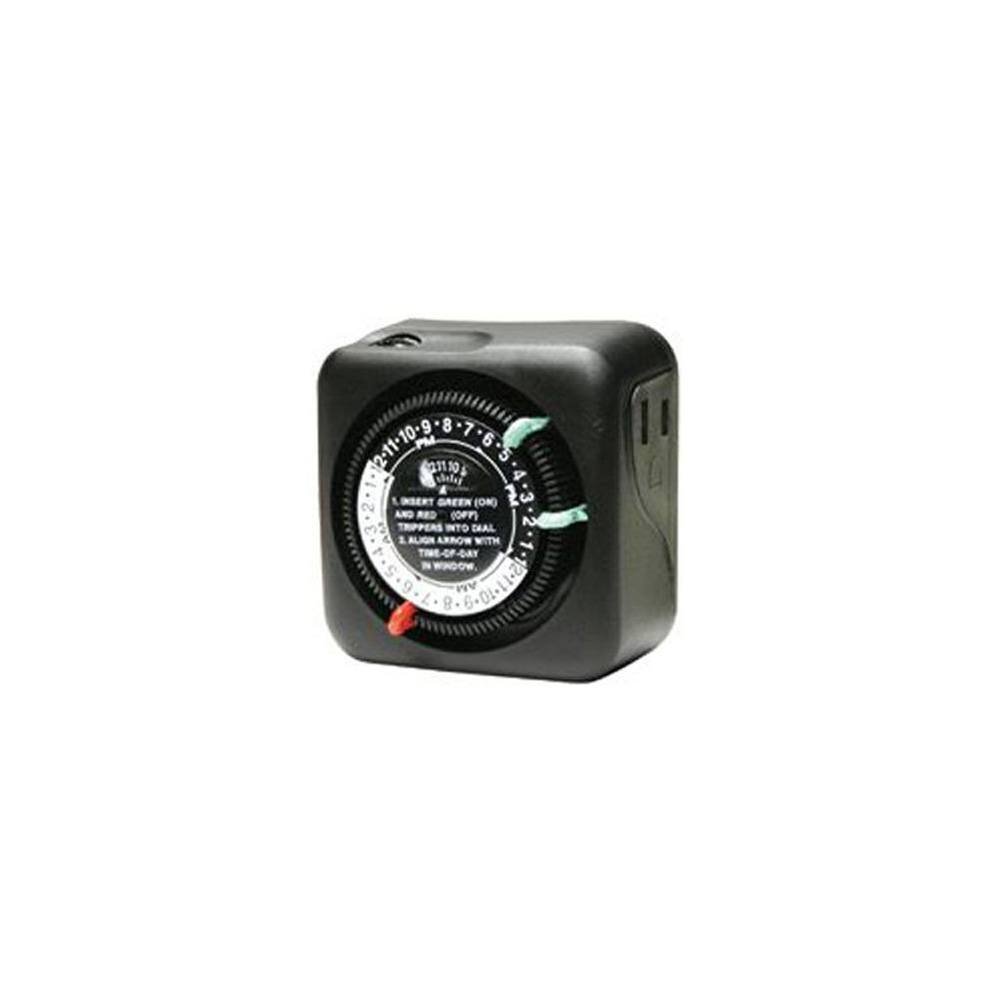
Mynd 1: Framan view of the Intermatic TN111RM40 timer, highlighting the 24-hour dial, green (ON) and red (OFF) trippers, and the time-of-day window. The image also shows the product dimensions: 3 inches deep, 4 inches wide, and 3 inches high.
The Intermatic TN111RM40 timer features a rotating 24-hour dial with markings for AM and PM. It includes removable trippers (pins) for setting ON and OFF times, a manual override switch, and a single 2-prong polarized outlet.
Uppsetning
- Taktu tímastillinn úr umbúðunum: Takið tímastillinn varlega úr umbúðunum. Athugið hvort hann sé skemmdur.
- Þekkja íhluti: Locate the green (ON) trippers and red (OFF) trippers. These are small pins that insert into the dial.
- Stilla núverandi tíma:
- Rotate the entire dial clockwise until the current time aligns with the "TIME-OF-DAY" arrow in the window. Ensure to distinguish between AM and PM hours.
- Insert ON/OFF Trippers:
- Insert the green (ON) trippers into the dial at the desired times you want the connected appliance to turn ON.
- Insert the red (OFF) trippers into the dial at the desired times you want the connected appliance to turn OFF.
- The timer supports up to two ON and two OFF settings per 24-hour period.
- Tengdu tímastillinn: Plug the timer into a standard 2-prong wall outlet.
- Tengdu tæki: Stingdu lamp or small appliance into the 2-prong polarized outlet on the side of the timer. Ensure the appliance is switched to the ON position if it has its own power switch.
Notkunarleiðbeiningar
Once set up, the timer will automatically turn your connected appliance ON and OFF according to the programmed times. The dial will continuously rotate clockwise, indicating the passage of time.
Handvirk hnekking
The Intermatic TN111RM40 includes a manual override feature. This allows you to temporarily turn the connected appliance ON or OFF without disturbing the programmed schedule.
- To manually turn the appliance ON or OFF, locate the manual override switch (often a small lever or button) on the timer.
- Toggle the switch to the desired position. The timer will resume its programmed schedule at the next ON or OFF event.
Viðhald
- Þrif: Aftengdu tímastillinn úr innstungunni áður en þú þrífur hann. Þurrkaðu ytra byrðið með mjúkum klút.amp klút. Ekki nota slípiefni eða leysiefni.
- Geymsla: Ef tímastillirinn er geymdur í langan tíma skal gæta þess að hann sé hreinn og þurr. Geymið á köldum, þurrum stað fjarri beinu sólarljósi.
- Skoðun: Periodically inspect the timer and its cord for any signs of wear or damage. If damage is found, discontinue use and replace the unit.
Úrræðaleit
| Vandamál | Möguleg orsök | Lausn |
|---|---|---|
| Tækið kveikir/slökkvar ekki á forrituðum tímum. |
|
|
| Tímastillirinn snýst ekki. |
|
|
Tæknilýsing
- Gerð: TN111RM40
- Vörumerki: Intermatic
- Tegund: 24-tíma vélrænni tímamælir
- Stillingar: Up to 2 ON/OFF events per day
- Tegund úttaks: 2-Prong Polarized
- Hýsing: 3R (Suitable for outdoor use)
- Litur: Svartur
- Efni: Plast
- Vörumál: 3" (dýpt) x 4" (breidd) x 3" (hæð)
- Þyngd hlutar: 5.3 aura
- UPC: 702811361973
Ábyrgð og stuðningur
For warranty information or technical support, please refer to the official Intermatic webvefsíðu eða hafið samband við þjónustuver þeirra. Geymið kaupkvittunina vegna ábyrgðarkröfu.
Intermatic Customer Support: www.intermatic.com/support