1. Inngangur og yfirview
This manual provides comprehensive instructions for the setup, operation, maintenance, and troubleshooting of your InFocus IN3124 Projector. Designed for clarity and ease of use, this guide will help you maximize your projector's performance and longevity.
The InFocus IN3124 is a high-performance projector featuring XGA (1024 x 868) native resolution, 4800 lumens of brightness, and a 3000:1 contrast ratio, making it suitable for various presentation environments. Its portable design allows for flexible placement and usage.
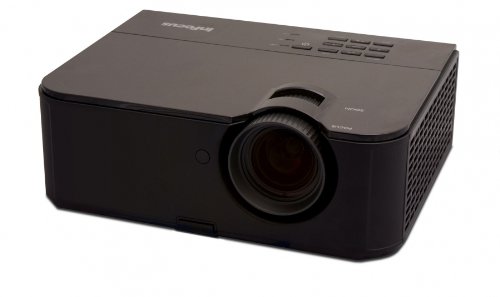
Mynd 1: Framhlið view of the InFocus IN3124 Projector, highlighting the main lens and the top-mounted control panel.
2. Uppsetning
2.1 Upptaka
Fjarlægið skjávarpann og allan fylgihluti varlega úr umbúðunum. Gakktu úr skugga um að allir íhlutir sem taldir eru upp á pakkningalistanum séu til staðar. Geymið upprunalegu umbúðirnar til síðari flutnings eða geymslu.
2.2 Staðsetning
Position the projector on a stable, level surface. Ensure adequate ventilation around the unit to prevent overheating. Maintain a clear path between the projector lens and the projection screen or surface. The optimal projection distance will vary based on the desired screen size.
2.3 Rafmagnstenging
- Tengdu rafmagnssnúruna við aflgjafainntak skjávarpans.
- Stingdu hinum enda rafmagnssnúrunnar í jarðtengda rafmagnsinnstungu.
2.4 Tenging inntaksgjafa
The IN3124 projector supports various input sources. Connect your video source (e.g., computer, DVD player) to the appropriate input port on the projector. Common ports include VGA and HDMI (if available on your specific model).
- VGA: Use a VGA cable to connect to a computer's video output.
- HDMI: Use an HDMI cable for digital video and audio (check projector for HDMI port availability).
3. Notkunarleiðbeiningar
3.1 Kveikt/slökkt
- Til að kveikja á: Press the power button on the projector's control panel or the remote control. The power indicator light will illuminate.
- Til að slökkva á: Press the power button twice. The projector will enter a cooling cycle before shutting down completely. Do not unplug the projector during the cooling cycle.
3.2 Að stilla fókus og aðdrátt
Rotate the focus ring on the projector lens until the image appears sharp and clear. Use the zoom ring (if present) to adjust the image size to fit your screen.
3.3 Val á inntaksuppsprettum
Press the "Source" or "Input" button on the projector's control panel or remote control to cycle through available input sources (e.g., VGA, HDMI). Select the input corresponding to your connected device.
3.4 Menu Navigation and Keystone Correction
Use the menu buttons on the projector or remote to access the On-Screen Display (OSD). Navigate through the menu options to adjust settings such as brightness, contrast, color, and keystone correction. Keystone correction helps to square the image if the projector is not perfectly perpendicular to the screen.
4. Viðhald
4.1 Þrif á linsunni
Þurrkið varlega linsuna á skjávarpanum með mjúkum, lólausum klút sem er sérstaklega hannaður fyrir sjónfleti. Notið ekki slípiefni eða of mikið afl, þar sem það getur rispað linsuna.
4.2 Þrif á loftsíum
Regularly check and clean the projector's air filters to ensure proper airflow and prevent overheating. Refer to the projector's specific filter access instructions. Use a soft brush or vacuum cleaner to remove dust accumulation.
4.3 Lamp Skipti
Myndvarpi lamp hefur takmarkaðan líftíma. Þegar lamp life indicator appears or the image becomes dim, the lamp may need replacement. Consult the full service manual or manufacturer's websíða fyrir ítarlegar upplýsingaramp skiptiferlar og samhæft lamp models. Always allow the projector to cool down completely before attempting lamp skipti.
4.4 Geymsla
Þegar skjávarpinn er ekki í notkun í langan tíma skal geyma hann á köldum, þurrum stað, fjarri beinu sólarljósi og miklum hita. Notið upprunalegu umbúðirnar eða verndarhulstur til að koma í veg fyrir ryk og skemmdir.
5. Bilanagreining
This section addresses common issues you might encounter with your InFocus IN3124 Projector. For more complex problems, contact customer support.
- Engin mynd sýnd:
- Ensure the projector is powered on and the power indicator is solid.
- Verify that the input source cable (VGA, HDMI) is securely connected to both the projector and the source device.
- Veldu rétta inntaksuppsprettu með því að nota „Heimild“ hnappinn.
- Check if the source device is outputting a signal.
- Dim or Faded Image:
- Stilltu birtustig og andstæðustillingar í OSD valmyndinni.
- Gakktu úr skugga um að lamp is not nearing the end of its lifespan.
- Clean the projector lens and air filters.
- Check the projection mode (e.g., Eco mode might reduce brightness).
- Myndin er óskýr:
- Stilltu fókushringinn á linsu skjávarpa.
- Gakktu úr skugga um að skjávarpaflöturinn sé sléttur og skjávarpinn stöðugur.
- Check the resolution settings of your source device to match the projector's native resolution.
- Fjarstýring virkar ekki:
- Skiptu um rafhlöður í fjarstýringunni.
- Gakktu úr skugga um að engar hindranir séu á milli fjarstýringarinnar og innrauðs móttakara skjávarpans.
- Beindu fjarstýringunni beint að skjávarpanum.
6. Tæknilýsing
The following table outlines the key technical specifications for the InFocus IN3124 Projector:
| Eiginleiki | Forskrift |
|---|---|
| Gerðarnúmer | IN3124 |
| Display Resolution (Native) | XGA (1024 x 868) |
| Birtustig | 4800 lúmen |
| Andstæðuhlutfall | 3000:1 |
| Skjár Tegund | LCD, LCoS |
| Þyngd hlutar | 8.16 pund (3.7 kg) |
| Vörumál (L x B x H) | 12.83 x 10.43 x 4.8 tommur (32.59 x 26.49 x 12.19 cm) |
| Sérstakur eiginleiki | Færanlegt |
7. Ábyrgð og stuðningur
For detailed warranty information, please refer to the warranty card included with your product packaging or visit the official InFocus webÁbyrgðin nær yfirleitt yfir framleiðslugalla í tiltekinn tíma frá kaupdegi.
If you encounter issues that cannot be resolved using the troubleshooting guide, or require technical assistance, please contact InFocus customer support. Contact details can usually be found on the manufacturer's webvefsíðu eða í vörugögnum þínum.


