1. Yfirview
The Eaton Ellipse PRO 650 FR is an Uninterruptible Power Supply (UPS) designed to provide backup power and surge protection for electronic equipment. It safeguards against power outages, sags, surges, and other electrical disturbances, ensuring continuous operation and protecting sensitive devices. This manual provides essential information for the safe and efficient use of your UPS.
2. Uppsetning
2.1 Upptaka og skoðun
Carefully remove the UPS from its packaging. Inspect the unit for any signs of damage that may have occurred during transit. Retain the packaging for future transport or storage.
2.2 Staðsetning
Place the UPS in a clean, dry, and well-ventilated area, away from direct sunlight, heat sources, and excessive moisture. Ensure adequate clearance around the ventilation openings to prevent overheating. The unit can be positioned vertically or horizontally.
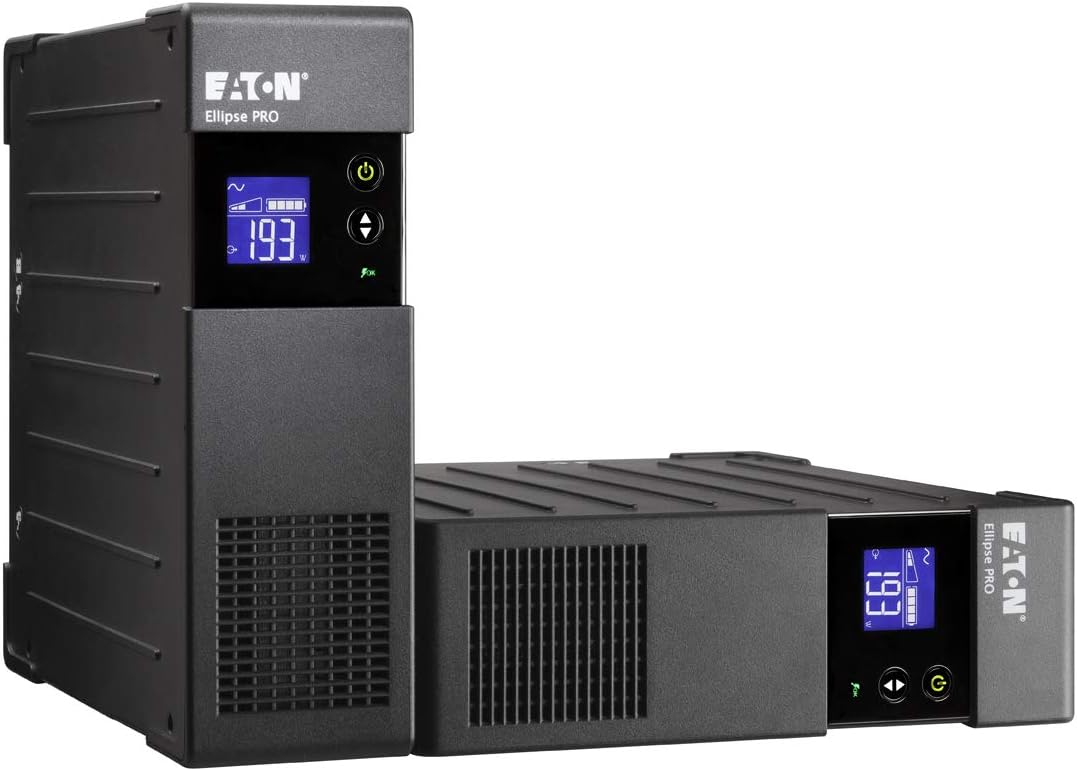
Image: The Eaton Ellipse PRO 650 FR UPS shown in both vertical (tower) and horizontal (desktop) configurations, illustrating flexible placement options.
2.3 Tenging við rafmagn
- Tengdu rafmagnssnúruna á UPS-tækinu við jarðtengda innstungu.
- Leyfðu UPS-tækinu að hlaða í að minnsta kosti 8 klukkustundir fyrir fyrstu notkun til að tryggja bestu mögulegu afköst rafhlöðunnar.
2.4 Tengibúnaður
Connect your computer, monitor, and other critical electronic devices to the UPS output receptacles. Ensure that the total load does not exceed the UPS's capacity (650VA/400W for this model). The UPS features both battery backup and surge-protected outlets, as well as surge-only outlets.

Image: Rear panel of the Eaton Ellipse PRO 650 FR UPS, displaying the input power connector, USB port, network protection ports, and multiple output receptacles for connecting devices.
2.5 USB samskiptatengi
Connect the supplied USB cable from the UPS to your computer. This allows for communication between the UPS and your computer, enabling features like automatic shutdown during extended power outages and monitoring of UPS status via software (available from Eaton's websíða).
3. Rekstur
3.1 Kveikt/slökkt
- Til að kveikja á: Ýttu á og haltu inni rofanum (venjulega merktur með ⏻) for a few seconds until the display illuminates and the UPS emits a short beep.
- Til að slökkva á: Press and hold the power button again until the display turns off and the UPS emits a longer beep.
3.2 LCD skjár og vísar
The front LCD display provides real-time information about the UPS status, including input voltage, framleiðsla binditage, load level, battery charge level, and operational mode. Use the arrow buttons next to the display to cycle through different information screens.

Mynd: Ítarleg view of the Eaton Ellipse PRO 650 FR's LCD screen, showing input power status (sine wave), battery charge level, current power output in watts (193W), and an 'OK' status indicator.
3.3 Rafhlaðastilling
Á meðan á krafti stendurtage, the UPS will automatically switch to battery power. It will emit an audible alarm (typically beeping) to indicate it is operating on battery. The display will show the remaining battery charge. When utility power returns, the UPS will automatically switch back to utility power and begin recharging its battery.
3.4 EcoControl Function
The EcoControl function helps save energy by automatically shutting down peripherals connected to specific outlets when the master device (e.g., your computer) is turned off. Refer to the detailed manual for configuration of this feature.
4. Viðhald
4.1 Umhirða rafhlöðu
The UPS contains a sealed lead-acid battery. For optimal battery life, keep the UPS connected to a power source to maintain a full charge. Avoid storing the UPS in extreme temperatures. Batteries are consumable items and will eventually require replacement. Consult Eaton's support for battery replacement procedures and compatible battery models.
4.2 Þrif
Ensure the UPS is powered off and disconnected from the wall outlet before cleaning. Use a soft, dry cloth to wipe the exterior. Do not use liquid or aerosol cleaners, as they may damage the unit.
5. Bilanagreining
If the UPS is not functioning as expected, refer to the following common issues:
- UPS kveikir ekki á sér: Ensure the power cord is securely connected to a live wall outlet. Check the power button operation.
- No power to connected equipment: Verify that the UPS is turned on and that equipment is plugged into the correct outlets. Check for tripped circuit breakers on the UPS or in your building.
- UPS pípir stöðugt eða oft: This usually indicates the UPS is operating on battery power due to an outage or low battery. If utility power is present, the battery may be weak or require replacement.
- Rafhlaðan hleður ekki: Ensure the UPS is connected to a live wall outlet. If the issue persists after several hours, the battery may be faulty.
For more detailed troubleshooting, consult the full user manual available on the Eaton websíðuna eða hafðu samband við tækniaðstoð.
6. Tæknilýsing
| Eiginleiki | Forskrift |
|---|---|
| Gerðarnúmer | ELP650FR |
| Vörumerki | Eaton |
| Getu | 650VA / 400W |
| Inntak Voltage | 230 volt |
| Tegund rafhlöðu | Lokað blýsýra |
| Typical Battery Life (full load) | Um það bil 9 mínútur |
| Mál (LxBxH) | 11.22 x 3.23 x 10.24 tommur |
| Þyngd | 14.52 pund |
| USB tengi | 1 (USB 2.0) |
7. Ábyrgð og stuðningur
Eaton products are backed by a manufacturer's warranty. For specific warranty terms and conditions applicable to your region, please refer to the documentation included with your product or visit the official Eaton website. For technical assistance, product registration, or to locate service centers, please visit Eaton stuðningur.


