1. Inngangur
This manual provides detailed instructions for the proper setup, operation, maintenance, and troubleshooting of your JVC HR-VP58U 4 Head Hi-Fi Stereo VCR. Please read this manual thoroughly before using the unit to ensure optimal performance and safety. Keep this manual for future reference.
2. Mikilvægar öryggisupplýsingar
VIÐVÖRUN: To reduce the risk of fire or electric shock, do not expose this appliance to rain or moisture. Do not remove the cover. Refer servicing to qualified personnel only.
- Gakktu úr skugga um að aflgjafinn voltage passar við einkunnina á tækinu.
- Ekki loka fyrir loftræstingarop.
- Forðist að setja tækið nálægt hitagjöfum eða í beinu sólarljósi.
- Ekki útsetja tækið fyrir lekandi eða skvettandi vökva.
- Taktu tækið úr sambandi í eldingum eða þegar það er ónotað í langan tíma.
3. Innihald pakka
Staðfestu að pakkinn þinn inniheldur eftirfarandi hluti:
- JVC HR-VP58U VCR Unit
- Fjarstýring
- Rafmagnssnúra (meðfylgjandi)
- Hljóð-/myndsnúrur (RCA-gerð, venjulega rauðar, hvítar, gular)
- Leiðbeiningar (þetta skjal)
4. Vöru lokiðview
4.1 Framhlið

Mynd 1: Framan view of the JVC HR-VP58U VCR with its remote control. The VCR features a power button, tape slot, and front audio/video input jacks.

Mynd 2: Ítarlegt view of the JVC HR-VP58U VCR's front panel, showing playback controls (Play, Rewind, Fast Forward, Stop/Eject, Pause) and the remote control.
The front panel provides access to essential controls and input jacks for convenient operation. Key features include:
- POWER hnappur: Kveikir eða slekkur á myndbandstækinu.
- Tape Slot: Insert VHS tapes for playback or recording.
- VIDEO (MONO) L-AUDIO-R Jacks: Front panel audio/video input for temporary connections (e.g., camcorder).
- Spilunarstýringar: Buttons for Play, Stop/Eject, Rewind, Fast Forward, and Pause.
- Skjár: Shows current channel, time, and operational status.
4.2 Bakhlið

Mynd 3: Rear panel of the JVC HR-VP58U VCR, displaying the power cord, serial number, and various audio/video input/output ports.
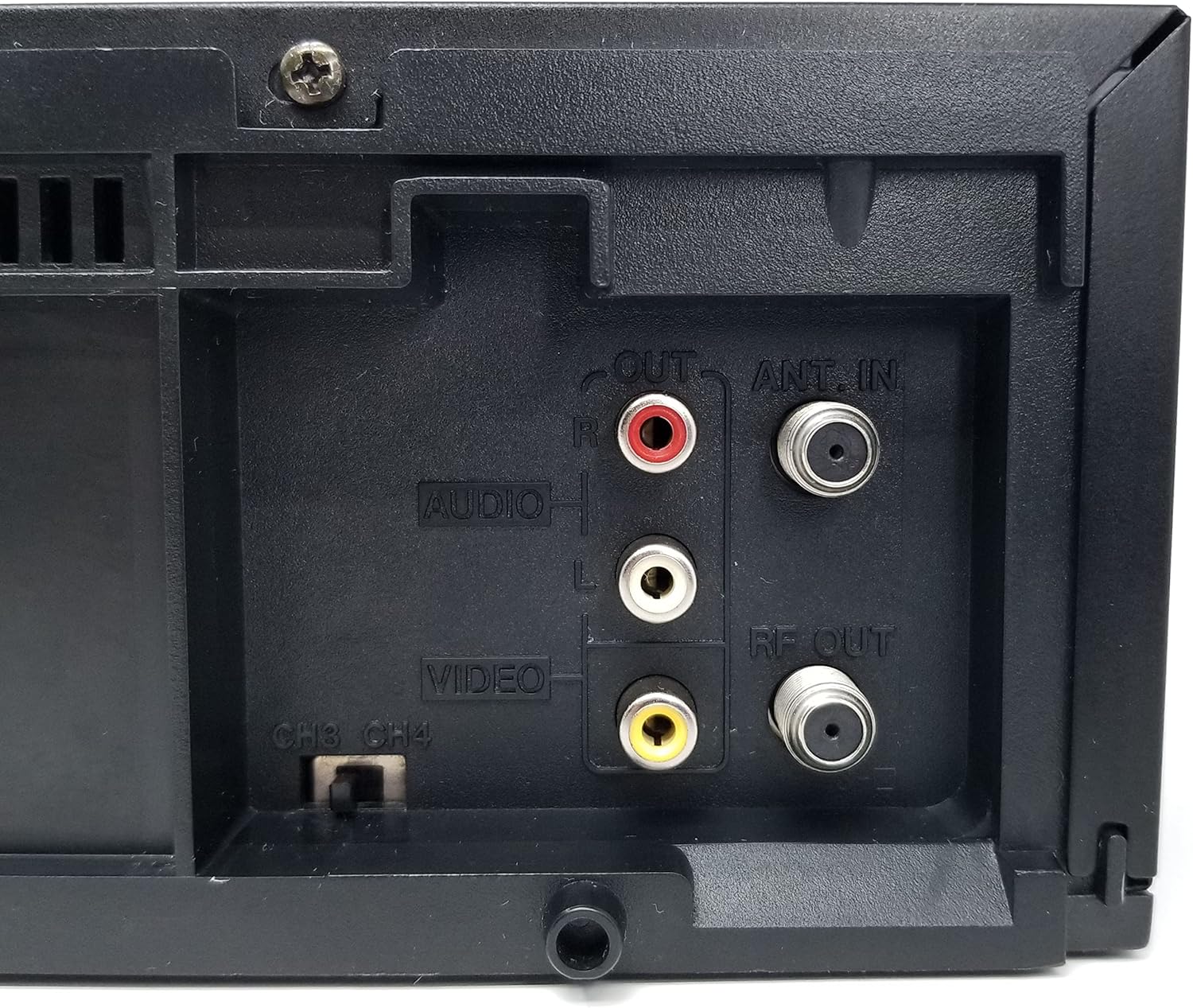
Mynd 4: Close-up of the rear audio (red/white RCA), video (yellow RCA), RF OUT, and ANT. IN connections on the JVC HR-VP58U VCR.
The rear panel houses all necessary connections for integrating the VCR into your home entertainment system.
- ANT. IN: Connects to your antenna or cable TV signal.
- RF ÚT: Connects to your TV's antenna input (typically for older TVs).
- AUDIO OUT (L/R) & VIDEO OUT: RCA jacks (red, white, yellow) for connecting to your TV or audio receiver.
- AUDIO IN (L/R) & VIDEO IN: RCA jacks (red, white, yellow) for connecting external devices for recording.
- CH3/CH4 Switch: Selects the RF output channel for your TV.
5. Uppsetning
5.1 Tenging við sjónvarp
Það eru tvær helstu aðferðir til að tengja myndbandstækið þitt við sjónvarp:
- Using RCA Audio/Video Cables (Recommended for best quality):
- Connect the yellow VIDEO OUT jack on the VCR to the yellow VIDEO IN jack on your TV.
- Connect the white AUDIO OUT (L) jack on the VCR to the white AUDIO IN (L) jack on your TV.
- Connect the red AUDIO OUT (R) jack on the VCR to the red AUDIO IN (R) jack on your TV.
- Select the corresponding Video Input (e.g., Video 1, AV1) on your TV.
- Using an RF Coaxial Cable (for older TVs or limited inputs):
- Connect your antenna or cable TV signal to the ANT. IN jack on the VCR.
- Connect an RF coaxial cable from the RF OUT jack on the VCR to the ANT. IN jack on your TV.
- Set the CH3/CH4 switch on the VCR's rear panel to either 3 or 4.
- Tune your TV to the corresponding channel (3 or 4) to receive the VCR's signal.
5.2 Rafmagnstenging
Plug the attached power cord into a standard AC wall outlet (120V, 60Hz).
6. Notkunarleiðbeiningar
6.1 Grunnspilun
- Turn on your TV and select the correct input source (AV input or Channel 3/4).
- Ýttu á KRAFTUR hnappinn á myndbandstækinu eða fjarstýringunni til að kveikja á tækinu.
- Settu VHS-spólu í spóluopið. Myndbandstækið mun sjálfkrafa hlaða spólunni inn.
- Ýttu á SPILA button on the VCR or remote control to begin playback.
- Notaðu REW (Spóla til baka) og FF (Spóla áfram) hnappar til að fletta í gegnum spóluna.
- Ýttu á Hlé hnappinn til að stöðva spilun tímabundið. Ýttu aftur til að halda áfram.
- Ýttu á STÖÐVA/ÚTTAKA hnappinn til að stöðva spilun og losa spóluna.
6.2 Upptaka
The JVC HR-VP58U allows for recording from various sources.
- Insert a recordable VHS tape with the erase protection tab intact.
- To record from TV: Select the desired TV channel on the VCR.
- To record from external device (e.g., camcorder): Connect the device to the front or rear AUDIO IN/VIDEO IN jacks. Select the appropriate input source on the VCR (e.g., Line 1, L1).
- Ýttu á REC (Record) button. Recording will begin immediately.
- Ýttu á HÆTTU hnappinn til að ljúka upptöku.
Refer to the remote control section for advanced recording features like timer recording.
6.3 Aðgerðir fjarstýringar
The included remote control provides full functionality for your VCR. Familiarize yourself with its buttons for convenient operation.
- POWER: Turns the VCR on/off.
- SKUTLA PLÚS: For variable speed playback and search.
- MENU/OK: Opnar og staðfestir valmyndarval.
- CH +/-: Skiptir um rásir eða vafrar um valmyndir.
- Sjónvarp/myndbandstæki: Skiptir á milli sjónvarps- og myndbandsstillinga.
- REC/STOP/PLAY/PAUSE/FF/REW: Standard transport controls.
- TIMER: Accesses timer recording settings.
- DISPLAY: Shows on-screen display information.
7. Viðhald
7.1 Þrif á einingunni
- Þurrkaðu ytra byrði myndbandstækisins með mjúkum, þurrum klút.
- Ekki nota fljótandi hreinsiefni eða úðabrúsa, þar sem þau geta skemmt áferðina eða innri íhluti.
- Fyrir þrjósk óhreinindi, örlítið dýftampÞvoið klútinn með vatni og þurrkið síðan strax.
7.2 Tape Head Cleaning
Over time, tape heads can accumulate dirt, leading to poor picture or sound quality. Use a dry-type VHS head cleaning cassette periodically (e.g., every 50-100 hours of use) according to the cleaning cassette's instructions. Avoid wet-type cleaners unless specifically recommended, as they can cause damage if used improperly.
8. Bilanagreining
| Vandamál | Möguleg orsök | Lausn |
|---|---|---|
| Enginn kraftur | Rafmagnssnúra úr sambandi; innstungan er ekki virk. | Athugið tengingu rafmagnssnúrunnar; prófið innstunguna með öðru tæki. |
| Engin mynd/hljóð við spilun | Incorrect TV input selected; A/V cables loose or incorrect; dirty tape heads. | Select correct TV input; check all cable connections; use a head cleaning cassette. |
| Spólan spilast ekki eða losnar | Spóla festist; bilun í myndbandstæki. | Do not force the tape. Power cycle the VCR. If issue persists, seek professional service. |
| Léleg myndgæði (snjóhvít, brengluð) | Dirty tape heads; worn-out tape; weak signal. | Clean tape heads; try a different tape; check antenna/cable connection. |
| Fjarstýring virkar ekki | Tómar rafhlöður; hindrun; fjarstýringarskynjari stíflaður. | Replace batteries; remove obstructions; ensure clear line of sight to VCR sensor. |
9. Tæknilýsing
- Gerð: HR-VP58U
- Höfuð: 4-höfða Hi-Fi hljómtæki
- Myndbandakerfi: NTSC
- Aflgjafi: AC 120V, 60Hz
- Mál (B x H x D): Approximately 19.72 x 8.82 x 13.82 inches (based on package dimensions, actual unit may vary slightly)
- Þyngd: Um það bil 8.98 pund
- Hljóð: Hi-Fi hljómtæki
- Inntak: Front A/V (RCA), Rear A/V (RCA), RF (Coaxial)
- Úttak: Rear A/V (RCA), RF (Coaxial)
10. Ábyrgð og stuðningur
For warranty information or technical support, please refer to the documentation provided at the time of purchase or contact your retailer. If you encounter any issues with the product, it is recommended to contact the seller directly for assistance before attempting repairs.
Note: This product is a JVC HR-VP58U VCR. For specific support related to this model, please have your model number and serial number ready when contacting support.


