1. Inngangur
The Sony Cyber-Shot DSC-H300 is a versatile 20.1-megapixel compact digital camera featuring a powerful 35x optical zoom lens. Designed for ease of use, it includes Optical SteadyShot image stabilization to reduce blur, various shooting modes, and the ability to capture HD videos. Its DSLR-like body provides a comfortable grip for stable shooting.
2. Hvað er í kassanum
Gakktu úr skugga um að allir eftirfarandi hlutir séu innifaldir í pakkanum þínum:
- Sony Cyber-Shot DSC-H300 Camera Body
- AA rafhlöður (x4)
- Axlaról
- Linsulok
- Linsuól
- Fjöl USB snúru
- Leiðbeiningar (þetta skjal)
3. Myndavél lokiðview
Familiarize yourself with the main components and controls of your DSC-H300 camera.
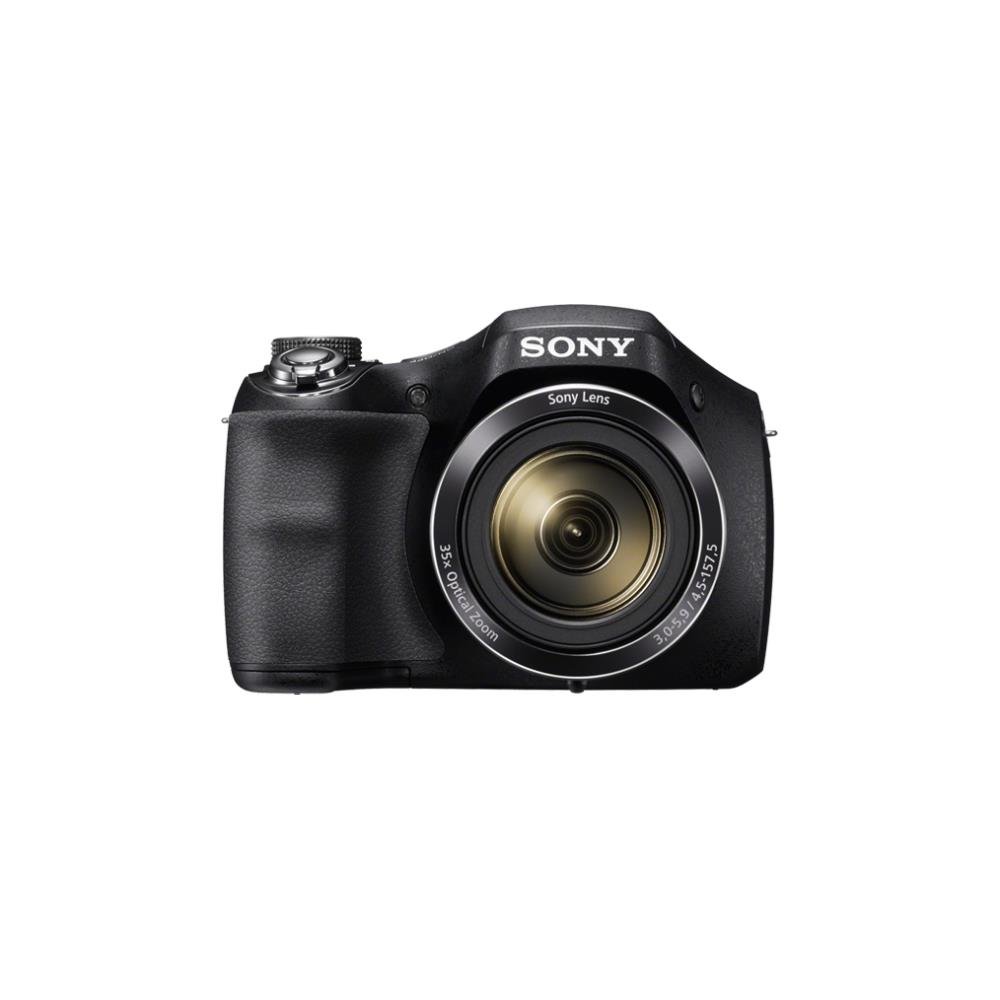
Mynd 1: Framan view of the Sony Cyber-Shot DSC-H300 digital camera, illustrating its compact size with a width of 12.75 cm (5.06 inches) and a height of 8.9 cm (3.504 inches).
Lykilhlutir:
- Linsa: Features 35x optical zoom.
- Grip: Ergonomískt hannað fyrir þægilega meðhöndlun.
- Lokarahnappur: Til að taka myndir.
- Aðdráttarhnappur (W/T): Stýrir sjón- og stafrænum aðdrátt.
- Stillingarskífa: Selects various shooting modes (Auto, Program, Manual, Scene, Movie, etc.).
- ON/OFF hnappur: Powers the camera on or off.
- LCD Screen (3.0 inches): Til að ramma inn myndir, endurviewað taka myndir og vafra um valmyndir.
- Stjórnhnappar: For menu navigation, flash settings, display options, and playback.
- Kvikmyndahnappur: Sérstakur hnappur til að hefja og stöðva myndbandsupptöku.
4. Uppsetning
4.1 Rafhlöður settar í
- Opnaðu rafhlöðulokið sem er staðsett neðst á myndavélinni.
- Settu fjórar AA rafhlöður í og gætið þess að pólunin (+/-) sé rétt eins og gefið er til kynna inni í hólfinu.
- Lokaðu rafhlöðuhólfinu tryggilega.
4.2 Minniskort sett í
- Opnaðu hlífina yfir minniskortaraufinu, sem er venjulega staðsett nálægt rafhlöðuhólfinu.
- Insert a compatible memory card (e.g., SD, SDHC, SDXC, Memory Stick PRO Duo) with the label facing the correct direction until it clicks into place.
- Lokaðu hlífinni yfir minniskortaraufinni.
4.3 Attaching the Shoulder Strap and Lens Cap
- Thread the shoulder strap through the strap eyelets on the camera body and secure it.
- Attach the lens cap to the lens using the provided lens strap to prevent loss.
5. Notkun myndavélarinnar
5.1 Kveikt/slökkt
Ýttu á ON/OFF button to power the camera on or off. The lens will extend when powered on.
5.2 Að velja tökustillingu
Snúðu Stillingarskífa to select your desired shooting mode:
- Snjallsjálfvirkni (iA): Camera automatically optimizes settings for various scenes.
- Sjálfvirkt forrit (P): Camera sets exposure, but you can adjust other settings.
- Lokaraforgangur (S): You set the shutter speed, camera adjusts aperture.
- Ljósopsforgangur (A): You set the aperture, camera adjusts shutter speed.
- Handbók (M): Þú stjórnar bæði lokarahraða og ljósopi.
- Val á senu (SCN): Choose from various scene modes (e.g., Portrait, Landscape, Night Scene).
- Kvikmyndaháttur: Til að taka upp myndbönd.
- Víðmyndarstilling: For capturing wide panoramic shots.
5.3 Myndataka
- Frame your shot: Notaðu LCD skjáinn til að setja saman myndina.
- Fókus: Hálfýttu á Lokarahnappur to activate autofocus. The camera will beep and the focus indicator will turn green when focus is achieved.
- Handtaka: Ýttu alveg á Lokarahnappur að taka myndina.
- Aðdráttur: Notaðu Aðdráttarhnappur (W/T) to adjust the focal length. 'W' for wide-angle, 'T' for telephoto.
- Flash: Press the flash control button to cycle through flash modes (Auto, Fill-flash, Slow Sync, Flash Off, Advanced Flash).
- Myndstöðugleiki: Optical SteadyShot image stabilization is built-in to reduce blur caused by camera shake.
5.4 Myndbandsupptaka
- Ensure the camera is in Kvikmyndastilling (selected via the Mode Dial) or simply press the dedicated Kvikmyndahnappur.
- Ýttu á Kvikmyndahnappur again to start recording. A red recording indicator will appear on the screen.
- Ýttu á Kvikmyndahnappur once more to stop recording.
- The camera records in 720p HD with clear audio captured by the built-in microphone.
5.5 Víðmyndastilling
Veldu Panorama Mode on the Mode Dial. Press the shutter button and sweep the camera horizontally or vertically across the scene to capture a wide panoramic image.
5.6 Viewing and Deleting Images/Videos
Ýttu á Spilunarhnappur (usually indicated by a play icon) to enter playback mode. Use the navigation buttons to scroll through your captured photos and videos. To delete an item, select it and press the Eyða hnappur (trash can icon).
6. Viðhald
6.1 Þrif á myndavélarhúsinu
Þurrkið myndavélarhúsið með mjúkum, þurrum klút. Fyrir þrjósk óhreinindi, þurrkið örlítið.ampen the cloth with water and then wipe dry. Avoid using organic solvents like alcohol or thinner.
6.2 Þrif á linsunni
First, use a lens brush or blower to remove dust and small particles. Then, gently wipe the lens surface with a clean, soft lens cleaning cloth. Do not use excessive force or abrasive materials.
6.3 Hreinsun LCD skjásins
Use a soft, lint-free cloth specifically designed for LCD screens. Gently wipe the screen to remove smudges or dust.
6.4 Umhirða rafhlöðu
Always use fresh AA batteries. Remove batteries from the camera if it will not be used for an extended period to prevent leakage and damage.
6.5 Geymsla
Store the camera in a cool, dry place away from direct sunlight, high temperatures, and humidity. Keep it in a camera bag or case to protect it from dust and scratches.
7. Bilanagreining
Ef þú lendir í vandræðum með myndavélina þína skaltu prófa eftirfarandi grunn skref í úrræðaleit:
- Myndavélin kveikir ekki á sér: Gakktu úr skugga um að rafhlöðurnar séu rétt settar í og fullhlaðnar. Prófaðu nýjar rafhlöður.
- Myndirnar eru óskýrar: Check that the lens is clean. Ensure the camera is focusing correctly (half-press shutter). Use a faster shutter speed in low light or for moving subjects. Optical SteadyShot is active to help.
- Flassið lýsir ekki: Check flash mode settings; ensure it's not set to 'Flash Off'.
- Villa í minniskorti: Turn off the camera, remove and reinsert the memory card. Ensure the card is compatible and not full.
- Myndavélin frýs: Remove the batteries, wait a few seconds, and reinsert them to reset the camera.
For more detailed troubleshooting and solutions, please refer to the comprehensive user manual provided with your product or visit the official Sony support websíða.
8. Tæknilýsing
| Eiginleiki | Forskrift |
|---|---|
| Nafn líkans | DSC H300 |
| Upplausn ljósmyndskynjara | 20.1 MP |
| Optískur aðdráttur | 35x |
| Stafræn aðdráttur | 70x |
| Myndstöðugleiki | Digital, Optical (SteadyShot) |
| Skjástærð | 3 tommur (LCD) |
| Myndbandsupplausn | 720p |
| Gerð skynjara | CCD |
| Lágmarks lokarahraði | 30 sekúndur |
| Hámarks lokarahraði | 30 sekúndur |
| ISO svið | 100 - 3200 (Útvíkkað) |
| Aflgjafi | 4x AA rafhlöður |
| Tengingar | USB |
| Samhæf minniskort | Memory Stick Duo, SD Memory Card, SDHC Memory Card, SDXC Memory Card, microSD Memory Card, microSDHC Memory Card, microSDXC Memory Card |
| Þyngd hlutar | 495 grömm |
9. Ábyrgð og stuðningur
Your Sony Cyber-Shot DSC-H300 digital camera comes with a manufacturer's warranty. Please refer to the warranty card included in your product packaging for specific terms, conditions, and duration of coverage.
For technical support, customer service, driver downloads, and additional detailed manuals, please visit the official Sony support websíða:


