1. Inngangur
Thank you for choosing the SCHWAIGER DCR600HD Full HD Cable TV Receiver. This manual provides essential information for the safe and efficient use of your device. Please read these instructions carefully before installation and operation, and keep them for future reference.
2. Öryggisleiðbeiningar
- Aflgjafi: Notið aðeins straumbreytinn sem fylgir tækinu. Gangið úr skugga um að hljóðstyrkurinn sé réttur.tage samsvarar staðbundinni aflgjafa.
- Loftræsting: Do not block ventilation openings. Ensure adequate space around the receiver for proper airflow to prevent overheating.
- Raki: Keep the device away from water, moisture, and high humidity. Do not expose it to rain or splashes.
- Þrif: Aftengdu rafmagnið áður en þú þrífur. Notið mjúkan, þurran klút. Notið ekki fljótandi hreinsiefni eða úðabrúsa.
- Staðsetning: Place the receiver on a stable, flat surface. Avoid direct sunlight, heat sources, and strong magnetic fields.
- Þjónusta: Reynið ekki að opna eða gera við tækið sjálfur. Látið hæft starfsfólk sjá um alla þjónustu.
3. Innihald pakka
Vinsamlegast athugið hvort eftirfarandi atriði séu í pakkanum:
- SCHWAIGER DCR600HD Cable TV Receiver
- Fjarstýring
- Power Cable (integrated or separate adapter)
- Notendahandbók (þetta skjal)
4. Vöru lokiðview
4.1 Framhlið
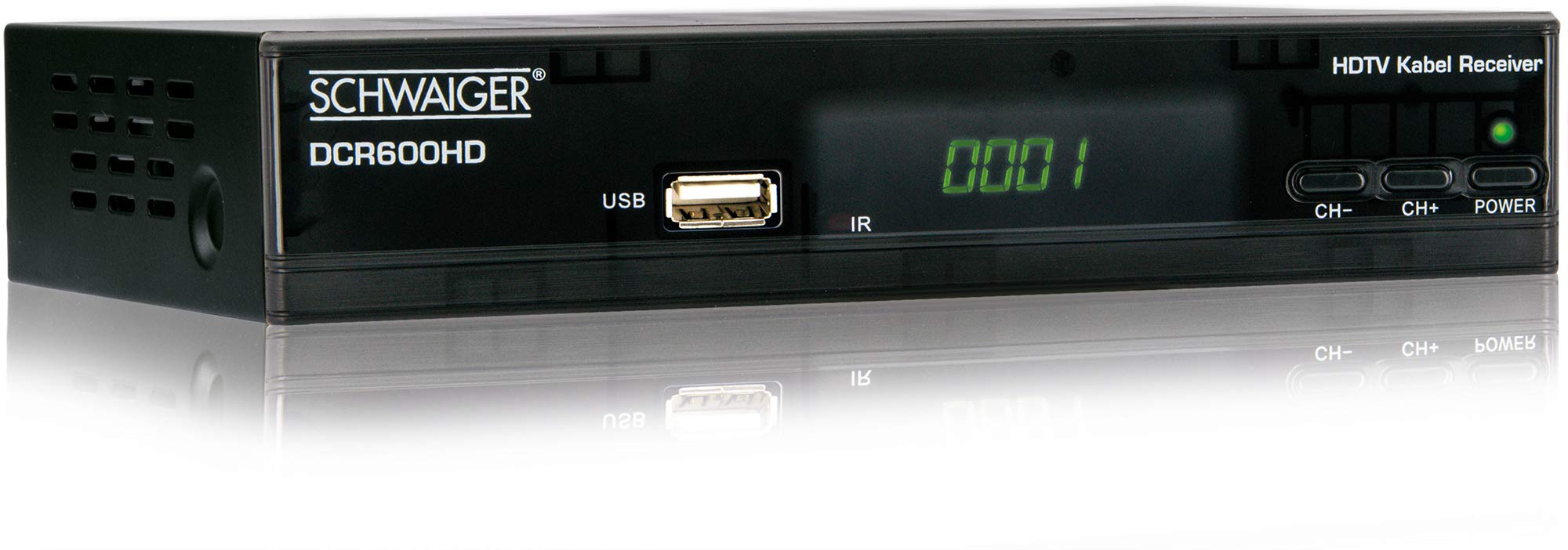
Mynd: Framan view of the SCHWAIGER DCR600HD receiver, showing the display, USB port, IR receiver, and control buttons.
- Skjár: Shows channel number or time.
- USB tengi: For connecting USB storage devices for media playback.
- IR: Innrautt móttakari fyrir fjarstýringuna.
- CH- / CH+: Buttons for changing channels.
- POWER: Button to turn the receiver on or off (standby).
4.2 Bakhlið

Mynd: Aftan view of the SCHWAIGER DCR600HD receiver, displaying various input and output ports.
- RF IN: Input for connecting to your cable TV network.
- ETHERNET / LAN: For network connection (if supported for updates or specific services).
- HDMI: High-Definition Multimedia Interface output for connecting to an HD TV.
- TV SCART (CVBS): SCART output for connecting to older TVs or other devices.
- ~220-240V 50/60Hz: Aflgjafi fyrir móttakara.
4.3 Fjarstýring

Mynd: Layout of the SCHWAIGER DCR600HD remote control, showing various function buttons.
The remote control allows you to operate all functions of your receiver. Familiarize yourself with the button layout for easy navigation.
5. Uppsetning
5.1 Tenging við móttakara
- Connect to Cable Network: Connect your cable TV antenna cable to the RF IN port on the rear panel of the receiver.
- Tengjast við sjónvarp:
- For High Definition (HD) picture quality, connect an HDMI cable from the HDMI tengið á móttakaranum við HDMI inntak á sjónvarpinu þínu.
- For standard definition (SD) or older TVs, connect a SCART cable from the TV SCART (CVBS) tengið á móttakaranum við SCART inntakið á sjónvarpinu þínu.
- Tengdu rafmagn: Plug the power cable into the receiver's power input and then into a wall outlet.
- Turn on TV: Switch on your television and select the correct input source (HDMI or SCART) corresponding to your connection.
5.2 Uppsetning í fyrsta skipti
Upon first power-on, the receiver will typically guide you through an initial setup process:
- Val á tungumáli: Use the remote control to select your preferred language for the on-screen menus.
- Val á landi: Select your country. This helps configure regional settings and channel frequencies.
- Rásaskönnun: The receiver will prompt you to perform an automatic channel scan. Confirm to start scanning for available cable TV channels. This process may take several minutes.
- Vista stillingar: Once the scan is complete, save the found channels. Your receiver is now ready for use.
6. Notkunarleiðbeiningar
6.1 Grunnaðgerð
- Kveikt/slökkt: Ýttu á KRAFTUR button on the remote control or front panel to switch the receiver on or to standby mode.
- Rásarval: Notaðu CH+ / CH- buttons on the remote or front panel to change channels sequentially. Alternatively, use the number buttons to directly enter a channel number.
- Hljóðstyrksstilling: Notaðu VOL+ / VOL- buttons on the remote control to adjust the audio volume.
- Þagga: Ýttu á ÞAGGA button to temporarily turn off the sound. Press again to restore.
6.2 Rafræn dagskrárleiðbeining (EPG)
The EPG provides a schedule of current and upcoming TV programs.
- Ýttu á EPG button on the remote control to access the Electronic Program Guide.
- Navigate through channels and program times using the arrow buttons.
- Ýttu á OK til view nákvæmar upplýsingar um valið forrit.
6.3 Spilun margmiðlunar í gegnum USB
You can play multimedia files (AVI, MKV, MP3) from a USB storage device.
- Settu USB-lykil eða ytri harða disk í USB tengi á framhliðinni.
- The receiver should detect the USB device and prompt you to open the media player, or you can access it via the main menu.
- Fletta í gegnum þinn files and folders using the arrow buttons and press OK to select and play a file.
- Use the media control buttons (Play, Pause, Stop, Fast Forward, Rewind) on the remote control for playback.
6.4 Textavarp
Access teletext services provided by broadcasters.
- Ýttu á TTX button on the remote control to activate teletext.
- Use the number buttons to enter page numbers or the arrow buttons to navigate.
- Ýttu á TTX again to exit teletext.
7. Viðhald
- Þrif: Regularly wipe the receiver with a soft, dry, lint-free cloth. Do not use abrasive cleaners, waxes, or solvents.
- Loftræsting: Ensure that the ventilation slots are not obstructed by dust or other objects.
- Hugbúnaðaruppfærslur: Athugaðu reglulega upplýsingar framleiðanda website for any available software updates for your model. Follow the instructions provided with the update carefully.
8. Bilanagreining
If you encounter problems with your receiver, refer to the following common issues and solutions:
| Vandamál | Möguleg orsök/lausn |
|---|---|
| Engin mynd eða hljóð |
|
| Fjarstýring virkar ekki |
|
| Engar rásir fundust við skönnun |
|
| USB-miðlar spilast ekki |
|
9. Tæknilýsing
| Eiginleiki | Lýsing |
|---|---|
| Nafn líkans | DCR600HD |
| Vörutegund | Digital DVB TV Tuner / Digital Player |
| Litur | Svartur |
| Mál (B x D x H) | 17 cm x 4.5 cm x 10 cm |
| Þyngd | 380 g |
| Tengitækni | HDMI, USB, SCART, RF |
| Samhæf tæki | Sjónvarp |
| Vídeókóðun | H.264 |
| Stuðlar upplausnir | 576i, 576p, 720p, 1080i, 1080p |
| Hlutföll | 4:3, 16:9 |
| Hljóðútgangsstilling | Stereo |
| Stutt hljóðsnið | MP3 |
| Studdar tegundir fjölmiðla | AVI, MKV, MP3 |
| Samtals USB tengi | 1 (USB 4-pin Type A) |
| Samtals HDMI tengi | 1 |
| Orkunotkun | 3.8 W |
| Voltage | 240 volt |
| Sérstakir eiginleikar | Electronic Program Guide (EPG), Teletext, Built-in Bluetooth (Note: Bluetooth functionality may vary by region/firmware) |
| Fjarstýring | Innifalið |
10. Ábyrgð og stuðningur
For warranty information and technical support, please refer to the documentation included with your product packaging or visit the official SCHWAIGER webGeymið kaupkvittunina sem sönnun fyrir kaup vegna ábyrgðarkröfu.


