1. Inngangur
This manual provides detailed instructions for the installation, operation, and maintenance of your Axis P1355 Surveillance/Network Camera. The Axis P13 series offers high-performance fixed cameras designed for both indoor and outdoor surveillance, delivering superb image quality with H.264 compression. These models support HDTV 720p/1080p video and are equipped with features like Wide Dynamic Range and Day/Night functionality for clear imaging in various lighting conditions. Specific models within the P13 series, including HDTV 720p, incorporate Axis Lightfinder technology for enhanced low-light sensitivity, while HDTV 1080p and 5-megapixel cameras feature P-iris control for optimized depth of field and lens resolution.
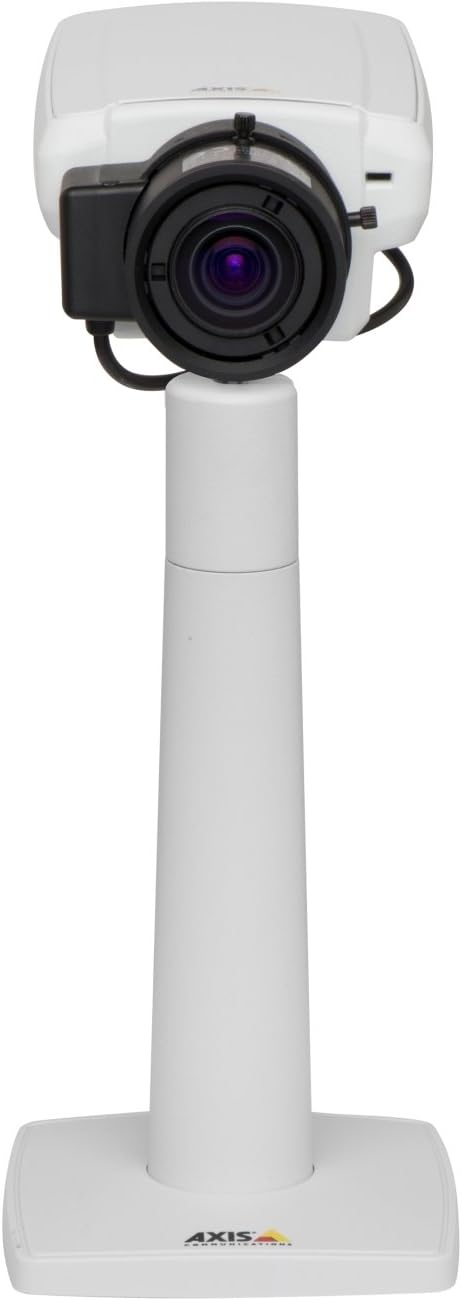
Mynd 1: The Axis P1355 Surveillance Camera shown mounted on its stand. This image illustrates the camera's physical appearance and typical mounting configuration.
2. Öryggisupplýsingar
Please read all safety instructions before installing or operating the camera.
- Ensure the power source matches the camera's requirements to prevent electrical hazards.
- Uppsetning skal framkvæmd af hæfu starfsfólki í samræmi við gildandi rafmagnsreglugerðir.
- Ekki láta myndavélina verða fyrir miklum hita, raka eða tærandi umhverfi.
- Forðist að linsan verði fyrir beinum ljósgjöfum, svo sem sólinni, þar sem það getur skemmt myndflöguna.
- Aftengdu rafmagnið áður en þú þrífur eða þjónustar myndavélina.
3. Uppsetning og uppsetning
The Axis P1355 camera is designed for both indoor and outdoor use and supports various mounting options.
3.1 Uppsetning
The camera is typically designed for wall mount installation. Ensure the mounting surface is strong enough to support the camera's weight (approximately 2 pounds). Use appropriate screws and anchors for the chosen surface.
- Select a suitable location for optimal surveillance coverage.
- Securely attach the mounting bracket to the wall.
- Mount the camera onto the bracket, ensuring it is firmly in place.
- Adjust the camera's angle for the desired field of view.
3.2 Tengingar
The Axis P1355 camera primarily uses wired connectivity for reliable data transmission and power.
- Rafmagnstenging: Connect the provided power adapter to the camera's power input and then to a suitable electrical outlet. The camera operates on a corded electric power source.
- Nettenging: Connect an Ethernet cable from the camera's network port to your network switch or router. This provides wired connectivity for video streaming and control.
- Wireless Connectivity (Optional/Configuration): While primarily wired, the camera supports Wi-Fi for certain configurations. Refer to the Axis product documentation for specific wireless setup instructions if applicable to your model variant.
4. Notkunarleiðbeiningar
Once installed and connected, the Axis P1355 camera can be configured and operated via a network interface.
4.1 Upphafleg aðgangur og stilling
- Notaðu Axis IP Utility eða svipað netgreiningartól til að finna IP-tölu myndavélarinnar á netkerfinu þínu.
- Opna a web vafra og sláðu inn IP-tölu myndavélarinnar til að fá aðgang að henni web viðmót.
- Log in using the default credentials (refer to Axis documentation for default username/password, typically 'root' and 'pass' or similar, which should be changed immediately).
- Fylgdu leiðbeiningunum á skjánum til að setja upp grunnstillingar fyrir net, dagsetningu/tíma og notendareikninga.
4.2 Video Monitoring and Features
- Lifandi View: Access the live video feed through the web interface or compatible video management software.
- Upplausn: The camera supports video capture resolutions up to 720p and effective video resolutions of 1080 pixels, with effective still resolution of 2 MP.
- Color and Monochrome Modes: The camera can operate in both color and monochrome (black and white) modes, automatically switching based on light conditions or configured manually.
- Nætursjón: Utilize the integrated night vision capabilities for surveillance in low-light or complete darkness.
- Optískur aðdráttur: Adjust the optical zoom for detailed views of specific areas.
- P-Iris Control: For models equipped with P-iris, this feature allows precise control over the iris position to optimize depth of field and lens resolution, enhancing image sharpness. This can be configured via the web viðmót.
- Myndbandssnið: Video is typically captured in MP4 format.
- Fjarstýring: The camera supports remote control for various settings and adjustments.
5. Viðhald
Regular maintenance ensures optimal performance and longevity of your Axis P1355 camera.
- Þrif: Gently clean the camera lens and housing with a soft, damp klút. Forðist slípiefni eða leysiefni.
- Uppfærsla vélbúnaðar: Athugaðu reglulega Axis Communications webvefsíða fyrir uppfærslur á vélbúnaði. Með því að halda vélbúnaðinum uppfærðum er tryggt að aðgangur að nýjustu eiginleikum, öryggisuppfærslum og úrbótum á afköstum sé tryggður.
- Snúruskoðun: Regularly inspect all cables for signs of wear or damage, especially for outdoor installations.
- Umhverfisskoðun: Gakktu úr skugga um að notkunarumhverfi myndavélarinnar sé innan tilgreindra hitastigs- og rakastigsbila.
6. Bilanagreining
This section addresses common issues you might encounter with your Axis P1355 camera.
- Enginn kraftur:
- Verify the power adapter is securely connected to both the camera and a working power outlet.
- Athugaðu hvort rafmagnssnúran sé skemmd.
- Engin nettenging:
- Ensure the Ethernet cable is properly connected to the camera and the network switch/router.
- Check network switch/router status.
- Confirm the camera has a valid IP address and is on the same network segment as your viewing tæki.
- Léleg myndgæði:
- Hreinsaðu myndavélarlinsuna.
- Adjust focus and zoom settings via the web viðmót.
- Check lighting conditions; enable night vision or adjust exposure settings if necessary.
- Ensure P-iris control is correctly configured for optimal sharpness (if applicable).
- Ekki er hægt að nálgast Web Tengi:
- Verify the camera's IP address.
- Ensure your computer is on the same network as the camera.
- Try restarting the camera and your network equipment.
7. Tæknilýsing
| Eiginleiki | Smáatriði |
|---|---|
| Vörumerki | Axis fjarskipti |
| Gerðarnúmer | AXIS P1355 |
| Inni/úti notkun | Inni, úti |
| Tengitækni | Wired (Wi-Fi capable for certain configurations) |
| Sérstakur eiginleiki | Nætursýn |
| Aflgjafi | Rafmagnstæki með snúru (7.1 vött) |
| Myndbandsupplausn | 720p |
| Árangursrík myndbandsupplausn | 1080 pixlar |
| Árangursrík kyrrupplausn | 2 MP |
| Aðdráttargerð | Optical Zoom (2.9x Optical) |
| Gerð stjórnanda | Iris (P-iris control) |
| Gerð uppsetningar | Veggfesting |
| Vörumál (L x B x H) | 3.07 x 5.94 x 1.69 tommur |
| Þyngd hlutar | 2 pund |
| International Protection Rating | IP54 |
| Myndbandsupptökusnið | MP4 |
8. Ábyrgð og stuðningur
Nánari upplýsingar um ábyrgð og tæknilega aðstoð er að finna á opinberu vefsíðu Axis Communications. websíðuna eða hafðu samband við þjónustuver þeirra beint.
Framleiðandi: AXIS COMMUNICATION INC.
Websíða: www.axis.com (Vinsamlegast heimsækið opinberu website for the most current support resources, drivers, and documentation.)