Inngangur
This manual provides instructions for the proper setup, operation, and maintenance of your Linq IT-H408 4-Port USB 2.0 Hub. This device allows you to expand a single USB port into four, each with an independent on/off switch, facilitating efficient management of connected peripherals.
Vara lokiðview
The Linq IT-H408 is a USB 2.0 hub designed to provide four additional USB ports. Each port features an individual power switch, allowing you to control power to connected devices independently. It supports data transfer speeds of up to 480 Mbps.
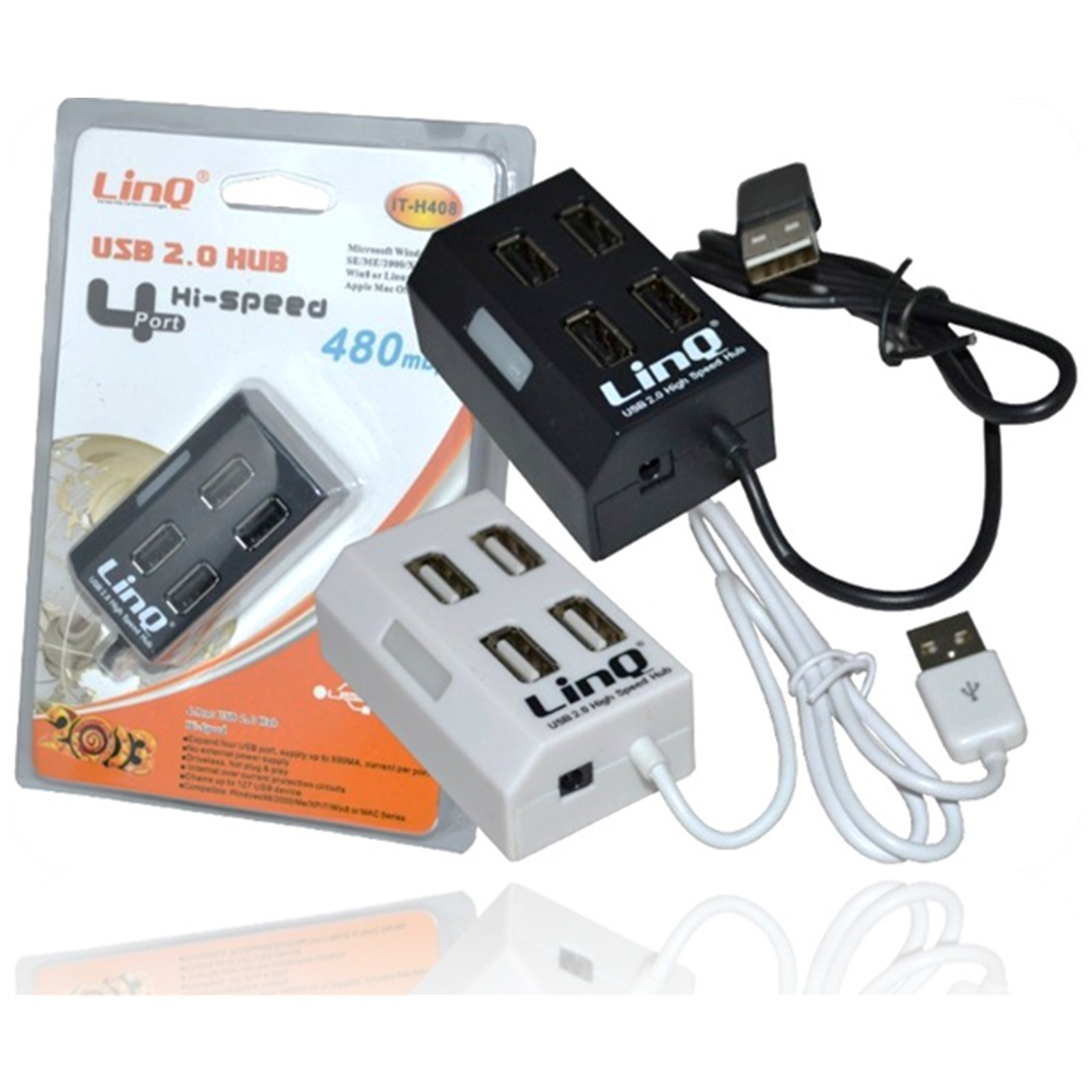
Figure 1: Linq IT-H408 4-Port USB 2.0 Hub. This image displays the hub's compact form factor, highlighting the four USB ports and their corresponding individual power switches, along with the integrated USB cable for connection to a host device.
Uppsetningarleiðbeiningar
- Taktu upp miðstöðina: Carefully remove the Linq IT-H408 USB Hub from its packaging.
- Tengjast tölvu: Plug the integrated USB cable from the hub into an available USB 2.0 or USB 3.0 port on your computer.
- Uppsetning ökumanns: The hub is plug-and-play and typically does not require additional driver installation for compatible operating systems (Windows 98/2000/ME/XP/7/8, Mac OS series). Your operating system should automatically detect and configure the device.
- Tengja jaðartæki: Plug your USB devices (e.g., flash drives, keyboards, mice) into the available ports on the Linq IT-H408 hub.
Operating the Hub
- Powering On/Off Ports: Each USB port on the Linq IT-H408 has an independent on/off switch. Press the switch corresponding to the desired port to toggle its power state. An indicator light (if present) will illuminate when the port is active.
- Tengist tæki: Insert your USB device into an available port. Ensure the port is powered on using its individual switch.
- Gagnaflutningur: The hub supports USB 2.0 data transfer speeds up to 480 Mbps. Performance may vary based on the connected device and host system.
- Orkunotkun: For high-power devices, ensure your computer's USB port can supply sufficient power. If multiple high-power devices are connected, an external power adapter (not included) might be required for optimal performance, if the hub supports it.
Viðhald
- Þrif: Notið mjúkan, þurran klút til að þrífa ytra byrði miðstöðvarinnar. Forðist að nota fljótandi hreinsiefni eða leysiefni.
- Geymsla: Þegar miðstöðin er ekki í notkun skal geyma hana á köldum, þurrum stað fjarri beinu sólarljósi og miklum hita.
- Meðhöndlun: Forðist að missa miðstöðina eða láta hana verða fyrir hörðum höggum. Reynið ekki að taka tækið í sundur.
Úrræðaleit
Tæki ekki þekkt:
- Ensure the hub's USB cable is securely connected to your computer.
- Verify that the individual switch for the connected port is in the "on" position.
- Prófaðu að tengja miðstöðina við aðra USB tengi á tölvunni þinni.
- Test the connected device by plugging it directly into your computer's USB port to rule out device issues.
- Endurræstu tölvuna þína.
Hæg gagnaflutningshraði:
- Ensure both the hub and the connected device are USB 2.0 compatible for optimal USB 2.0 speeds.
- Forðastu að tengja mörg tæki með mikla bandbreidd samtímis ef þú finnur fyrir hægagangi.
- Ensure the hub is connected to a USB 2.0 or higher port on your computer.
Stöðug tenging:
- Athugið hvort allar kapaltengingar séu lausar.
- Ensure the hub is not placed near sources of strong electromagnetic interference.
- If using a desktop computer, try connecting the hub to a rear USB port directly on the motherboard.
Tæknilýsing
| Gerðarnúmer | IT-H408 (Internal: 6950029010495) |
| Vörumerki | Linq |
| Viðmót | USB 2.0 |
| Fjöldi hafna | 4 (with individual switches) |
| Gagnaflutningshraði | Allt að 480 Mbps |
| Samhæft stýrikerfi | Windows 98 / 2000 / ME / XP / 7 / 8, Mac OS series |
| Litur | Hvítur, Svartur |
| Stærðir (u.þ.b.) | 19 x 11.6 x 5 cm (Package dimensions) |
| Þyngd (u.þ.b.) | 80 grömm |
| Rafhlöður nauðsynlegar | Nei |
Ábyrgð og stuðningur
Specific warranty information for the Linq IT-H408 USB Hub is typically provided at the point of purchase or within the product packaging. Please refer to your purchase documentation for details regarding warranty coverage and duration.
For technical support or further assistance, please contact your retailer or visit the official Linq webGeymið kaupkvittunina sem sönnun fyrir kaupum ef um ábyrgðarkröfur er að ræða.