Inngangur
This manual provides detailed instructions for the installation, operation, maintenance, and troubleshooting of your Clarion NX514 Car Navigation System. The NX514 is an advanced AV navigation unit featuring a 6.2-inch VGA display, SmartAccess Link for smartphone integration, Google Voice Search, Mapple Navi 5 for comprehensive navigation, and various media playback options including DVD, USB, SD, and Bluetooth.
Please read this manual thoroughly before using the product to ensure safe and optimal performance.
Uppsetning
Rétt uppsetning er mikilvæg fyrir virkni og öryggi leiðsögukerfisins. Það er eindregið mælt með því að hæfur fagmaður framkvæmi uppsetninguna.
1. Upptaka og athuga íhluti
Staðfestið að allir íhlutir séu til staðar:
- Aðaleining Clarion NX514
- GPS loftnet
- Rafmagnsleiðslur (rafmagn, hátalari o.s.frv.)
- Uppsetningarbúnaður
- Notendahandbók (þetta skjal)
2. Raflagnatengingar
Connect the wiring harness to your vehicle's power supply, ground, and speaker outputs. Ensure all connections are secure to prevent malfunctions. The GPS antenna should be mounted in a location with a clear view himinsins fyrir bestu mögulegu merkjamóttöku.
For SmartAccess Link functionality, connect your smartphone via the HDMI input. An appropriate adapter may be required for certain iPhone models (e.g., iPhone 5s/5c/5).
3. Innsetning SD-korts
Insert the provided 8GB SD card containing map data into the designated SD card slot on the unit. Ensure it is inserted correctly and securely.

Mynd 1: Framan view of the Clarion NX514 unit. This image shows the main display and control buttons, illustrating the general appearance of the device during setup.
Notkunarleiðbeiningar
1. Basic Interface and Touchscreen
The Clarion NX514 features a 6.2-inch VGA touchscreen for intuitive control. Tap icons and menus to navigate through functions. Physical buttons are also available for common operations like volume control and menu access.
2. Google Voice Search
The system integrates Google Voice Leitaðu að hands-free operation. To activate, press the voice command button (if available on your steering wheel or unit) and speak your command. You can search for destinations, points of interest, or control navigation functions. A smartphone is required for full voice recognition capabilities.
- Exampskipanir: "Find a Japanese restaurant," "Navigate to [address]," "Change route."
- Gourmet Search: Access restaurant information from services like Gurunavi, Hot Pepper Gourmet, and Yahoo! JAPAN. You can narrow down destinations, view details, make calls (requires Bluetooth pairing with a smartphone), and set routes via voice.

Figure 2: Clarion NX514 demonstrating Google Voice Search. The image shows the navigation unit displaying a map, with speech bubbles illustrating voice commands for searching for Japanese food and filtering by price.
3. SmartAccess Link (Smartphone Integration)
Connect your iPhone or Android smartphone to the NX514 via the HDMI input to access various popular apps directly on the navigation screen. This allows for playback of music, videos, and other content from your smartphone. Ensure your smartphone is compatible and any necessary adapters are used.
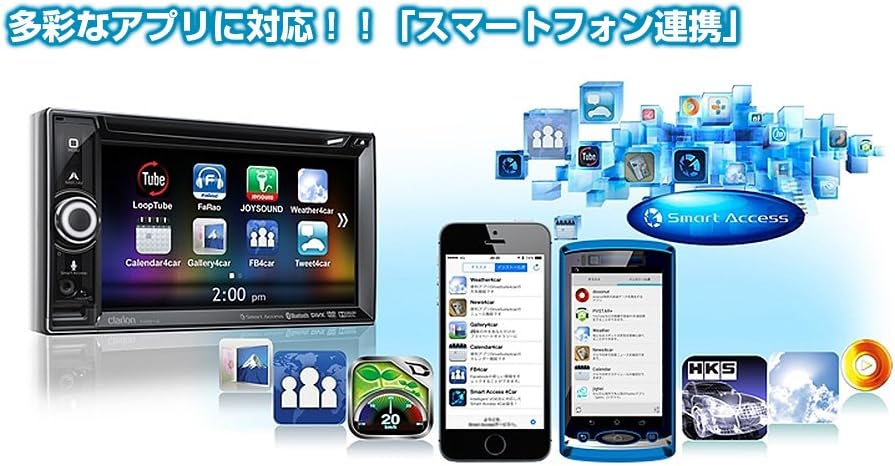
Figure 3: Clarion NX514 displaying various smartphone applications via SmartAccess Link. The image shows the unit's screen mirroring apps like YouTube, Calendar, and Weather, alongside two smartphones.
4. Navigation (Mapple Navi 5)
The Mapple Navi 5 system provides comprehensive navigation features designed to enhance your driving experience.
- Leit að áfangastað: Leitaðu að destinations by address, name, or category.
- Tourism Navigation: Access a vast database of tourist spots, including recommended drive courses, seasonal attractions (flowers, seasonal fish, fruit picking), and local gourmet information.
- SA/PA & Roadside Stations: Find information on service areas, parking areas, and roadside stations across Japan.
- Leiðarvísir: Follow clear visual and voice prompts for turn-by-turn directions.

Figure 4: Clarion NX514 showcasing Mapple Navi 5 features. This image highlights various tourism-related functions such as recommended drive courses, spot search, and information on SA/PA and local gourmet.
5. Spilun fjölmiðla
The NX514 supports various media formats:
- DVD spilun: Insert a DVD into the disc slot for video and audio playback.
- USB/SD kort: Spila hljóð og myndband files stored on USB devices or SD cards.
- Bluetooth hljóð: Stream music wirelessly from your Bluetooth-enabled smartphone or other devices.
- Sjónvarp í einu segmenti: Watch digital terrestrial television broadcasts (where available).

Figure 5: Clarion NX514 demonstrating Bluetooth phone and audio functions. The image shows the unit's screen displaying a phone dialer and a music playback interface, along with a smartphone connected via NaviCon and Bluetooth.
6. Steering Wheel Remote Control
If your vehicle is equipped with steering wheel controls, the NX514 can be integrated to allow safe and convenient operation of audio and navigation functions without taking your hands off the wheel. This includes volume adjustment, track skipping, and activating voice commands.
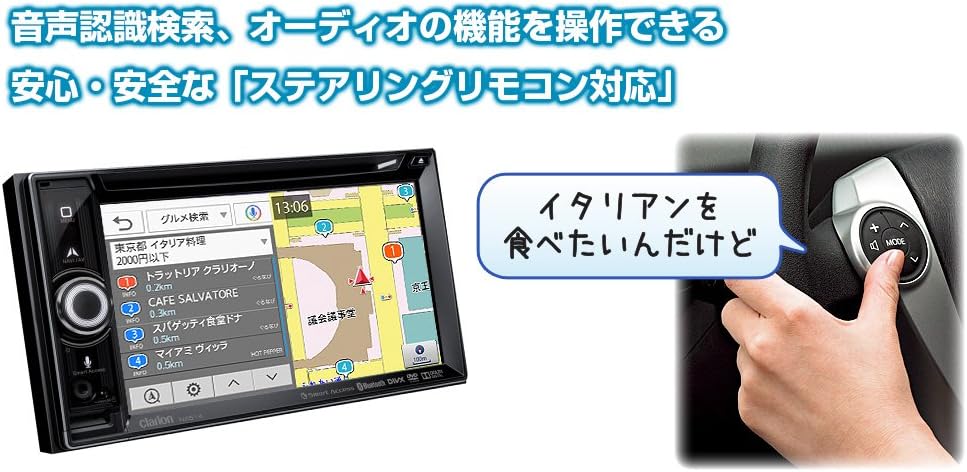
Figure 6: Clarion NX514 unit shown alongside a steering wheel with integrated remote controls. This illustrates the convenience of operating the navigation system using steering wheel buttons, including voice recognition activation.
Viðhald
To ensure the longevity and optimal performance of your Clarion NX514, follow these maintenance guidelines:
- Skjárhreinsun: Gently wipe the touchscreen with a soft, dry cloth. For stubborn smudges, use a cloth lightly dampened with a screen cleaner specifically designed for electronic displays. Avoid abrasive materials or harsh chemicals.
- Almenn þrif: Keep the unit free from dust and debris. Use a soft brush or compressed air to clean around buttons and crevices.
- Umhirða SD korta: Handle the SD card carefully. Avoid exposing it to extreme temperatures, moisture, or static electricity. Always ensure the unit is powered off or in a safe state before inserting or removing the SD card to prevent data corruption.
- Uppfærsla vélbúnaðar: Periodically check the official Clarion websíðuna fyrir allar tiltækar uppfærslur á vélbúnaði til að tryggja að kerfið þitt hafi nýjustu eiginleika og villuleiðréttingar.
Úrræðaleit
If you encounter issues with your Clarion NX514, refer to the following common problems and solutions:
Enginn rafmagn / Tækið kveikir ekki á sér
- Check all power connections to ensure they are securely attached.
- Verify the vehicle's fuse related to the car audio system.
- Ensure the vehicle's ignition is in the ACC or ON position.
No GPS Signal / Incorrect Position
- Ensure the GPS antenna is mounted in a location with an unobstructed view himinsins.
- Avoid placing objects near the antenna that could block the signal.
- Allow a few minutes for the system to acquire satellites after starting the vehicle.
SD Card Errors / Map Data Not Loading
- Gakktu úr skugga um að SD-kortið sé alveg og rétt sett í raufina.
- The SD card contains critical map data. Avoid removing it while the unit is operating or during power fluctuations.
- If data corruption is suspected, contact Clarion support for assistance. Do not attempt to modify the SD card contents yourself, as this may void the warranty.
Vandamál með Bluetooth-tengingu
- Ensure Bluetooth is enabled on both the NX514 and your smartphone.
- Eyðið fyrri pörunum á báðum tækjunum og reynið að para aftur.
- Move your smartphone closer to the NX514 unit.
Snertiskjár svarar ekki
- Perform a soft reset of the unit (refer to the device's specific reset procedure, usually a small reset button).
- Gakktu úr skugga um að skjárinn sé hreinn og laus við óhreinindi.
Tæknilýsing
| Eiginleiki | Forskrift |
|---|---|
| Vörumerki | Clarion |
| Nafn líkans | NX514 |
| Skjástærð | 6.2 tommur |
| Skjár Tegund | LCD (VGA with high-brightness LED) |
| Eiginleikar | Voice Operation, Touchscreen |
| Tengingar | Bluetooth, USB, HDMI |
| Tegund korts | City Tour (Mapple Navi 5) |
| Gerð uppsetningar | Festing á mælaborði |
| Minni Geymsla | 8 GB (SD-kort) |
| Vöruþyngd | 2000 grömm |
| Compatible Satellite System | GPS |
| Samhæfð ökutækisgerð | Fólksbíll |
Ábyrgð og stuðningur
Your Clarion NX514 Car Navigation System is covered by a manufacturer's warranty. Please refer to the warranty card included with your product for specific terms and conditions, including the warranty period and coverage details.
For technical support, service, or further inquiries, please contact Clarion customer service or visit the official Clarion websíða:
Clarion Official Product Page (Japanese)
When contacting support, please have your product model number (NX514) and purchase information readily available.


