Inngangur
This manual provides detailed instructions for the setup, operation, and maintenance of your iBall Tarang F5 5.1 Speakers for PC. Please read this manual thoroughly before using the product to ensure proper functionality and to prevent damage.
Innihald pakka
Gakktu úr skugga um að allir hlutir sem taldir eru upp hér að neðan séu til staðar í pakkanum þínum:
- 1 x Bassahátalari
- 5 x gervihnattahátalaraeiningar
- 1 x fjarstýring
- Audio Connection Cables (RCA to 3.5mm, RCA to RCA)
- Notendahandbók (þetta skjal)
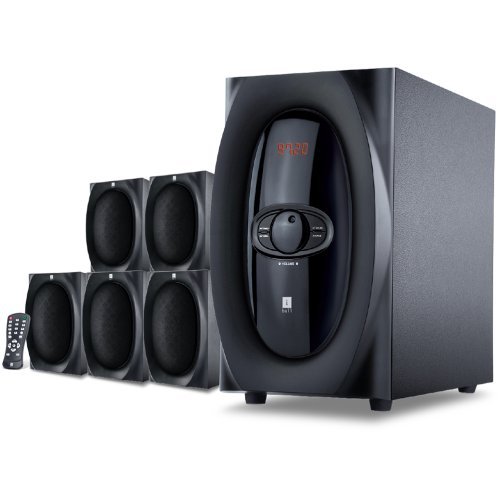
Mynd: Yfirview of the iBall Tarang F5 5.1 Speaker System, showing the subwoofer and five satellite speakers.
Uppsetningarleiðbeiningar
- Staðsetning hátalara: Place the subwoofer on a stable surface, preferably on the floor. Arrange the five satellite speakers around your listening area for optimal 5.1 surround sound. Typically, one center speaker, two front left/right, and two rear left/right speakers.
- Connecting Satellite Speakers: Connect each satellite speaker to the corresponding output ports on the rear panel of the subwoofer unit. Ensure correct polarity (positive to positive, negative to negative) if applicable, or match color-coded connectors.
- Connecting Audio Source:
- For PC/MP3 Player (2.1Ch or 5.1Ch input): Use the provided audio cables to connect the audio output of your device to the "Audio Input" ports on the subwoofer. For 5.1 channel input, ensure your source device supports 5.1 output and connect all relevant channels (Front L/R, Rear L/R, Center/Sub). For 2.1 channel, connect to the stereo input.
- For USB/SD/MMC Card: Insert your USB drive or SD/MMC card into the designated slot on the front panel of the subwoofer.
- Rafmagnstenging: Connect the power cord to the subwoofer unit and then plug it into a standard AC power outlet.
- Kveikt á: Turn on the main power switch located on the rear or front panel of the subwoofer. The LED display should illuminate.

Image: Illustrative diagram of the subwoofer's rear panel, detailing connections for satellite speakers and various audio input sources.
Notkunarleiðbeiningar
Front Panel Controls and Remote Control
The iBall Tarang F5 can be operated using the controls on the front panel of the subwoofer or via the included full-function remote control.
- Kveikt/slökkt: Ýttu á KRAFTUR button on the remote or the main power switch on the unit.
- Val inntaksheimildar: Ýttu á INNSLAG button on the remote or front panel to cycle through available sources: 2.1Ch, 5.1Ch, USB, SD/MMC, FM Radio. The selected source will be displayed on the LED screen.
- Hljóðstyrksstilling: Notaðu VOL+ og VOL- buttons on the remote or the master volume knob on the front panel to adjust the overall volume.
- Stilling á bassa/diskant: Notið tileinkað BASS +/BASSI- og TREBLE +/TRÍBÆLI- buttons on the remote control to fine-tune audio output.
- Hljóða aðgerð: Ýttu á ÞAGGA hnappinn á fjarstýringunni til að þagga hljóðið tímabundið. Ýttu aftur til að taka það af.
USB/SD/MMC spilun
When a USB drive or SD/MMC card is inserted, the system will automatically switch to the USB/SD input mode and begin playing compatible audio files. Use the remote control for playback functions:
- Spila / gera hlé: Ýttu á SPILA/HÁT hnappinn.
- Næsta / fyrri lag: Notaðu NÆST og FYRIR hnappa.
Rekstur FM útvarps
Til að nota FM útvarpsaðgerðina:
- Switch the input source to FM ham með því að nota INNSLAG hnappinn.
- Sjálfvirk skönnun: Ýttu á og haltu inni SPILA/HÁT button (or a dedicated SKANNA button if available on the remote) to automatically scan and save available FM stations.
- Handvirk stilling: Notaðu NÆST og FYRIR buttons to manually tune to specific frequencies or navigate through saved stations.
Viðhald
- Þrif: Use a soft, dry cloth to clean the speaker surfaces. Do not use liquid cleaners, aerosols, or solvents, as these may damage the finish or internal components.
- Loftræsting: Ensure the subwoofer's ventilation openings are not blocked to prevent overheating.
- Staðsetning: Forðist að setja hátalarana í beinu sólarljósi, nálægt hitagjöfum eða á svæðum með mikilli raka eða ryki.
- Rafmagnssnúra: Skoðið rafmagnssnúruna reglulega til að athuga hvort hún sé skemmd. Ef hún er skemmd skal hætta notkun og hafa samband við þjónustuver.
Úrræðaleit
| Vandamál | Möguleg orsök | Lausn |
|---|---|---|
| Enginn kraftur | Power cord not connected; Power switch off; Power outlet faulty | Ensure power cord is securely connected. Turn on the power switch. Test the power outlet with another device. |
| Ekkert hljóð | Incorrect input source; Volume too low; Audio cables loose/damaged; Mute function active | Select the correct input source. Increase volume. Check all audio cable connections. Deactivate mute. |
| Bjagað hljóð | Volume too high; Source audio quality poor; Speaker cables loose | Reduce volume. Test with a different audio source. Check satellite speaker connections. |
| Fjarstýring virkar ekki | Batteries depleted; Obstruction between remote and unit; Remote sensor blocked | Replace remote control batteries. Ensure clear line of sight to the subwoofer's IR sensor. |
| Léleg FM móttaka | Antenna not extended/positioned correctly; Weak signal area | Extend and adjust the FM antenna for better reception. Try auto-scanning again. |
Tæknilýsing
| Eiginleiki | Smáatriði |
|---|---|
| Vörumerki | iBall |
| Fyrirmynd | Tarang F5 |
| Rásarstillingar | 5.1 Surround Sound |
| Stærð bassahátalara | 5.25 tommur |
| Stærð gervihnattabílstjóra | 3 Inches (each) |
| Impedans hátalara | 8 Ohm |
| Satellite Impedance | 4 Ohm |
| Samhæf tæki | Computers, MP3 Players, SD Cards |
| Tengitækni | USB, RCA (for 2.1Ch/5.1Ch input) |
| Sérstakir eiginleikar | FM Radio, USB/SD/MMC Playback, Remote Control, LED Display, Wooden Cabinets |
| Aflgjafi | AC |
| Efni | Viður |
| Þyngd hlutar | 8 kg |
| Stærðir pakka (B x H x D) | 40.4 x 34.2 x 32.8 cm |
Ábyrgð og stuðningur
Your iBall Tarang F5 5.1 Speakers are covered by a limited warranty from the date of purchase. Please refer to the warranty card included in your package for specific terms and conditions.
For technical support, service, or warranty claims, please contact iBall customer service:
- Websíða: www.iball.co.in/support (ExampTengillinn, raunverulegur tengill getur verið breytilegur)
- Netfang: support@iball.co.in (Example email, actual email may vary)
- Sími: 1800-XXX-XXXX (Example number, actual number may vary)
Please have your product model number (Tarang F5) and proof of purchase ready when contacting support.


