1. Inngangur
This manual provides essential information for the setup, operation, and maintenance of your Epson SureColor P400 Wireless Color Photo Printer. Please read this manual thoroughly before using the printer to ensure optimal performance and longevity.
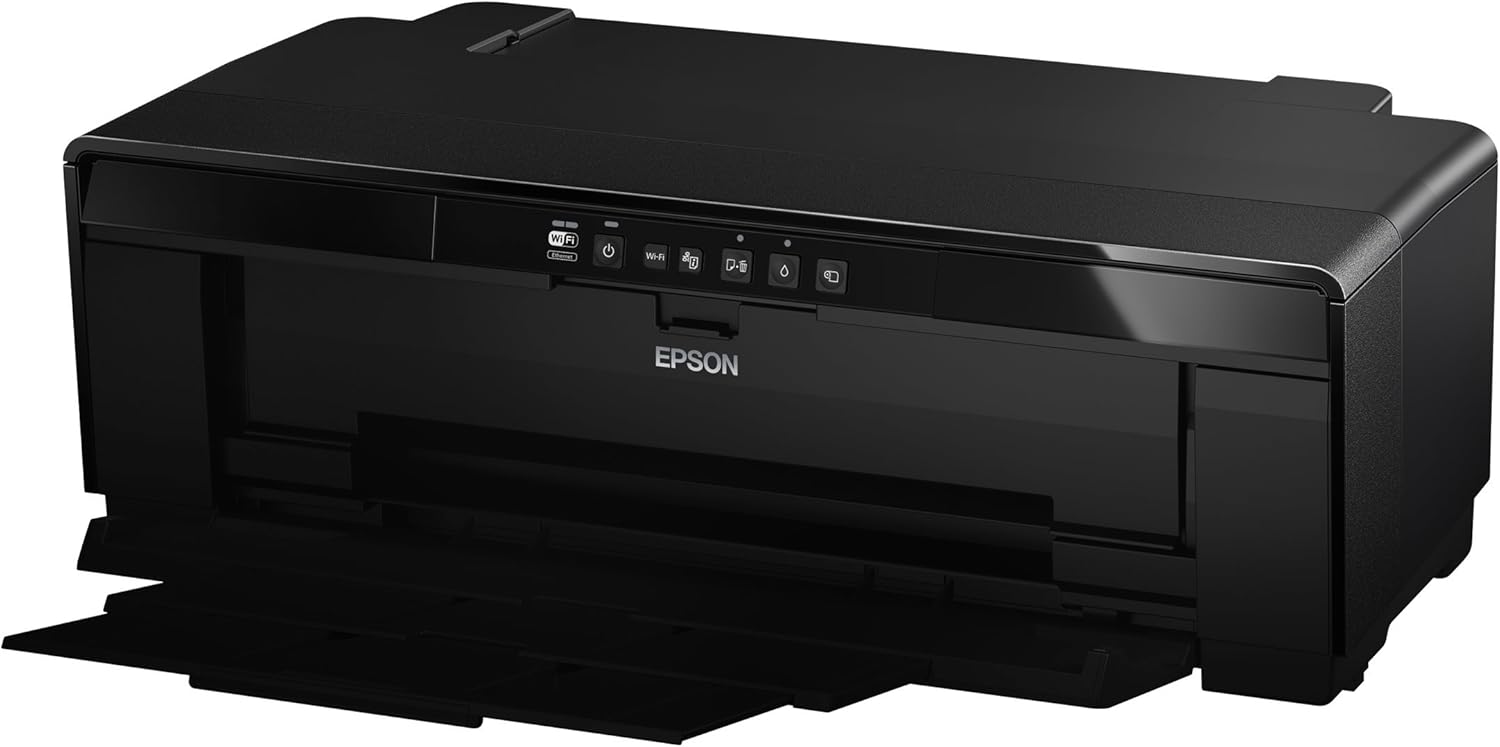
Mynd 1: Framan view of the Epson SureColor P400 Wireless Color Photo Printer.
2. Helstu eiginleikar
- UltraChrome HG2 Ink: Utilizes an 8-color pigment ink set, including Red and Orange inks, for vibrant, true-to-life color and deep blacks.
- Gloss Optimizer: Provides a smooth, professional finish to prints.
- Fjölhæf miðlunarmeðferð: Supports 13-inch wide cut-sheet and roll paper, fine art paper, and art board up to 1.3 mm thick.
- Tengingar: Features Wireless (Wi-Fi), Ethernet, and USB 2.0 for flexible printing options.
- Individual Ink Cartridges: High-capacity 14 mL cartridges allow for replacement of only the color needed.

Mynd 2: Lokiðview of the Epson SureColor P400 highlighting advanced paper handling, versatile connectivity, and the MicroPiezo printhead.
3. Uppsetningarleiðbeiningar
3.1 Upptaka og staðsetning
- Fjarlægðu prentarann varlega úr umbúðunum.
- Place the printer on a stable, flat surface with adequate space around it for operation and ventilation.
- Fjarlægið öll hlífðarteip og umbúðaefni af prentaranum.
3.2 Að setja upp blekhylki
- Open the printer cover to access the ink cartridge slots.
- Unpack each 14 mL ink cartridge (Cyan, Gloss Optimizer, Magenta, Matte Black, Orange, Photo Black, Red, Yellow).
- Settu hverja rörlykju í samsvarandi litakóðaða rauf þar til hún smellpassar.
- Lokaðu prentaralokinu.
Video 1: Official Epson SureColor P400 overview, demonstrating key features and ink installation. This video provides a visual guide to the printer's capabilities and how to manage ink cartridges.
3.3 Rafmagnstenging
- Tengdu rafmagnssnúruna við prentarann og síðan í rafmagnsinnstungu.
- Ýttu á rofann til að kveikja á prentaranum.
3.4 Uppsetning hugbúnaðar og tenging
- Install the printer software on your computer (PC or Mac) from the provided CD or Epson's official websíða.
- Follow the on-screen instructions to set up your preferred connection method:
- Þráðlaust net (Wi-Fi): Tengdu prentarann við þráðlausa netið þitt.
- Ethernet: Tengdu Ethernet-snúru frá prentaranum við beininn þinn eða netmiðstöð.
- USB 2.0: Tengdu USB snúru (fylgir ekki með) frá prentaranum við tölvuna þína.

Image 3: Illustration of the Epson SureColor P400's compatibility and connectivity features, showing various devices and connection types.
4. Notkunarleiðbeiningar
4.1 Að hlaða pappír
The SureColor P400 offers multiple paper loading options:
- Auto Sheet Feeder: For photo, matte, and plain papers. Load paper into the top rear slot.
- Rear Single Sheet Fine Art Paper Path: For heavier fine art papers and specialty media.
- Roll Paper Holder: For 8.3-inch or 13-inch wide roll paper, ideal for panoramas up to 129 inches long.
- Front Straight-Through Path: Handles art board up to 1.3 mm thick.

Image 4: Diagram illustrating the three media feed options available on the Epson SureColor P400, including the top-loading auto-sheet feeder, front fine-art media feed, and roll media feed.

Image 5: The Epson SureColor P400 is capable of printing on a wide range of media, including various types of Epson Legacy Papers, Velvet Fine Art, Premium Photo Paper Luster, and Exhibition Canvas Gloss.
4.2 Prentun
- Gakktu úr skugga um að prentarinn sé kveikt á og tengdur við tækið þitt.
- Opnaðu skjalið eða myndina sem þú vilt prenta á tölvunni þinni.
- Veldu „Prenta“ úr valmynd forritsins.
- Choose the Epson SureColor P400 as your printer.
- Adjust print settings such as paper type, size, and quality in the printer driver dialog box.
- Click "Print" to begin the printing process.
5. Viðhald
5.1 Skipta um blekhylki
- When an ink cartridge is low or empty, a notification may appear on your computer or the printer's indicator light will signal.
- Press the ink droplet button on the printer's control panel to move the print head to the replacement position.
- Opnaðu blekhylkishlífina.
- Press the tab on the empty cartridge to release it, then pull it straight out.
- Unpack a new genuine Epson ink cartridge and insert it firmly into the correct slot until it clicks.
- Close the ink cartridge cover and press the ink droplet button again to return the print head to its home position.
5.2 Þrif á prenthaus
If print quality declines or you notice missing lines or incorrect colors, perform a print head cleaning:
- Opnaðu hugbúnað prentarans í tölvunni þinni.
- Select "Head Cleaning" or "Nozzle Check" to initiate the cleaning cycle.
- Follow the on-screen prompts. Repeat if necessary.
5.3 Cleaning the Paper Path
If you experience streaks on your prints, the paper path may need cleaning. Refer to the user guide for detailed instructions on how to clean the internal components, such as the pad that collects excess ink.
6. Bilanagreining
- Prentari svarar ekki:
- Athugaðu rafmagnstenginguna og vertu viss um að prentarinn sé kveikt á.
- Staðfestu nettengingu eða USB-snúrutengingu.
- Endurræstu prentarann og tölvuna þína.
- Léleg prentgæði (rendur, fölvun):
- Athugaðu blekmagn og skiptu um tóm blekhylki.
- Framkvæmdu hreinsun á prenthaus og stútaprófun.
- Gakktu úr skugga um að þú notir réttar pappírsstillingar fyrir miðilinn þinn.
- Clean the paper path if streaks persist.
- Pappírsstopp:
- Slökktu á prentaranum og fjarlægðu varlega allan fastan pappír úr inn- eða úttaksskúffunum.
- Refer to the user guide for instructions on clearing internal paper jams.
7. Tæknilýsing
| Eiginleiki | Smáatriði |
|---|---|
| Gerðarnúmer | C11CE85201 |
| Vörumál (D x B x H) | 12.8" x 24.5" x 8.6" |
| Þyngd hlutar | 27.1 pund |
| Prenttækni | Inkjet (Pigment-based ink) |
| Printer Output | Litur |
| Hámarks prentupplausn | 5760 x 1440 dpi |
| Blek litir | Cyan, Magenta, Yellow, Photo Black, Matte Black, Red, Orange, Gloss Optimizer |
| Tengitækni | USB 2.0, Wireless (Wi-Fi), Ethernet |
| Stærðir fjölmiðla sem studdir eru | Up to 13" x 129" (roll paper), 13" x 19" (sheet) |
| Hámarksfjöldi inntaksblaðs | 1 (single sheet feed for specialty media) |
| Tvíhliða prentun (tvíhliða) | Já |
| Orkunotkun | Printing: Approx. 20 W; Sleep mode: Approx. 1.4 W; Power off: Approx. 0.15 W |
| Samhæf tæki | PC, Mac |

Image 6: Contents of the Epson SureColor P400 box, including the printer, ink cartridges, power cord, and user guide. Note that the USB cable is not included.
8. Upplýsingar um ábyrgð
Specific warranty details for the Epson SureColor P400 are not provided in this manual. Please refer to the warranty card included with your product or visit the official Epson website for the most current and comprehensive warranty information.
9. Þjónustudeild
For technical assistance, troubleshooting, or further inquiries, please visit the official Epson support website or contact Epson customer service. Support resources often include FAQs, driver downloads, and contact information for live assistance.
Þú getur heimsótt Epson verslun á Amazon fyrir frekari upplýsingar um vöruna og fylgihluti.


