1. Inngangur
This manual provides essential information for the safe and efficient use of your InFocus IF195a Touch Pad. Please read this manual thoroughly before operating the device and retain it for future reference.
2. Öryggisupplýsingar
- Ekki láta tækið verða fyrir miklum hita, beinu sólarljósi eða miklum raka.
- Forðist að missa tækið eða láta það verða fyrir miklum höggum.
- Use only the charger provided or approved by InFocus.
- Ekki reyna að taka tækið í sundur eða gera við það sjálfur. Látið hæft starfsfólk sjá um alla þjónustu.
- Haltu tækinu í burtu frá vatni og öðrum vökva.
- Fargið tækinu og rafhlöðu þess á ábyrgan hátt í samræmi við gildandi reglur.
3. Vöru lokiðview
The InFocus IF195a is a 20-inch Android-powered touch pad designed for interactive use. Familiarize yourself with its components.
3.1 Framhlið View

Mynd 1: Framan view of the InFocus IF195a Touch Pad. This image shows the large 20-inch display with the Android operating system interface, including various app icons and the Google search bar. The device features a sleek bezel around the screen.
- Skjár: 20-inch multi-touch screen.
- Myndavél að framan: Located at the top center bezel.
- Hljóðnemi: Innbyggt fyrir raddinntak.
3.2 hlið View og hafnir
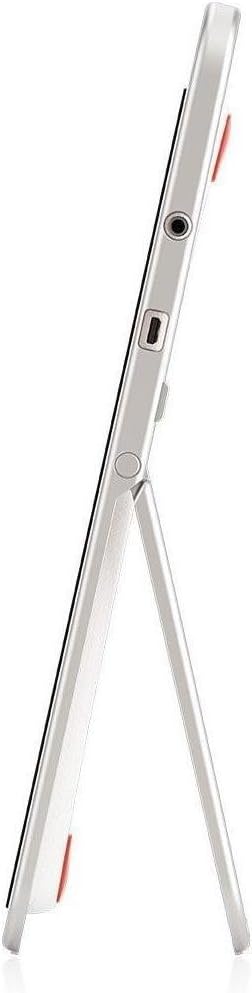
Mynd 2: Hlið view of the InFocus IF195a Touch Pad. This image highlights the device's slim profile and the integrated kickstand, which allows for upright positioning. Visible ports include a headphone jack and a USB port.
- Aflhnappur: Used to turn the device on/off or put it to sleep.
- Hljóðstyrkshnappar: Adjust the device's audio output.
- Heyrnartólstengi (3.5 mm): Til að tengja utanaðkomandi hljóðtæki.
- Ör-USB tengi: Fyrir hleðslu og gagnaflutning.
- Innbyggður stuðningur: Allows the device to stand upright.
4. Uppsetning
4.1 Úrpakkning og upphafleg greiðsla
- Carefully remove the InFocus IF195a Touch Pad and all accessories from the packaging.
- Connect the provided power adapter to the Micro-USB port on the device and plug it into a power outlet. Allow the device to charge fully before first use. The charging indicator will typically show a full battery when complete.
4.2 Kveikt/slökkt
- Til að kveikja á: Press and hold the Power button until the InFocus logo appears on the screen.
- Til að slökkva á: Haltu inni aflrofanum þar til slökkvalmynd birtist. Veldu „Slökkva“ og staðfestu.
- Að sofa/vaka: Briefly press the Power button to put the device into sleep mode or wake it up.
4.3 Uppsetningarhjálp
Þegar tækið er fyrst kveikt á mun það leiða þig í gegnum upphafsuppsetningarferlið:
- Val á tungumáli: Veldu valið tungumál.
- Wi-Fi tenging: Select your Wi-Fi network from the list and enter the password. A stable internet connection is required for many features.
- Google reikningur: Sign in with an existing Google account or create a new one. This is necessary to download apps from the Google Play Store and access Google services.
- Dagsetning og tími: Set the correct date and time or allow the device to set it automatically via the network.
- Persónuverndarstillingar: Review og stilla persónuverndarstillingar eftir þörfum.
5. Notkun tækisins
5.1 Snertu Bendingar
- Bankaðu á: Snertu skjáinn einu sinni til að velja hlut eða opna forrit.
- Snertu og haltu inni: Haltu inni hlut til að opna samhengisvalmyndir eða draga hluti.
- Strjúktu: Dragðu fingurinn yfir skjáinn til að fletta í gegnum lista eða skipta á milli heimaskjáa.
- Klípaðu til aðdráttar: Notaðu tvo fingur til að stækka eða minnka aðdrátt á myndum, kortum eða web síður.
5.2 Heimaskjár og leiðsögn
- Heimahnappur: Fer aftur á aðalskjáinn.
- Til baka hnappur: Returns to the previous screen or closes the current application.
- Hnappur fyrir nýleg forrit: Displays a list of recently used applications for quick switching.
- Tilkynningarspjald: Strjúktu niður frá efri hluta skjásins til að fá aðgang að tilkynningum og flýtistillingum.
5.3 Uppsetning og stjórnun forrita
- Google Play Store: Open the "Play Store" app to browse and download applications. A Google account is required.
- Að setja upp forrit: Select an app and tap "Install." Follow on-screen prompts for permissions.
- Að fjarlægja forrit: Farðu til Stillingar > Forrit, select the desired app, and tap "Uninstall." Alternatively, touch and hold an app icon on the home screen and drag it to the "Uninstall" option (if available).
5.4 Tenging við utanaðkomandi tæki
- Heyrnartól: Tengdu 3.5 mm heyrnartól í heyrnartólstengið.
- USB tæki: Connect compatible USB devices (e.g., flash drives, keyboards) to the Micro-USB port using an appropriate adapter if necessary. The device supports USB On-The-Go (OTG).
6. Viðhald
6.1 Þrif á tækinu
- Notaðu mjúkan, lólausan klút til að þrífa skjáinn og líkamann tækisins.
- Fyrir þrjósk merki, örlítið dýftampÞurrkið klútinn með vatni eða skjáhreinsiefni sem er sérstaklega hannað fyrir rafeindatæki.
- Forðist að nota sterk efni, slípiefni eða úðabrúsa.
6.2 Umhirða rafhlöðu
- Til að lengja líftíma rafhlöðunnar skal forðast að tæma hana alveg oft.
- Ekki skilja tækið eftir tengt við hleðslutækið í langan tíma eftir að það er fullhlaðið.
- Store the device in a cool, dry place if not used for a long time, with the battery charged to about 50%.
6.3 Hugbúnaðaruppfærslur
Athugaðu reglulega hvort hugbúnaðaruppfærslur séu til staðar til að tryggja bestu mögulegu afköst og öryggi. Farðu á Stillingar > Um spjaldtölvuna > Kerfisuppfærslur to check for and install available updates. Ensure your device is connected to Wi-Fi and has sufficient battery charge before starting an update.
7. Bilanagreining
| Vandamál | Möguleg lausn |
|---|---|
| Tækið kviknar ekki á. | Ensure the device is charged. Connect the charger and wait a few minutes before attempting to power on again. If unresponsive, perform a hard reset by holding the power button for 10-15 seconds. |
| Vandamál með Wi-Fi tengingu. | Athugaðu hvort Wi-Fi sé virkt í stillingunum. Endurræstu Wi-Fi leiðina. Gleymdu netkerfinu og tengdu aftur. Gakktu úr skugga um að þú sért innan seilingar Wi-Fi merkisins. |
| Forrit eru að hrynja eða frjósa. | Close and restart the application. Clear the app's cache (Stillingar > Forrit > [Nafn forrits] > Geymsla > Hreinsa skyndiminniEf vandamálið er viðvarandi skaltu fjarlægja forritið og setja það upp aftur. |
| Skjárinn svarar ekki. | Restart the device. Ensure the screen is clean and free of debris. If the issue continues, contact support. |
| Hæg frammistaða. | Close unnecessary background applications. Clear cache for frequently used apps. Check available storage (Stillingar > Geymsla) and free up space if needed. Consider a factory reset as a last resort. |
7.1 Factory Reset
Endurstilling á verksmiðjustillingar mun eyða öllum gögnum úr tækinu þínu og endurstilla það í upprunalegar verksmiðjustillingar. Taktu öryggisafrit af öllum mikilvægum gögnum áður en þú heldur áfram.
- Farðu til Stillingar > Afritun og endurstilling > Núllstilling verksmiðjugagna.
- Read the warning message carefully.
- Tap "Reset tablet" and then "Erase everything" to confirm.
- Tækið mun endurræsa og hefja endurstillingarferlið.
8. Tæknilýsingar
| Eiginleiki | Forskrift |
|---|---|
| Fyrirmynd | IF195a |
| Vörumerki | InFocus |
| Skjárstærð | 20 tommur |
| Hámarksupplausn | 1600 x 900 |
| Örgjörvi | ARM Cortex-A15 Quad-Core 1.8 GHz |
| RAM Stærð | 2 GB |
| Geymslugeta | 16 GB |
| Stýrikerfi | Android 4.4 KitKat |
| Upplausn myndavélar að aftan | 5 MP |
| Mál (L x B x H) | 61.6 x 47 x 8.6 cm |
| Þyngd | 3.7 kg |
| Litur | Grátt |
9. Ábyrgð og stuðningur
For warranty information, please refer to the warranty card included with your product or visit the official InFocus website. For technical support, product registration, or service inquiries, please contact InFocus customer service through their official channels.
Please note that warranty terms may vary by region and retailer. Keep your proof of purchase for warranty claims.


