1. Inngangur
This manual provides comprehensive instructions for the installation, operation, and maintenance of your Cisco CP-DX80-VESA VESA Adapter and Wall Mount. Please read this manual thoroughly before installation to ensure correct setup and to prevent damage to the product or connected devices. Retain this manual for future reference.
2. Öryggisupplýsingar
Fylgið eftirfarandi öryggisráðstöfunum við uppsetningu og notkun:
- Viðvörun: Improper installation can result in serious personal injury or damage to equipment. Ensure all mounting hardware is securely fastened.
- Varúð: Do not exceed the weight capacity specified for this mount. Refer to the specifications section for details.
- Ensure the wall structure can safely support the combined weight of the mount and the attached device.
- Use appropriate tools and follow all steps carefully. If unsure, consult a qualified installer.
- Haltu litlum hlutum fjarri börnum.
3. Innihald pakka
Gakktu úr skugga um að allir íhlutir séu til staðar áður en uppsetning hefst:
- Cisco CP-DX80-VESA VESA Adapter
- Veggfestingarfesting
- Festingarbúnaður (skrúfur, akkeri, þvottavélar)
- Leiðbeiningarhandbók
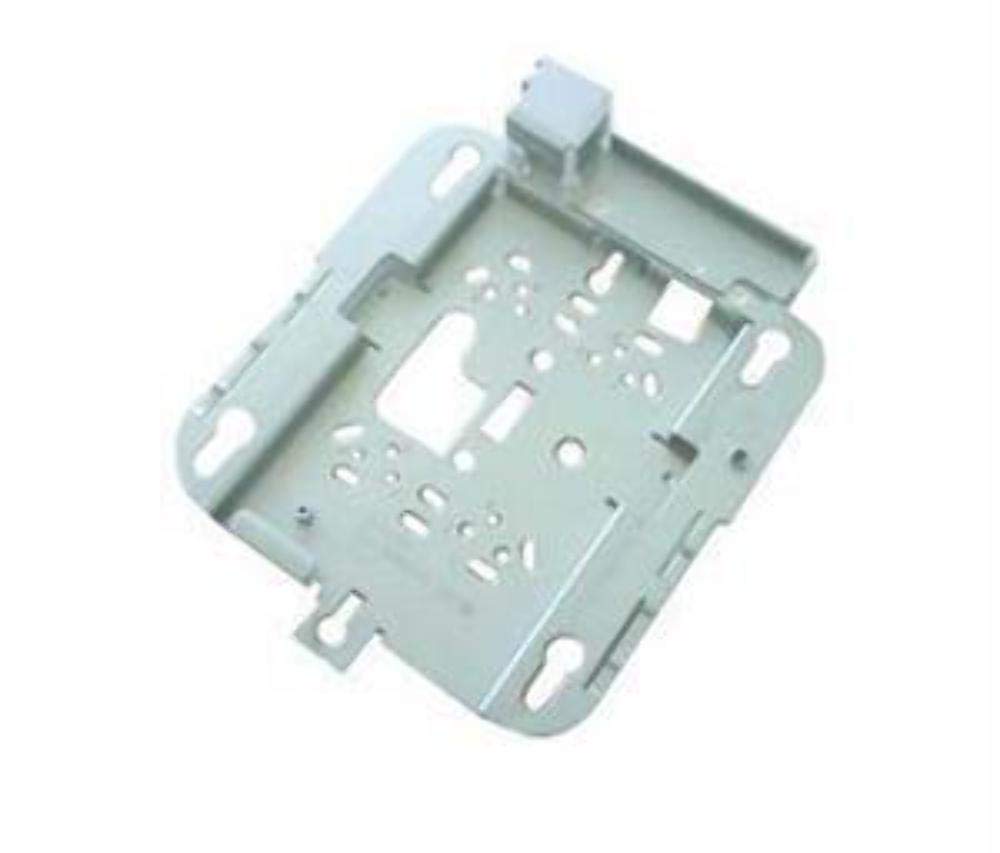
Image: The Cisco CP-DX80-VESA VESA Adapter and Wall Mount. This image displays the primary components of the product, including the adapter plate and the wall mounting bracket, designed to secure a video conferencing system to a wall.
4. Uppsetning og uppsetning
4.1 Verkfæri sem þarf
- Bora
- Borar (hentugir fyrir veggefni)
- Phillips höfuðskrúfjárn
- Stig
- Blýantur
- Stud finder (recommended for drywall installation)
4.2 Uppsetning veggfestingar
- Veldu staðsetningu: Choose a suitable wall location, ensuring it can support the weight of the mount and the device. Avoid areas with electrical wires or plumbing.
- Mark bora holur: Hold the wall mount bracket against the wall at the desired height. Use a level to ensure it is straight. Mark the drill hole locations with a pencil.
- Bora holur: Drill pilot holes at the marked locations. Use appropriate drill bits for your wall type (e.g., wood studs, concrete, drywall with anchors).
- Öruggur krappi: Insert wall anchors (if required) into the pilot holes. Align the wall mount bracket with the holes and secure it to the wall using the provided screws. Ensure it is firmly attached.
4.3 VESA Adapter Attachment to Device
- Greinið VESA mynstur: Locate the VESA mounting holes on the back of your Cisco DX80 video conferencing system.
- Festa millistykki: Align the Cisco CP-DX80-VESA adapter with the VESA mounting holes on the DX80 device.
- Öruggt millistykki: Use the appropriate screws from the mounting hardware kit to securely fasten the VESA adapter to the DX80 device. Do not overtighten.
4.4 Mounting the Device to the Wall Bracket
- Lift Device: Carefully lift the DX80 device with the attached VESA adapter. It is recommended to have assistance for this step.
- Engage Mount: Hook the VESA adapter onto the wall mount bracket. Ensure the adapter is fully seated and engaged with the bracket's locking mechanism.
- Öruggt tæki: Depending on the design, there may be additional screws or clips to secure the device to the wall bracket. Fasten these as instructed to prevent accidental dislodging.
- Lokaskoðun: Gently pull on the mounted device to ensure it is stable and securely attached to the wall.
5. Rekstraratriði
Once the Cisco DX80 is securely mounted using the CP-DX80-VESA adapter and wall mount, its operation remains consistent with its standard functionality. The mount provides a stable platform for the device.
- Ensure all cables (power, network, video) are properly connected and routed to avoid strain or interference.
- Periodically check the stability of the mount and the device, especially after any adjustments or movement.
6. Viðhald
The Cisco CP-DX80-VESA VESA Adapter and Wall Mount requires minimal maintenance.
- Þrif: Þurrkið yfirborð festingarinnar með mjúkum, þurrum klút. Forðist slípiefni eða leysiefni sem gætu skemmt áferðina.
- Skoðun: Periodically inspect all mounting screws and connections to ensure they remain tight. Over time, vibrations or environmental factors can cause screws to loosen.
- Skemmdir: If any part of the mount appears damaged or worn, discontinue use and contact Cisco support for replacement parts or advice.
7. Bilanagreining
This section addresses common issues related to the installation and stability of the mount.
| Vandamál | Möguleg orsök | Lausn |
|---|---|---|
| Festingin er óstöðug eða óstöðug. | Loose mounting screws; inadequate wall support; incorrect anchors. | Tighten all screws. Verify wall structure and use appropriate anchors. Reinstall if necessary. |
| Device not attaching correctly to VESA adapter. | Incorrect screw size; misalignment. | Ensure correct VESA screws are used. Realign the adapter with the device's mounting holes. |
| Wall mount bracket not level. | Uppsetningarvilla. | Remove bracket, re-mark holes using a level, and reinstall. |
8. Tæknilýsing
Key technical specifications for the Cisco CP-DX80-VESA VESA Adapter and Wall Mount:
| Eiginleiki | Smáatriði |
|---|---|
| Gerðarnúmer | CP-DX80-VESA |
| Vörumál | 10.63 x 16.14 x 3.54 tommur |
| Þyngd hlutar | 2.2 pund |
| Vélbúnaðarviðmót | Ethernet (for connected device) |
| Framleiðandi | Cisco Systems, Inc |
| Dagsetning fyrst í boði | 21. ágúst 2015 |
| UPC | 882658710469 |
9. Ábyrgð og stuðningur
For information regarding the product warranty, please refer to the official Cisco warranty documentation provided with your original purchase or visit the Cisco webSérstakir ábyrgðarskilmálar geta verið mismunandi eftir svæðum og vörum.
9.1 Tæknileg aðstoð
If you encounter issues that cannot be resolved using the troubleshooting guide, or require further assistance, please contact Cisco Technical Support:
- Websíða: Visit the official Cisco support website for documentation, FAQs, and contact options.
- Sími: Refer to your product's packaging or the Cisco websíða fyrir svæðisbundnar þjónustusímanúmer.
When contacting support, please have your product model number (CP-DX80-VESA) and purchase information readily available.


