1. Inngangur
This manual provides detailed instructions for the installation, operation, and maintenance of your JOOAN 770 HD 720P Wireless IP Camera. Please read this manual thoroughly before using the product to ensure proper functionality and to avoid damage. Keep this manual for future reference.
2. Vöru lokiðview
2.1 Innihald pakka
Gakktu úr skugga um að allir hlutir sem taldir eru upp hér að neðan séu innifaldir í pakkanum þínum. Ef einhverjir hlutir vantar eða eru skemmdir skaltu hafa samband við þjónustuver.
- JOOAN 770 HD 720P Wireless IP Camera (Note: Some variants may be 1080P or have internal model JA-C9E-U)
- Rafmagns millistykki
- USB gagnasnúra
- Festingar Bracket
- Skrúfupakkning (til festingar)
- Netsnúra (Ethernet)
- Notendahandbók (þetta skjal)

Image: Contents of the JOOAN 770 HD 720P Wireless IP Camera package, including the camera, power adapter, cables, and mounting hardware.
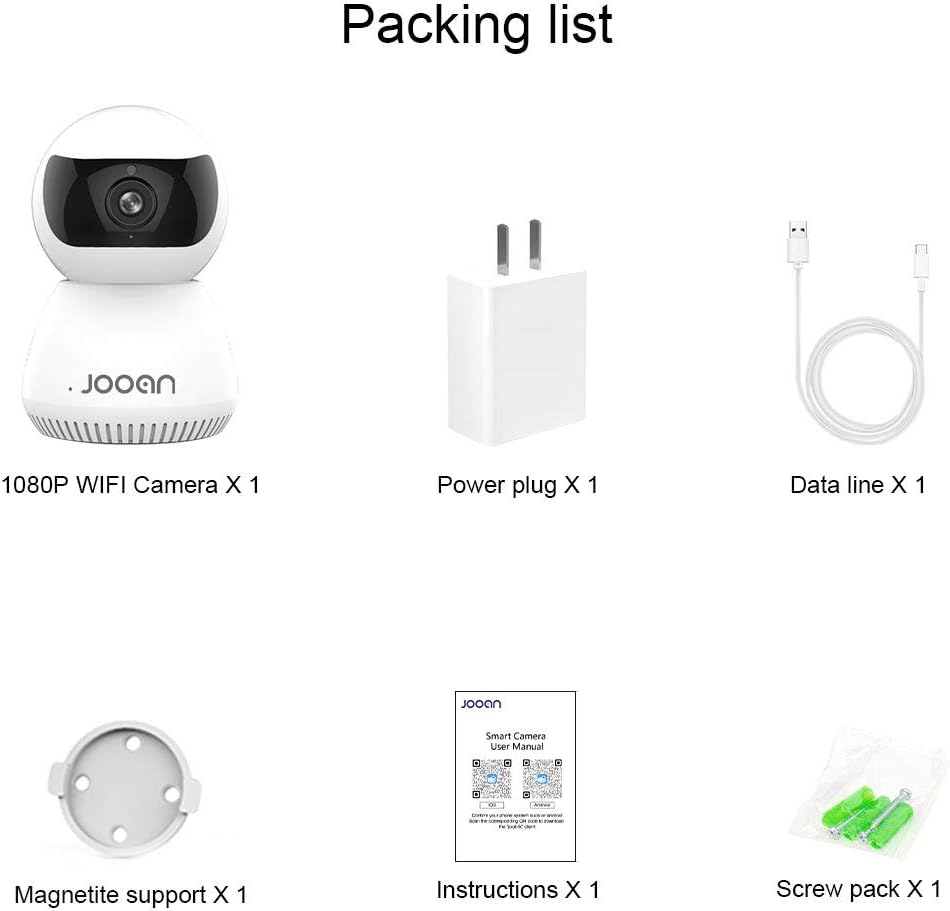
Mynd: Ítarleg view of the packing list for a JOOAN WiFi Camera, showing a 1080P camera, power plug, data line, magnetite support, instructions, and screw pack.
2.2 Helstu eiginleikar
- HD Video Quality: Captures clear 720P high-definition video. (Note: Some models may support 1080P resolution).
- Þráðlaus tenging: Supports Wi-Fi for flexible placement and easy setup.
- Halla/snúa virkni: Bjóðar upp á breitt viewing angle with 355° horizontal rotation and 100° vertical tilt, controllable via the companion application.
- Tvíhliða hljóð: Innbyggður hljóðnemi og hátalari gera kleift að eiga samskipti í rauntíma.
- Nætursjón: Equipped with infrared LEDs for clear monitoring in low-light conditions, up to 35 feet.
- Hreyfiskynjun: Alerts users to detected movement within the camera's field of view.
- Staðbundin geymsla: Supports Micro SD cards up to 128GB for continuous or event-triggered recording.
- P2P Cloud Monitoring: Remote access and monitoring via smartphone (Android & iOS) and computer applications.
- Ethernet tengi: Provides an option for wired network connection when Wi-Fi signal is unstable.

Mynd: Framan view of the JOOAN 770 HD 720P Wireless IP Camera, showcasing hvelfingarhönnun þess og linsu.

Image: A JOOAN camera with speech bubbles indicating two-way audio functionality, allowing communication between the camera's location and a remote user via a smartphone.

Image: A JOOAN camera in a nursery setting, illustrating its infrared night vision capability with red LEDs visible, providing clear monitoring in darkness.
3. Uppsetningarleiðbeiningar
3.1 Upppakkning og upphafleg uppsetning
- Fjarlægðu alla íhluti varlega úr umbúðunum.
- Choose a suitable location for your camera. Ensure it is within range of your Wi-Fi network or close to an Ethernet port.
- For optimal performance, place the camera on a stable, flat surface or mount it using the provided bracket and screws.
3.2 Kveikt á
- Connect the USB data cable to the camera's power input port.
- Stingdu straumbreytinum í venjulega rafmagnsinnstungu.
- The camera will power on, and an indicator light will illuminate, typically blinking to indicate readiness for setup.
3.3 Network Connection (Wi-Fi or Ethernet)
Your camera supports both wireless (Wi-Fi) and wired (Ethernet) connections.
Wi-Fi tenging:
- Ensure your smartphone is connected to the 2.4GHz Wi-Fi network you intend to use for the camera. (5GHz networks are generally not supported).
- Proceed to section 3.4 for app installation and pairing, which will guide you through the Wi-Fi setup process.
Ethernet tenging:
- Connect one end of the provided network cable to the camera's Ethernet port.
- Connect the other end of the network cable to an available LAN port on your router or network switch.
- The camera will automatically attempt to establish a wired network connection.

Mynd: Aftan view of the JOOAN camera, highlighting the Ethernet port for wired network connectivity.
3.4 Uppsetning appa og pörun tækja
- Download the official companion application for JOOAN cameras from your smartphone's app store (e.g., Apple App Store for iOS, Google Play Store for Android). Refer to the quick start guide included in your package for the specific app name or QR code.
- Opnaðu appið og stofnaðu nýjan notandareikning, eða skráðu þig inn ef þú ert nú þegar með einn.
- Follow the in-app instructions to add a new device. This typically involves scanning a QR code on the camera, or selecting your camera model and following prompts for Wi-Fi configuration (entering your Wi-Fi password).
- Once successfully paired, the camera's indicator light will usually turn solid, and you will see the live video feed in the app.
4. Notkunarleiðbeiningar
4.1 Í beinni View
After successful pairing, open the companion app and select your camera from the device list to view the live video feed. You can switch between standard and high-definition viewing modes if available.
4.2 Stilling og hallastýring
Í beinni view screen within the app, use the directional controls (often a joystick-like interface or swipe gestures) to remotely adjust the camera's horizontal (pan) and vertical (tilt) angles. The camera supports 355° pan and 100° tilt.
4.3 Tvíhliða hljóð
Til að nota tvíhliða hljóðaðgerðina skaltu ýta á hljóðnematáknið í beinni útsendingu appsins. view interface. Hold the button to speak, and release to listen. Ensure your phone's microphone permissions are granted to the app.
4.4 Hreyfiskynjun og viðvaranir
- Farðu í stillingar myndavélarinnar í appinu.
- Locate the "Motion Detection" or "Alarm Settings" option.
- Enable motion detection and configure sensitivity levels as desired.
- Set up alert notifications (e.g., push notifications to your phone, email alerts) to be informed when motion is detected.
4.5 Upptaka og geymsla
Upptaka á ör-SD-korti:
- Insert a Micro SD card (up to 128GB, Class 10 or higher recommended) into the camera's SD card slot. Power off the camera before inserting or removing the card.
- In the app settings, format the SD card if prompted.
- Configure recording settings: continuous recording, motion-triggered recording, or scheduled recording.
- Upptaka footage getur verið viewútgefið og sótt beint úr appinu.
Geymsla í skýinu (valfrjálst):
The camera may offer optional cloud storage services. Refer to the app for details on subscription plans and activation.
5. Viðhald
- Þrif: Use a soft, dry cloth to clean the camera lens and body. Avoid using liquid cleaners or abrasive materials.
- Hugbúnaðaruppfærslur: Regularly check the companion app for firmware updates. Keeping the camera's firmware updated ensures optimal performance and security.
- Staðsetning: Ensure the camera is not exposed to extreme temperatures, direct sunlight for prolonged periods, or excessive moisture.
- Power Cycle: Ef myndavélin lendir í vandræðum skaltu prófa að taka hana úr sambandi við rafmagnið í 10 sekúndur og stinga henni síðan aftur í samband.
6. Bilanagreining
Þessi hluti fjallar um algeng vandamál sem þú gætir lent í. Ef um flóknari vandamál er að ræða, vinsamlegast hafðu samband við þjónustuver.
| Vandamál | Möguleg orsök | Lausn |
|---|---|---|
| Myndavélin tengist ekki við Wi-Fi. | Incorrect Wi-Fi password; camera too far from router; 5GHz Wi-Fi network used; router firewall settings. | Verify Wi-Fi password. Move camera closer to router. Ensure you are using a 2.4GHz Wi-Fi network. Check router settings for any restrictions. |
| Engin bein myndsending. | Camera offline; poor network connection; app issue. | Check camera's power and network connection. Restart camera and router. Close and reopen the app. Ensure stable internet connection. |
| Tvíhliða hljóð virkar ekki. | Microphone/speaker muted in app; app permissions not granted; network latency. | Check audio settings in the app. Ensure the app has microphone permissions on your phone. Verify network stability. |
| Hreyfiskynjunarviðvaranir bárust ekki. | Motion detection disabled; notification settings incorrect; app running in background. | Enable motion detection in app settings. Check app notification permissions on your phone. Ensure the app is allowed to run in the background. |
| SD-kort tekur ekki upp eða greinist ekki. | SD card not inserted correctly; card corrupted; unsupported card type/size; card not formatted. | Reinsert SD card. Try a different, compatible SD card (Max 128GB, Class 10). Format the SD card via the app. |
7. Tæknilýsing
The following are the technical specifications for the JOOAN 770 HD 720P Wireless IP Camera:
| Eiginleiki | Smáatriði |
|---|---|
| Fyrirmynd | 770 (Internal Model: JA-C9E-U) |
| Myndbandsupplausn | 720P HD (Some variants may support 1080P) |
| Tengingar | Þráðlaust net (2.4 GHz), Ethernet |
| Pant/halla svið | Lárétt: 355°, Lóðrétt: 100° |
| Aflgjafi | Rafmagn með snúru, 5 volt |
| Geymsla | Micro SD kort (hámark 128GB) |
| Sérstakir eiginleikar | Motion Sensor, Two-Way Audio, Infrared Night Vision |
| Samhæf tæki | Smartphone (Android & iOS), Tablet, Computer |
| Efni | Málmur |
| Mál | Um það bil 20 x 15.2 x 13.8 cm |
| Þyngd | Um það bil 679.99 g |

Image: The bottom of a JOOAN Smart Camera, displaying the model number JA-C9E-U and power specifications.
8. Ábyrgð og stuðningur
JOOAN products are designed for reliability and performance. For warranty information, please refer to the warranty card included with your product or visit the official JOOAN website. If you encounter any issues or require technical assistance, please contact JOOAN customer support.
Samskiptaupplýsingar:
- Skype: live:market_491
- Netfang: wendy@qacctv.com


