1. Inngangur
This manual provides detailed instructions for the installation, operation, and maintenance of your Alpine CDE-163BT Advanced Bluetooth CD Receiver. Please read this manual thoroughly before using the unit to ensure proper operation and to prevent damage. Keep this manual for future reference.
The Alpine CDE-163BT is a versatile car stereo receiver featuring advanced Bluetooth connectivity for hands-free calling and audio streaming, CD playback, USB input, and FM/AM tuner capabilities. It is designed to deliver high-quality audio performance and user-friendly control.
2. Uppsetning og uppsetning
2.1 Innihald pakka
Áður en uppsetning hefst skal ganga úr skugga um að allir íhlutir séu til staðar:
- Alpine CDE-163BT Head Unit
- Raflið
- Festingarhylki og skrauthringur
- Hljóðnemi fyrir handfrjáls símtöl með Bluetooth
- Handbók eiganda (þetta skjal)
- Festingarbúnaður (skrúfur, sviga)
2.2 Raflagnamynd
Refer to the wiring diagram provided with the unit's installation guide for specific connections. Key connections include:
- Kraftur: Yellow (constant 12V), Red (switched 12V), Black (ground).
- Hátalarar: White/White-Black (Front Left), Gray/Gray-Black (Front Right), Green/Green-Black (Rear Left), Purple/Purple-Black (Rear Right).
- Loftnet: Blue (power antenna/amplifier remote turn-on).
- Hljóðnemi: Connect the supplied microphone to the dedicated input for hands-free calling.
Varúð: Incorrect wiring can cause damage to the unit or vehicle's electrical system. If you are unsure about any wiring connections, consult a qualified professional installer.
2.3 Byrjunarkveikt
Eftir uppsetningu skaltu kveikja á bílnum. Tækið ætti að kvikna á. Fylgdu leiðbeiningunum á skjánum fyrir upphafsuppsetningu, svo sem tungumálaval eða klukkustillingu.
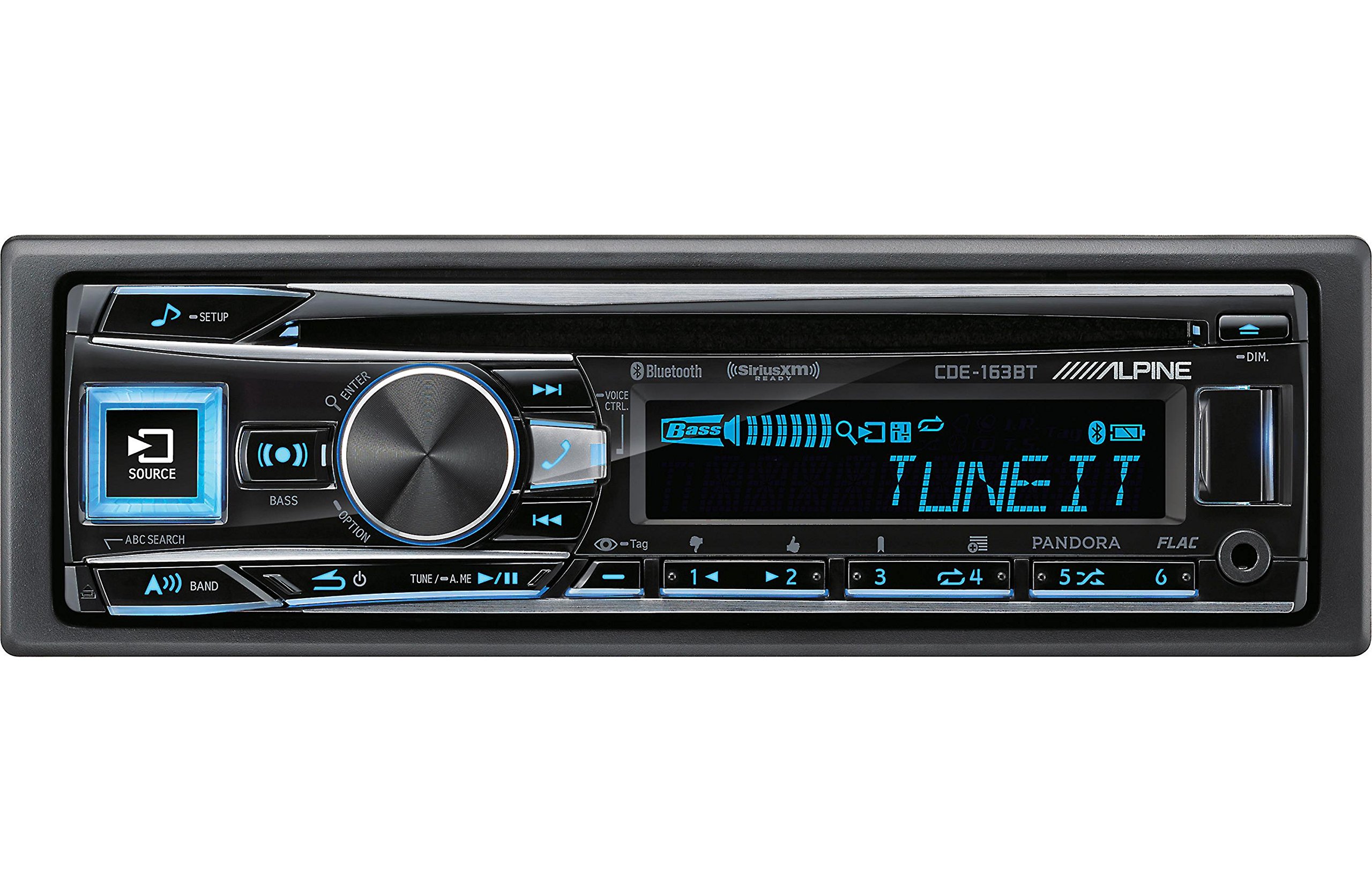
Figure 2.3.1: Front panel of the Alpine CDE-163BT receiver. This image displays the main controls, including the large rotary knob, source button, setup button, and display screen showing "TUNEIT" and "Bass" indicators.
3. Rekstur
3.1 Stjórntæki á framhliðinniview
Kynntu þér helstu stjórntækin á framhliðinni:
Mynd 3.1.1: Ítarleg view of the Alpine CDE-163BT front panel. Key controls include the SOURCE button (left, illuminated), SETUP button (top left), large central rotary knob for volume and selection, BASS/OPTION button, VOICE CTRL button, and various preset/track skip buttons along the bottom.
- SOURCE hnappur: Selects the audio source (CD, Tuner, USB, Bluetooth Audio, AUX).
- SETUP hnappur: Accesses the main setup menu for system adjustments.
- Rotary Knob (Volume/ENTER): Turns to adjust volume. Press to confirm selections in menus.
- BASS/OPTION Button: Provides quick access to bass settings or other options depending on the current mode.
- VOICE CTRL Button: Activates voice control features on connected smartphones.
- BAND Hnappur: Switches between FM1, FM2, FM3, and AM bands in tuner mode.
- TUNE/A.ME/II Buttons: Used for manual tuning, auto memory, and play/pause functions.
- Track Skip/Preset Buttons (1-6): Used for skipping tracks or selecting radio presets.
- DIM hnappur: Stillir birtustig skjásins.
3.2 Power On/Off and Source Selection
- Til að snúa tækinu ON, press any button (e.g., SOURCE or the Rotary Knob).
- Til að snúa tækinu SLÖKKT, press and hold the power button (often integrated with the TUNE/A.ME button).
- Ýttu á HEIMILD button repeatedly to cycle through available audio sources: CD, Tuner, USB, Bluetooth Audio, AUX.
3.3 Hljóðstyrkur
Snúðu stóra miðjunni Snúningshnappur clockwise to increase volume and counter-clockwise to decrease volume.
3.4 Hljóðstillingar
Ýttu á BASS/OPTION button or navigate through the SETUP menu to adjust audio settings such as Bass, Treble, Balance (left/right), and Fader (front/rear). Use the Rotary Knob to adjust values and press it to confirm.
3.5 Radio Operation (FM/AM Tuner)
- Select "Tuner" as the source using the HEIMILD hnappinn.
- Ýttu á HLJÓMSVEIT hnappinn til að skipta á milli FM1, FM2, FM3 og AM tíðna.
- Handvirk stilling: Ýttu á SJÁ buttons (◀ / ▶) to manually tune frequencies.
- Leitaðu að stillingu: Ýttu á og haltu inni SJÁ hnappana til að leita sjálfkrafa að næstu stöð með sterkari styrk.
- Forstilltar stöðvar: To store a station, tune to the desired frequency, then press and hold one of the numbered preset buttons (1-6) until you hear a beep. To recall a preset, simply press the corresponding numbered button.
3.6 Geislaspilun
- Settu geisladisk í diskaraufina. Tækið skiptir sjálfkrafa yfir í geisladiska og byrjar að spila.
- Use the ◀ / ▶ buttons to skip tracks.
- Ýttu á TUNE/A.ME/II button for Play/Pause.
- Ýttu á ABC SEARCH button to search for tracks by name.
3.7 Bluetooth-tenging
The CDE-163BT features built-in Bluetooth for hands-free calling and audio streaming.
3.7.1 Að para Bluetooth tæki
- Gakktu úr skugga um að kveikt sé á Bluetooth í farsímanum þínum.
- On the CDE-163BT, go to the SETUP menu and select "Bluetooth Setup".
- Choose "Pairing" or "Device Search".
- On your mobile device, search for available Bluetooth devices and select "Alpine CDE-163BT".
- Confirm the pairing code if prompted. Once paired, the Bluetooth icon on the receiver's display will illuminate.
3.7.2 Handfrjáls símtöl
- Þegar símtal berst birtir tækið auðkenni þess sem hringir. Ýttu á ENTER button (Rotary Knob) to answer.
- Ýttu á til að slíta símtali ENTER hnappinn aftur.
- Use the supplied microphone for clear communication.
- Ýttu á VOICE CTRL button to activate your smartphone's voice assistant.
3.7.3 Bluetooth hljóðstreymi
- Select "Bluetooth Audio" as the source.
- Start playback on your paired mobile device. Audio will stream through the receiver.
- Use the ◀ / ▶ buttons on the receiver to skip tracks.
3.8 USB spilun
- Connect a USB storage device (e.g., USB flash drive) to the USB port.
- Select "USB" as the source. The unit will automatically detect and begin playing compatible audio files (including FLAC format).
- Use the ◀ / ▶ buttons to skip tracks.
- The unit supports various audio formats.
3.9 Pandora and SiriusXM Ready
- Pandóra: Connect your iPhone or Android smartphone via USB or Bluetooth and launch the Pandora app. Select Pandora as the source on the receiver to control the app.
- SiriusXM: This unit is SiriusXM Ready. An optional SiriusXM Connect Vehicle Tuner and subscription are required for satellite radio reception. Connect the tuner and select SiriusXM as the source.
3.10 Skjárstillingar
- Ýttu á DIM hnappinn til að stilla birtustig skjásins.
- Access the SETUP menu to customize display colors for buttons and the screen.
4. Viðhald
4.1 Þrif á einingunni
Þurrkið framhliðina með mjúkum, þurrum klút. Fyrir þrjósk bletti, dampen the cloth lightly with water. Avoid using harsh chemicals, abrasive cleaners, or solvents as they can damage the finish.
4.2 Umhirða diska
Handle CDs by their edges. Keep discs clean and free of scratches. If a disc is dirty, wipe it gently from the center outwards with a soft, lint-free cloth. Do not use solvents or abrasive cleaners on discs.
5. Bilanagreining
If you experience issues with your CDE-163BT, refer to the table below for common problems and solutions.
| Vandamál | Möguleg orsök | Lausn |
|---|---|---|
| Enginn kraftur | Röng raflögn; Öryggi sprungið; Kveikjan er slökkt. | Athugaðu rafmagnstengingar; Skiptu um öryggi; Kveikið á kveikjunni á bílnum. |
| Ekkert hljóð | Hljóðstyrkur of lágur; Hljóðnemi virkjaður; Röng raflögn fyrir hátalara; Amplíflegri af. | Hækka hljóðstyrk; Slökkva á hljóðnema; Athuga tengingar við hátalara; Athuga ampkraftur fyrir lyftara. |
| Bluetooth tengist ekki | Device not in pairing mode; Bluetooth off on phone; Interference. | Ensure phone Bluetooth is on and discoverable; Re-attempt pairing; Move closer to unit. |
| Geisladiskurinn hoppar eða spilast ekki | Dirty or scratched disc; Disc inserted incorrectly. | Clean disc; Insert disc correctly; Try a different disc. |
| USB tæki ekki þekkt | Ósamhæft snið; Skemmt USB tæki; Laus tenging. | Tryggja files are compatible; Try a different USB device; Reconnect USB device. |
If the problem persists after attempting these solutions, please contact Alpine customer support.
6. Tæknilýsing
Below are the technical specifications for the Alpine CDE-163BT Advanced Bluetooth CD Receiver:
- Gerðarnúmer: 79380
- Vörumál: 5 x 11 x 10 tommur
- Þyngd hlutar: 4.05 pund (4.1 pund)
- Þráðlaus samskiptatækni: Bluetooth
- Tengitækni: Bluetooth
- Sérstakir eiginleikar: Built-In Bluetooth, FM Tuner
- Aðrir skjáeiginleikar: Þráðlaust
- Litur: SVART
- Framleiðandi: Alpine
- Tengingartækni: Bluetooth
- Samhæf tæki: Snjallsími
- Gerð tengis: 3.5 mm tengi, USB
- Hljóðútgangsstilling: Mónó, steríó
- Surround Sound Channel Stilling: 4 Rás
- Hvaðtage: 200 vött
- Dagsetning fyrst í boði: 19. janúar 2016
7. Ábyrgð og þjónustuver
7.1 Upplýsingar um ábyrgð
Alpine products are manufactured to the highest quality standards. This product is covered by a limited warranty. Please refer to the separate warranty card included with your purchase for specific terms, conditions, and duration of coverage. Retain your proof of purchase for warranty claims.
7.2 Þjónustuver
Vinsamlegast hafið samband við þjónustuver Alpine ef þið viljið fá tæknilega aðstoð, bilanagreiningu umfram þessa handbók eða ábyrgðarþjónustu:
- Websíða: Heimsæktu opinberu Alpine-síðuna websíða fyrir stuðningsúrræði, algengar spurningar og tengiliðseyðublöð.
- Sími: Vísaðu til Alpine website or your warranty card for regional customer service phone numbers.
- Viðurkenndar þjónustumiðstöðvar: For repairs, locate an authorized Alpine service center through the official websíða.
When contacting support, please have your product model number (CDE-163BT) and serial number ready.