1. Inngangur
This manual provides detailed instructions for the safe and efficient operation of your Optoma EH416 Full HD 3D DLP Projector. Please read this manual thoroughly before using the projector and retain it for future reference. Proper use and maintenance will ensure optimal performance and longevity of your device.
Öryggisupplýsingar
- Ekki horfa beint í linsuna á skjávarpanum þegar ...amp er kveikt. Sterkt ljós getur valdið augnskaða.
- Tryggið næga loftræstingu í kringum skjávarpann. Ekki loka fyrir loftræstiop.
- Notið aðeins rafmagnssnúruna sem fylgir skjávarpanum. Tengið við rétt jarðtengda innstungu.
- Ekki láta skjávarpann verða fyrir rigningu, raka eða miklum raka.
- Látið hæft þjónustufólk sjá um alla þjónustu. Reynið ekki að opna eða gera við skjávarpann sjálfur.
2. Hvað er í kassanum
Please verify that all items listed below are present in your package. If any items are missing or damaged, contact your dealer immediately.
- Optoma EH416 Projector
- Rafmagnssnúra
- VGA til VGA snúru
- Fjarstýring
- Burðartaska
- Rafhlöður fyrir fjarstýringu
- Multilingual CD-ROM User’s Manual
- Quick Start kort
- Ábyrgðarkort
3. Vöru lokiðview
Helstu eiginleikar
- High Brightness: 4200 lumens for clear images in various lighting conditions.
- Hár birtuskil: 20,000:1 contrast ratio for sharp, luminous images with deep blacks.
- Full HD upplausn: Native 1080p (1920x1080) resolution, supporting up to WUXGA (1920x1200).
- Advanced Optical Lens: Features a 1.6x zoom and vertical lens shift for flexible installation.
- Víðtæk tengsl: Dual HDMI (one with MHL support), dual audio-in, VGA, and more.
- sRGB Color Profile: Enables vibrant and highly accurate colors based on Rec. 709 HDTV specification.
- Vegglitastilling: Compensates for brightness loss when projecting on non-white surfaces.
- Edge Mask: Eliminates soft edges and jaggedness on the projection border for a smooth image.
- Innbyggt hljóð: Innbyggður 10W hátalari.
Skjávarpa íhlutir
The image below illustrates the main components of the Optoma EH416 projector, including the lens, control panel, and various ports.
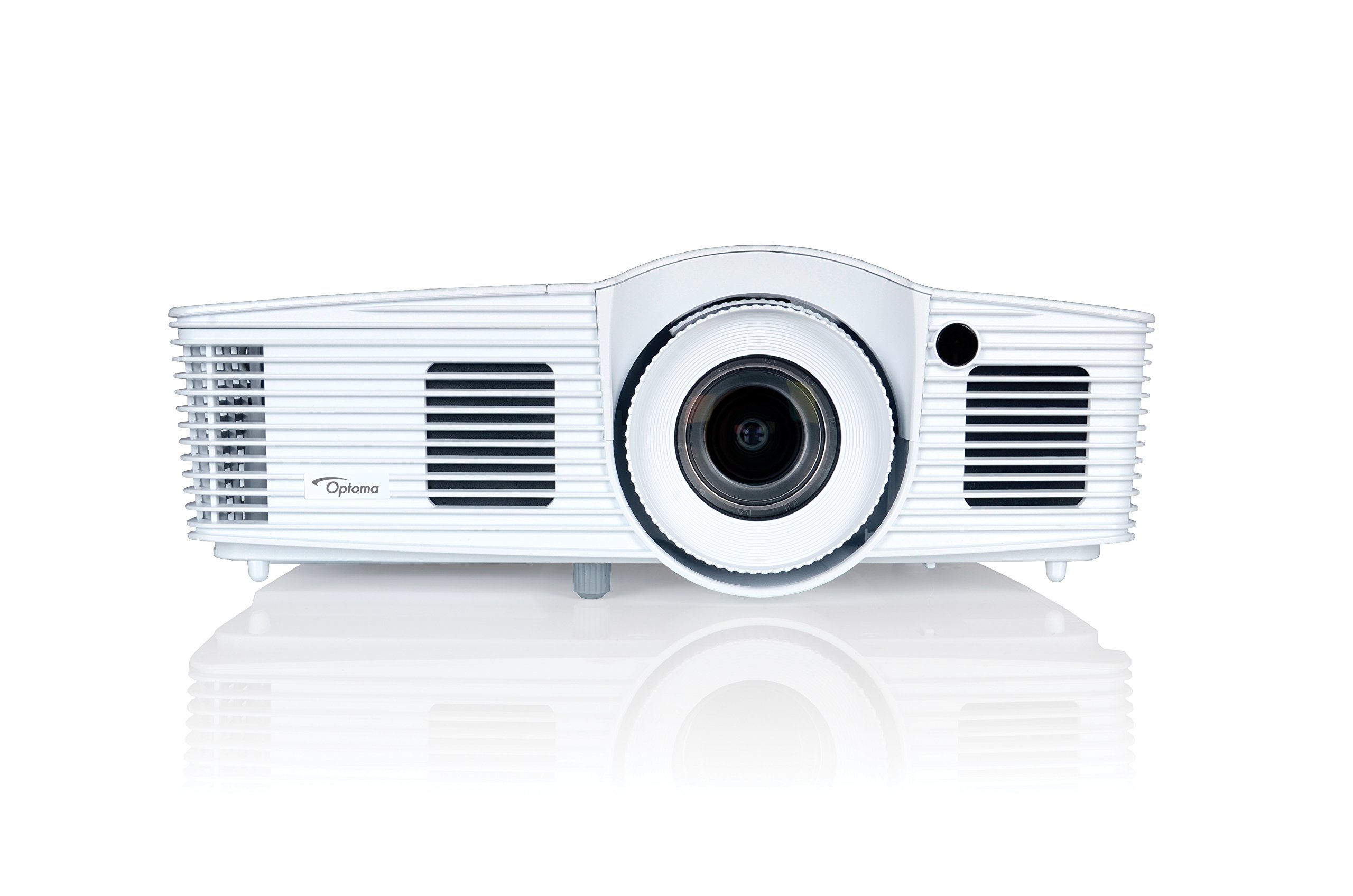
Mynd 1: Framan view of the Optoma EH416 Projector, showing the lens and primary controls.
Tengingarhafnir
The Optoma EH416 projector offers a wide range of connectivity options located on the rear panel for versatile integration with various devices.
- HDMI (x2): Digital input for high-definition video and audio. One port supports MHL for mobile devices.
- VGA (x2): Analog input for computer connections.
- Audio In (x2): 3.5mm stereo jack for analog audio input.
- Hljóðútgangur: 3.5mm stereo jack for connecting external speakers.
- USB-A: For power output or service.
- RS232: For projector control via a computer or control system.
- RJ45 (Ethernet): Fyrir netstýringu og stjórnun.
4. Uppsetning
Staðsetning skjávarpa
The Optoma EH416 offers flexibility in placement due to its 1.6x zoom and vertical lens shift capabilities. Position the projector on a stable surface or mount it securely. Adjust the distance from the screen to achieve the desired image size. The 1.6x zoom allows for a larger image from a shorter distance or a smaller image from a longer distance without moving the projector.
Að tengja tæki
- Rafmagnstenging: Tengdu rafmagnssnúruna við rafmagnsinntak skjávarpans og síðan við jarðtengda rafmagnsinnstungu.
- Uppruni myndbands:
- For HDMI devices (e.g., Blu-ray player, laptop): Connect an HDMI cable from your device to one of the HDMI ports on the projector.
- For VGA devices (e.g., older laptops): Connect a VGA cable from your device to a VGA port on the projector. If audio is also required, connect a separate 3.5mm audio cable from your device to an Audio In port on the projector.
- For MHL compatible mobile devices: Connect an MHL cable to the designated HDMI/MHL port.
- Hljóðútgangur (valfrjálst): If using external speakers, connect an audio cable from the projector's Audio Out port to your sound system.
Kveikt/slökkt
- Til að kveikja á: Ýttu á rofann á stjórnborði skjávarpans eða fjarstýringunni. Rafmagnsljósið verður blátt.
- Til að slökkva á: Ýttu tvisvar á rofann. Skjávarpinn fer í kælingarferli áður en hann slokknar alveg. Ekki taka skjávarpann úr sambandi á meðan kælingarferlið stendur.
5. Notkun skjávarpans
Grunnaðgerð
- Upprunaval: Use the 'Source' button on the remote or control panel to cycle through available input sources (HDMI1, HDMI2/MHL, VGA1, VGA2).
- Valmyndarleiðsögn: Press the 'Menu' button to access the On-Screen Display (OSD). Use the arrow keys to navigate and 'Enter' to select options.
- Hljóðstyrkur: Use the volume buttons on the remote control to adjust the audio output from the built-in speaker or Audio Out port.
Myndastillingar
- Fókus og aðdráttur: Rotate the focus and zoom rings on the projector lens to achieve a sharp and appropriately sized image.
- Keystone leiðrétting: If the image appears trapezoidal, use the 'Keystone' function in the OSD menu or the dedicated button on the remote to correct the image shape. The EH416 supports ±40° vertical keystone correction.
- Lóðrétt linsubreyting: This feature allows you to physically move the image up or down without tilting the projector, minimizing keystone distortion. Adjust the lens shift dial located near the lens.
- Vegglitastilling: Access this feature in the OSD menu to compensate for the color of your projection surface (e.g., blackboard, light yellow wall). This helps maintain accurate color reproduction even on non-white walls.
- sRGB Color Profile: For the most accurate and vibrant colors, especially when connecting to a PC, Mac, or sRGB compatible source, select the sRGB picture mode in the OSD. This profile adheres to the Rec. 709 HDTV specification.
- Edge Mask: This function, found in the OSD, helps to refine the edges of the projected image, eliminating any soft or jagged appearance on the border.
6. Viðhald
Þrif á skjávarpa
- Linsa: Notið mjúkan, lólausan klút sem er sérstaklega hannaður fyrir sjóngler. Notið ekki slípiefni.
- Casing: Þurrkaðu af skjávarpanum casinÞurrkið með mjúkum, þurrum klút. Fyrir þrjósk óhreinindi skal nota örlítið þurran klút.amp klút með mildu þvottaefni og þurrkið síðan.
- Loftop: Regularly check and clean the air vents to prevent dust buildup, which can lead to overheating. Use a soft brush or compressed air.
Lamp Umhyggja
Myndvarpi lamp hefur takmarkaðan líftíma. Þegar lamp life is nearing its end, a warning message may appear on the screen. Refer to the full user manual on the included CD-ROM for detailed instructions on lamp replacement. Always use genuine Optoma replacement lamps to ensure optimal performance and safety.
7. Bilanagreining
This section addresses common issues you might encounter. For more detailed troubleshooting, refer to the comprehensive user manual on the included CD-ROM.
- Engin mynd á skjánum:
- Check if the projector is powered on and the lamp er kveikt.
- Gakktu úr skugga um að myndbandsuppspretta tækisins sé kveikt á og virki rétt.
- Ensure the video cable (HDMI, VGA) is securely connected to both the projector and the source device.
- Veldu rétta inntaksuppsprettu með því að nota „Source“ hnappinn á fjarstýringunni eða skjávarpanum.
- Þoka eða brengluð mynd:
- Stilltu fókushringinn á linsu skjávarpa.
- Ef myndin er trapisulaga skaltu nota keystone leiðréttingaraðgerðina.
- Ensure the projector is perpendicular to the screen or use vertical lens shift.
- Ekkert hljóð:
- Athugaðu hljóðstyrkinn á skjávarpanum og upprunatækinu.
- If using an analog VGA connection, ensure a separate audio cable is connected.
- Verify that the audio output is not muted.
- Fjarstýring virkar ekki:
- Athugaðu og skiptu um rafhlöður.
- Gakktu úr skugga um að engar hindranir séu á milli fjarstýringarinnar og innrauðs móttakara skjávarpans.
8. Tæknilýsing
| Eiginleiki | Smáatriði |
|---|---|
| Gerðarnúmer | EH416 |
| Skjáupplausn | 1920 x 1080 (Full HD) |
| Birtustig | 4200 lúmen |
| Andstæðuhlutfall | 20,000:1 |
| Tengitækni | Wireless, HDMI, MHL, VGA |
| Vörumál | 8.81 x 12.36 x 4.48 tommur |
| Þyngd hlutar | 6.6 pund |
| Mælt er með notkun | Viðskipti, menntun |
| Framleiðandi | OPTOMA TECHNOLOGY |
| Dagsetning fyrst í boði | 5. apríl 2016 |
9. Ábyrgð og stuðningur
Your Optoma EH416 projector comes with a manufacturer's warranty. Please refer to the included warranty card for specific terms, conditions, and registration information. For technical support, product registration, or to download the latest drivers and firmware, please visit the official Optoma website or contact Optoma customer service.


