1. Inngangur
Þakka þér fyrir kaupinasing the Sony Signature Series Audio Component Amplifier TA-ZH1ES. This high-resolution headphone amplifier is designed to deliver exceptional audio quality, featuring advanced technologies such as Sony's enhanced S-Master HX digital amplifier and DSD Remastering Engine. This manual provides essential information for the proper setup, operation, and maintenance of your device.
2. Öryggisupplýsingar
Please read all safety instructions carefully before using the amplifier. Geymdu þessa handbók til síðari viðmiðunar.
- Aflgjafi: Connect the unit only to the AC power outlet specified in the specifications.
- Loftræsting: Tryggið næga loftræstingu í kringum tækið til að koma í veg fyrir ofhitnun. Ekki loka loftræstiopum.
- Raki: Ekki láta eininguna verða fyrir rigningu eða raka til að draga úr hættu á eldi eða raflosti.
- Erlendir hlutir: Ekki setja neina hluti inn í op á tækinu.
- Þjónusta: Látið hæft þjónustufólk sjá um alla þjónustu. Reynið ekki að opna eða gera við tækið sjálfur.
- Staðsetning: Setjið tækið á stöðugt, slétt yfirborð fjarri beinu sólarljósi, hitagjöfum og miklu ryki eða titringi.
3. Vöru lokiðview
3.1 Framhlið
The front panel provides various headphone output connections and essential controls for operation.

Mynd 3.1: Skipulag framhliða
This image displays the front panel of the TA-ZH1ES amplifier, highlighting the various headphone output jacks and the volume control knob. From left to right, you can see the XLR4 balanced output, multiple 4.4mm and 3.5mm balanced outputs, and 6.3mm and 3.5mm unbalanced outputs. The large rotary knob on the right is for volume control, and a Walkman/Xperia USB input is also visible.
- Aflhnappur: Kveikir eða slekkur á tækinu.
- Val á innslætti: Fer í gegnum tiltækar inntaksheimildir.
- Úttaksval: Selects the desired output mode.
- Skjár: Sýnir núverandi stillingar og stöðu.
- Valmynd/Til baka hnappur: Navigates menu options or returns to the previous screen.
- Enter hnappur: Staðfestir val.
- Gain Button: Adjusts the output gain for different headphone impedances.
- Hljóðstyrkur: Stjórnar hljóðstyrk úttaksins.
- Útgangur heyrnartóla:
- Balanced Connections: 4.4mm, 3.5mm x 2, XLR4
- Unbalanced Connections: 6.3mm, 3.5mm
- Walkman/Xperia USB Input: For connecting compatible portable devices.
3.2 Bakhlið
The rear panel houses various input and output terminals for connecting to other audio components and the power supply.
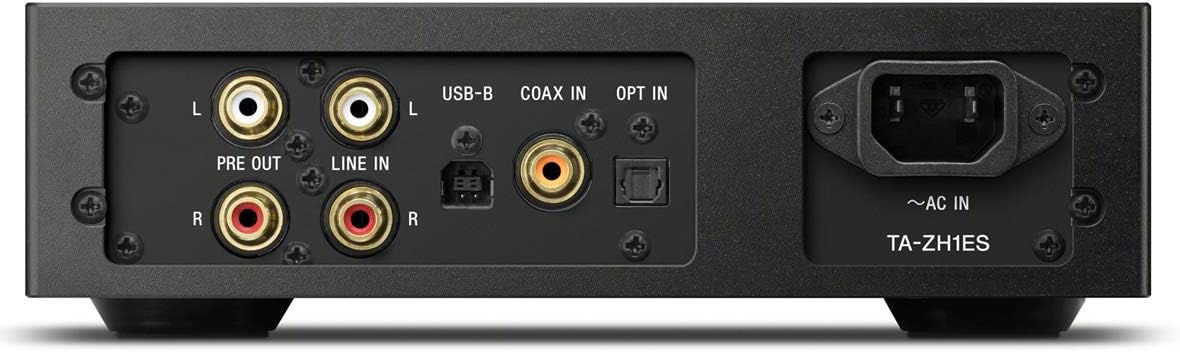
Mynd 3.2: Skipulag aftari spjalds
This image illustrates the rear panel of the TA-ZH1ES amplifier, detailing the various connectivity options. Visible ports include RCA Line In (L/R), RCA Pre Out (L/R), USB-B input, Coaxial input, Optical input, and the AC power inlet. Each port is clearly labeled for easy identification.
- LINE IN (RCA L/R): Analog audio input for connecting external devices.
- PRE OUT (RCA L/R): Analog audio output for connecting to a power amplifier eða virkir hátalarar.
- USB-B inntak: For connecting to a computer or other digital audio sources.
- COAX IN: Stafrænn koaxial hljóðinntak.
- VERA MEÐ: Stafrænn sjónrænn hljóðinntak.
- ~AC IN: Power input for the AC power cord.
4. Uppsetning
Follow these steps to set up your TA-ZH1ES amplíflegri.
4.1 Staðsetning
Settu amplifier on a flat, stable surface with adequate space for ventilation. Avoid placing it near heat sources or in direct sunlight.

Mynd 4.1: Amplifier Staðsetning
This image shows the Sony TA-ZH1ES amplifier positioned on a flat surface, demonstrating a typical setup environment. Ensure the unit has sufficient space around it for proper airflow.
4.2 Tenging hljóðgjafa
Connect your audio sources to the appropriate input terminals on the rear panel.
- Digital Sources (Computer, CD Player, etc.):
- For a computer, connect a USB-B cable from your computer to the USB-B inntak.
- For a CD player or other digital audio device, use a coaxial cable for the LÁTA INN or an optical cable for the VERA MEÐ.
- Analog Sources (Turntable with pre-amp, etc.): Connect RCA cables from your analog source to the LÍNUINNGANGUR (RCA V/H) skautanna.
- Portable Devices (Walkman/Xperia): Connect compatible portable devices to the Walkman/Xperia USB Input on the front panel. This input also supports charging for Walkman devices.
4.3 Connecting Headphones or External Amplíflegri
- Heyrnartól: Connect your headphones to the appropriate balanced (4.4mm, 3.5mm x 2, XLR4) or unbalanced (6.3mm, 3.5mm) output jacks on the front panel.
- Ytra vald Amplifier/Active Speakers: If using the TA-ZH1ES as a DAC or pre-amplifier, connect RCA cables from the PRE OUT (RCA L/R) terminals on the rear panel to your power amplifier eða virkir hátalarar.
4.4 Rafmagnstenging
Tengdu meðfylgjandi rafmagnssnúruna við ~ AC IN terminal on the rear panel, then plug the other end into a wall outlet.
5. Notkunarleiðbeiningar
5.1 Grunnaðgerð
- Kveikt á: Press the Power button on the front panel.
- Veldu inntak: Use the Input Selector button to choose the desired audio source (e.g., USB-B, COAX, OPT, LINE IN).
- Tengdu heyrnartól: Plug your headphones into the appropriate jack.
- Stilla hljóðstyrk: Slowly turn the Volume knob clockwise to increase the volume to a comfortable listening level.

Mynd 5.1: Stjórntæki efst á spjaldinu
Þessi mynd sýnir ofan frá view of the TA-ZH1ES amplifier, clearly showing the power button, input/output selectors, display screen, menu navigation buttons (Menu/Back, Enter), and the Gain button. These controls are used for basic operation and feature adjustments.
5.2 DSD Remastering Engine
The DSD Remastering Engine converts all PCM audio sources to DSD 11.2MHz, aiming to provide a more natural and analog-like sound experience. This feature can be enabled or disabled through the unit's menu settings.
5.3 DSEE HX
DSEE HX (Digital Sound Enhancement Engine HX) upscales compressed audio files to near high-resolution quality. This feature is particularly effective for improving the sound of lower-resolution files, such as those from streaming services or older recordings. Access DSEE HX settings via the unit's menu.
5.4 Stillingar á styrk
The amplifier features adjustable gain settings to optimize performance with various headphone impedances. Press the Hagnaður button on the front panel to cycle through available gain levels (e.g., Low, Mid, High). Select the setting that provides sufficient volume without distortion for your specific headphones.
6. Viðhald
Proper care ensures the longevity and optimal performance of your amplíflegri.
- Þrif: Wipe the unit with a soft, dry cloth. Do not use abrasive pads, scouring powder, or solvents such as alcohol or benzene.
- Loftræsting: Periodically check that the ventilation openings are free from dust and obstructions.
- Geymsla: If storing the unit for an extended period, disconnect it from the power outlet and store it in a clean, dry place.
7. Bilanagreining
Ef þú lendir í vandræðum með þinn ampLifier, vísaðu til eftirfarandi algengra vandamála og lausna.
| Vandamál | Möguleg orsök/lausn |
|---|---|
| Enginn kraftur | Ensure the AC power cord is securely connected to both the unit and the wall outlet. Check if the power outlet is functional. |
| Ekkert hljóð |
|
| Bjagað hljóð |
|
| Unit becomes hot | Ensure adequate ventilation around the unit. Do not block the ventilation openings. If overheating persists, discontinue use and contact service. |
Ef vandamálið er enn til staðar eftir að þessar lausnir hafa verið prófaðar, vinsamlegast hafið samband við þjónustuver Sony.
8. Tæknilýsing
| Eiginleiki | Smáatriði |
|---|---|
| Gerðarnúmer | TA-ZH1ES |
| Vöruvíddir (B x H x D) | 2.56 x 12.36 x 8.27 tommur (u.þ.b. 65 x 314 x 210 mm) |
| Þyngd hlutar | 1 pund (u.þ.b. 0.45 kg) |
| Viðnám heyrnartóla | 12-600 ohm |
| Heyrnartólsúttak | Balanced: 4.4mm, 3.5mm x 2, XLR4 Unbalanced: 6.3mm, 3.5mm |
| Stafræn inntak | USB-B, Coaxial, Optical, Walkman/Xperia USB |
| Analog inntak | RCA Line In (L/R) |
| Analog úttak | RCA Pre Out (L/R) |
| Framleiðandi | Sony |
| Dagsetning fyrst í boði | 1. september 2016 |
Athugið: Upplýsingar geta breyst án fyrirvara.
9. Ábyrgð og stuðningur
Nánari upplýsingar um ábyrgð er að finna á ábyrgðarkortinu sem fylgir vörunni eða á opinberri þjónustusíðu Sony. website for your region. For technical assistance, product registration, or service inquiries, please contact Sony customer support.
Sony stuðningur Websíða: https://www.sony.com/electronics/support