1. Inngangur
The DxO ONE is a compact digital camera designed to enhance the photographic capabilities of your iPhone or iPad. It features a 1-inch 20.2-megapixel BSI CMOS sensor and a high-quality f/1.8 lens, enabling superior image capture, particularly in low-light conditions. The device can operate independently or connect directly to your iOS device via the Lightning port, transforming your iPhone/iPad into a large viewfinder and control interface.

Figure 1.1: The DxO ONE Digital Connected Camera, a compact device designed to attach to an iPhone or iPad.
2. Hvað er í kassanum
Gakktu úr skugga um að allir hlutir séu í umbúðunum:
- DxO ONE Camera
- 8GB microSD kort
- USB snúru
- Úlnliðsband
- Mjúkur poki
- DxO Connect software (available as a free download for Mac/PC)
- DxO OpticsPro for OS X® Photos - DxO ONE Camera only (available as a free download from the Mac App Store®)
3. Uppsetning
3.1. Hleðsla rafhlöðunnar
Before initial use, fully charge the DxO ONE battery using the provided USB cable. Connect the small end of the USB cable to the camera's USB port and the other end to a USB power adapter or computer. The charging indicator will illuminate during charging.
3.2. MicroSD kortið sett í
Locate the microSD card slot on the DxO ONE. Insert the included 8GB microSD card (or another compatible card up to 128GB) into the slot until it clicks into place. Ensure the card is inserted with the correct orientation.
3.3. Installing the DxO ONE App
The DxO ONE requires a dedicated application for full functionality when connected to an iOS device. Download the "DxO ONE" app from the Apple App Store on your iPhone or iPad. The app is compatible with iPhone SE, 6s Plus, 6s, 6 Plus, 6, 5s, 5c, 5, iPad Pro, Air 2, Air, mini 4, 3, 2, or iPad (4th gen.), running iOS 9.0 or later, or WatchOS 2.0.
3.4. Connecting to an iPhone or iPad
To connect the DxO ONE to your iOS device:
- Slide open the lens cover on the DxO ONE to expose the Lightning connector.
- Carefully plug the DxO ONE's Lightning connector into your iPhone or iPad's Lightning port.
- The DxO ONE app should automatically launch. If not, open it manually.

Figure 3.1: The DxO ONE camera connected to an iPhone via the Lightning port, showing the compact integration.
3.5. Wi-Fi Connectivity (Remote Control)
The DxO ONE can also be paired with your iOS device via Wi-Fi for remote control. This allows for flexible positioning of the camera while maintaining control from your iPhone or iPad. Refer to the in-app instructions for Wi-Fi pairing.
4. Operating the DxO ONE
4.1. Sjálfstætt starfræksla
The DxO ONE can be used without being connected to an iOS device. The small OLED screen on the camera provides basic framing assistance and displays essential settings. To capture photos in standalone mode, simply power on the camera and press the shutter button.
4.2. Using with iPhone/iPad (Connected Mode)
When connected, your iPhone or iPad acts as a large, high-resolution viewfinder and control panel. The DxO ONE app provides access to various camera settings and modes.

Figure 4.1: The DxO ONE application interface displayed on an iPhone, showing various camera settings and live view.
4.2.1. Myndavélarstillingar og stillingar
The app offers a range of shooting modes, including:
- Sjálfvirkur háttur: For simplified point-and-shoot operation.
- Umhverfisstillingar: Optimized settings for specific scenarios (e.g., sports, night).
- Advanced Modes (P/A/S/M): Program, Aperture Priority, Shutter Priority, and Manual modes for full creative control over exposure settings (ISO, aperture, shutter speed).
Adjust settings by tapping on the corresponding icons within the app interface. The f/1.8 aperture allows for shallow depth of field and excellent low-light performance.
4.2.2. SuperRAW Mode
The DxO ONE features a unique SuperRAW mode. This mode captures multiple RAW images in quick succession and combines them to reduce noise and enhance image quality, particularly in challenging lighting conditions. This process occurs automatically within the camera and app.
4.2.3. Myndbandsupptaka
The camera supports Full HD video recording (1080p at 30fps) and slow-motion video (720p at 120fps). Switch to video mode within the app to begin recording.
4.2.4. Image Playback and Sharing
After capturing images or videos, you can review them directly within the DxO ONE app. The app facilitates instant sharing of your content to social media platforms like Facebook, Twitter, and Instagram, or saving them to your iOS device's photo library.
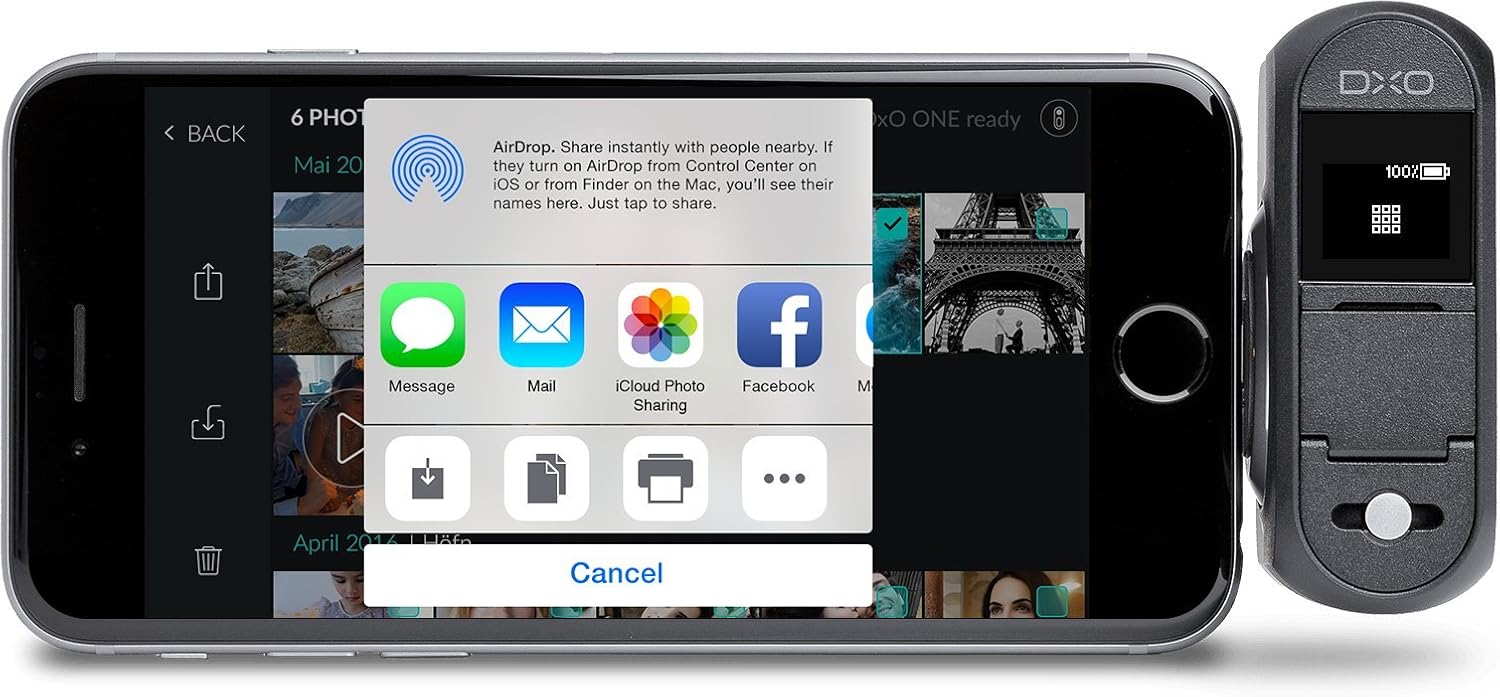
Figure 4.2: An iPhone screen displaying various sharing options available directly from the DxO ONE application, allowing users to quickly distribute their photos.
5. Viðhald
5.1. Þrif
Use a soft, lint-free cloth to clean the camera body and lens. Avoid using harsh chemicals or abrasive materials. For the lens, use a specialized lens cleaning solution and cloth.
5.2. Umhirða rafhlöðu
The DxO ONE uses a rechargeable lithium-ion battery. To prolong battery life:
- Forðastu að tæma rafhlöðuna alveg oft.
- Store the camera with a partial charge (around 50%) if not used for extended periods.
- Hlaðið rafhlöðuna á köldum og þurrum stað.
Battery life provides up to 200 images per charge.
5.3. Geymsla
Store the DxO ONE in its soft pouch to protect it from dust and scratches. Keep it in a cool, dry place away from direct sunlight and extreme temperatures.
6. Bilanagreining
6.1. Camera Not Connecting to iOS Device
- Ensure the DxO ONE's lens cover is fully open to expose the Lightning connector.
- Verify that the Lightning connector is securely plugged into your iPhone/iPad.
- Check if your iOS device is running iOS 9.0 or later.
- Restart both the DxO ONE and your iOS device.
- Ensure the DxO ONE app is installed and updated to the latest version.
6.2. Firmware Update Issues
The DxO ONE app automatically updates the camera's firmware. If an update fails or encounters issues, ensure a stable internet connection and sufficient battery on both devices. Try the update again.
6.3. Léleg myndgæði
- Clean the camera lens for smudges or dust.
- Ensure adequate lighting for your subject.
- Utilize SuperRAW mode in low-light conditions to reduce noise.
- Adjust ISO, aperture, and shutter speed settings in advanced modes for optimal exposure.
6.4. Rafhlaðan tæmist hratt
- Ensure the camera is powered off when not in use.
- Avoid prolonged use of Wi-Fi connectivity, as it consumes more power.
- Operating in very cold environments can reduce battery performance.
7. Tæknilýsing
| Eiginleiki | Smáatriði |
|---|---|
| Nafn líkans | DxO EINN |
| Gerðarnúmer | CAM01-01-USA |
| Upplausn ljósmyndskynjara | 20.2 MP |
| Stærð ljósmyndskynjara | 1-inch BSI CMOS |
| Tegund linsu | Standard Prime |
| Hámarks ljósop | f/1.8 |
| Brennivídd | 32mm (equivalent) |
| ISO svið | 100-51200 |
| Hámarks lokarahraði | 30 sekúndur |
| Myndbandsupplausn | 1080p (30 FPS), 720p (120 FPS) |
| Stuðningur File Snið | .JPG, .DNG (RAW), .DXO (SuperRAW), .MOV (H.264) |
| Tengingar | Lightning, USB, Wi-Fi |
| Samhæfðar festingar | iPhone SE, 6s Plus, 6s, 6 Plus, 6, 5s, 5c, 5, iPad Pro, Air 2, Air, mini 4, 3, 2, or iPad (4th gen.) running iOS 9.0 or later, or WatchOS 2.0 |
| Geymsla | Micro SD Card (up to 128 GB) |
| Þyngd hlutar | 14 aura |
8. Ábyrgð og stuðningur
8.1. Upplýsingar um ábyrgð
The DxO ONE camera is covered by a 1-year parts & labor warranty frá kaupdegi. Þessi ábyrgð nær yfir framleiðslugalla og bilanir við eðlilega notkun. Vinsamlegast geymið kaupkvittunina vegna ábyrgðarkröfu.
8.2. Þjónustudeild
For technical assistance, troubleshooting beyond this manual, or warranty service, please visit the official DxO support website. Online resources, FAQs, and contact information for customer service are available there.


