1. Vöru lokiðview
The ADATA HM900 (model AHM900-6TU3-CEUBK) is a 6TB external hard disk drive designed for high-capacity data storage and transfer. This mechanical hard disk drive offers ample space for extensive data needs and supports simultaneous operations without compromising performance. It connects via USB, making it compatible with various devices, including personal computers and televisions.

Mynd 1: Framhlið view of the ADATA HM900 External Hard Drive.
2. Uppsetningarleiðbeiningar
2.1 Innihald pakka
Áður en haldið er áfram skaltu ganga úr skugga um að allir hlutir séu til staðar í pakkanum:
- ADATA HM900 External Hard Disk Drive
- USB gagnasnúra
- Rafmagns millistykki
- Leiðbeiningar um hraða notkun (ef fylgja með)
2.2 Connecting the Hard Drive
- Tengdu straumbreytinn: Plug the power adapter into the DC IN port on the back of the ADATA HM900. Connect the other end of the power adapter to a wall outlet. The device requires 12 Watts of power.
- Tengdu USB snúruna: Insert one end of the provided USB data cable into the USB port (marked 'SS' for SuperSpeed USB) on the back of the hard drive.
- Tengstu við tækið þitt: Plug the other end of the USB cable into an available USB port on your computer, television, or other compatible device.
- Kveikt á: The drive should power on automatically. A status indicator light will typically illuminate to show it is active.
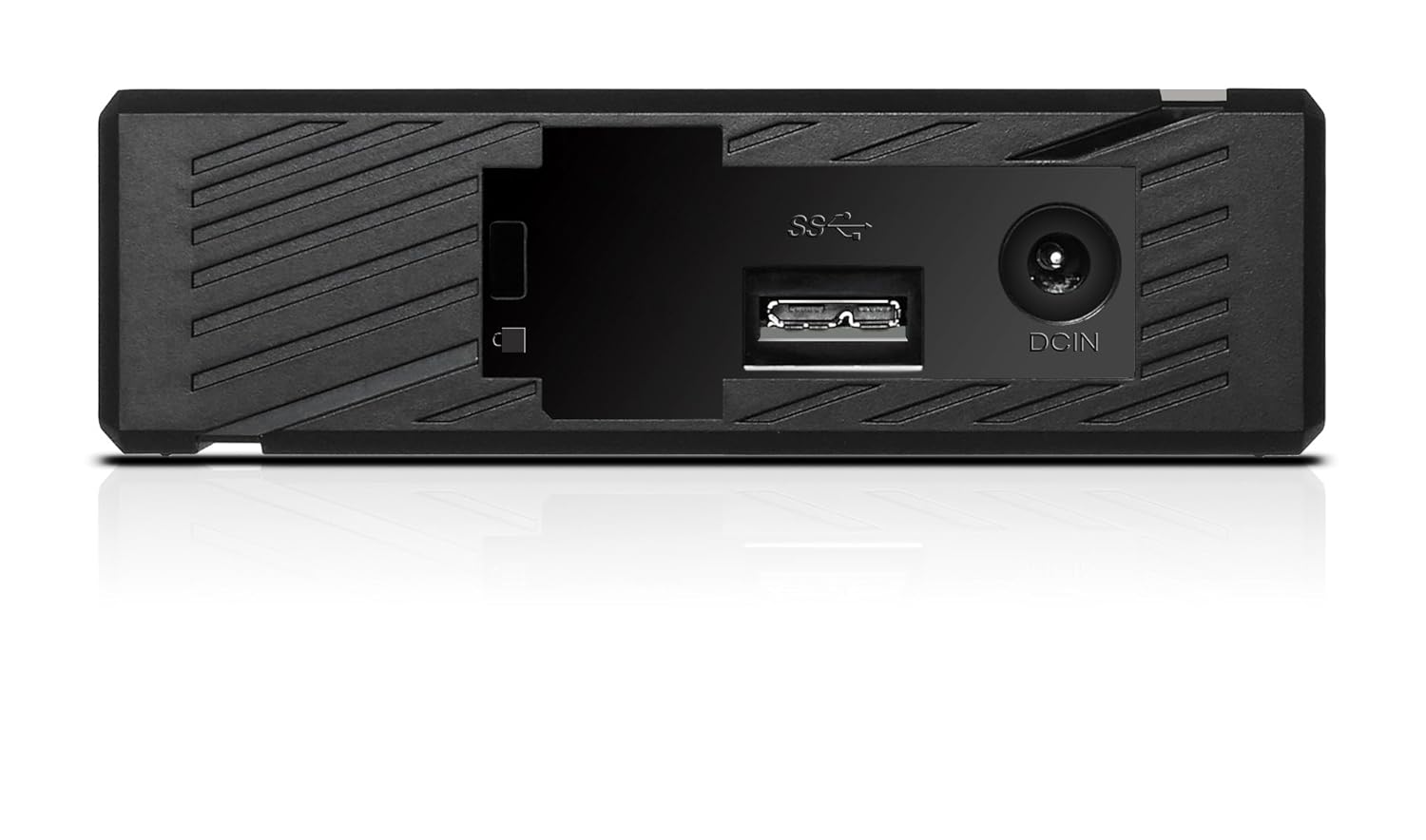
Mynd 2: Aftan view of the ADATA HM900, highlighting the USB and DC IN ports for connection.
3. Notkun harða disksins
3.1 Upphafleg skráning
Upon first connection, your operating system (Windows, macOS, Linux) or compatible device (e.g., smart TV) should automatically detect the ADATA HM900. For computers, it may appear as a new drive letter or volume in 'My Computer'/'This PC' or 'Finder'.
3.2 Gagnaflutningur
Til að flytja files, simply drag and drop them to and from the HM900 drive icon. For larger transfers, it is recommended to use your operating system's copy/paste functions or dedicated backup software.
3.3 Using with a Television
The ADATA HM900 is compatible with televisions that support external storage devices. Connect the drive as described in Section 2.2. Refer to your television's user manual for specific instructions on how to access and play media files from an external USB drive.
4. Viðhald og umönnun
Proper care ensures the longevity and reliability of your ADATA HM900 external hard drive:
- Örugg aftenging: Always safely eject or unmount the hard drive from your operating system before physically disconnecting the USB cable or power. This prevents data corruption.
- Líkamleg vernd: Avoid dropping or subjecting the drive to strong impacts, as it contains a mechanical hard disk that can be damaged.
- Umhverfisskilyrði: Store and operate the drive in a cool, dry environment, away from direct sunlight, extreme temperatures, and high humidity.
- Þrif: Notið mjúkan, þurran klút til að þrífa ytra byrði drifsins. Notið ekki fljótandi hreinsiefni eða leysiefni.
5. Bilanagreining
5.1 Drif ekki greint
- Athugaðu tengingar: Ensure both the power adapter and USB cable are securely connected to the drive and your device.
- Prófaðu annað USB tengi: Connect the drive to a different USB port on your computer or device.
- Staðfestu kraft: Confirm the power adapter is plugged into a working electrical outlet and the drive's indicator light is on.
- Endurræstu tæki: Restart your computer or television and try connecting the drive again.
- Athugaðu Diskastjórnun (Windows) / Diskagagnsemi (macOS): For computers, check if the drive appears in disk management tools, even if it doesn't have a drive letter assigned.
5.2 Hægur gagnaflutningshraði
- Notið USB 3.0 tengi: Ensure the drive is connected to a USB 3.0 (or higher) port on your device for optimal speeds. USB 2.0 ports will result in slower transfers.
- Forðastu önnur USB tæki: Disconnect other high-bandwidth USB devices during large transfers.
- Athugaðu heilbrigði drifsins: Run a disk check utility on your computer to ensure the drive is healthy.
6. Tæknilýsing
| Eiginleiki | Forskrift |
|---|---|
| Vörumerki | ADATA |
| Gerðarnúmer | AHM900-6TU3-CEUBK |
| Stafræn geymslugeta | 6 TB |
| Harður diskur Lýsing | Vélrænn harður diskur |
| Formþáttur harða disksins | 2.5 tommur |
| Tengitækni | USB |
| Stærðir hlutar (LxBxH) | 19 x 12.1 x 3.65 sentimetrar |
| Þyngd hlutar | 998 g |
| Hvaðtage | 12 Watt |
| Samhæf tæki | Television, Personal Computers |
| Fyrsti laus dagsetning | 11. nóvember 2016 |
7. Ábyrgð og stuðningur
For detailed warranty information, please refer to the warranty card included with your product or visit the official ADATA website. Support resources, including drivers and firmware updates, may also be available on the ADATA support portal.