Inngangur
The MOOER Ocean Machine TDL3 is a versatile multi-effects pedal designed for electric guitar, combining two independent delays, a high-fidelity reverb, and an audio looper. This manual provides detailed instructions for setting up, operating, and maintaining your device to ensure optimal performance and creative expression.

Mynd 1: Framan view of the MOOER Ocean Machine TDL3 multi-effects pedal, showcasinstjórntæki þess og skjá.
Uppsetning
Aflþörf
The Ocean Machine TDL3 requires a 9V DC power supply with a minimum current of 500mA. Ensure the power supply is center-negative. Using an incorrect power supply can damage the unit and void the warranty.
- Voltage: 9 Volt DC
- Núverandi: 500mA (lágmark)
- Pólun: Miðjuneikvæð
Tengingar
Tengdu gítarinn þinn og amplifier to the appropriate input and output jacks. The pedal supports both mono and stereo configurations.
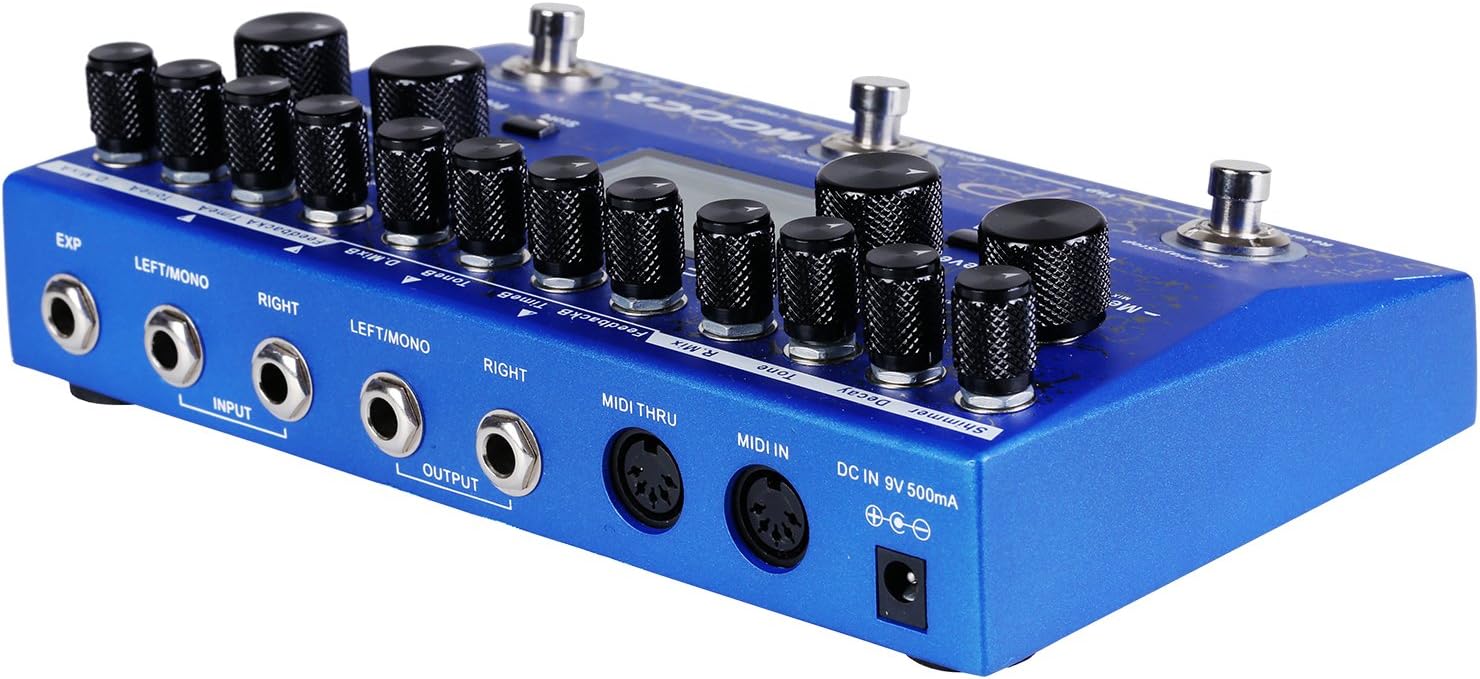
Mynd 2: Aftan view of the MOOER Ocean Machine TDL3, showing input/output jacks, MIDI ports, and power input.
- Input (LEFT/MONO, RIGHT): Connect your instrument to the LEFT/MONO input for mono operation. For stereo input, connect to both LEFT/MONO and RIGHT inputs.
- Output (LEFT/MONO, RIGHT): Tengstu við þitt amplifier or audio interface. Use LEFT/MONO for mono output. For stereo output, connect to both LEFT/MONO and RIGHT outputs.
- EXP: Connect an external expression pedal for real-time control over various parameters.
- MIDI IN/THRU: Connect to MIDI devices for external control and synchronization.
- DC IN 9V 500mA: Connect the specified 9V DC power adapter.
Notkunarleiðbeiningar
The Ocean Machine TDL3 offers extensive control over its delay, reverb, and looper functions. Familiarize yourself with the main controls and display.
Main Controls Overview
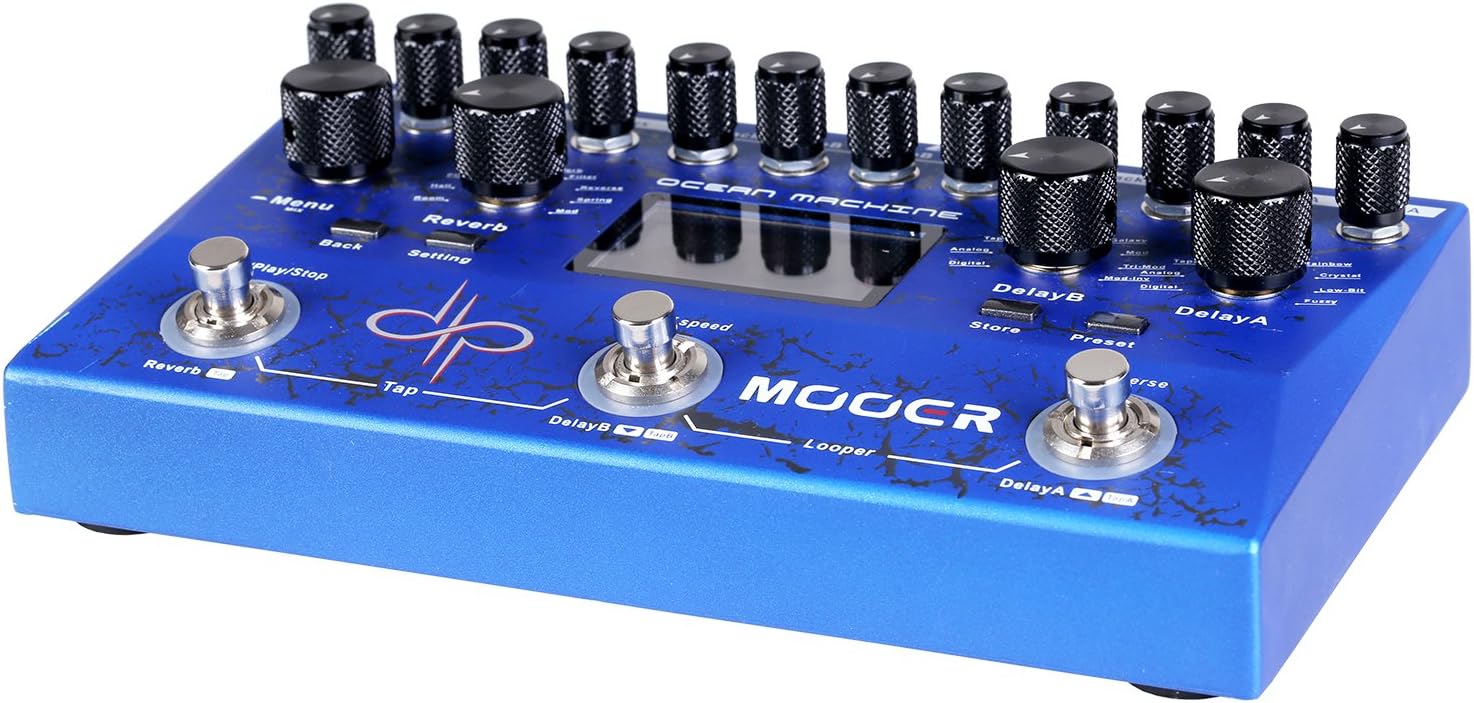
Mynd 3: Efst view of the MOOER Ocean Machine TDL3, highlighting the various knobs and footswitches.
- MENU hnappur: Navigates through menus and adjusts parameters on the LCD screen.
- REVERB Section: Controls for Mix, Tone, Decay, Shimmer, and Reverb Type.
- DELAY A Section: Controls for Mix, Feedback, Time, and Delay Type.
- DELAY B Section: Controls for Mix, Feedback, Time, and Delay Type.
- Footswitches (REVERB, DELAY B, DELAY A): Activate/deactivate effects, tap tempo, and looper functions.
- LCD skjár: Shows current settings, preset information, and menu options.
Seinkunaraðgerðir
The pedal features two independent delays (Delay A and Delay B) with 15 different delay types and a delay time range of 0-2 seconds. Each delay can be configured with optional ping-pong effects.
- Tegundir tafa: Explore various delay algorithms including Analog, Digital, Tape, Modulated, Reverse, and more.
- Tími: Adjusts the delay time. Can be synchronized via Tap Tempo.
- Viðbrögð: Stýrir fjölda endurtekninga með seinkuðu formi.
- Blanda: Adjusts the wet/dry balance of the delay effect.
Reverb Functions
A high-fidelity reverb section offers 9 different reverb types and a shimmer effect for ambient textures.
- Reverb tegundir: Includes Hall, Plate, Room, Spring, Modulated, Filter, Reverse, and Shimmer.
- Rotnun: Stýrir lengd endurómshalans.
- Tónn: Adjusts the brightness or darkness of the reverb.
- Shimmer: Adds an octave-up effect to the reverb tail.
- Blanda: Adjusts the wet/dry balance of the reverb effect.
Looper virkni
The integrated audio looper provides 32 MB of storage memory, allowing up to 44 seconds of recording time.
- Record/Play/Stop: Controlled by the dedicated footswitch (typically the REVERB footswitch in Looper mode).
- Ofurliði: Layer additional guitar parts over your recorded loop.
- Afturkalla/Endurgera: Correct mistakes during overdubbing.
Modes of Operation and Presets
The Ocean Machine TDL3 features multiple operational modes and the ability to save and recall presets.

Mynd 4: Close-up of the LCD screen showing various settings and parameters, including delay and reverb types.
- Lifandi háttur: Allows direct control of effects via knobs and footswitches.
- Forstillt stilling: Recall saved combinations of delay, reverb, and looper settings. The pedal offers a multitude of programmable options via the LCD menu.
- Vistar forstillingar: To save a preset, adjust your desired settings, then navigate through the menu using the MENU knob to find the "Store" option. Confirm to save.
- Effect Chain Order: The pedal allows you to reorder the internal effect chain (Delay A, Delay B, Reverb) to customize your sound. This is accessible through the system menu.
MIDI stjórn
The Ocean Machine TDL3 is MIDI programmable, allowing integration with other MIDI-enabled devices for advanced control and synchronization.
- Skilaboð um breytingu á forriti (tölvu): Recall specific presets.
- Skilaboð um breytingu á stjórnunarstaðli (CC): Control individual parameters in real-time.
- MIDI gegnum: Passes MIDI data to other devices in a chain.
Alþjóðlegar stillingar
Access the global settings menu to adjust overall parameters such as Global EQ, input/output levels, and other system configurations.
- Global EQ: Fine-tune the overall tonal response of the pedal.
- Input/Output Levels: Optimize signal levels for seamless integration with various instruments and setups.
Viðhald
To ensure the longevity and optimal performance of your MOOER Ocean Machine TDL3, follow these maintenance guidelines:
- Þrif: Use a soft, dry cloth to clean the pedal's surface. Avoid abrasive cleaners or solvents.
- Geymsla: Geymið pedalinn á köldum, þurrum stað fjarri beinu sólarljósi og miklum hita.
- Kraftur: Aftengdu alltaf rafmagnið þegar pedalinn er ekki í notkun í langan tíma.
- Knobs and Footswitches: Handle controls gently. If any knobs feel loose, they may need to be re-secured by a qualified technician.
Úrræðaleit
If you encounter issues with your Ocean Machine TDL3, refer to the following common troubleshooting steps:
- Ekkert hljóð:
- Athugaðu allar kapaltengingar (tæki, ampfrelsari, kraftur).
- Ensure the power supply meets the 9V DC, 500mA, center-negative specifications.
- Verify that the pedal is powered on and effects are engaged.
- Check input/output levels in the global settings.
- Óvæntur hávaði/suð:
- Gakktu úr skugga um að allir kaplar séu rétt varðir og í góðu ástandi.
- Prófaðu aðra innstungu eða einangraða aflgjafa.
- Athugaðu hvort jarðlykkjur séu í merkjakeðjunni þinni.
- Tap Tempo Not Working in Preset Mode:
- In Preset Mode, the tap tempo footswitch requires delay sub-divisions to be set.
- Navigate to the desired preset.
- Press REVERB + DELAY B footswitches simultaneously to enter preset edit mode.
- Press the MENU knob once.
- Rotate the MENU knob until "TempoB:" is highlighted and press the knob to enter sub-division settings.
- Press the MENU knob to turn sub-division on, select the desired sub-division, and press "back" to return.
- Press REVERB + DELAY B footswitches simultaneously to exit edit mode. Save the preset if satisfied.
- Vandamál með LCD skjá:
- Ensure the pedal is receiving adequate power.
- If the display is unresponsive, try power cycling the unit.
Tæknilýsing
| Eiginleiki | Forskrift |
|---|---|
| Gerðarnúmer | TDL3 |
| Mál (L x B x H) | 4.1 x 1.9 x 2.3 tommur |
| Þyngd hlutar | 6.4 aura |
| Aflþörf | 9V DC, 500mA, Center-Negative |
| Tegundir tafa | 15 (2 independent delays) |
| Reverb Tegundir | 9 (with Shimmer effect) |
| Looper Recording Time | Up to 44 seconds (32 MB storage) |
| Tengingar | Stereo Input/Output, Expression Pedal Input, MIDI IN/THRU |
| Vélbúnaðarviðmót | Ethernet (Note: This specification from product data may refer to internal communication or a specific feature not typically user-facing for a guitar pedal.) |
| Merkjasnið | Analog |
| Fyrsti laus dagsetning | 10. mars 2017 |
Ábyrgð og stuðningur
MOOER products are designed for reliability and performance. For warranty information and technical support, please refer to the official MOOER webeða hafið samband við dreifingaraðila á staðnum. Geymið kaupkvittunina vegna ábyrgðarkröfu.
- Opinber MOOER Websíða: www.mooeraudio.com
- Þjónustudeild: Contact information can typically be found on the official webumbúðir á síðunni eða vörunni.


