Inngangur
The Astrum ET200 Stereo Wireless Headset is an in-ear Bluetooth headset designed for hands-free communication and audio playback. Featuring Bluetooth V4.0 connectivity, it supports music and call functions with an in-built microphone and audio caller ID. This manual provides detailed instructions to help you set up, operate, and maintain your headset.
Hvað er í kassanum
- 1 x Astrum ET200 Wireless Headset Earphone
- 1 x hleðslusnúra
- 2 x Ear-hooks (various sizes)
- 1 x Notendahandbók
Vara lokiðview
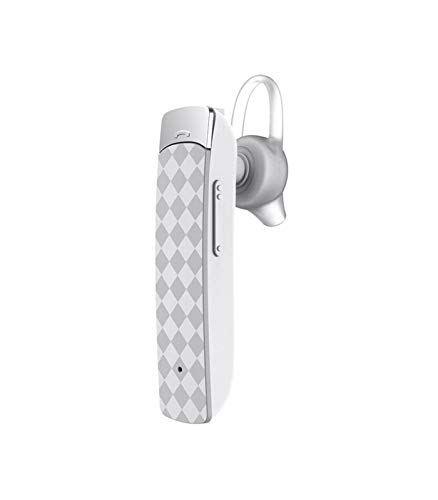

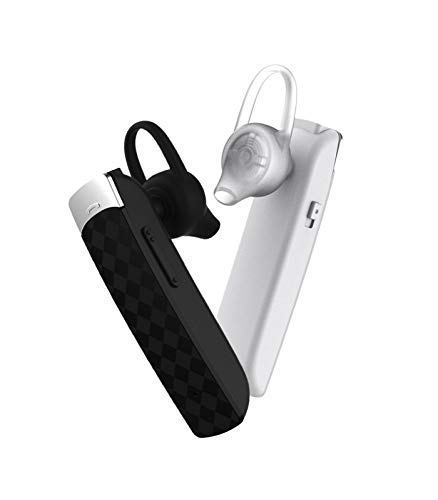
Uppsetning
1. Hleðsla heyrnartólsins
Before first use, fully charge the headset. Connect the provided charging cable to the headset's charging port and the other end to a USB power source (e.g., computer USB port, wall adapter). The charging indicator light will illuminate during charging and turn off or change color when fully charged. Charging time is approximately 2 hours.
2. Pörun við Bluetooth tæki
- Gakktu úr skugga um að slökkt sé á höfuðtólinu.
- Press and hold the multi-function button on the headset until the indicator light flashes red and blue alternately, indicating pairing mode.
- Í Bluetooth-tækinu þínu (snjallsíma, spjaldtölvu o.s.frv.) skaltu fara í Bluetooth-stillingarnar og virkja Bluetooth.
- Leitaðu að available devices. The headset will appear as "ET200" or similar.
- Select "ET200" to connect. If prompted for a password, enter "0000".
- Once successfully paired, the indicator light will flash blue slowly, and you may hear a confirmation tone.
The headset supports Bluetooth V4.0 and has a range of up to 10 meters (33 feet) in an open environment.
Notkunarleiðbeiningar
Kveikt/slökkt
- Kveikt á: Press and hold the multi-function button for approximately 3 seconds until the blue indicator light flashes.
- Slökkva á: Press and hold the multi-function button for approximately 3 seconds until the red indicator light flashes and then turns off.
Símtalsstýring
- Svara símtali: Briefly press the multi-function button.
- Ljúka símtali: Ýttu stuttlega á fjölnotahnappinn meðan á símtali stendur.
- Hafna símtali: Press and hold the multi-function button for 2 seconds when an incoming call rings.
- Endurval síðasta númer: Ýttu tvisvar á fjölnotahnappinn.
Spilun tónlistar
- Spila / gera hlé: Briefly press the multi-function button.
- Næsta lag: Press and hold the Volume + button.
- Fyrra lag: Press and hold the Volume - button.
Hljóðstyrksstilling
- Auka hljóðstyrk: Briefly press the Volume + button.
- Minnka hljóðstyrk: Briefly press the Volume - button.
Viðhald
- Clean the headset regularly with a soft, dry cloth. Do not use abrasive cleaners or solvents.
- Forðist að láta heyrnartólin verða fyrir miklum hita, raka eða beinu sólarljósi.
- Geymið heyrnartólið á köldum og þurrum stað þegar það er ekki í notkun.
- Ekki reyna að taka heyrnartólið í sundur eða breyta því, því það ógildir ábyrgðina.
Úrræðaleit
| Vandamál | Möguleg orsök | Lausn |
|---|---|---|
| Heyrnartólið kviknar ekki á. | Lítið rafhlaða. | Hladdu heyrnartólið að fullu. |
| Ekki er hægt að para heyrnartólin. | Headset not in pairing mode; Bluetooth disabled on device; device out of range. | Ensure headset is in pairing mode (flashing red/blue). Enable Bluetooth on your device. Move device closer to headset (within 10m). |
| Ekkert hljóð eða léleg hljóðgæði. | Hljóðstyrkur of lágur; heyrnartól ekki tengd; truflanir. | Increase volume on headset and device. Re-pair the headset. Move away from other wireless devices. |
| Vandamál með gæði símtala. | Veikt merki; hljóðnemi stíflaður. | Færðu þig á stað með betra merki. Gakktu úr skugga um að hljóðneminn sé ekki hulinn. |
Tæknilýsing
- Gerð: ET200
- Tengingartækni: Bluetooth V4.0
- Bluetooth Profiles: HFP / HSP / A2DP / AVRCP
- Þráðlaust svið: Allt að 10 metrar (33 fet)
- Símtalstími: Allt að 5 klst
- Leiktími: Allt að 4.5 klst
- Hleðslutími: Allt að 2 klst
- Biðtími: Allt að 200 klst
- Gerð stjórna: Símtalsstjórnun, snerting
- Þyngd hlutar: 10 grömm
- Vörumál: 3.5 x 3.5 x 12.8 cm
- Efni: Plast
Ábyrgð og stuðningur
The Astrum ET200 Stereo Wireless Headset comes with a 1 árs ábyrgð framleiðanda frá kaupdegi. Þessi ábyrgð nær yfir framleiðslugalla og vinnugalla við eðlilega notkun. Hún nær ekki til tjóns sem orsakast af misnotkun, slysum, óheimilum breytingum eða eðlilegu sliti.
For warranty claims, technical support, or any inquiries, please contact Astrum customer service. You can find more information and contact details on the official Astrum websíðuna eða í gegnum kaupstaðinn þinn.
Visit the official Astrum store for more products and support: Astrum Store on Amazon


