1. Inngangur
This user manual provides comprehensive instructions for the installation, operation, maintenance, and troubleshooting of the IP-COM G3224P 24-Port Managed PoE Switch. Please read this manual thoroughly before using the device to ensure proper and safe operation.
The IP-COM G3224P is a high-performance managed Power over Ethernet (PoE) switch designed for small to medium-sized businesses and enterprise networks. It offers 24 Gigabit Ethernet ports with PoE+ capabilities and additional SFP ports for fiber uplinks, providing flexible and scalable network solutions.
2. Vöru lokiðview
2.1 Innihald pakka
- IP-COM G3224P 24-Port Managed PoE Switch
- Rafmagnssnúra
- Rekkifestingarbúnaður (festingar og skrúfur)
- Gúmmífætur (til að setja á borðplötuna)
- Fljótleg uppsetningarleiðbeiningar
2.2 Framhlið Lýsing
The front panel of the IP-COM G3224P switch features various ports and LED indicators for status monitoring.
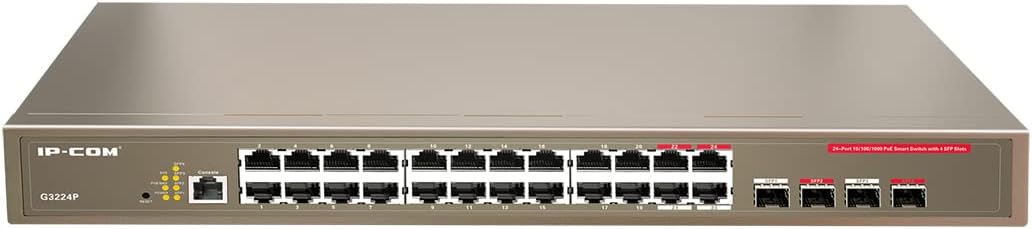
Figure 2.1: IP-COM G3224P Front Panel Layout
This image displays the front panel of the IP-COM G3224P switch. On the left, the IP-COM logo and model number G3224P are visible. To the right, there are LED indicators for SYS, PoE MAX, and individual port status. A console port is also present. The main section features 24 Gigabit Ethernet RJ45 ports, arranged in two rows, with port numbers 1 through 24. On the far right, there are four SFP ports labeled SFP1, SFP2, SFP3, and SFP4, which are used for fiber optic uplinks.
2.3 LED Vísar
| LED vísir | Staða | Lýsing |
|---|---|---|
| SYS | Grænt (solid) | Kerfið virkar eðlilega. |
| SYS | Grænt (blikkar) | System is booting up or firmware is being upgraded. |
| PoE MAX | Rautt (solid) | PoE power budget is nearing or exceeding its limit. |
| Tengja/Aðgerð (á hverja höfn) | Grænt (solid) | Höfn er tengd. |
| Tengja/Aðgerð (á hverja höfn) | Grænt (blikkar) | Port is transmitting or receiving data. |
| PoE (á hverja höfn) | Gulur (fastur) | PoE-straumur er tengdur við tækið. |
3. Uppsetning og uppsetning
3.1 Öryggisráðstafanir
- Gakktu úr skugga um að aflgjafinn voltage matches the switch's requirements (240V as per specifications).
- Ekki loka fyrir loftræstingarop.
- Haldið tækinu frá vatni, eldi og miklum hita.
- Ekki reyna að opna eða gera við tækið sjálfur.
3.2 Uppsetning rekki
- Festið meðfylgjandi rekkafestingar við hliðar rofans með meðfylgjandi skrúfum.
- Festið rofann í venjulegt 19 tommu búnaðarrekka með viðeigandi rekkaskrúfum (ekki innifaldar).
- Ensure adequate airflow around the switch for proper cooling.
3.3 Uppsetning á skjáborði
- Festu meðfylgjandi gúmmífætur neðst á rofanum.
- Place the switch on a flat, stable surface with sufficient ventilation.
3.4 Tenging rofans
- Rafmagnstenging: Connect the power cord to the power inlet on the rear panel of the switch and then to a grounded power outlet.
- Nettæki: Connect network devices (e.g., computers, servers, IP cameras, VoIP phones) to the RJ45 ports (1-24) on the front panel using standard Ethernet cables.
- PoE tæki: For PoE-powered devices, simply connect them to any of the RJ45 ports. The switch will automatically detect and provide power if the device is PoE compliant.
- Uplink tengingar: Use the SFP ports (SFP1-SFP4) for fiber optic uplinks to other network devices or the core network. Insert compatible SFP transceivers into the SFP slots before connecting fiber optic cables.
- Tenging við stjórnborð (valfrjálst): For initial configuration or advanced management, connect a console cable from your computer to the console port on the switch.
4. Notkunarleiðbeiningar
4.1 Byrjunarkveikt
After connecting the power cord, the switch will automatically power on. Observe the SYS LED indicator. It will blink during boot-up and turn solid green once the system is ready.
4.2 Grunnnettenging
Once powered on, the switch will automatically detect connected devices. The Link/Act LED for each connected port will illuminate solid green, indicating a successful link. It will blink when data is being transmitted or received.
4.3 PoE Operation
When a PoE-compatible device is connected to a port, the switch will negotiate power delivery. The PoE LED for that port will turn yellow, indicating that power is being supplied. Monitor the PoE MAX LED; if it turns red, the total PoE power budget is being approached or exceeded, and you may need to reduce the number of PoE devices or use a higher-capacity power source.
4.4 Stjórnunaraðgangur
The IP-COM G3224P is a managed switch, offering various configuration options via a web-based GUI, CLI (Command Line Interface) via the console port, or SNMP. Refer to the detailed management guide (usually available on the manufacturer's website) for advanced configuration, including VLANs, QoS, port mirroring, and security settings.
- Web GUI: Aðgangur að rofanum web interface by typing its default IP address (check the Quick Installation Guide or manufacturer's documentation) into a web vafra.
- CLI: Connect via the console port using a terminal emulator (e.g., PuTTY) with appropriate serial port settings.
5. Viðhald
5.1 Þrif
- Regularly clean the exterior of the switch with a soft, dry cloth.
- Ekki nota vökva- eða úðahreinsiefni.
- Gakktu úr skugga um að loftræstiop séu laus við ryk og hindranir.
5.2 vélbúnaðaruppfærslur
Periodically check the IP-COM official webvefsíða fyrir uppfærslur á vélbúnaði. Að halda vélbúnaðinum uppfærðum tryggir bestu mögulegu afköst, öryggi og aðgang að nýjum eiginleikum. Fylgdu leiðbeiningunum sem fylgja uppfærslupakkanum fyrir vélbúnað vandlega.
5.3 Umhverfissjónarmið
Ensure the switch operates within its specified environmental conditions (temperature, humidity) to prevent damage and ensure longevity.
6. Bilanagreining
| Vandamál | Möguleg orsök | Lausn |
|---|---|---|
| No power / SYS LED off | Rafmagnssnúra ekki tengd eða rafmagnsinnstunga biluð. | Athugaðu tengingu rafmagnssnúrunnar. Prófaðu aðra innstungu. |
| Engin tenging á tengi (Link/Act LED slökkt) | Cable issue, device off, or incorrect port. | Check Ethernet cable. Ensure connected device is powered on. Try a different port or cable. |
| PoE device not powering on (PoE LED off) | Device not PoE compliant, cable issue, or power budget exceeded. | Verify device is PoE compliant. Check cable. Check PoE MAX LED; if red, reduce PoE load. |
| Network performance issues | Cable quality, network congestion, or incorrect configuration. | Use high-quality Ethernet cables. Check for network loops. Review switch configuration (VLANs, QoS). |
| Get ekki fengið aðgang web stjórnendaviðmót | Röng IP-tala, netstillingar eða eldveggur. | Verify the switch's IP address. Ensure your computer is on the same subnet. Disable temporary firewalls. |
If problems persist, consult the full product documentation or contact IP-COM technical support.
7. Tæknilýsing
| Eiginleiki | Smáatriði |
|---|---|
| Fyrirmynd | G3224P |
| Hafnir | 24 x 10/100/1000Base-T (RJ45) with PoE+, 4 x 1000Base-X (SFP) |
| Skiptageta | 56 Gbps |
| Flutningshlutfall | 41.66 mpps |
| PoE staðall | IEEE 802.3af / at |
| Inntak Voltage | 240 volt |
| Mál (L x B x H) | 29 x 44 x 44 cm |
| Þyngd | 15 kíló |
| Rekkifesting | Já |
| Stjórnun | Stýrt (Web GUI, CLI, SNMP) |
Athugið: Forskriftir geta breyst án fyrirvara.
8. Ábyrgð og tækniaðstoð
8.1 Upplýsingar um ábyrgð
IP-COM products typically come with a limited warranty. Please refer to the warranty card included with your product or visit the official IP-COM webvefsíðunni fyrir ítarlegar ábyrgðarskilmála sem eiga við um þitt svæði og kaupdag.
8.2 Tæknileg aðstoð
For technical assistance, product inquiries, or troubleshooting beyond the scope of this manual, please contact IP-COM technical support. Support contact information can usually be found on the official IP-COM webá síðunni eða í umbúðum vörunnar.
IP-COM Official Websíða: www.ip-com.com.cn


