Inngangur
This manual provides comprehensive instructions for the setup, operation, maintenance, and troubleshooting of your Thomson Universal 2-in-1 Zapper Remote Control ROC Z107. Please read this manual carefully before using the device to ensure optimal performance and longevity.
Vara lokiðview
The Thomson ROC Z107 is a universal remote control designed to operate two devices, typically a Television (TV) and a Set-Top Box (STB). It features large buttons for ease of use and includes a learning function for expanded compatibility.
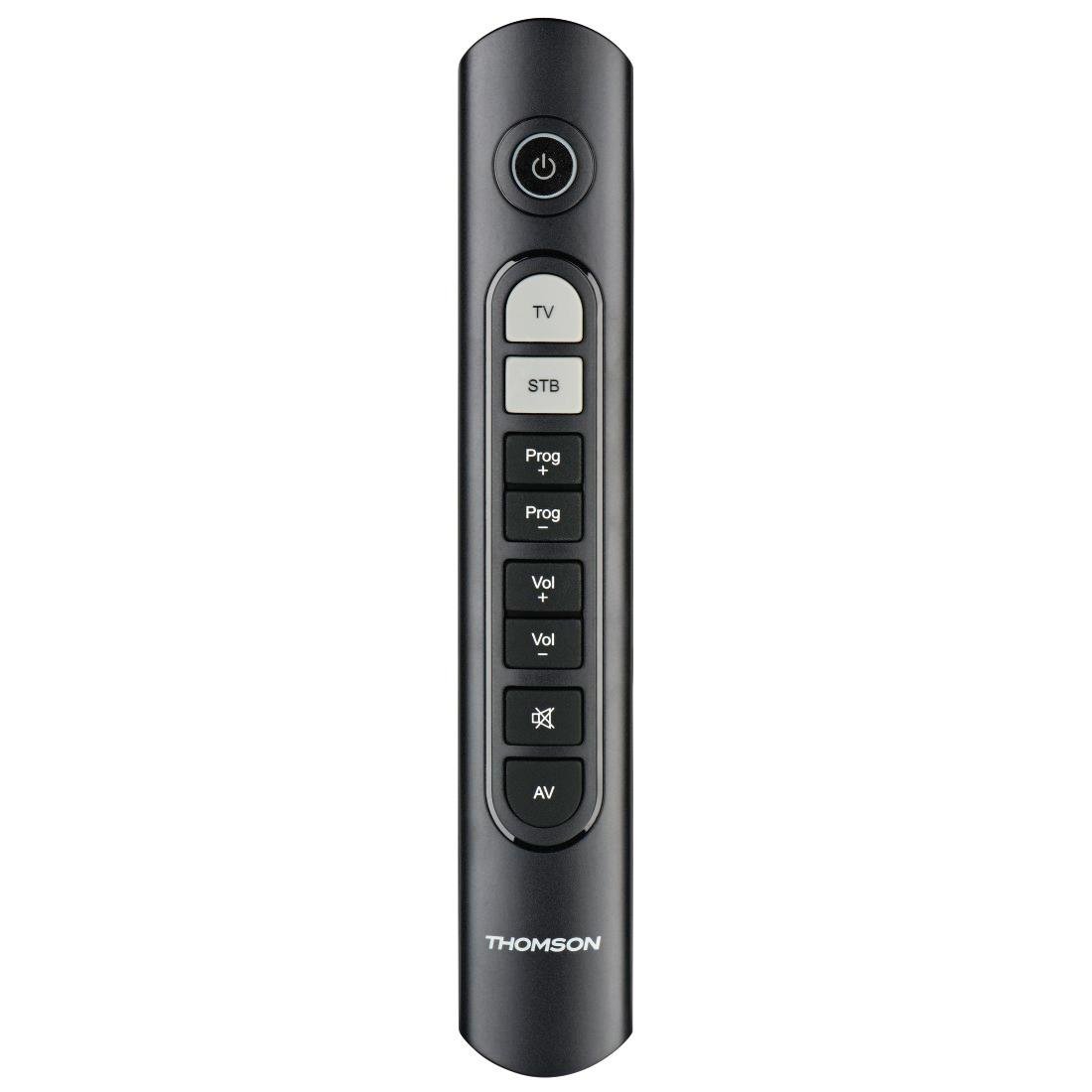
Image: Thomson Universal 2-in-1 Zapper Remote Control ROC Z107. This image displays the remote control from a slightly angled top-down perspective, highlighting its ergonomic design and the layout of its primary buttons.
Uppsetning
1. Uppsetning rafhlöðu
- Opnaðu rafhlöðulokið á bakhlið fjarstýringarinnar.
- Insert two AAA batteries, ensuring correct polarity (+ and -). Two AAA batteries are included with your purchase.
- Lokaðu rafhlöðuhólfinu tryggilega.
2. Initial Programming (Pre-programmed Devices)
The remote control is pre-programmed for many popular brands such as LG, Sony, Samsung, Sharp, and Philips. For these brands, the remote may function immediately after battery installation without further setup. Test the remote with your TV and STB.
3. Learning Function (For Unlisted or Specific Functions)
If your device is not immediately compatible or if you wish to add specific functions from your original remote, use the learning function:
- Place the Thomson remote and your original remote control head-to-head, approximately 2-5 cm apart.
- Press and hold the desired device button (TV or STB) on the Thomson remote until the indicator light blinks.
- Press the button on the Thomson remote that you wish to program. The indicator light will blink slowly.
- Press the corresponding button on your original remote control. The indicator light on the Thomson remote will blink rapidly to confirm successful learning.
- Repeat for other buttons as needed.
- Press the device button (TV or STB) again to exit learning mode.
4. Master Volume and Program Selection
This feature allows you to designate which device (TV or STB) controls the volume and program channels, regardless of which device mode the remote is currently in. Refer to the full user manual for specific steps on setting up master control functions.
Notkunarleiðbeiningar
The Thomson ROC Z107 remote control features a simplified button layout for essential functions.

Image: Close-up of Thomson ROC Z107 remote control buttons. This image provides a detailed view of the remote's buttons, including Power, TV, STB, Program Up/Down, Volume Up/Down, Mute, and AV input selection.
- Aflhnappur (⏻): Turns the selected device (TV or STB) on or off.
- Sjónvarpshnappur: Selects the Television control mode.
- STB Button: Selects the Set-Top Box control mode.
- Prog + / Prog - Buttons: Changes the program/channel up or down.
- Vol + / Vol - Buttons: Eykur eða lækkar hljóðstyrkinn.
- Hljóða hnappur (🔇): Þaggar eða slökktir á hljóðinu.
- AV-hnappur: Switches the input source on the TV (e.g., HDMI 1, HDMI 2, AV).
Viðhald
Skipt um rafhlöðu
When the remote control's performance degrades or the indicator light does not respond, it is time to replace the batteries. Follow the battery installation steps outlined in the Setup section.
Þrif
To clean the remote control, use a soft, dry cloth. Do not use liquid cleaners or abrasive materials, as these can damage the remote's surface or internal components.
Úrræðaleit
- Fjarstýring svarar ekki:
- Athugið hvort rafhlöðurnar séu rétt settar í og hvort þær séu ekki tæmdar. Skiptið um þær ef þörf krefur.
- Gakktu úr skugga um að engar hindranir séu á milli fjarstýringarinnar og innrauðs móttakara tækisins.
- Verify that the remote is in the correct device mode (TV or STB).
- Sérstakar aðgerðir virka ekki:
- If a specific button does not work, it may not be programmed for your device or the device may not support that function. Use the learning function to program the button from your original remote.
- Some older devices may have limited compatibility with universal remotes.
- Remote range is limited:
- Gakktu úr skugga um að rafhlöðurnar séu nýjar.
- The maximum operating range is 10 meters. Operating beyond this distance may result in unreliable performance.
Tæknilýsing
| Vörumerki | Thomson |
| Nafn líkans | ROC Z107 |
| Gerðarnúmer | 00132672 |
| Efni | Plast |
| Litur | Svartur |
| Smit | Infrared (IR Wireless) |
| Fjöldi tækja sem studd er | 2 (TV, STB) |
| Samhæf jaðartæki | Television, DTH, Set-Top Box |
| Aflgjafi | 2 x AAA rafhlöður (meðfylgjandi) |
| Hámarkssvið | 10 metrar |
| Vörumál | 31.5 x 15.5 x 4 cm |
| Þyngd hlutar | 170 grömm |
| Fjöldi hnappa | 9 |
Ábyrgð
This product is covered by a manufacturer's warranty. Please refer to the warranty card included in the product packaging or contact Thomson customer support for detailed warranty information and terms.
Stuðningur
For further assistance, technical support, or inquiries regarding your Thomson Universal 2-in-1 Zapper Remote Control ROC Z107, please visit the official Thomson webvefsíðu eða hafið samband við þjónustuver þeirra. Tengiliðaupplýsingar er yfirleitt að finna á umbúðum vörunnar eða á opinberri netviðveru vörumerkisins.