1. Inngangur
Þakka þér fyrir kaupinasing the Bytech Massive Bluetooth Long Bar Speaker-BK. This manual provides essential information for the proper setup, operation, and maintenance of your new speaker. Please read this manual thoroughly before using the product to ensure optimal performance and longevity.
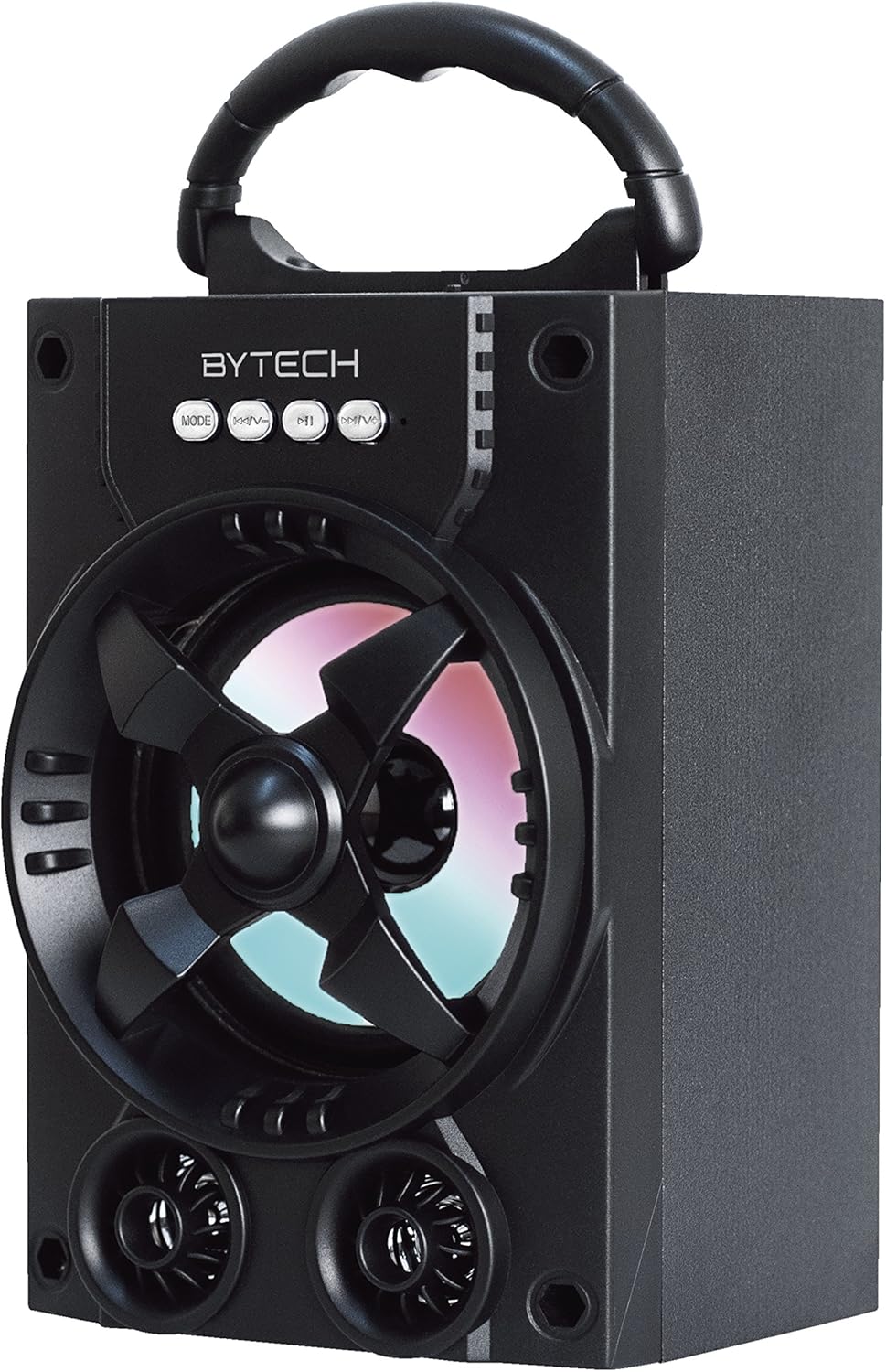
Mynd 1.1: Framan view of the Bytech Massive Bluetooth Long Bar Speaker-BK, showcasing its design, handle, and speaker grille with LED lights.
2. Innihald pakka
Vinsamlegast athugið hvort eftirfarandi atriði séu í pakkanum:
- Bytech Massive Bluetooth Long Bar Speaker-BK
- USB hleðslusnúra
- Notendahandbók (þetta skjal)
Ef einhverjar vörur vantar eða eru skemmdar, vinsamlegast hafið samband við þjónustuver.
3. Vörueiginleikar
- LED Performance Lights: Dynamic LED lights that synchronize with your music for an enhanced audio-visual experience.
- Convenient Carrying Handle: Integrated handle for easy portability, allowing you to take your music anywhere.
- Universal Bluetooth Connectivity: Seamlessly connect wirelessly to your smartphone, tablet, or other Bluetooth-enabled devices.
- Surround hljóð: Designed to deliver a high-quality surround sound experience.
- Færanleg hönnun: Ideal for various settings, including parties, outdoor gatherings, and personal use.

Figure 1.2: The speaker shown with its retail packaging, illustrating its key features such as multi-color LED lights, Bluetooth connectivity, and surround sound capability.
4. Stýringar og vísbendingar
The speaker features intuitive controls and indicators for easy operation:
- MODE hnappur: Press to switch between available input modes (e.g., Bluetooth).
- V-hnappur: Press to decrease volume. Long press to skip to the previous track.
- V+ hnappur: Press to increase volume. Long press to skip to the next track.
- M hnappur: (Function not explicitly detailed, typically for mode or mute)
- LED ljós: Indicate power status, charging status, and provide dynamic light effects during audio playback.
5. Uppsetningarleiðbeiningar
5.1 Hleðsla hátalarans
- Tengdu litla enda USB hleðslusnúrunnar við hleðslutengið á hátalaranum.
- Tengdu stóra enda USB hleðslusnúrunnar við USB straumbreyti (fylgir ekki með) eða USB tengi tölvu.
- LED-ljósið sýnir hleðslustöðu (t.d. rautt fyrir hleðslu, slökkt þegar það er fullhlaðið).
- Gefðu um það bil 3-4 klukkustundir til að ná fullri hleðslu áður en þú notar það í fyrsta skipti.
5.2 Kveikt/slökkt
- To power on, press and hold the Power button (location not specified, typically near charging port or on control panel) for a few seconds until you hear an audible prompt or see the LED lights activate.
- Til að slökkva á hátalaranum, ýttu á og haltu inni aflrofanum aftur þar til hann slokknar.
5.3 Bluetooth pörun
- Ensure the speaker is powered on and in Bluetooth pairing mode (indicated by a flashing LED light or audible prompt).
- Í snjallsímanum eða spjaldtölvunni skaltu fara í Bluetooth-stillingarnar.
- Leitaðu að available devices. The speaker will appear as "BYTECH" or a similar name.
- Veldu hátalarann af listanum til að hefja pörun.
- Once successfully paired, the LED indicator will typically become solid, and you may hear a confirmation tone.
6. Notkunarleiðbeiningar
6.1 Spila hljóð í gegnum Bluetooth
- After successful Bluetooth pairing, open your preferred music application on your connected device.
- Select and play your desired audio. The sound will be streamed wirelessly to the speaker.
- Use the V+ and V- buttons on the speaker or your connected device to adjust the volume.
- Long press V+ or V- to skip tracks.
6.2 LED Performance Lights
The speaker features integrated LED lights that enhance your listening experience. These lights typically activate automatically when the speaker is powered on and playing audio. Specific controls for light modes are not detailed, but they are designed to provide dynamic visual effects.
6.3 Skipt um ham
Ýttu á MODE button to cycle through available input modes. While Bluetooth is the primary connectivity, other modes (if available, such as FM radio or AUX input) can be accessed via this button.
7. Viðhald og umönnun
- Þrif: Notið mjúkan, þurran klút til að þrífa ytra byrði hátalarans. Notið ekki slípiefni, vax eða leysiefni.
- Geymsla: Þegar hátalarinn er ekki í notkun í langan tíma skal geyma hann á köldum, þurrum stað fjarri beinu sólarljósi og miklum hita.
- Umhirða rafhlöðu: Til að lengja endingu rafhlöðunnar skaltu forðast að tæma hana alveg oft. Hladdu hátalarann reglulega, jafnvel þótt hann sé ekki í notkun, til að viðhalda heilbrigði rafhlöðunnar.
- Vatnsþol: Þessi vara er EKKI waterproof. Avoid exposure to water, rain, or excessive moisture to prevent damage.
8. Bilanagreining
Ef þú lendir í vandræðum með hátalarann skaltu skoða eftirfarandi algeng vandamál og lausnir:
| Vandamál | Möguleg orsök | Lausn |
|---|---|---|
| Hátalarinn kviknar ekki. | Lítið rafhlaða. | Hladdu hátalarann að fullu. |
| Ekkert hljóð frá hátalaranum. | Volume too low; Not paired; Incorrect mode. | Increase volume on speaker and device; Ensure successful Bluetooth pairing; Press MODE button to select correct input. |
| Bluetooth-tengingin er óstöðug eða bilar. | Device too far; Interference; Pairing issue. | Move device closer to speaker (within 33 ft/10m); Avoid obstacles; Forget device on your phone and re-pair. |
| LED ljós virka ekki. | Speaker not powered on or playing audio. | Ensure speaker is on and audio is playing. |
9. Tæknilýsing
| Eiginleiki | Smáatriði |
|---|---|
| Vörumerki | Bytech |
| Nafn líkans | BYTECH |
| Tegundarnúmer vöru | BCAUBS134BK |
| Tegund hátalara | Surround Sound |
| Tengitækni | Bluetooth |
| Þráðlaus samskiptatækni | Bluetooth |
| Samhæf tæki | Snjallsími |
| Hámarksúttaksstyrkur hátalara | 20 Watt |
| Tíðni svörun | 20 KHz |
| Viðnám | 1 Ohm |
| Stærð hátalara | 5 tommur |
| Aflgjafi | Rafmagnstenging með snúru (til hleðslu) |
| Tegund rafhlöðu | 1 Lithium Ion rafhlaða nauðsynleg |
| Litur | Svartur |
| Vörumál | 4.75 x 5.5 x 8.5 tommur |
| Þyngd hlutar | 1.3 pund |
| Er vatnsheldur | Nei |
| Upprunaland | Kína |
| UPC | 805112038121 |
10. Upplýsingar um ábyrgð
Bytech products are manufactured to the highest quality standards. For specific warranty terms and conditions, please refer to the warranty card included with your purchase or visit the official Bytech webGeymið kaupkvittunina vegna ábyrgðarkröfu.
11. Þjónustudeild
For technical assistance, troubleshooting, or general inquiries, please contact Bytech customer support. Contact information can typically be found on the product packaging, the official Bytech websíðuna eða kaupkvittunina þína.
Athugið: Engin opinber vörumyndbönd frá seljanda voru tiltæk til innfellingar byggt á þeim gögnum sem gefin voru upp.


