Inngangur
This manual provides essential information for the safe and efficient operation of your Behringer EUROPORT MPA200BT portable PA system. Please read these instructions thoroughly before using the device to ensure proper setup, usage, and maintenance. Retain this manual for future reference.
The Behringer EUROPORT MPA200BT is an all-in-one portable PA system designed for various applications, featuring 200 watts of power, Bluetooth connectivity for audio streaming, and a wireless microphone for vocal performances or presentations. Its battery operation allows for use in locations without direct power access.
Mikilvægar öryggisleiðbeiningar
Fylgdu alltaf þessum grunnöryggisráðstöfunum þegar rafbúnaður er notaður:
- Lestu allar leiðbeiningar áður en þú notar vöruna.
- Do not use this product near water or in wet environments.
- Hreinsið aðeins með þurrum klút.
- Ekki loka neinum loftræstiopum. Setjið upp í samræmi við leiðbeiningar framleiðanda.
- Ekki setja upp nálægt neinum hitagjöfum eins og ofnum, hitatöflum, ofnum eða öðrum tækjum (þ. amplyftara) sem framleiða hita.
- Ekki brjóta niður öryggistilgang skautaðrar eða jarðtengdrar klöppu. Skautuð kló hefur tvö blöð þar sem annað er breiðara en hitt. Jarðtengi hefur tvö hníf og þriðja jarðtengi. Breiða blaðið eða þriðja tindurinn eru til öryggis. Ef meðfylgjandi kló passar ekki í innstungu þína skaltu hafa samband við rafvirkja til að skipta um úrelta innstungu.
- Verndaðu rafmagnssnúruna gegn því að ganga á hana eða klemma hana, sérstaklega við innstungur, innstungur og staðinn þar sem þau fara út úr tækinu.
- Notaðu aðeins viðhengi/aukahluti sem framleiðandi tilgreinir.
- Taktu þetta tæki úr sambandi í eldingum eða þegar það er ónotað í langan tíma.
- Látið alla þjónustu til hæfs þjónustufólks. Þjónusta er nauðsynleg þegar tækið hefur skemmst á einhvern hátt, svo sem að rafmagnssnúra eða kló er skemmd, vökvi hefur hellst niður eða hlutir hafa fallið inn í tækið, tækið hefur orðið fyrir rigningu eða raka, virkar ekki eðlilega , eða hefur verið fellt niður.
Innihald pakka
Upon unpacking your Behringer EUROPORT MPA200BT, please verify that all components are present and in good condition:
- Behringer EUROPORT MPA200BT Portable PA System
- Wireless Microphone (ULM300M)
- USB Receiver for Wireless Microphone (ULM300USB)
- Rafmagnssnúra
- Notendahandbók (þetta skjal)

Image: The Behringer EUROPORT MPA200BT portable PA system shown with its accompanying wireless microphone.
Vara lokiðview: Stjórntæki og tengingar
Familiarize yourself with the various controls and connection points on your MPA200BT unit.

Image: Rear panel of the MPA200BT, highlighting the main control interface, inputs, and outputs.

Mynd: Ítarleg view of the MPA200BT's control panel, including display, rotary encoder, and buttons.
Eiginleikar stjórnborðs:
- Skjár skjár: Shows current settings, input levels, and Bluetooth status.
- Snúningskóðari: Used to navigate menus and adjust parameters. Press to confirm selections.
- PROCESS Button: Activates or deactivates sound processing effects.
- SETUP hnappur: Fer inn í uppsetningarvalmynd kerfisins.
- EXIT hnappur: Exits current menu or setting.
- ENTER hnappur: Staðfestir val innan valmynda.
- Bluetooth hnappur: Ræsir Bluetooth-pörunarstillingu.
Inntaks-/úttakstengingar:
- INPUT 1 & 2 (XLR/TRS Combo Jacks): For connecting microphones or line-level instruments.
- WIRELESS SYSTEM (USB Port): For connecting the ULM300USB wireless microphone receiver.
- MP3 Input (3.5mm Stereo Jack): Til að tengja utanaðkomandi hljóðspilara.
- MIX OUTPUT (XLR): For sending the mixed audio signal to another PA system or recording device.
- Rafstraumsinntak: Til að tengja rafmagnssnúruna.
Uppsetning
- Rafmagnstenging:
Connect the supplied power cable to the AC Power Inlet on the rear of the MPA200BT and then to a suitable power outlet. The unit can also operate on its internal battery.
- Upphafleg kveikt á:
Press the power switch to turn on the unit. The display will illuminate.
- Staðsetning:
Place the MPA200BT on a stable, flat surface or mount it on a speaker stand (sold separately). Ensure proper ventilation around the unit.
- Að tengja inntak:
- Hljóðnemar/hljóðfæri með snúru: Connect to INPUT 1 or INPUT 2 using XLR or 1/4" TRS cables.
- External Audio Players: Connect to the MP3 Input using a 3.5mm stereo cable.
Notkunarleiðbeiningar
Bluetooth hljóð streymi

Image: The Bluetooth logo, representing wireless audio streaming capability.
- Ensure the MPA200BT is powered on.
- Ýttu á Bluetooth button on the control panel. The Bluetooth icon on the display will flash, indicating pairing mode.
- On your smartphone or Bluetooth-enabled device, navigate to the Bluetooth settings and select "BEHRINGER MPA200BT" from the list of available devices.
- Once paired, the Bluetooth icon on the MPA200BT display will stop flashing and remain solid.
- You can now stream audio from your device to the MPA200BT. Adjust the volume using your device's controls and the MPA200BT's master volume.
Wireless Microphone Usage (ULM300M/ULM300USB)
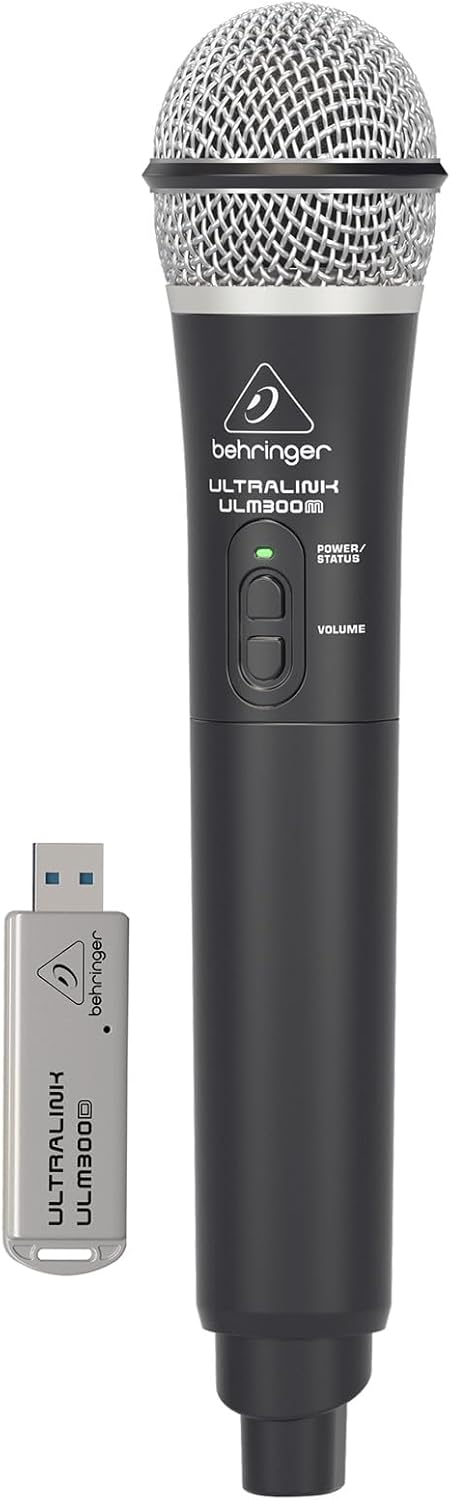
Image: The Behringer ULM300M wireless microphone shown with its USB receiver, the ULM300USB.
- Insert the ULM300USB receiver into the Þráðlaust kerfi USB port on the MPA200BT.
- Ensure the ULM300M wireless microphone has fresh batteries installed.
- Power on the wireless microphone. The status LED on both the microphone and the receiver should indicate a successful connection (usually a solid green light).
- Adjust the microphone's volume using the controls on the microphone itself and the MPA200BT's input gain settings.
Fjarstýring í gegnum snjallsímaapp

Image: A smartphone screen showing the graphical user interface of the Behringer remote control application, used to manage the PA system settings.
The MPA200BT can be controlled remotely using a dedicated smartphone application. This allows for adjustments to volume, EQ, and effects from a distance.
- Download the official Behringer MPA200BT control app from your device's app store (iOS/Android).
- Ensure your smartphone is connected to the MPA200BT via Bluetooth (as described in the "Bluetooth Audio Streaming" section).
- Open the app. It should automatically detect and connect to your MPA200BT unit.
- Use the app's interface to control various parameters of the PA system.
Rekstur rafhlöðu
The MPA200BT features an internal rechargeable battery for portable use.
- The battery charges automatically when the unit is connected to AC power.
- A battery level indicator on the display shows the remaining charge.
- For optimal battery life, fully charge the unit before its first use and periodically when not in use for extended periods.
Viðhald
- Þrif: Notið mjúkan, þurran klút til að þrífa ytra byrði tækisins. Notið ekki slípiefni eða leysiefni.
- Geymsla: When not in use, store the MPA200BT in a cool, dry place, away from direct sunlight and extreme temperatures.
- Umhirða rafhlöðu: If storing for extended periods, ensure the battery is partially charged (around 50%) and recharge it every few months to prevent deep discharge.
- Loftræsting: Ensure that the ventilation openings are not obstructed during operation to prevent overheating.
Úrræðaleit
| Vandamál | Möguleg orsök | Lausn |
|---|---|---|
| Enginn kraftur | Power cable not connected; unit not switched on; battery depleted. | Check power cable connection; ensure power switch is ON; charge battery. |
| Ekkert hljóðúttak | Volume too low; input source not connected or selected; faulty cable; microphone off. | Increase master volume and input gain; check input connections; test cables; ensure microphone is powered on and paired. |
| Bluetooth pörun mistekst | MPA200BT not in pairing mode; device too far; interference. | Press Bluetooth button to enter pairing mode; move device closer; restart both devices. |
| Þráðlaus hljóðnemi virkar ekki | USB receiver not connected; microphone off; depleted batteries in microphone; interference. | Ensure ULM300USB is fully inserted; power on microphone; replace microphone batteries; ensure clear line of sight. |
| Squealing/Feedback | Microphone too close to speaker; microphone gain too high. | Move microphone further from speaker; reduce microphone input gain. |
Tæknilýsing
| Eiginleiki | Smáatriði |
|---|---|
| Fyrirmynd | EUROPORT MPA200BT |
| Úttak Wattage | 200 Watt |
| Aflgjafi | Rafhlaðaknúið / AC-knúið |
| Tengitækni | Bluetooth |
| Fjöldi rása | 2 |
| Þyngd hlutar | 12.1 kg (26.6 lbs) |
| Vörumál (L x B x H) | 11.02 x 10.11 x 16.53 tommur |
| Gerð uppsetningar | Borðplata |
| Samhæf tæki | Snjallsími |
| Framleiðandi | Tónlistarættbálkurinn í Bandaríkjunum |
Ábyrgð og stuðningur
Nánari upplýsingar um ábyrgð og tæknilega aðstoð er að finna á opinberu Behringer websíðuna eða hafið samband við þjónustuver þeirra. Geymið kaupkvittunina sem sönnun fyrir kaupunum.
Tilföng á netinu: www.behringer.com
Framleiðandi: Tónlistarættbálkurinn í Bandaríkjunum
Opinber vörumyndbönd
No relevant official product videos from the seller were found in the provided data for embedding.


