Inngangur
The Homtime C1 Pro is an advanced electronic alarm clock designed for modern bedrooms, offering a blend of essential features and convenient functionalities. It integrates a Bluetooth speaker, dual USB charging ports, a large dimmable LCD screen, and a built-in thermometer. This manual provides detailed instructions to help you set up, operate, and maintain your C1 Pro alarm clock.
Hvað er í kassanum
- 1 x Homtime C1 Pro Main Unit
- 1 x straumbreytir
- 1 x Notendahandbók
Helstu eiginleikar
- Einfaldar stillingar: Unique rotary button and alarm setting button for easy time and alarm adjustment.
- Stillanleg LCD skjár: 4-level dimmable screen (High, Medium, Low, Off) for optimal visibility day or night. Displays time (12H/24H), temperature (°F/°C), charging status, and alarm time.
- Melody Alarm: Customize your ringtone using an SD card. Alarm volume increases gradually.
- Blunda aðgerð: 9-minute interval snooze.
- Tvö USB hleðslutengi: Two 5V/3A universal USB ports for simultaneous charging of two devices.
- Bluetooth hátalari: Compact speaker with balanced bass for wireless audio streaming.
- Tenging við Aux-inntak: Built-in 3.5mm aux cable for wired music playback.
- Afritun rafhlöðu: Requires 3 AAA batteries (not included) to maintain alarm settings during power outages.
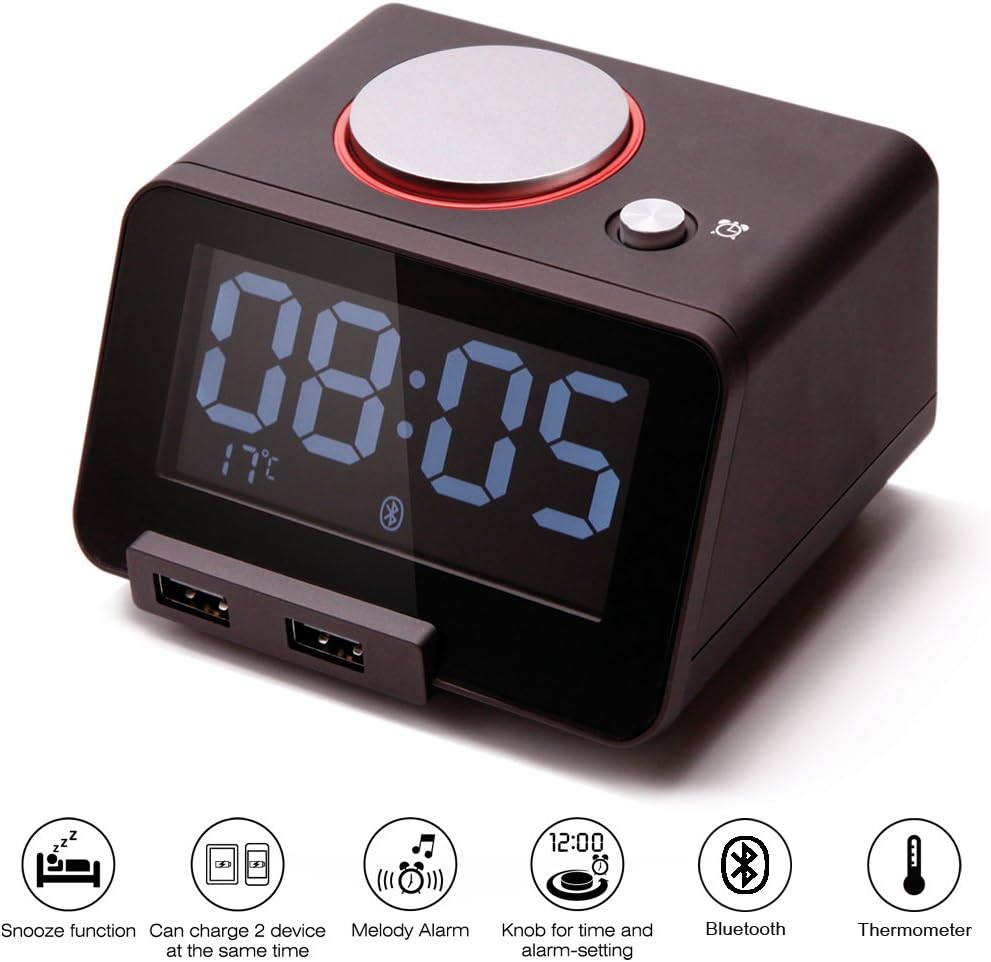
Figure 1: Homtime C1 Pro highlighting its main features.
Uppsetning
- Rafmagnstenging: Connect the provided power adapter to the DC 5V port on the back of the C1 Pro and plug it into a wall outlet. The display will light up.
- Setjið upp vararafhlöður (valfrjálst en mælt er með): Open the battery compartment on the bottom and insert 3 AAA batteries (not included). This ensures time and alarm settings are retained during power interruptions.
- Upphafleg tímastilling: The clock typically displays 00:00 upon first power-up. To set the time, gently rotate the large silver knob on top of the clock. Press the knob to confirm the hour, then rotate to set minutes, and press again to confirm.
- Stilltu vekjaratíma: Press the small alarm button next to the rotary knob. The alarm time will flash. Rotate the large knob to set the desired alarm hour and minutes, pressing the knob to confirm each. Press the alarm button again to save.
- Insert Micro SD Card (for Custom Ringtones): If you wish to use custom alarm melodies, store your favorite songs onto a Micro SD card. Insert the Micro SD card into the card slot located at the back of the unit.

Figure 2: Labeled components of the Homtime C1 Pro for easy setup.

Figure 3: Inserting a Micro SD card for custom alarm melodies.
Notkunarleiðbeiningar
- Stilla birtustig skjásins: Press the large rotary knob on top of the clock to cycle through four brightness levels: High, Medium, Low, and Off. This allows you to adjust the display to your preference, especially for nighttime use.
- Blunda aðgerð: When the alarm sounds, press the large rotary knob to activate the snooze function. The alarm will pause for 9 minutes and then sound again.
- Canceling Alarm: To completely turn off the alarm, press the small alarm button next to the rotary knob.
- Hitaskjár: The current room temperature is displayed on the bottom left of the LCD screen. To switch between Celsius (°C) and Fahrenheit (°F), locate the small button on the back of the unit labeled 'C/F' and press it.
- 12H/24H Time Format: To switch between 12-hour and 24-hour time formats, locate the button on the back of the unit labeled '12H/24H' and press it.
- Bluetooth tenging:
- Gakktu úr skugga um að kveikt sé á Bluetooth í farsímanum þínum.
- On your device, search for Bluetooth devices and select "C1pro" from the list.
- Once connected, you can play audio from your device through the C1 Pro's speaker.
- USB hleðsla: The two USB ports on the front of the unit provide 5V/3A output for charging. Simply connect your device's USB charging cable to one of the ports. The C1 Pro can charge two devices simultaneously.
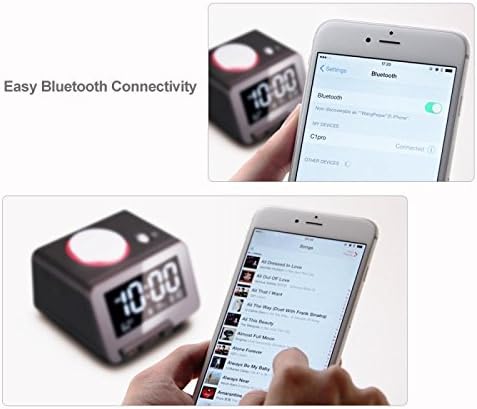
Figure 4: Adjusting the LCD display brightness.

Figure 5: Connecting your device via Bluetooth.
Myndband 1: Opinberri vöru lokiðview demonstrating features like time setting, temperature display, USB charging, and Bluetooth connectivity.
Viðhald
- Þrif: Notið mjúkan, þurran klút til að þrífa yfirborð vekjaraklukkunnar. Notið ekki fljótandi hreinsiefni eða slípiefni.
- Skipt um rafhlöðu: If using backup batteries, replace them periodically (e.g., annually) to ensure continuous functionality during power outages.
- Geymsla: If storing the unit for an extended period, remove the AAA backup batteries to prevent leakage.
Úrræðaleit
- Skjárinn er auður: Ensure the power adapter is securely connected to both the clock and a working power outlet. Check if the display brightness is set to 'Off' by pressing the large rotary knob.
- Viðvörun hringir ekki: Verify the alarm time is set correctly. Ensure the alarm is enabled (check the alarm indicator on the display). Check if the volume is set to an audible level. If using an SD card, ensure it is properly inserted and contains playable audio files.
- Cannot set time/alarm: Ensure the rotary knob is functioning correctly. Refer to the 'Setup' section for detailed instructions on time and alarm setting.
- USB hleðsla virkar ekki: Ensure the C1 Pro is powered on. Try a different USB cable or device to rule out cable/device issues.
- Bluetooth tengist ekki: Ensure Bluetooth is enabled on your device and the C1 Pro is within range. Try restarting both the C1 Pro and your mobile device.
- Hitamæling virðist ónákvæm: Ensure the clock is placed in an area with good air circulation, away from direct heat sources or drafts.
Tæknilýsing
| Eiginleiki | Forskrift |
|---|---|
| Vörumerki | Homtime |
| Gerðarnúmer | C1PRO |
| Litur | Svartur |
| Skjár Tegund | LCD |
| Vörumál | 4.33"B x 2.52"H |
| Þyngd hlutar | 1.15 pund |
| Aflgjafi | Battery Powered (Main power via adapter) |
| Rafhlöður nauðsynlegar | 3 AAA batteries (for backup, not included) |
| USB útgangur | 5V/3A (Total for 2 ports) |
| Sérstakir eiginleikar | Snooze, Alarm, Adjustable Volume, Thermometer, Bluetooth, Aux-in |
| Efni | Polycarbonate, Acrylonitrile Butadiene Styrene |
Ábyrgð og stuðningur
Homtime products are designed for reliability and performance. The manufacturer, All Best Technology Limited, typically provides a warranty for their products. Please refer to the warranty card included with your purchase for specific terms and conditions, including warranty duration and contact information for support. For general inquiries or technical assistance, you may visit the official Homtime store on Amazon or contact their customer service as per the details provided in your product packaging.


