Inngangur
This manual provides detailed instructions for the installation, operation, and maintenance of your LSLYA Dual 2 Din 7-inch Bluetooth Car Stereo with GPS Navigation. Please read this manual thoroughly before using the product to ensure proper function and to prevent damage.
Öryggisupplýsingar
- Mælt er með faglegri uppsetningu: Installation of this car stereo requires professional guidance. Incorrect installation can lead to a short circuit or damage to the unit and vehicle. If you are unsure, seek professional assistance.
- Aflgjafi: This car stereo operates on a 12V DC power supply. Verify your vehicle's voltage before installation. Connecting to an incompatible voltage will cause a short circuit.
- Raflagnatengingar: Always confirm the positive and negative terminals of your car's power supply. Connect wires according to the provided wiring diagram to ensure correct operation and prevent damage.
- No CD/DVD Player: This unit is not equipped with a CD/DVD player.
- Non-Removable Faceplate: The faceplate of this car stereo is not removable.
Uppsetning og uppsetning
Raflagnamynd
Vísað er til eftirfarandi skýringarmyndar fyrir réttar raflagnatengingar. Gakktu úr skugga um að allar tengingar séu öruggar og einangraðar.

This comprehensive wiring diagram provides instructions for connecting the LSLYA car stereo to the vehicle's electrical system. It details connections for all four speakers (front/rear, left/right), the rear camera, steering wheel control, constant power (+12V B+), ignition switch (+12V ACC), ground (B-), auto antenna, and headlight detection line. Proper installation according to this diagram is crucial for correct operation.
Physical Installation and Connections
The unit is designed for a standard Dual 2 Din opening. Ensure adequate space and secure mounting. Connect all necessary cables to the rear of the unit as shown in the diagram below.
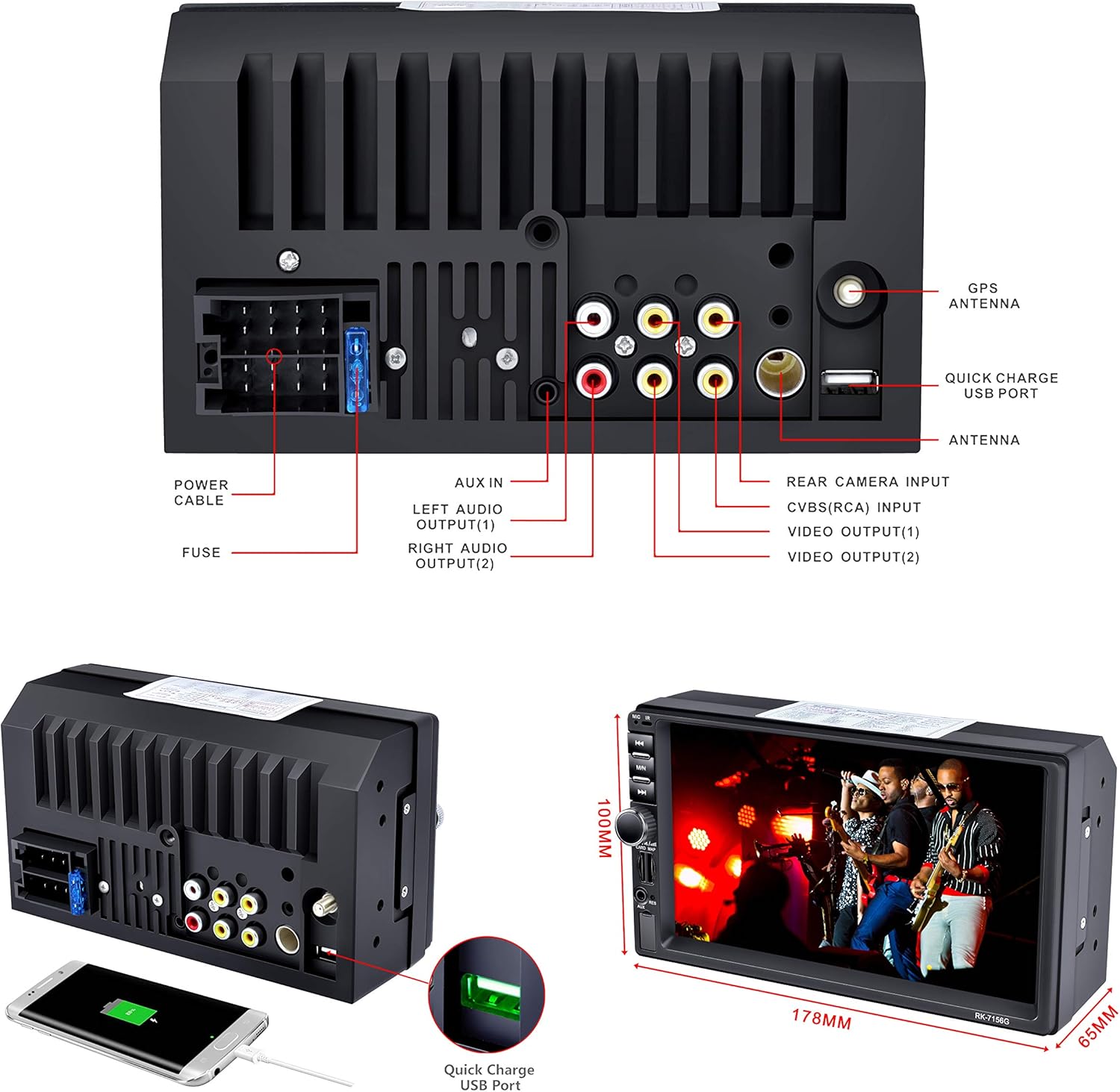
This image provides a detailed rear view of the LSLYA car stereo, illustrating all available input and output ports. These include connections for the GPS antenna, quick charge USB, radio antenna, rear camera, video outputs, left and right audio outputs, AUX input, power cable, and fuse. The physical dimensions of the unit are also indicated.
- GPS loftnet: Connect the GPS antenna to the designated port for navigation functionality.
- Útvarpsloftnet: Tengdu útvarpsloftnet ökutækisins.
- Inntak aftari myndavélar: Tengdu samhæfan afturhlera view myndavél fyrir aðstoð við bílastæðakerfið.
- USB tengi: Utilize the USB ports for media playback and device charging.
- Audio/Video Outputs: Tengdu ytri amplifiers or monitors as needed.
Notkunarleiðbeiningar
Grunnstýringar og viðmót
The unit features a 7-inch touchscreen for primary control, supplemented by physical buttons on the left side for quick access to essential functions.
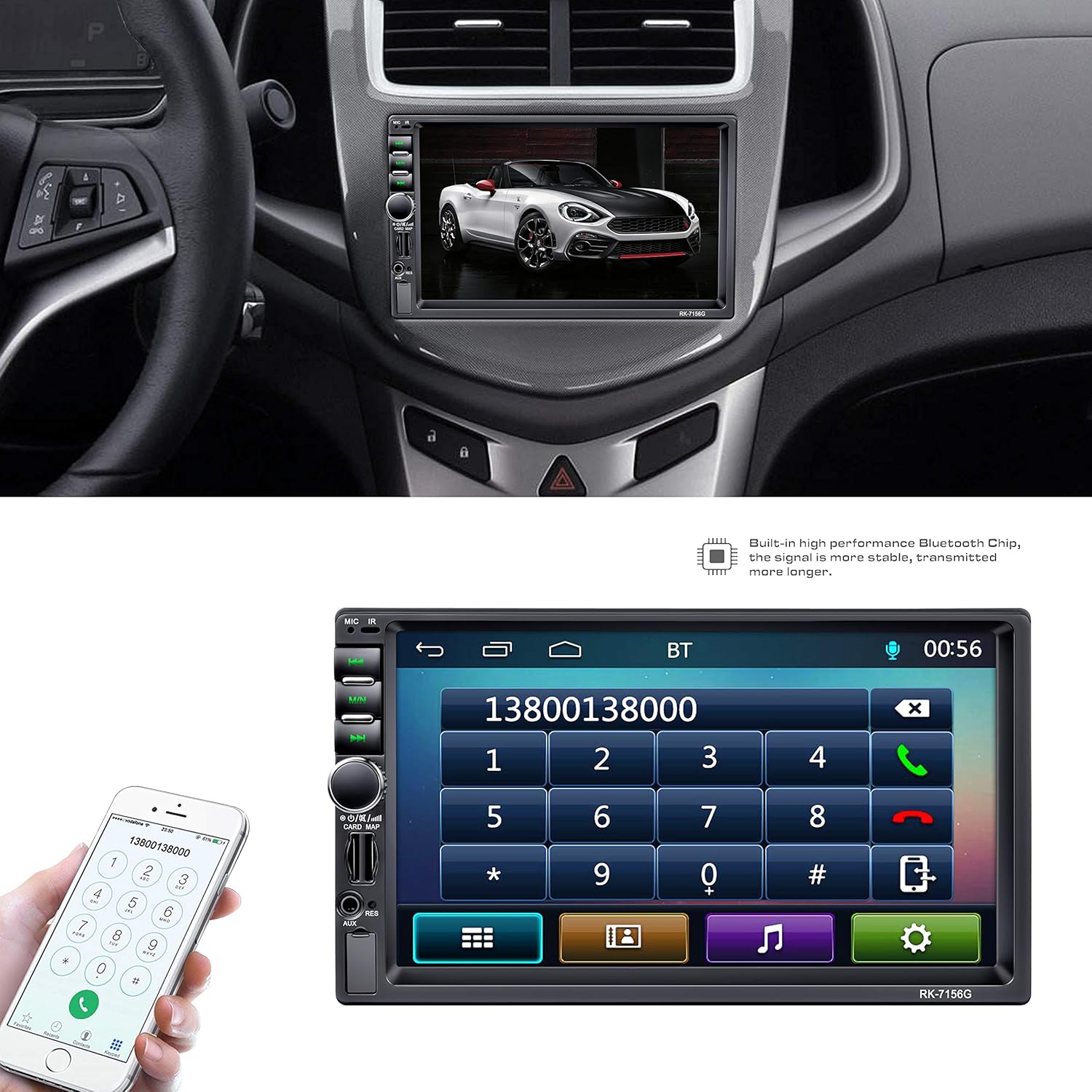
This image illustrates the LSLYA Dual 2 Din Car Stereo integrated into a vehicle's dashboard. The 7-inch touchscreen displays the Bluetooth phone call interface, allowing users to dial numbers directly from the unit. A smartphone is also shown, indicating the Bluetooth connectivity feature for hands-free communication.
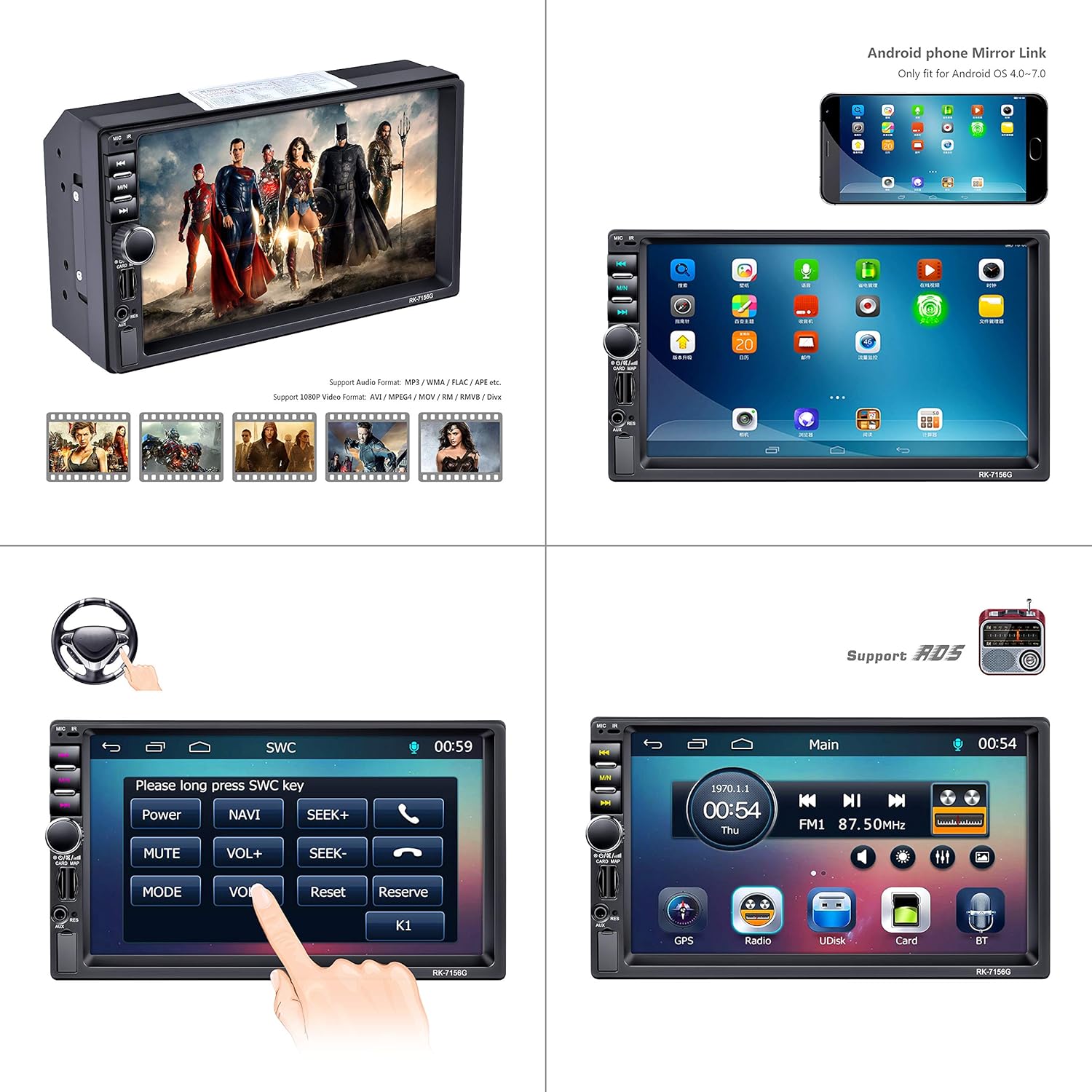
This composite image demonstrates several key functions of the LSLYA car stereo. It shows the unit's ability to play various video formats, an example of the Android phone mirror link feature (for OS 4.0-7.0), the interface for setting up steering wheel controls, and the main menu screen providing access to GPS, Radio, USB (UDisk), SD Card, and Bluetooth functions.
Bluetooth pörun
To pair your smartphone:
- Access the Bluetooth menu on the stereo's touchscreen.
- Virkjaðu Bluetooth á snjallsímanum þínum og leitaðu að tiltækum tækjum.
- Select the car stereo (usually named 'BT' or similar) from your phone's list.
- Staðfestu pörunarkóðann ef beðið er um það.
Þegar pörun hefur átt sér stað er hægt að hringja handfrjálst og streyma hljóði.
GPS leiðsögn
The unit features a built-in GPS navigation module. To use:
- Tap the 'GPS' icon on the main menu.
- Enter your destination using the touchscreen keyboard.
- Follow the on-screen directions and voice prompts for route guidance.
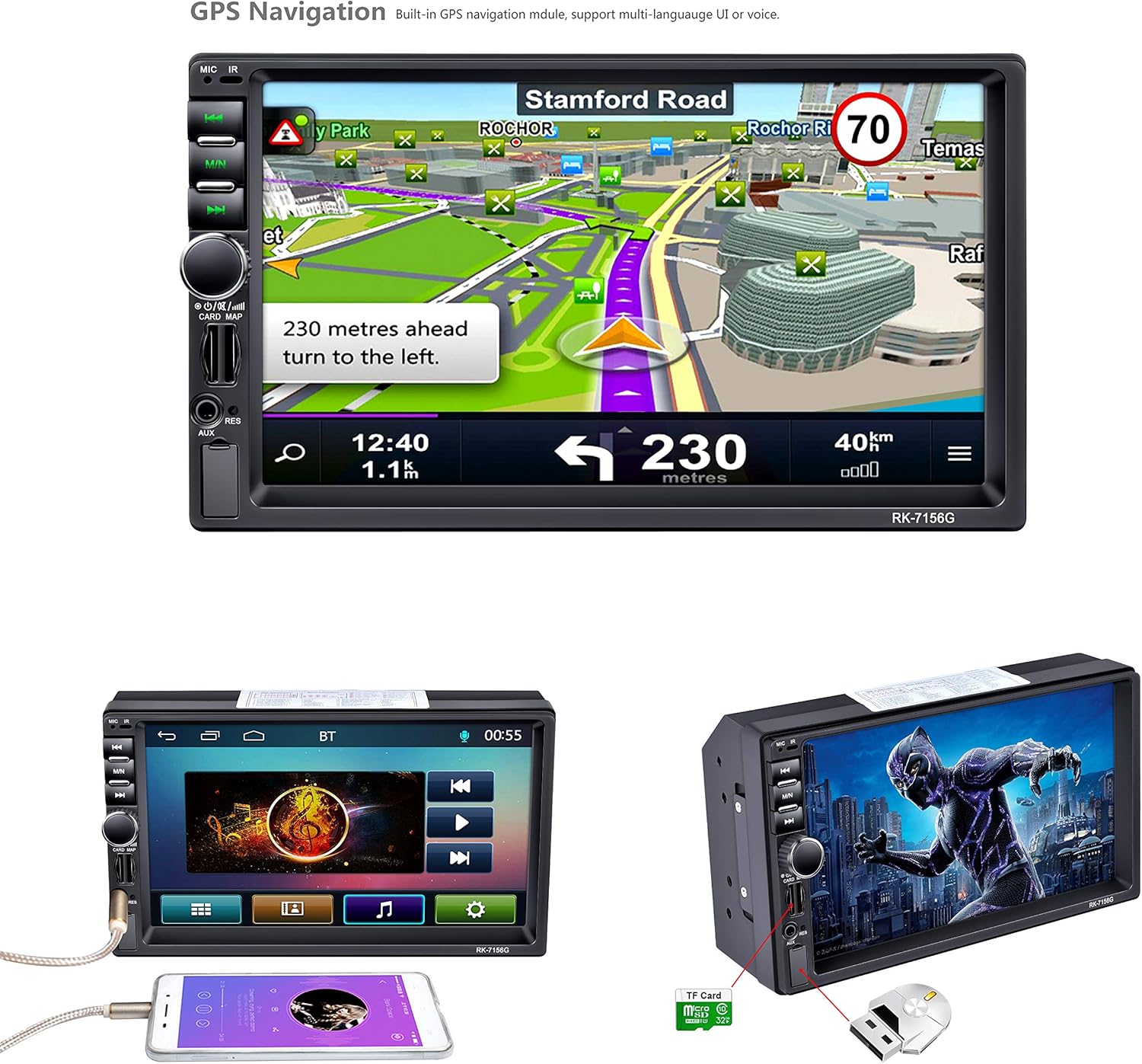
The car stereo's 7-inch screen displays the integrated GPS navigation system. The map shows a route with turn-by-turn directions, including a prompt to '230 meters ahead turn to the left'. This highlights the built-in navigation capabilities of the unit.
Media Playback (USB, SD, MP5)
The stereo supports various media formats via USB, TF/SD card slots. Insert your storage device into the appropriate slot and select the 'UDisk' (USB) or 'Card' (TF/SD) option from the main menu to browse and play media files.
Útvarp (FM/AM/RDS)
Select the 'Radio' icon from the main menu. Use the touchscreen to scan for stations, save presets, and access RDS information where available.
Stýrisstýring (SWC)
If your vehicle supports steering wheel controls, you can configure them through the stereo's settings menu. Access the SWC setup interface to map your vehicle's steering wheel buttons to the stereo's functions.
Inntak myndavélar að aftan
When a rear camera is connected and the vehicle is put into reverse gear, the stereo automatically displays the camera feed on the screen, often with parking guidelines.

This image showcases the audio and visual capabilities of the LSLYA car stereo. It features the sound balance adjustment screen, allowing users to fine-tune audio output. The bottom left highlights the 7-inch HD LCD display (800x480 resolution) with a vibrant image. The bottom right demonstrates the rear view camera input, displaying a clear image with parking guidelines for safe reversing.
Mirror Link
The unit supports Android phone mirror link for Android OS 4.0-7.0. Connect your compatible Android smartphone via USB to mirror its screen onto the stereo display.
Viðhald
- Þrif: Notið mjúkan, þurran klút til að þrífa skjáinn og ytra byrði tækisins. Forðist slípiefni eða leysiefni.
- Hugbúnaðaruppfærslur: Athugaðu framleiðanda webSæktu reglulega um vefsíðuna til að sjá hvort tiltækar hugbúnaðaruppfærslur séu tiltækar til að tryggja bestu mögulegu afköst og nýja eiginleika.
- Skipt um öryggi: If the unit loses power, check the fuse located at the rear of the unit. Replace with a fuse of the same rating if blown.
Úrræðaleit
- Enginn kraftur:
- Check all power connections (B+, ACC, Ground) as per the wiring diagram.
- Verify the fuse is intact and not blown.
- Gakktu úr skugga um að rafgeymi ökutækisins sé nægilega hlaðinn.
- Ekkert hljóð:
- Athugaðu tengingar hátalaravíranna.
- Verify volume levels and mute settings.
- Ensure audio output mode is correctly selected.
- GPS virkar ekki/ónákvæmt:
- Gakktu úr skugga um að GPS-loftnetið sé rétt tengt og að það sé skýrt view himinsins.
- Check GPS settings within the unit.
- Vandamál með Bluetooth-tengingu:
- Gakktu úr skugga um að Bluetooth sé virkt bæði í hljómtækinu og snjallsímanum þínum.
- Delete previous pairings and attempt to re-pair.
- Færið ykkur nær tækinu ef þið lendið í vandræðum með merkið.
- Stýrisstýringar bregðast ekki við:
- Verify SWC wiring connections.
- Re-calibrate the steering wheel controls through the unit's settings menu.
Tæknilýsing
| Vörumerki | LSLYA |
| Gerðarnúmer | B07FZ49MFT |
| Skjárstærð | 7 tommur |
| Skjáupplausn | 800x480 (HD LCD) |
| Tengitækni | Bluetooth, USB |
| Sérstakir eiginleikar | Built-In Bluetooth, Touchscreen, GPS Navigation, MP5/TF/SD/USB Media Player, Steering Wheel Control, FM/AM/RDS Tuner, Rear Camera Input, Android Mirror Link (OS 4.0-7.0) |
| Samhæf tæki | Snjallsími |
| Hljóðútgangsstilling | Stereo |
| Output Power | 50 vött (á rás) |
| Samtals Wattage | 200 Watt |
| Fjöldi rása | 4 |
| Þyngd hlutar | 2.22 pund |
| Stærðir pakka | 8.39 x 6.06 x 4.92 tommur |
| Dagsetning fyrst í boði | 10. nóvember 2018 |
Ábyrgð og stuðningur
For warranty information or technical support, please refer to the documentation included with your purchase or contact LSLYA customer service through their official channels. Keep your purchase receipt as proof of purchase.