1. Inngangur
This manual provides essential information for setting up, operating, and maintaining your VIZIO V-Series 50-inch Class 4K HDR Smart TV. Please read these instructions thoroughly before using your television to ensure proper functionality and safety.

Mynd 1: Framan view of the VIZIO V-Series 50-inch 4K HDR Smart TV.
2. Hvað er í kassanum
Gakktu úr skugga um að allir hlutir séu í umbúðunum:
- VIZIO V-Series 50-inch Class 4K HDR Smart TV
- Rafmagnssnúra
- Fjarstýring
- Standur (2 stykki)
3. Uppsetning
3.1 Standurinn festur
- Leggið sjónvarpsskjáinn varlega með niður á mjúkan, hreinan flöt til að koma í veg fyrir skemmdir.
- Stilltu hverjum standhluta saman við samsvarandi raufar neðst á sjónvarpinu.
- Festið standana með meðfylgjandi skrúfum. Gangið úr skugga um að þeir séu vel festir.

Figure 2: VIZIO V-Series TV with its two-piece stand attached.
3.2 Tenging við rafmagn og utanaðkomandi tæki
- Tengdu rafmagnssnúruna við aflgjafainntak sjónvarpsins og síðan í vegginnstungu.
- For external devices (e.g., cable box, gaming console, Blu-ray player), use HDMI ports. The TV features multiple HDMI inputs.
- For internet connectivity, connect an Ethernet cable to the LAN port or connect wirelessly via Wi-Fi during the initial setup.
- USB devices can be connected to the USB port for media playback.
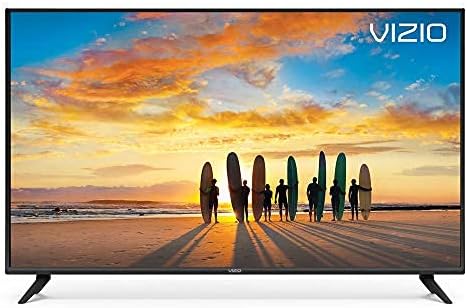
Figure 3: Close-up of the rear input ports, including HDMI, USB, Ethernet, and audio outputs.
3.3 Uppsetningarhjálp
Upon first power-on, the TV will guide you through an on-screen setup wizard to configure language, network settings, and channel scanning.
4. Að stjórna sjónvarpinu
4.1 Aðgerðir fjarstýringar
The included remote control provides access to all TV functions. It features dedicated buttons for popular streaming apps and navigation controls.
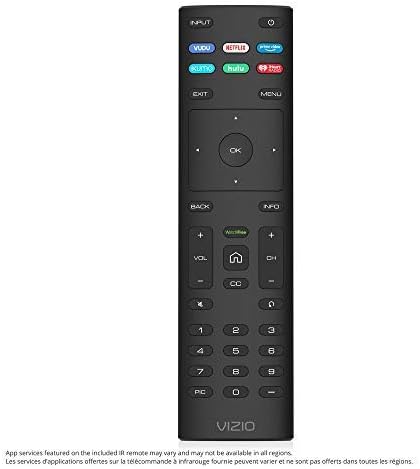
Figure 4: The VIZIO Smart TV remote control with quick access buttons for streaming services.
4.2 SmartCast 3.0
VIZIO SmartCast 3.0 provides an intuitive interface to access streaming apps, live TV, and inputs. Navigate using the remote's directional pad and the 'Home' button.
4.3 Raddstýring
The TV supports hands-free voice control through compatible devices like Amazon Alexa or Google Assistant. Follow the on-screen instructions to link your voice assistant device.
4.4 VIZIO Watch Free
Access over 100 free streaming channels, including news, movies, and sports, directly through the VIZIO Watch Free+ app.
4.5 Chromecast Built-in and Screen Mirroring
Utilize Chromecast built-in to stream content from thousands of compatible apps on your smartphone or tablet directly to the TV. Screen mirroring allows you to display your device's screen on the TV.

Mynd 5: Dæmiample of screen mirroring from a smartphone to the VIZIO Smart TV.
5. Helstu eiginleikar
- Dolby Vision HDR: Capable of displaying a wider spectrum of colors and detail, including HDR10 and HLG content support.
- Full Array LED baklýsing: Evenly distributes LEDs across the screen's backlight for superior light uniformity and picture performance.
- 4K Ultra HD: Offers four times the resolution of 1080p with over 8 million pixels for enhanced clarity.
- Octal-Core Processor: A high-powered processor ensures less lag in smart home apps and during activity switching.
6. Tæknilýsing
| Eiginleiki | Forskrift |
|---|---|
| Vörumerki | VIZIO |
| Gerðarnúmer | V505-G9 |
| Skjástærð | 50 tommur (49.5 tommu þvermál) |
| Upplausn | 4K Ultra HD (3840x2160) |
| Skjátækni | LED |
| Endurnýjunartíðni | 120 Hz |
| Sérstakur eiginleiki | Flat |
| Hlutfall | 16:9 |
| Vörumál | 44.13 x 2.42 x 25.59 tommur |
| Þyngd hlutar | 21.2 pund (9600 grömm) |
| Voltage | 120 volt (AC) |
| Hvaðtage | 135 vött |
| Tengitækni | Ethernet, HDMI, USB |

Figure 6: Energy Guide label for the VIZIO V505-G9 TV, showing estimated yearly energy cost.
7. Viðhald
7.1 Þrif á skjánum
Til að þrífa skjáinn skaltu þurrka hann varlega með mjúkum, lólausum klút. Fyrir þrjósk bletti skaltu þurrka hann létt.ampÞurrkið klútinn með vatni eða sérstöku skjáhreinsiefni. Forðist að nota sterk efni eða slípiefni.
7.2 Almenn umönnun
Keep the TV in a well-ventilated area. Avoid blocking ventilation openings. Do not expose the TV to direct sunlight, extreme temperatures, or high humidity.
8. Bilanagreining
- Enginn kraftur: Gakktu úr skugga um að rafmagnssnúran sé vel tengd bæði við sjónvarpið og innstunguna. Prófaðu aðra innstungu.
- Engin mynd/hljóð: Gakktu úr skugga um að rétt inntaksgjafi sé valinn. Athugaðu allar kapaltengingar við ytri tæki.
- Vandamál með nettengingu: Endurræstu beininn og mótaldið. Sláðu inn Wi-Fi lykilorðið þitt aftur í netstillingum sjónvarpsins. Fyrir snúrutengdar tengingar skaltu ganga úr skugga um að Ethernet-snúran sé rétt tengd.
- Fjarstýring svarar ekki: Skiptu um rafhlöður í fjarstýringunni. Gakktu úr skugga um að engar hindranir séu á milli fjarstýringarinnar og skynjara sjónvarpsins.
9. Ábyrgð og stuðningur
For warranty information, product registration, and technical support, please refer to the official VIZIO website or contact VIZIO customer service. Keep your purchase receipt for warranty claims.


