1. Inngangur
Thank you for choosing the iggual QR Barcode Scanner. This device is designed for efficient and reliable scanning of both 1D and 2D barcodes, offering both manual and automatic scanning modes. It features an ergonomic design for comfortable use and broad compatibility with various operating systems. This manual provides essential information for setting up, operating, and maintaining your scanner.
Helstu eiginleikar:
- Ergonomic design with a comfortable trigger button.
- Detects all common 1D and 2D barcodes, including QR codes.
- Supports manual and automatic scanning modes.
- Wired USB connectivity for reliable data transmission.
- Compatible with Windows XP/7/8/10, macOS, Linux, and Android.
2. Innihald pakka
Vinsamlegast athugið innihald pakkans til að ganga úr skugga um að allir hlutir séu til staðar:
- iggual QR Barcode Scanner (Model IGG315651)
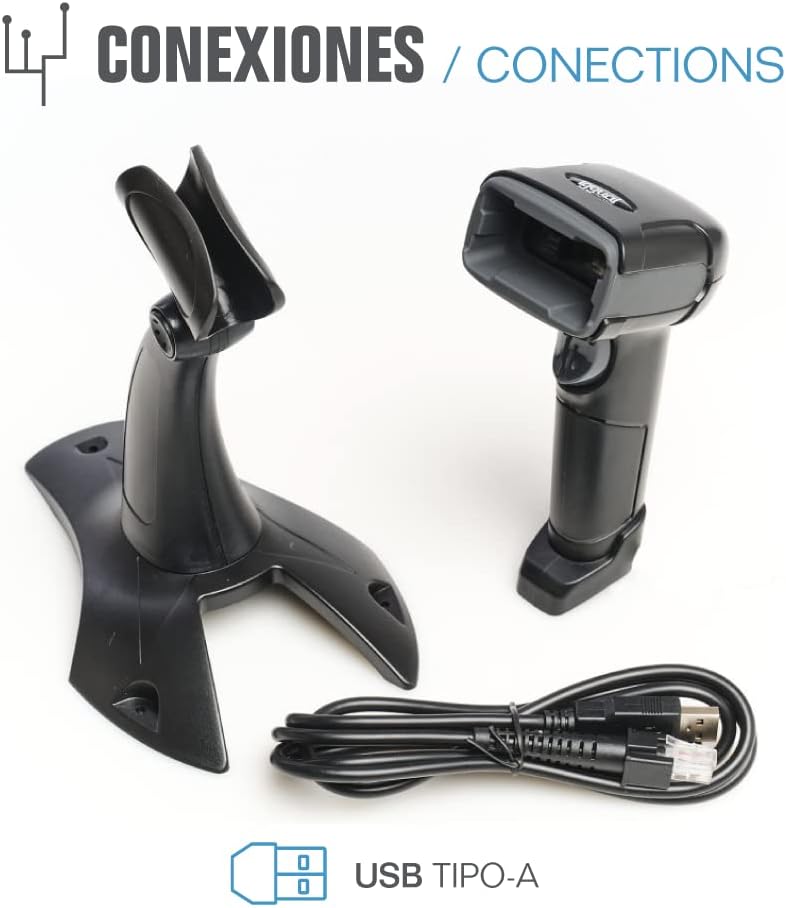
- USB snúra (tegund A)
- Scanner Stand (Optional, depending on package)

Mynd 2.1: Package contents including the scanner, stand, and USB Type-A cable.
3. Vöru lokiðview
Familiarize yourself with the main components of your iggual barcode scanner:
- Skannunargluggi: Svæði þar sem strikamerki eru lesin.
- Kveikjuhnappur: Virkjar skönnun í handvirkri stillingu.
- USB tengi: For connecting the scanner to your computer.
- LED vísir: Provides visual feedback on scanning status.
- Pípari: Provides audible feedback on scanning status.

Mynd 3.1: The iggual barcode scanner with its optional stand, highlighting the LED indicator and beeper functionality.
4. Uppsetning
4.1 Tenging skannans
- Connect the USB cable to the USB port on the scanner.
- Stingdu hinum enda USB snúrunnar í lausa USB tengi á tölvunni þinni eða hýsiltæki.
- The scanner will typically be recognized automatically by your operating system as a standard HID keyboard device. No special drivers are usually required.
4.2 Kerfissamhæfni
The iggual QR Barcode Scanner is compatible with a wide range of operating systems:
- Windows XP / 7 / 8 / 10
- macOS
- Linux
- Android

Mynd 4.1: Operating system compatibility for the iggual barcode scanner.
5. Notkunarleiðbeiningar
5.1 Skannunarstillingar
Skanninn styður tvær aðal skönnunarstillingar:
- Handvirk stilling: Press the trigger button to activate the scanner and read a barcode. Release the button after a successful scan.
- Sjálfvirk stilling: The scanner continuously emits a scanning beam, reading barcodes as they are presented within its field of view without needing to press the trigger. Refer to the full product manual (if available from iggual.com) for instructions on switching between modes, usually done by scanning specific configuration barcodes.
5.2 Studdar strikamerkjategundir
This scanner is capable of reading a wide range of 1D and 2D barcode symbologies, including:
- 2D kóðar: QR Code, Maxi Code, MicroPDF, PDF417
- 1D kóðar: Code 128, EAN-13, EAN-8, Code 39, UPC-A, UPC-E, Code 93, Interleaved 2 of 5, Codabar, MSI, RSS, etc.

Mynd 5.1: Scanner capabilities including 200 scans/second, 2D scanning, and supported code types.
5.3 Skannunarferli
- Ensure the scanner is properly connected to your host device.
- Opnaðu forrit þar sem þú vilt að skönnuðu gögnin birtist (t.d. textaritil, töflureikni eða sölustaðarhugbúnað).
- Point the scanning window at the barcode you wish to read.
- If in manual mode, press and hold the trigger button. If in automatic mode, simply present the barcode.
- A successful scan will be indicated by a short beep and/or a flash of the LED indicator. The scanned data will appear in your active application.
- If the barcode is not read, adjust the distance and angle of the scanner relative to the barcode.
6. Viðhald
6.1 Þrif
- Til að þrífa ytra byrði skannans skal nota mjúkan klút.amp klút.
- For the scanning window, use a lint-free cloth and a mild glass cleaner. Avoid abrasive materials or harsh chemicals that could scratch the surface.
- Gætið þess að enginn vökvi komist inn í hýsið á skannanum.
6.2 Geymsla
Þegar skannann er ekki í notkun skal geyma hann á köldum, þurrum stað, fjarri beinu sólarljósi og miklum hita.
7. Bilanagreining
| Vandamál | Möguleg orsök | Lausn |
|---|---|---|
| Tölvan þekkir ekki skannann. | Loose USB connection, faulty USB port, or cable issue. | Ensure USB cable is securely connected. Try a different USB port or cable. Restart the computer. |
| Skanninn les ekki strikamerki. | Barcode damaged, incorrect scanning angle/distance, scanner in wrong mode, or dirty scanning window. | Check barcode integrity. Adjust scanning angle and distance. Ensure scanner is in the correct mode (manual/automatic). Clean the scanning window. |
| Skönnuð gögn birtast rangt. | Keyboard layout mismatch or corrupted data. | Ensure your computer's keyboard layout matches the scanner's default output (usually US English). If issues persist, consult the full product manual for advanced configuration. |
8. Tæknilýsing
| Eiginleiki | Smáatriði |
|---|---|
| Fyrirmynd | IGG315651 |
| Mál (L x B x H) | 160 x 80 x 100 mm (6.3 x 3.15 x 3.94 tommur) |
| Þyngd | 120 g (0.26 lbs) |
| Skannahraði | 200 skannar/sekúndu |
| Myndskynjari | 640(H) x 480(V), 256 Grayscale |
| Tengingar | Wired USB (Type-A) |
| Aflgjafi | Rafmagnstenging með snúru (USB-knúið) |
| Stýrikerfi | Windows XP/7/8/10, macOS, Linux, Android |
| Stuðningur strikamerki | 1D & 2D (QR, Maxi Code, MicroPDF, Code, PDF417, RSS, etc.) |
Mynd 8.1: Physical dimensions of the iggual barcode scanner.
9. Ábyrgð og stuðningur
For warranty information, technical support, or to download the complete product manual with advanced configuration options, please visit the official iggual websíðuna eða hafið samband við dreifingaraðila á ykkar svæði.
Opinber Websíða: www.iggual.com


