1. Inngangur
Thank you for choosing the Anker PowerPort Strip 2 mini. This compact power strip is designed to provide convenient power and charging solutions for your electronic devices at home, in the office, or while traveling. It features two AC outlets and two PowerIQ-enabled USB ports, allowing you to power and charge up to four devices simultaneously.
Please read this manual carefully before using the product to ensure proper operation and safety. Keep this manual for future reference.
2. Vöru lokiðview
The Anker PowerPort Strip 2 mini is a versatile charging solution with a compact design. Key features include:
- Two AC Outlets: Provides power for standard electronic devices.
- Two PowerIQ USB Ports: Intelligently identifies your device to deliver the fastest possible charge up to 2.4A per port, 24W total.
- Fyrirferðarlítil og flytjanleg hönnun: Tilvalið fyrir ferðalög og lítil rými.
- 5 feta rafmagnssnúra: Offers flexibility in placement.
- Flat stinga: Designed to keep other wall outlets accessible.
- Öryggiseiginleikar: Includes an internal safety shutter and fire-retardant casing.
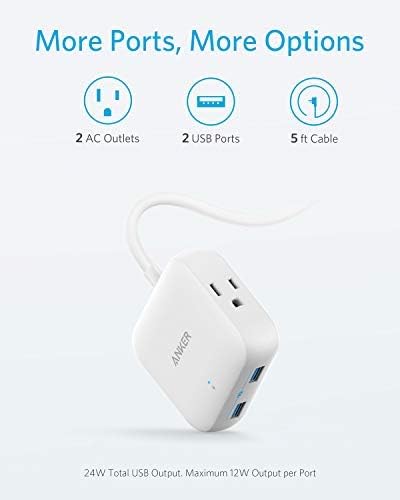
Image: The Anker PowerPort Strip 2 mini, highlighting its two AC outlets, two USB ports, and the integrated 5-foot power cable.
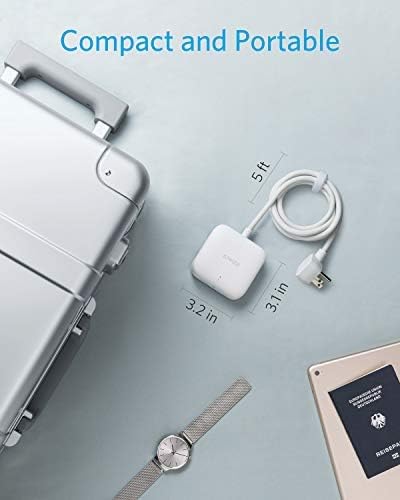
Image: The compact size of the PowerPort Strip 2 mini is demonstrated next to a travel suitcase and a wristwatch, emphasizing its portability.
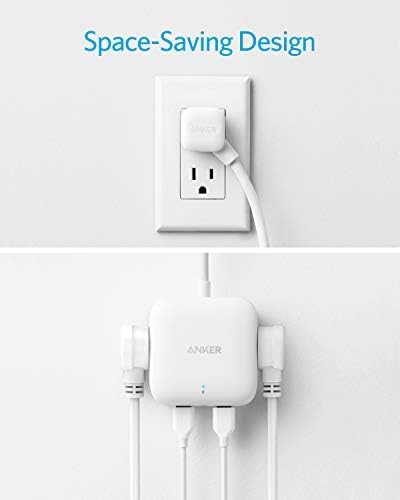
Image: The PowerPort Strip 2 mini plugged into a wall outlet, showcasing its flat plug design that allows other outlets to remain unobstructed, and its side-facing ports for a tidy setup.
3. Uppsetning
Follow these steps to set up your Anker PowerPort Strip 2 mini:
- Taktu upp: Takið rafmagnsröndina varlega úr umbúðunum.
- Tengjast við rafmagn: Plug the power strip's flat plug into a standard 125V AC wall outlet. Ensure the outlet is easily accessible.
- Tengdu tæki: Plug your electronic devices into the available AC outlets or USB ports.
The power strip is now ready for use.
4. Notkunarleiðbeiningar
The Anker PowerPort Strip 2 mini is designed for simple operation:
- Notkun rafmagnsinnstungna: Insert the power plugs of your devices into the two AC outlets. Ensure the total power consumption of connected AC devices does not exceed 1250W.
- Notkun USB tengi: Connect your USB-powered devices (e.g., smartphones, tablets) to the two USB ports using their respective charging cables. The PowerIQ technology will automatically detect your device and deliver an optimized, high-speed charge. Note that this product does not support Qualcomm Quick Charge.
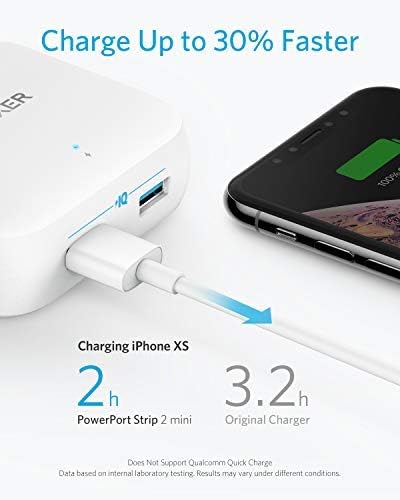
Image: The PowerPort Strip 2 mini charging an iPhone XS, demonstrating its ability to charge devices faster than a standard charger.
5. Öryggisupplýsingar
Til að tryggja örugga notkun og koma í veg fyrir skemmdir skal fylgja eftirfarandi öryggisleiðbeiningum:
- Aðeins innanhússnotkun: This power strip is intended for indoor use in dry locations only. Do not expose to rain, moisture, or liquids.
- Forðastu ofhleðslu: Do not exceed the maximum power rating of 1250W for AC outlets or 24W total for USB ports. Overloading can cause overheating and fire hazards.
- Safety Shutter: The internal safety shutter prevents foreign objects from being inserted into the AC outlets, enhancing safety, especially around children.
- Fire-Retardant Casing: The product features a fire-retardant plastic casing for enhanced safety, offering flame protection up to 1382°F.
- Voltage Samhæfni: The power strip is designed for 125V AC input and output for its AC outlets. The USB ports are compatible with devices requiring 5V USB power. While the unit itself may be compatible with worldwide input voltages (100V-240V), ensure your connected AC devices are also compatible with the local voltage if traveling internationally.
- Skemmtiferðaskipavænt: This power strip is designed without surge protection, making it generally acceptable for use on cruise ships. Always confirm with your specific cruise line's policies regarding electrical devices.
- Rétt meðhöndlun: Do not disassemble, modify, or attempt to repair the device. Do not use if the cord or plug is damaged.
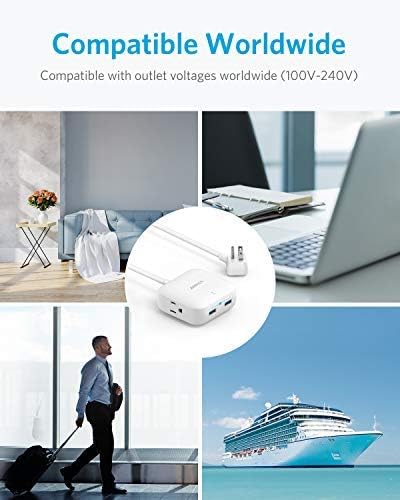
Image: The PowerPort Strip 2 mini shown in different travel environments, illustrating its global voltage compatibility (100V-240V input) and suitability for use on cruise ships.
6. Viðhald
To maintain your Anker PowerPort Strip 2 mini in optimal condition:
- Þrif: Aftengdu rafmagnsröndina úr innstungunni áður en þú þrífur hana. Notaðu mjúkan, þurran klút til að þurrka yfirborðið. Ekki nota fljótandi hreinsiefni eða úðabrúsa.
- Geymsla: When not in use, store the power strip in a cool, dry place away from direct sunlight and extreme temperatures.
- Skoðun: Skoðið rafmagnssnúruna og klóna reglulega til að athuga hvort einhver merki um skemmdir séu á rafmagnssnúrunni. Ef skemmdir finnast skal hætta notkun og hafa samband við þjónustuver.
7. Bilanagreining
If you encounter issues with your Anker PowerPort Strip 2 mini, refer to the following common solutions:
- Engin rafmagn/hleðsla:
- Gakktu úr skugga um að rafmagnsröndin sé tryggilega tengd við virka veggtengil.
- Check if the connected devices are properly plugged into the power strip.
- Staðfestið að tækin sjálf virki rétt.
- Confirm that the total power draw does not exceed the maximum rating.
- Slow USB Charging:
- Gakktu úr skugga um að þú notir hágæða hleðslusnúru.
- The PowerIQ technology optimizes charging speed, but some devices may have specific charging requirements or limitations.
- Note that this product does not support Qualcomm Quick Charge, so devices requiring this technology will charge at standard PowerIQ speeds.
- Ofhitnun:
- Immediately unplug the power strip and all connected devices.
- Check for overloading. Reduce the number of connected devices or their power consumption.
- Tryggið næga loftræstingu í kringum rafmagnsröndina.
If the problem persists, please contact Anker customer support.
8. Tæknilýsing
| Eiginleiki | Forskrift |
|---|---|
| Gerðarnúmer | A9121 |
| AC innstungur | 2 |
| USB tengi | 2 (PowerIQ enabled) |
| AC Input/Output Voltage | 125 volt |
| USB útgangur | 24W Max (5V/2.4A per port) |
| Max AC Power Rating | 1250W |
| Vörumál | 3.11 x 3.15 x 1.34 tommur |
| Þyngd hlutar | 10.6 aura |
| Lengd snúru | 5 fet |
| Sérstakir eiginleikar | Compact, Portable, Flat Plug, Safety Door |
9. Ábyrgð og stuðningur
Anker provides the following warranty and support for the PowerPort Strip 2 mini:
- Takmörkuð ábyrgð: This product is covered by an 18-month worry-free warranty from the date of purchase.
- Ábyrgð á tengdum búnaði: A lifetime* $25,000 connected equipment warranty is provided. *For the purpose of this connected equipment warranty, "lifetime" is defined as the lifetime of the product.
- Þjónustudeild: Fyrir tæknilega aðstoð, ábyrgðarkröfur eða almennar fyrirspurnir, vinsamlegast farðu á opinberu vefsíðu Anker. websíðuna eða hafðu samband við þjónustudeild þeirra.


