1. Inngangur
This manual provides detailed instructions for the setup, operation, and maintenance of your Tera Wireless Barcode Scanner, Model 8541733886. Please read this manual thoroughly before using the device to ensure proper functionality and to prevent damage.
The Tera Wireless Barcode Scanner offers versatile connectivity and efficient scanning capabilities for various barcode types, both printed and digital.
2. Vöru lokiðview
2.1 Íhlutir
Pakkinn inniheldur venjulega:
- Tera Wireless Barcode Scanner
- Hands-Free Stand
- 2.4 GHz þráðlaus USB-dongle
- USB hleðslu/gagnasnúra
- Leiðbeiningar (þetta skjal)

Image: Tera Wireless Barcode Scanner, showing the scanner unit, flexible stand, 2.4GHz USB dongle, and USB cable.
2.2 Helstu eiginleikar
- 3 Connection Modes: Supports Bluetooth, 2.4GHz wireless, and USB 2.0 wired connections.
- Víðtækt eindrægni: Works with POS systems, iOS, Android, Windows, Mac OS, and Linux. Supports Bluetooth HID, SPP, and BLE protocols.
- Fljótleg og nákvæm skönnun: Equipped with an ARM32Bit Cortex CPU and a Japan-manufactured scanner head, achieving decoding speeds up to 500 scans per second.
- Tvöföld upphleðslustilling:
- Skyndiupphalsstilling: Barcodes are transmitted to your device immediately upon scanning.
- Ótengd geymslustilling: Stores up to 50,000 barcodes internally when out of range, allowing for later upload.
- Multi-Language Barcode Support: Capable of scanning barcodes in English, Spanish, German, French, Italian, and Japanese. Ensure your keyboard language matches the selected language for correct input.
- Versatile Barcode Symbologies:
- 1D: UPC-A, UPC-E, EAN-8, EAN-13, Code 128, Code 39, Code 93, Code 11, Interleaved 2 of 5, Matrix 2 of 5, Standard 2 of 5, Coda bar, MSI Plessey, RSS, etc.
- 2D: QR Code, Data Matrix, PDF417, Aztec code, Maxicode, etc.
- Ending: Designed to withstand impacts from drops of up to 1.5 meters (5 feet) onto concrete.
- Langur rafhlöðuending: Built-in 2200mAh battery supports approximately 57,000 scans on a full charge, with up to 15 days of standby time.
3. Uppsetning
3.1 Hleðsla skannans
Áður en skannann er notaður í fyrsta skipti skal hlaða hann að fullu. Tengdu USB hleðslusnúruna við hleðslutengi skannans og við USB aflgjafa (t.d. USB tengi tölvu, USB millistykki). Vísirljósið sýnir hleðslustöðuna.

Image: Illustration showing the scanner's 2200mAh battery capacity and its ability to withstand a 1.5-meter drop.
3.2 Tengistillingar
Skanninn styður þrjár tengiaðferðir:

Image: Visual representation of the three connection modes: Bluetooth, 2.4G Wireless via USB dongle, and USB Wired connection.
3.2.1 USB Wired Mode (Plug & Play)
- Tengdu skannann beint við tölvuna þína með meðfylgjandi USB snúru.
- The computer will typically recognize the device automatically without requiring driver installation.
- Skanni er tilbúinn til notkunar.

Image: The scanner connected to a laptop, illustrating its plug-and-play functionality and compatibility with various operating systems including Windows, Mac OS, Linux, and Android.
3.2.2 2.4 GHz þráðlaus stilling
- Insert the 2.4GHz USB dongle into an available USB port on your computer or device.
- Kveiktu á strikamerkjaskannanum. Hann ætti að parast sjálfkrafa við donglinn.
- A successful connection is usually indicated by a specific sound or light on the scanner.
3.2.3 Bluetooth-stilling
- Ensure your device (smartphone, tablet, computer) has Bluetooth enabled.
- Put the scanner into Bluetooth pairing mode (refer to the scanner's quick start guide for specific instructions, usually by scanning a special barcode).
- On your device, search for available Bluetooth devices and select "Tera Barcode Scanner" (or similar name).
- Staðfestu pörun ef beðið er um það.
Athugið: Wireless range varies. Indoors with obstacles, Bluetooth range is approximately 33ft, and 2.4GHz wireless is approximately 98ft. Outdoors in barrier-free environments, Bluetooth range is approximately 65ft, and 2.4GHz wireless is approximately 328ft.
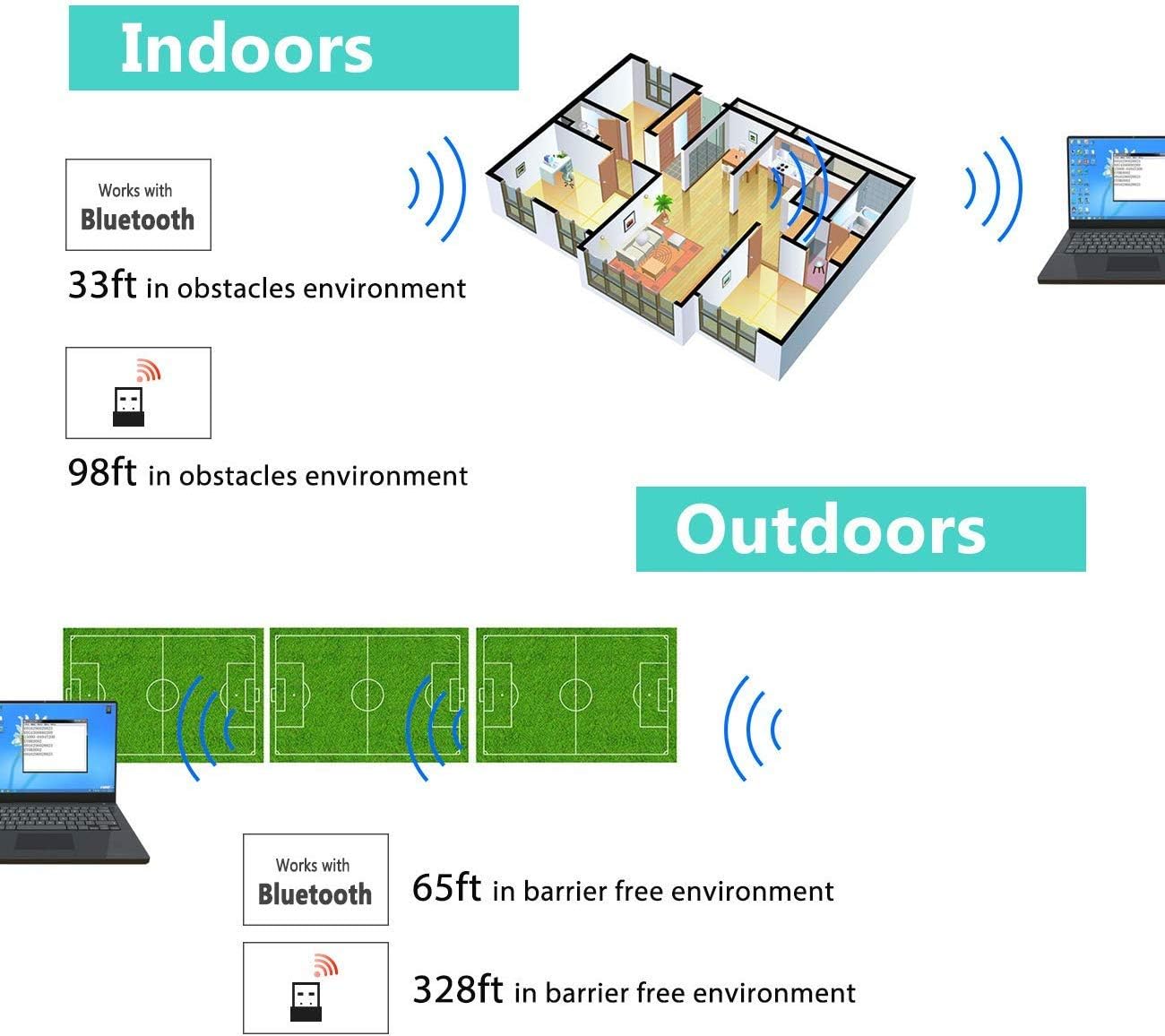
Image: Diagram illustrating the effective wireless range of the scanner in both indoor (with obstacles) and outdoor (barrier-free) environments for Bluetooth and 2.4GHz connections.
4. Notkunarleiðbeiningar
4.1 Skanna strikamerki
The scanner can read both 1D and 2D barcodes, including QR codes, from printed materials and digital screens.
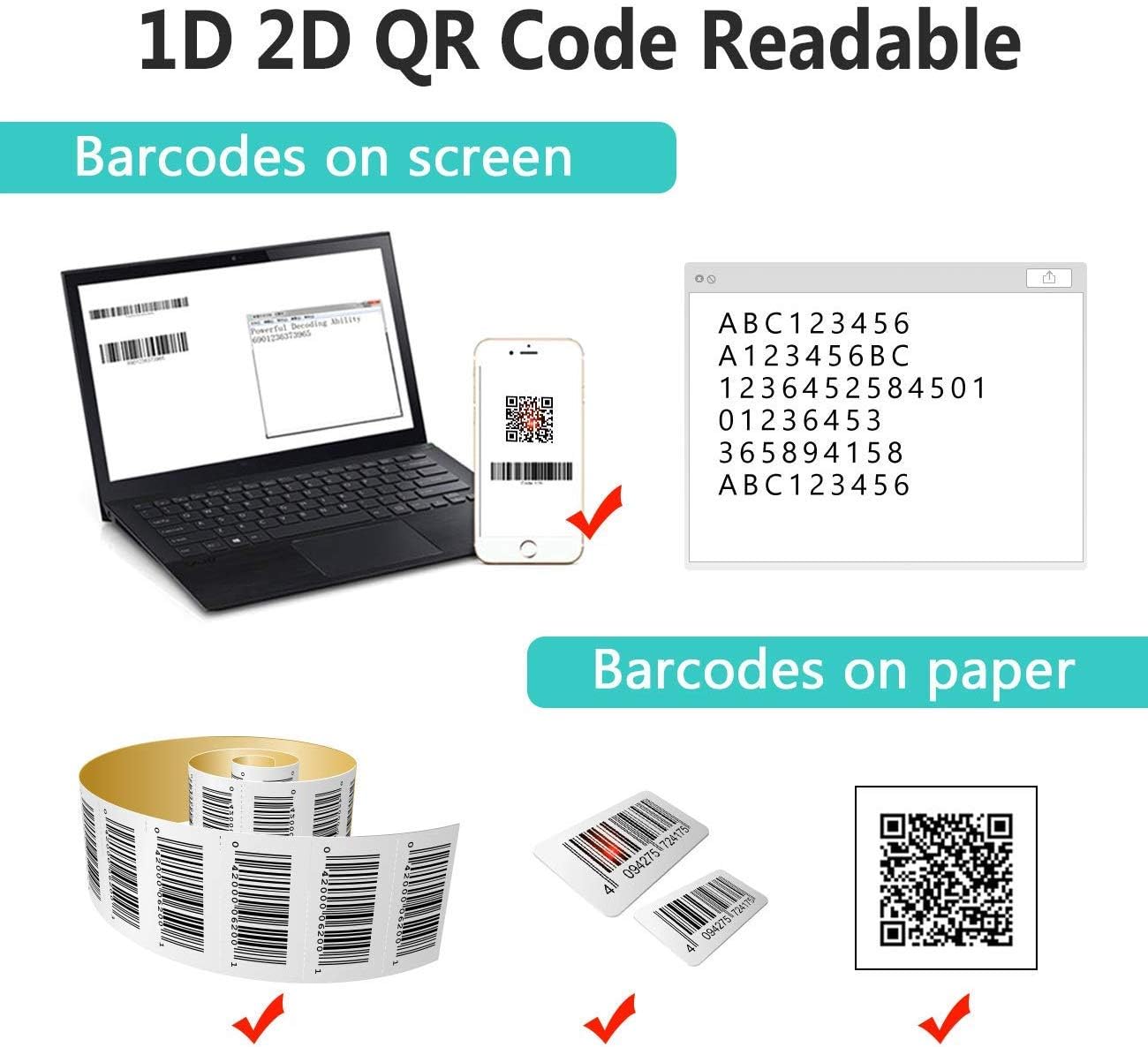
Image: The scanner demonstrating its ability to read 1D and 2D barcodes from both digital screens (laptop, smartphone) and physical printed labels.
Til að skanna strikamerki:
- Point the scanner's window at the barcode.
- Press the trigger button (or allow the sensor to activate in automatic modes).
- A successful scan is indicated by a beep and/or a green light.
4.2 Skannunarstillingar
Skanninn styður þrjár aðal skönnunarstillingar:

Image: The barcode scanner mounted on its stand, highlighting its 360-degree rotation capability and the three available scanning modes: Key Trigger Mode, Sensor Activated Mode, and Continuous Scan Mode.
- Lyklaræsingarstilling: Scan by manually pressing the trigger button for each barcode.
- Sensor Activated Mode: Skanninn virkjast sjálfkrafa þegar strikamerki greinist í skjánum. view.
- Stöðug skannastilling: The scanner continuously emits a scan beam, reading any barcode that passes through it.
Refer to the quick start guide or programming barcodes for instructions on how to switch between these modes.
4.3 Gagnaupphleðslustillingar
The scanner offers two methods for uploading scanned data:
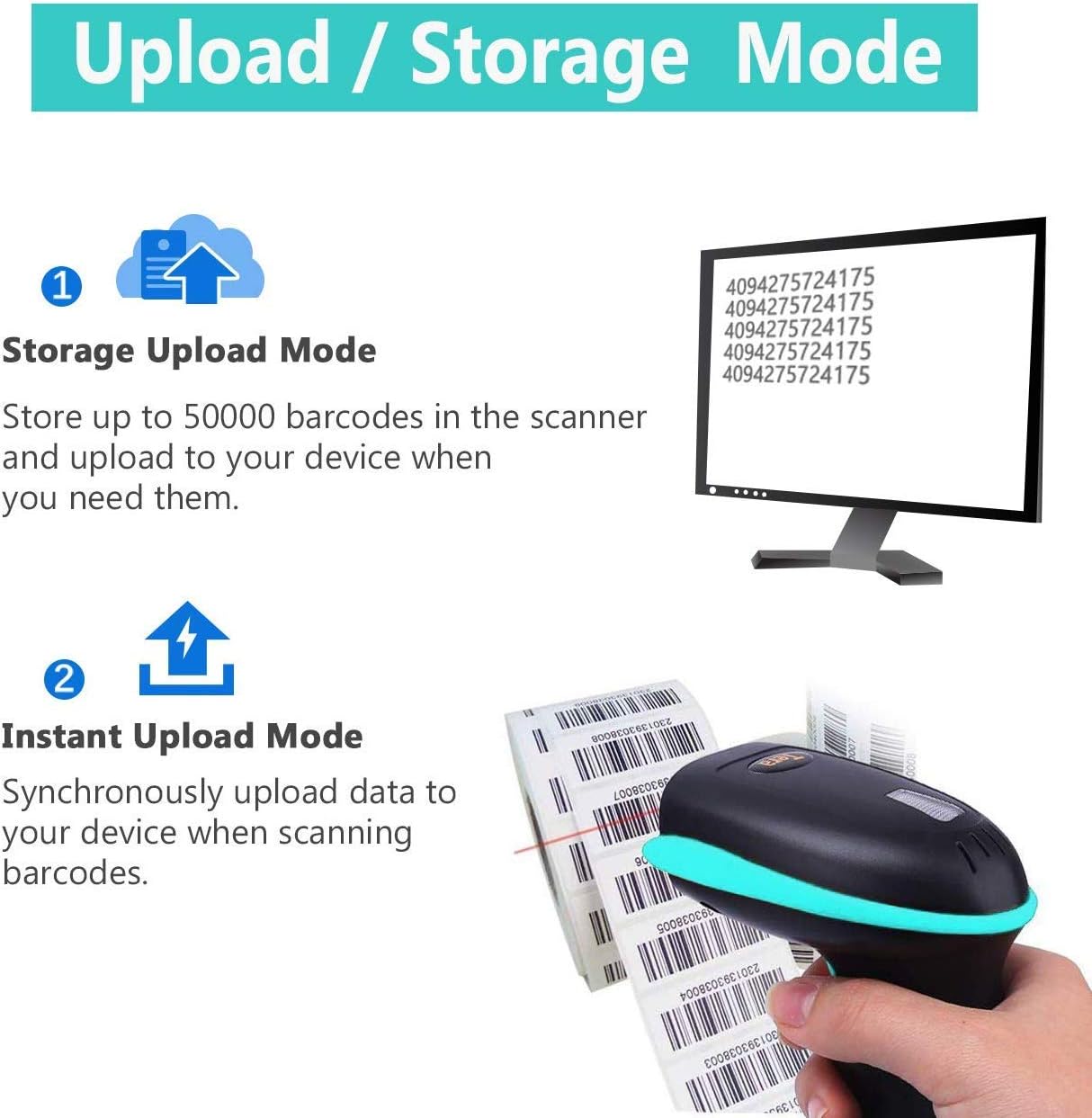
Image: Illustration of the two data upload modes: Storage Upload Mode, where barcodes are stored internally and uploaded later, and Instant Upload Mode, where data is transmitted immediately.
- Skyndiupphalsstilling: Barcodes are sent to your connected device immediately after scanning. This is suitable for real-time data entry.
- Ótengd geymslustilling: If the scanner is out of range or not connected, it will store scanned barcodes internally. Up to 50,000 barcodes can be stored. Once reconnected, you can upload the stored data to your device.
To switch between upload modes, scan the appropriate programming barcode found in the quick start guide.
5. Viðhald
5.1 Þrif
- Notið mjúkan, hreinan klút örlítiðampened with water or a mild cleaning solution to wipe the scanner's exterior.
- Do not use abrasive cleaners, solvents, or excessive liquid, as these can damage the device.
- Keep the scanning window clean and free of dust or smudges to ensure optimal reading performance.
5.2 Umhirða rafhlöðu
- Hlaðið skannann reglulega, sérstaklega ef hann verður geymdur í langan tíma.
- Forðastu að tæma rafhlöðuna alveg oft, því það getur stytt líftíma hennar.
- Geymið skannann á köldum og þurrum stað þegar hann er ekki í notkun.
5.3 Geymsla
When not in use, store the scanner in a safe place to prevent physical damage. The included stand can be used for convenient storage and hands-free operation.
6. Bilanagreining
| Vandamál | Möguleg orsök | Lausn |
|---|---|---|
| Skanninn kveikir ekki á sér. | Lítið rafhlaða. | Hladdu skannann í að minnsta kosti 2-3 klukkustundir. |
| Skanninn les ekki strikamerki. |
|
|
| No data transmitted to device. |
|
|
| Scanner beeps continuously or behaves erratically. | Configuration error or internal issue. | Perform a factory reset (refer to the quick start guide for the reset barcode). If the issue persists, contact support. |
7. Tæknilýsing
- Gerðarnúmer: 8541733886
- Vörumál: 6.1 x 2.55 x 3.54 tommur
- Þyngd hlutar: 1.05 pund
- Rafhlaða: 1 litíumjónarafhlaða (2200mAh)
- Tengingar: Bluetooth, 2.4GHz Wireless, USB 2.0 Wired
- Samhæf tæki: Desktop, Laptop, Smartphone (POS, iOS, Android, Windows, Mac OS, Linux)
- Aflgjafi: Rafmagnstenging með snúru (til hleðslu)
- Framleiðandi: Tera
- Fyrsta fáanlegt: 7. maí 2019
8. Ábyrgð og stuðningur
8.1 Upplýsingar um ábyrgð
For specific warranty details, please refer to the warranty card included with your product or visit the official Tera webGeymið kaupkvittunina sem sönnun fyrir kaup vegna ábyrgðarkröfu.
8.2 Þjónustuver
If you encounter any issues not covered in this manual or require further assistance, please contact Tera customer support. Contact information can typically be found on the product packaging, the official Tera websíðuna eða í gegnum söluaðila þinn.
Þegar þú hefur samband við þjónustuver skaltu hafa vörunúmerið þitt (8541733886) og kaupupplýsingar tiltækar.


Image: Illustrations representing customer service and technical support teams available to assist users.


