1. Inngangur
The Verbatim Keypad Secure USB 3.0 Flash Drive provides secure data storage with 256-bit AES hardware encryption and a built-in keypad for password entry. This manual provides essential information for setting up, operating, maintaining, and troubleshooting your device, ensuring your data remains protected and accessible.

Image: Verbatim Keypad Secure USB drive connected to a laptop, illustrating its secure function.
2. Öryggisupplýsingar
- Ekki láta tækið verða fyrir miklum hita, beinu sólarljósi eða miklum raka.
- Forðist að missa tækið eða láta það verða fyrir miklum höggum.
- Geymið þar sem börn ná ekki til.
- Ekki reyna að taka tækið í sundur eða breyta því. Það ógildir ábyrgðina og getur valdið skemmdum.
- Tryggið góða loftræstingu við notkun til að koma í veg fyrir ofhitnun.
3. Vöru lokiðview
Helstu eiginleikar:
- Built-in Keypad: For secure password entry, supporting up to 12 digits.
- 256-bit AES Hardware Encryption: Encrypts all data on the drive in real-time.
- 100% Data Encryption: Ensures complete data protection.
- Data Wipe Feature: Automatically erases data after multiple failed password attempts to prevent unauthorized access.
- USB 3.0 Type-A Interface: Offers high-speed data transfer, backward compatible with USB 2.0.
- Samhæfni milli palla: Works with both PC (Windows) and Mac operating systems.
- 32GB geymslurými: Ample space for important documents, photos, and videos.
Íhlutir:
- USB tengi: Standard USB Type-A for connecting to your computer.
- Takkaborð: Numeric keys (0-9) and lock/unlock buttons for password input.
- LED Vísar: Display power, lock, and encryption status.
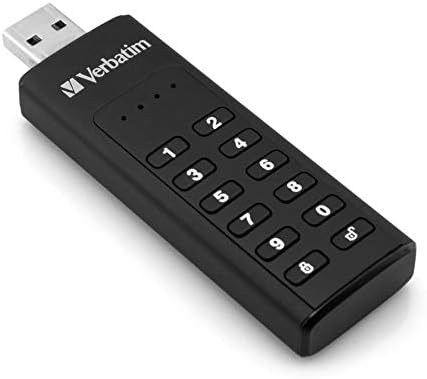
Image: Close-up of the Verbatim Keypad Secure USB drive, highlighting the keypad.
4. Uppsetning
Follow these steps for initial setup and password creation:
- Tengdu drifið: Plug the Verbatim Keypad Secure USB drive into an available USB port on your computer. The drive's LED indicators will illuminate.
- Initial Password Entry: The drive will typically require an initial default password. Refer to the small instruction leaflet included in the packaging for this default password.
- Set Your Personal Password: After entering the default password and unlocking the drive, you will be prompted to set a new, personal password. This password should be between 6 and 12 digits long. Enter your desired password and confirm it.
- Drive Initialization (if necessary): For some operating systems or if the drive is not immediately recognized, you may need to initialize and format the drive through your computer's disk management utility. Follow on-screen prompts or consult your operating system's help for 'Disk Management' or 'Disk Utility'.
- Tryggið drifið: Once your password is set, the drive will automatically lock when removed from the USB port or after a period of inactivity.

Image: Connecting the Verbatim Keypad Secure USB drive to a computer via a USB hub.
5. Notkunarleiðbeiningar
Unlocking the Drive:
- Plug the drive into a USB port.
- Ýttu á Opnaðu button (often represented by an open padlock icon) on the keypad.
- Enter your personal password using the numeric keys.
- Ýttu á Opnaðu button again to confirm. The LED indicator will change to show the drive is unlocked and ready for use.
Flutningur gagna:
Once unlocked, the drive functions like any standard USB flash drive. You can drag and drop files, copy and paste, or save directly to the drive.
Locking the Drive:
The drive automatically locks when safely ejected from the computer or when power is removed. To manually lock the drive while connected, press the Læsa button (often represented by a closed padlock icon) on the keypad.
Örugg fjarlæging:
Always safely eject the USB drive from your operating system before physically removing it from the USB port to prevent data corruption.
6. Viðhald
- Halda hreinu: Notið mjúkan, þurran klút til að þrífa ytra byrði drifsins. Forðist fljótandi hreinsiefni.
- Uppfærsla vélbúnaðar: Periodically check the Verbatim websíðuna til að sjá allar tiltækar uppfærslur á vélbúnaði fyrir tækið þitt til að tryggja bestu mögulegu afköst og öryggi.
- Öryggisafritun gagna: While the drive offers strong security, it is always recommended to maintain backups of critical data on multiple storage devices.
- Geymsla: Store the drive in a cool, dry place away from direct sunlight and strong magnetic fields.
7. Bilanagreining
- Tölvan þekkir ekki drifið:
- Gakktu úr skugga um að drifið sé alveg sett í USB tengið.
- Prófaðu annað USB tengi á tölvunni þinni.
- Prófaðu diskinn á annarri tölvu til að útiloka vandamál sem tengist tölvunni.
- Check your computer's Device Manager (Windows) or Disk Utility (Mac) to see if the drive is detected but not assigned a drive letter or formatted.
- Cannot unlock the drive:
- Gakktu úr skugga um að þú sért að slá inn rétt lykilorð.
- The drive will wipe its data after a certain number of incorrect password attempts (typically 10-20 attempts). If this occurs, the data is unrecoverable, and the drive will need to be reset and reformatted.
- Hæg gagnaflutningshraði:
- Ensure you are connected to a USB 3.0 port on your computer for optimal performance. USB 2.0 ports will result in slower speeds.
- Avoid using long or low-quality USB extension cables, as these can degrade transfer speeds.
- Stórt file transfers can sometimes cause the drive to warm up, which may lead to a temporary reduction in speed to protect the device.
- Drive gets warm during use:
- It is normal for the drive to become warm during extended periods of data transfer, especially with USB 3.0 speeds. This is generally not a cause for concern unless it becomes excessively hot to touch.
8. Tæknilýsing
| Nafn líkans | Keypad Secure |
| Gerðarnúmer | 49427 |
| Getu | 32 GB |
| Viðmót | USB 3.0 (USB 3.1 Gen 1) Type-A |
| Dulkóðun | AES 256-bit Hardware Encryption |
| Lestu hraða | Allt að 160 MB/s |
| Skrifa hraði | Allt að 130 MB/s |
| Samhæfni | Windows 7, 8, 10; Mac OS X 10.4 or higher |
| Mál (L x B x H) | 93.5 mm x 28 mm x 12 mm |
| Þyngd | 30 g |
| Litur | Svartur |

Image: Dimensional diagram of the Verbatim Keypad Secure USB drive.
9. Upplýsingar um ábyrgð
For detailed warranty information, please refer to the warranty card included with your product packaging or visit the official Verbatim webá síðunni. Ábyrgðarskilmálar geta verið mismunandi eftir svæðum.
10. Stuðningur
If you encounter any issues or have questions not covered in this manual, please visit the official Verbatim support webvefsíða fyrir algengar spurningar, niðurhal á rekla og upplýsingar um tengiliði vegna tæknilegrar aðstoðar.
Opinber Websíða: www.verbatim.com


