Inngangur
This manual provides comprehensive instructions for the proper use and maintenance of your ELECTROPRIME 8GB Rechargeable USB LCD Digital Voice Recorder, Model ASH20BEBUBEB26998. Please read this manual thoroughly before operating the device to ensure optimal performance and longevity. Keep this manual for future reference.
Vara lokiðview
The ELECTROPRIME Digital Voice Recorder is a compact and versatile device designed for high-quality audio recording and MP3 playback. It features an LCD screen for easy navigation, 8GB of internal storage, and a rechargeable battery.
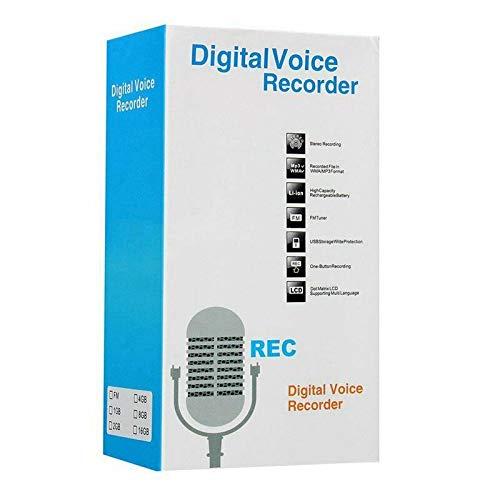
Figure 1: ELECTROPRIME Digital Voice Recorder with included accessories, including earphones, USB cable, and telephone adapter.
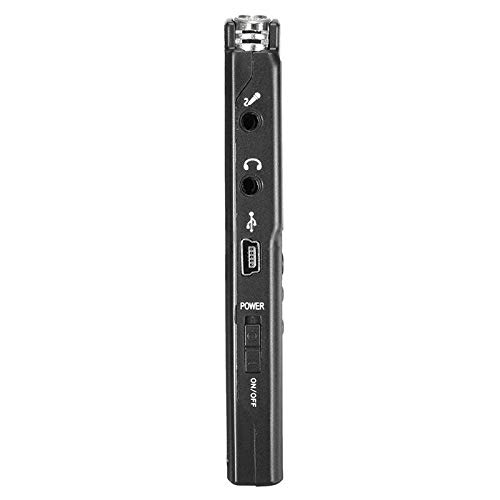
Mynd 2: Hlið view of the recorder, highlighting the USB port, headphone jack, microphone input, and power switch.
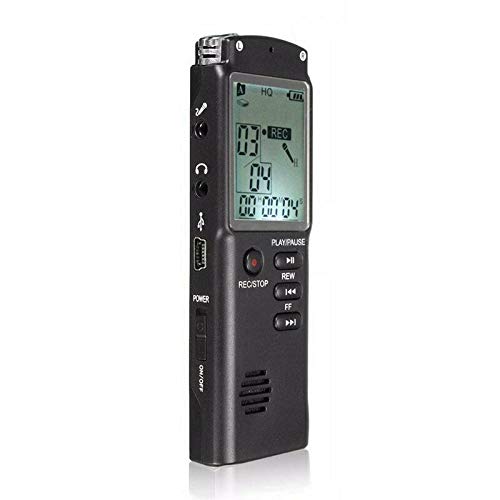
Mynd 3: Framan view of the recorder, displaying the LCD screen with recording information and control buttons.
Uppsetning
- Hleðsla tækisins: Connect the recorder to a computer's USB port or a USB wall adapter using the provided USB cable. The LCD screen will indicate charging status. A full charge typically takes 2-3 hours.
- Kveikt/slökkt: Locate the ON/OFF switch on the side of the device. Slide it to the "ON" position to power on and to the "OFF" position to power off.
- Upphafleg uppsetning: Upon first power-on, you may need to set the date and time. Use the navigation buttons (REW, FF) and Play/Pause button to adjust and confirm settings.
Notkunarleiðbeiningar
Hljóðupptaka
- Hefja upptöku: Þegar tækið er kveikt á, ýttu á REC/STOP button once. The LCD will display "REC" and a timer, indicating that recording has started.
- Gera hlé á upptöku: Meðan á upptöku stendur ýtirðu á SPILA/HÁT button to pause. Press it again to resume.
- Hætta upptöku: Ýttu á REC/STOP button again to stop recording. The recording will be saved automatically.
Spila upptökur
- Aðgangur að upptökum: In standby mode, use the REW or FF buttons to navigate through your saved recordings.
- Spila / gera hlé: Ýttu á SPILA/HÁT button to start playback of the selected recording. Press again to pause.
- Stilla hljóðstyrk: Use the volume control buttons (if present, typically on the side or via menu) to adjust playback volume.
Flytur Files í tölvu
- Tengjast: Connect the recorder to your computer using the USB cable.
- Aðgangstæki: Upptökutækið mun birtast sem flytjanlegur harðadiskur á tölvunni þinni.
- Flutningur: Open the drive, locate your audio files (usually in a folder like "RECORD" or "VOICE"), and copy them to your computer.
Using as an MP3 Player
The device supports MP3 audio playback. Transfer MP3 files to the device's internal storage via USB connection. Use the REW og FF buttons to select tracks and SPILA/HÁT til að stjórna spilun.
Viðhald
- Þrif: Notið mjúkan, þurran klút til að þrífa ytra byrði tækisins. Notið ekki fljótandi hreinsiefni eða leysiefni.
- Umhirða rafhlöðu: Til að lengja endingu rafhlöðunnar skaltu forðast að tæma tækið alveg oft. Hladdu tækið reglulega, jafnvel þótt það sé ekki í notkun í langan tíma.
- Geymsla: Geymið tækið á köldum, þurrum stað fjarri beinu sólarljósi, miklum hita og miklum raka.
- Forðastu áhrif: Verndaðu tækið gegn falli og höggum, sem geta skemmt innri íhluti.
Úrræðaleit
| Vandamál | Möguleg lausn |
|---|---|
| Ekki kveikir á tækinu. | Ensure the battery is charged. Connect to a USB power source and try again. Check the ON/OFF switch position. |
| Get ekki tekið upp hljóð. | Check if the device has sufficient memory. Delete old files if necessary. Ensure the microphone is not obstructed. |
| Tölvan þekkir ekki tækið. | Prófaðu aðra USB-tengi eða snúru. Gakktu úr skugga um að tækið sé kveikt á þegar það er tengt. Endurræstu tölvuna. |
| Léleg hljóðgæði. | Ensure the recording environment is quiet. Keep the device close to the audio source. Check recording settings (if adjustable). |
Tæknilýsing
- Vörumerki: RAFFRÆÐI
- Gerðarnúmer: ASH20BEBUBEB26998
- Geymslugeta minni: 8 GB
- Hljóðsnið: MP3
- Vélbúnaðarviðmót: USB
- Samhæf tæki: MP3 spilari
- Aflgjafi: Endurhlaðanleg rafhlaða (USB hleðsla)
Ábyrgð og stuðningur
Specific warranty information for this product is not provided in the available documentation. For warranty claims or technical support, please contact your retailer or the manufacturer, ELECTROPRIME, directly. Retain your proof of purchase for any warranty-related inquiries.
For further assistance, please refer to the official ELECTROPRIME websíðuna eða hafðu samband við þjónustudeild þeirra.