Inngangur
This manual provides comprehensive instructions for the setup, operation, and maintenance of your JMGO N7L projector. Please read this manual thoroughly before using the device to ensure proper functionality and to maximize your viewing experience. The JMGO N7L is a compact home cinema projector featuring Native 1080P Full HD resolution, 4K compatibility, Android OS, auto-focus, and keystone correction.
Vara lokiðview
Helstu eiginleikar
- Native 1080P Full HD Display: Offers 1920x1080 resolution, compatible with 4K video input.
- 700 ANSI Lúmen Birtustig: Provides clear images in various lighting conditions.
- Auto Focus & Keystone Correction: Automatic image adjustment for clarity and rectangular projection from different angles.
- Android stýrikerfi: Integrated operating system for direct access to streaming applications and content.
- Rík viðmót: Multiple ports for connecting external devices.
- Dual-band Wi-Fi: Supports 2.4G and 5G networks for stable online streaming.
- Integrated Bluetooth Speaker: Functions as a standalone Bluetooth speaker.
- 3D Video Support: Capable of displaying 3D content.
Skjávarpa íhlutir
The JMGO N7L features a compact, round design. Below are images illustrating its appearance and available connection ports.

Mynd 1: Að ofan view of the JMGO N7L projector, showcasing its sleek, circular design with a metallic finish.
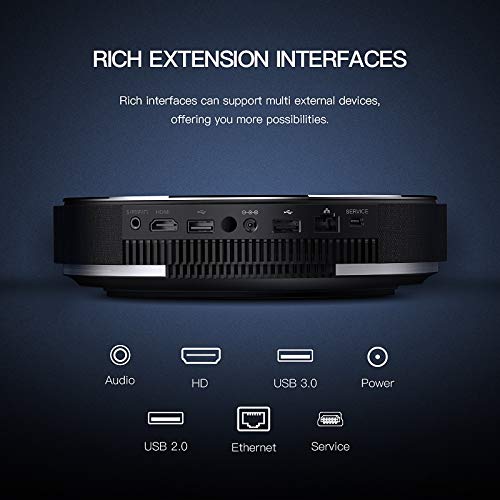
Mynd 2: Aftan view of the JMGO N7L projector, highlighting the various input and output ports including Audio, HDMI, USB 3.0, Power, USB 2.0, Ethernet, and Service ports.

Mynd 3: Diagram illustrating the versatility of the JMGO N7L projector, showing its ability to connect to various devices such as set-top boxes, game controllers, laptops, and external speakers, functioning as a central entertainment hub.
Uppsetning
1. Staðsetning
Position the projector on a stable, flat surface. Ensure there is adequate ventilation around the device. For optimal viewing, place the projector directly in front of the projection surface (wall or screen). The throw ratio of 1.2:1 allows for a 2-meter wide image from a 2.5-meter distance.
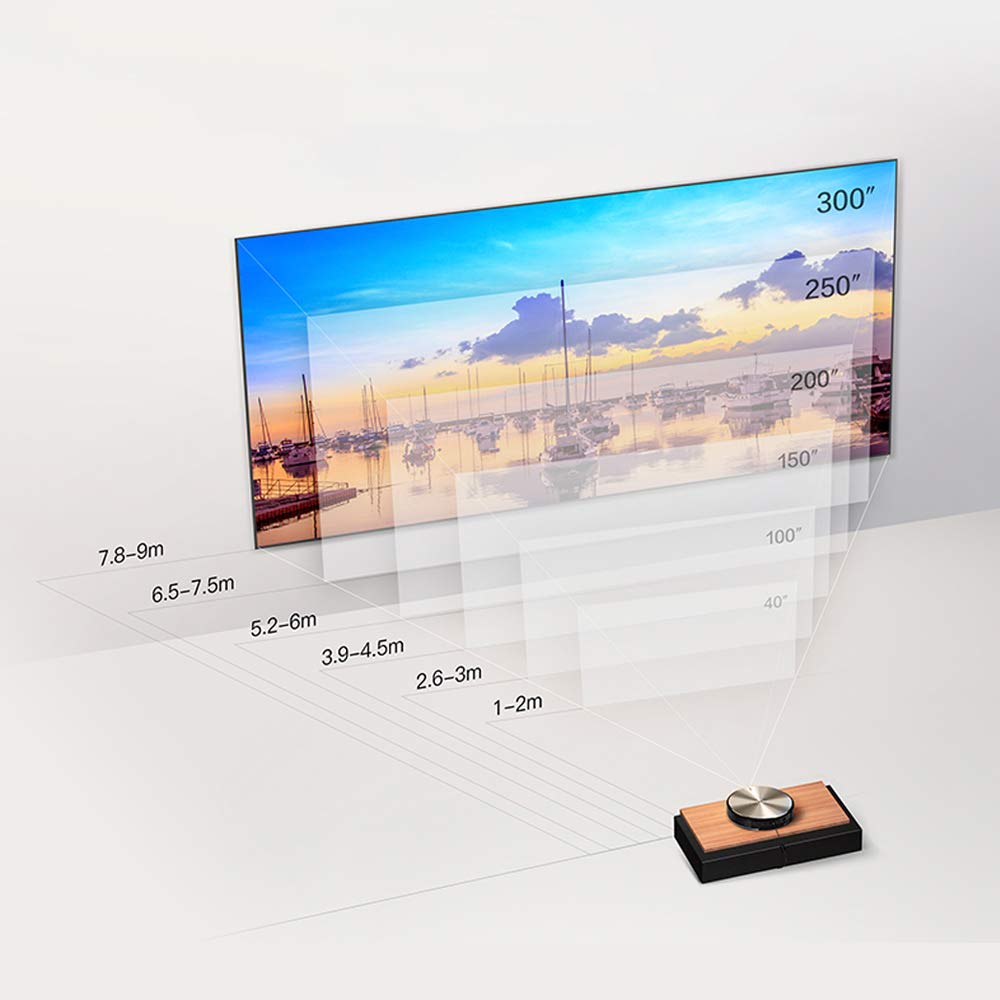
Mynd 4: Projection distance chart for the JMGO N7L, showing recommended distances for various screen sizes from 40 inches to 300 inches.

Mynd 5: The JMGO N7L projector positioned on a bedside table, demonstrating its compact size and suitability for various room settings.
2. Rafmagnstenging
- Tengdu straumbreytinn við aflgjafainntak skjávarpans.
- Stingdu straumbreytinum í viðeigandi rafmagnsinnstungu.
3. Initial Power On and Image Adjustment
- Ýttu á aflhnappinn á skjávarpanum eða fjarstýringunni til að kveikja á tækinu.
- The projector will automatically perform Sjálfvirkur fókus to ensure a clear image.
- Leiðrétting á hljómsteini will also automatically adjust the image to be rectangular, even if the projector is not perfectly aligned with the screen. Manual adjustments can typically be made via the settings menu if needed.

Mynd 6: Illustration of the JMGO N7L's auto-focus feature, which automatically adjusts the image for clarity upon startup.
4. Að tengja ytri tæki
Utilize the various ports on the rear of the projector to connect your desired devices:
- HDMI: For connecting Blu-ray players, gaming consoles, laptops, or other HDMI-enabled devices.
- USB 2.0/3.0: For connecting USB drives, external hard drives, or other USB peripherals.
- Ethernet: Fyrir snúrubundið internettengingu.
- Audio Output (3.5mm S/PDIF and 2-in-1 headphones): Til að tengja ytri hljóðkerfi eða heyrnartól.
Notkunarleiðbeiningar
1. Kveikt/slökkt
- Til að kveikja á: Ýttu á rofann á skjávarpanum eða fjarstýringunni.
- Til að slökkva á: Press the power button again. A shutdown menu may appear, allowing you to confirm power off or enter standby mode.
2. Navigating the Android OS
The JMGO N7L runs on a customized Android operating system, providing access to various applications and settings. Use the remote control to navigate the interface.
- Heimaskjár: Displays installed applications, recommended content, and system shortcuts.
- Stillingar: Access network settings, display options, sound settings, and system information.
- App Store: Download and install additional applications for streaming, gaming, and productivity.

Mynd 7: Screenshot of the JMGO OS interface, showing various applications and settings icons, indicating its Android-based smart functionality.
3. Wi-Fi tenging
- Farðu til Stillingar á heimaskjánum.
- Veldu Net og internet eða svipaður valkostur.
- Enable Wi-Fi and select your desired 2.4G or 5G network from the list.
- Sláðu inn lykilorðið ef beðið er um það og tengstu.
4. Using as a Bluetooth Speaker
The JMGO N7L can function as an independent Bluetooth speaker even in standby mode.
- Ensure the projector is powered on or in standby mode.
- Kveiktu á Bluetooth í farsímanum þínum og leitaðu að tiltækum tækjum.
- Select "JMGO N7L" (or similar name) from the list to pair.
- Once connected, audio from your mobile device will play through the projector's speakers.
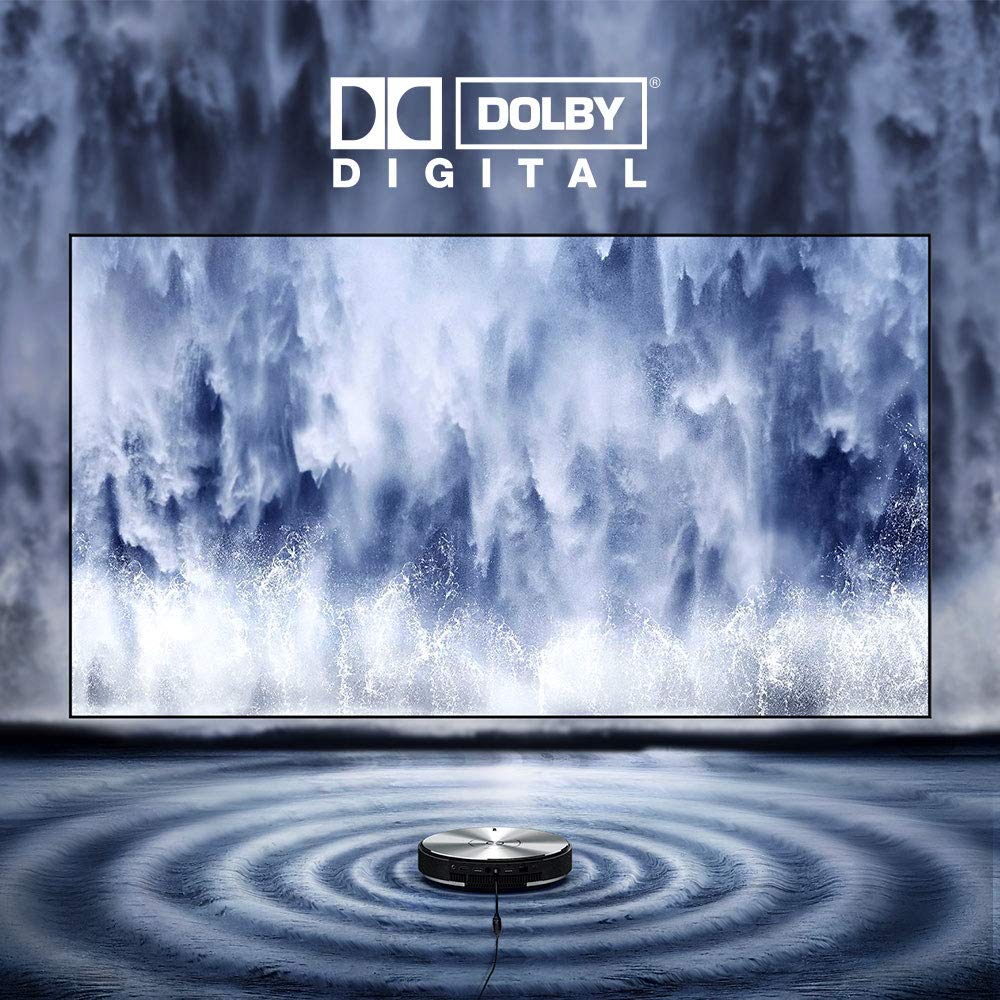
Mynd 8: Visual representation of the JMGO N7L's audio capabilities, featuring Dolby Digital sound, with sound waves emanating from the projector.
5. 3D Video Playback
The JMGO N7L supports 3D video playback. To experience 3D content, you will need compatible 3D glasses (sold separately) and 3D-formatted video content.
- Play a 3D video file or stream 3D content.
- The projector should automatically detect the 3D format. If not, check display settings for 3D options.
- Wear your 3D glasses to view the content in three dimensions.
Viðhald
- Þrif á linsunni: Notið mjúkan, lólausan klút sem er sérstaklega hannaður fyrir sjónlinsur. Notið ekki slípiefni eða klúta sem gætu rispað linsuna.
- Hreinsun að utan: Þurrkið ytra byrði skjávarpans með mjúkum, þurrum klút. Fyrir þrjósk bletti, þurrkið örlítið.amp Hægt er að nota klút, en gætið þess að raki komist ekki inn í tækið.
- Loftræsting: Gakktu úr skugga um að loftræstiop séu laus við ryk og hindranir til að koma í veg fyrir ofhitnun. Ekki loka fyrir loftræstiop meðan á notkun stendur.
- Geymsla: Þegar skjávarpinn er ekki í notkun í langan tíma skal geyma hann á köldum, þurrum stað, fjarri beinu sólarljósi og miklum hita.
Úrræðaleit
Engin mynd eða óskýr mynd
- Ensure the projector is powered on and connected correctly.
- Check the input source. Verify that the correct HDMI or other input is selected.
- Allow the auto-focus feature to complete. If the image remains blurry, try restarting the projector or manually adjusting focus via settings if available.
- Verify the projection distance is within the recommended range (refer to Figure 4).
Ekkert hljóð
- Athugaðu hljóðstyrkinn bæði á skjávarpanum og tengda tækinu.
- Ensure that external speakers are properly connected if used, and that the audio output setting on the projector is correct.
- If using HDMI, ensure the audio is not muted on the source device.
Vandamál með Wi-Fi tengingu
- Ensure your Wi-Fi router is working correctly and within range.
- Staðfestu að Wi-Fi lykilorðið sem slegið var inn sé rétt.
- Try restarting both the projector and your Wi-Fi router.
- Íhugaðu að nota snúrubundna Ethernet-tengingu ef vandamál koma upp viðvarandi.
Fjarstýring svarar ekki
- Athugaðu og skiptu um rafhlöður í fjarstýringunni.
- Gakktu úr skugga um að engar hindranir séu á milli fjarstýringarinnar og innrauðs móttakara skjávarpans.
Tæknilýsing
| Eiginleiki | Smáatriði |
|---|---|
| Vörumerki | JmGO |
| Fyrirmynd | N7L |
| Birtustig | 700 ANSI lumen |
| Innfæddur upplausn | 1920 x 1080 (Full HD) |
| Compatible Max Resolution | 4K |
| Skjátækni | DLP |
| Lamp Tegund | LED |
| Aðalflís | 4-core CPU, 8-core GPU |
| RAM / Flash minni | 2 GB DDR3 / 16 GB eMMC |
| Vélbúnaðarviðmót | Bluetooth, WiFi |
| Tengitækni | Wi-Fi (2.4G & 5G Dual-band) |
| Sérstakir eiginleikar | Auto Focus, Keystone Correction, Portable, Wireless, Built-in Speaker |
| Hljóðúttak | 3.5mm S/PDIF and 2-in-1 headphones |
| Þyngd hlutar | 2.48 kg |
| Stærðir pakka | 29.2 x 28.4 x 12.2 cm |
Ábyrgð og stuðningur
For information regarding warranty coverage, technical support, or service inquiries, please refer to the warranty card included with your product or visit the official JmGO webGeymið kaupkvittunina sem sönnun fyrir kaup vegna ábyrgðarkröfu.