Inngangur
The Tenda A300 Wireless N300 Universal Range Extender is designed to extend the coverage of an existing wireless network. It eliminates Wi-Fi dead zones and provides reliable wireless connectivity for devices in areas with weak signal strength. This manual provides instructions for setting up, operating, and maintaining your A300 range extender.
Innihald pakka
- Tenda A300 Wireless N300 Universal Range Extender
- Quick Installation Guide (This document serves as a comprehensive guide)
- Ethernet Cable (for wired connection setup, if applicable)
Vinsamlegast athugið innihald pakkans vandlega. Ef einhver hlutur vantar eða er skemmdur, hafið samband við söluaðila.
Vara lokiðview
Familiarize yourself with the physical features of your Tenda A300 range extender.
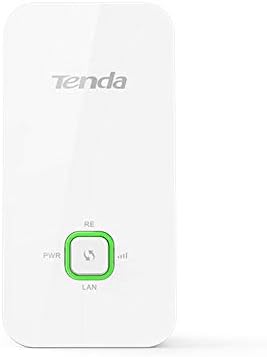
Mynd 1: Framan View of Tenda A300. This image displays the front panel of the Tenda A300, showing the Tenda logo at the top, and three indicator lights (PWR, RE, Signal Strength) and a button (RE button) at the bottom. The device is white with a sleek, rectangular design.

Mynd 2: Hornlaga View with Power Plug. This image shows the Tenda A300 from an angled perspective, highlighting its wall-plug design. The power prongs are visible on the back, indicating direct wall socket insertion. Ventilation slots are visible on the side.
LED Vísar:
- PWR (kraftur): Gefur til kynna orkustöðu tækisins.
- RE (Dreifingartæki): Indicates the connection status to the main router.
- Merkjastyrkur: Displays the strength of the signal received from the main router.
- LAN: Indicates the status of the wired connection via the Ethernet port.
Hnappar og hafnir:
- RE Button: Used for WPS (Wi-Fi Protected Setup) connection to the main router.
- Endurstilla hnappur: A small pinhole button to restore the device to factory default settings.
- LAN Port (10/100M): An Ethernet port for connecting a wired device or for initial setup.
Uppsetning
The Tenda A300 can be set up using two methods: WPS (Wi-Fi Protected Setup) or through a web vafra.
Method 1: WPS Setup (Recommended for WPS-enabled routers)
- Kveikt á: Plug the A300 into a power outlet near your main wireless router. Wait for the PWR LED to turn solid.
- Virkja WPS á leiðinni: Press the WPS button on your main wireless router. Refer to your router's manual for the exact location and procedure.
- Virkja WPS á útvíkkara: Within two minutes, press the RE button on the Tenda A300. The RE LED on the A300 will blink rapidly.
- Staðfestu tengingu: Wait for the RE LED on the A300 to turn solid green. This indicates a successful connection.
- Flytja útbreiddur: Unplug the A300 and move it to a location between your router and the Wi-Fi dead zone. Ensure the Signal Strength LED indicates a good signal (e.g., solid green).
Aðferð 2: Web Uppsetning vafra
- Kveikt á: Plug the A300 into a power outlet near your main wireless router. Wait for the PWR LED to turn solid.
- Tengjast við útvíkkara:
- Þráðlaust: Connect your computer or mobile device to the A300's default Wi-Fi network (e.g., "Tenda_Extender" or similar, check the label on the device). No password is required initially.
- Wired: Connect your computer to the A300's LAN port using an Ethernet cable.
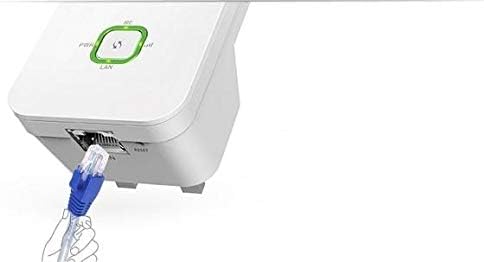
Figure 3: Ethernet Cable Connection. This image illustrates an Ethernet cable being plugged into the LAN port located at the bottom of the Tenda A300 range extender. This connection can be used for initial setup or to provide wired network access to a device.
- Aðgangur Web HÍ: Opna a web browser (e.g., Chrome, Firefox) and enter the default IP address (usually 192.168.0.254) eða sjálfgefið lénsheiti (t.d. re.tenda.cn) í veffangastikunni.
- Innskráning: Enter the default login credentials (usually "admin" for both username and password).
- Veldu net: Follow the on-screen instructions to scan for available wireless networks. Select your main router's Wi-Fi network.
- Sláðu inn lykilorð: Sláðu inn Wi-Fi lykilorðið fyrir aðalnet beinisins þíns.
- Configure Extender SSID (Optional): You can choose to keep the same SSID as your main router or create a new one for the extended network.
- Ljúka uppsetningu: Save the settings and wait for the A300 to restart. The RE LED should turn solid green.
- Flytja útbreiddur: Unplug the A300 and move it to a location between your router and the Wi-Fi dead zone. Ensure the Signal Strength LED indicates a good signal.
Notkunarleiðbeiningar
Once the Tenda A300 is successfully set up, it will automatically extend your wireless network. Devices can connect to the extended network using the configured SSID and password.
- Tengist tæki: Connect your wireless devices (smartphones, tablets, laptops) to the extended Wi-Fi network. If you chose a new SSID, connect to that. If you kept the same SSID, your devices should seamlessly roam between the router and extender.
- Þráðlaus tenging: You can connect a wired device (e.g., a desktop computer, gaming console, smart TV) to the A300's LAN port to provide it with network access.
- Eftirlitsstaða: Observe the LED indicators on the A300 to monitor its operational status. A solid green RE LED indicates a good connection to the main router.
Viðhald
To ensure optimal performance and longevity of your Tenda A300 range extender, consider the following maintenance tips:
- Besta staðsetning: Place the extender in a central location between your router and the desired coverage area, avoiding obstructions like thick walls or large metal objects.
- Uppfærsla vélbúnaðar: Athugaðu reglulega embættismann Tenda websíða fyrir uppfærslur á vélbúnaði. Uppfærsla á vélbúnaði getur bætt afköst, bætt við nýjum eiginleikum og lagað villur.
- Þrif: Keep the device clean and free from dust. Use a soft, dry cloth to wipe the exterior. Do not use liquid cleaners.
- Forðastu ofhitnun: Gætið þess að loftræstiop séu ekki stífluð til að koma í veg fyrir ofhitnun.
- Power Cycle: If you experience connectivity issues, try power cycling the extender (unplug it, wait 10 seconds, then plug it back in).
Úrræðaleit
Here are solutions to common issues you might encounter with your Tenda A300:
| Vandamál | Lausn |
|---|---|
| Engin rafmagn (PWR LED slökkt) | Gakktu úr skugga um að framlengingartækið sé vel tengt við virkan rafmagnsinnstungu. Prófaðu aðra innstungu. |
| Get ekki tengst við útvíkkað netkerfi |
|
| Weak signal from extender |
|
| Get ekki fengið aðgang web stjórnunarsíðu |
|
Tæknilýsing
| Eiginleiki | Smáatriði |
|---|---|
| Fyrirmynd | A300 |
| Staðlar og samskiptareglur | IEEE 802.11n, IEEE 802.11g, IEEE 802.11b, IEEE 802.3, IEEE 802.3u |
| Viðmót | 1 * 10/100M LAN Port |
| Hnappar | Range Extender button (WPS), Reset button |
| Aflgjafi | Input: AC 100-240V, 50/60Hz; Output: 5.0V 1A |
| LED Vísar | Power, RE (Range Extender), Signal Strength, LAN |
| Mál (L*B*H) | 110mm * 55mm * 39mm |
| Tíðni | 2.412 GHz - 2.472 GHz |
| Þráðlaust gjald | Allt að 300Mbps |
| Þráðlaust öryggi | WEP, WPA-PSK, WPA2-PSK |
| Þráðlausar aðgerðir | Wireless Radio Enable/Disable, SSID Broadcast Enable/Disable, Channel selection, AP Isolation, Domain Login Function |
| Þráðlaus stilling | Range Extender mode |
| Samhæf tæki | Beini |
Öryggisupplýsingar
- Ekki opna eða reyna að gera við tækið sjálfur.
- Haltu tækinu frá vatni, eldi, raka eða heitu umhverfi.
- Use only the power adapter provided or specified by the manufacturer.
- Tryggið góða loftræstingu og lokið ekki fyrir neinum loftræstiopum.
- Dispose of this product according to local environmental regulations.
Ábyrgð og stuðningur
Tenda products typically come with a limited warranty. For specific warranty terms and conditions, please refer to the warranty card included with your product or visit the official Tenda websíða.
For technical support, frequently asked questions, and driver downloads, please visit the official Tenda support website or contact their customer service department. Contact information can usually be found on the Tenda websíðuna eða í vöruumbúðunum.


