1. Inngangur
Thank you for choosing the TOZO NC9 Hybrid Active Noise Cancelling Wireless Earbuds. These earbuds are designed to provide an immersive audio experience with advanced noise cancellation, clear call quality, and comfortable all-day wear. This manual will guide you through the setup, operation, and maintenance of your new earbuds.
2. Hvað er í kassanum
- TOZO Hybrid Active Noise Cancelling Wireless Earbuds
- Hleðslutaska
- USB-C (A to C) cable (20cm)
- Eyrnatappar (margar stærðir)
- Notendahandbók

Figure 2.1: Contents of the TOZO NC9 package.
3. Vöru lokiðview
The TOZO NC9 earbuds feature a compact design with advanced audio technology. Key components include:
- Blönduð virk hávaðadeyfing: Up to 45dB noise reduction for an immersive listening experience.
- 6-Microphone ENC Clear Call: Enhanced environmental noise cancellation for clear voice transmission during calls.
- Gagnsæi háttur: Gerir þér kleift að heyra í umhverfi þínu án þess að taka af eyrnatólin.
- Stereo Bass Sound: Built-in 10mm drivers with OrigX Acoustic 2.0 technology for rich bass and clear audio.
- Vistvæn hönnun: Comfortable fit with six replaceable ear tip sizes.
- TOZO App Integration: Customize sound with 32 EQ options and noise cancellation modes.
- Lengri leiktími: Up to 59 hours total playtime with the charging case (ANC off).
- IPX8 vatnsþol: Protection against sweat, rain, and splashes.
- Bluetooth 5.3 tækni: Stable connection and low latency.
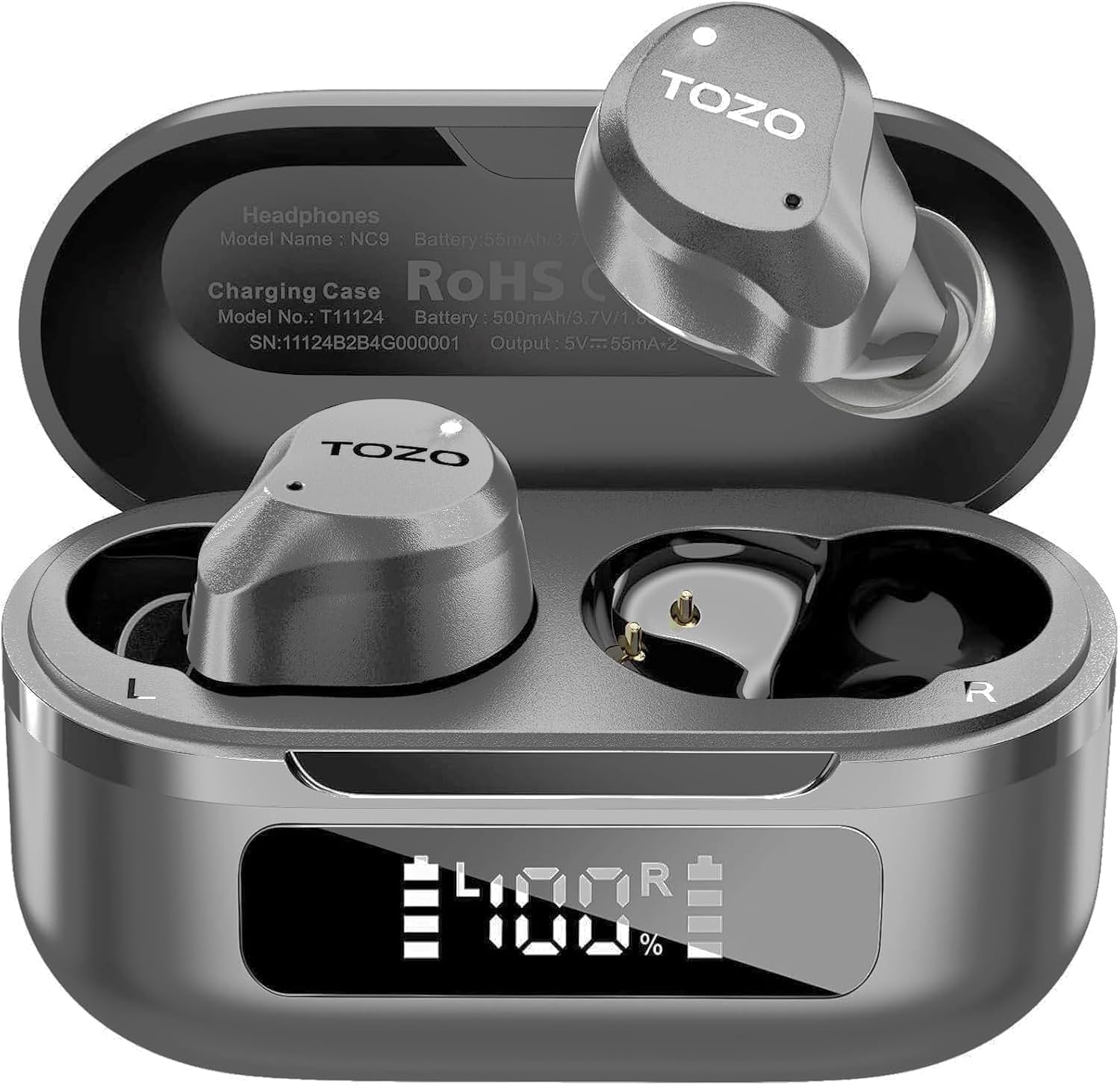
Figure 3.1: TOZO NC9 Earbuds and Charging Case.

Figure 3.2: TOZO OrigX Acoustics Technology for enhanced sound.
4. Uppsetning
4.1. Upphafleg pörun
- Opnaðu hleðsluhulstrið. Eyrnatólin fara sjálfkrafa í pörunarstillingu.
- Virkjaðu Bluetooth í tækinu þínu (snjallsíma, spjaldtölvu o.s.frv.).
- Leitaðu að "TOZO NC9" in the list of available Bluetooth devices and select it to connect.
- Þegar tengingin hefur átt sér stað heyrir þú hljóðskilaboð sem staðfestir að pörunin hafi tekist.
4.2. Að nota eyrnatólin
Til að hámarka hljóðgæði og þægindi skaltu tryggja rétta passun:
- Choose the ear tips that best fit your ear canal from the provided sizes.
- Insert the earbuds into your ears with the sound hole pointing downwards.
- Gently rotate the earbuds backward to secure them snugly in your ear.

Figure 4.1: Proper wearing of the TOZO NC9 Earbuds.
5. Notkunarleiðbeiningar
5.1. Snertu stýringar
The TOZO NC9 earbuds feature intuitive touch controls on each earbud:
- Einn smellur (vinstri/hægri): Spila/gera hlé á tónlist, svara/leggja niður símtali.
- Tvísmella (vinstri): Fyrra lag.
- Tvísmella (hægri): Næsta lag.
- Triple Tap (Left): Activate/Deactivate Noise Cancellation or Transparency Mode.
- Þríþætt smellun (hægri): Activate Voice Assistant (Siri, Google Assistant).
- Long Press (Left/Right): Hafna símtali.
5.2. Virk hávaðadeyfing (ANC) og gegnsæisstilling
The earbuds offer three sound modes:
- Active Noise Cancellation (ANC): Minnkar utanaðkomandi hávaða fyrir upplifun af hljóði.
- Gagnsæi háttur: Leyfir umhverfishljóðum að berast í gegn og heldur þér meðvituðum um umhverfið.
- Venjulegur háttur: Standard audio with no active noise processing.
Switch between modes by triple-tapping the left earbud.
Mynd 5.1: Virk hávaðadeyfing í aðgerð.
5.3. TOZO App Features
Download the TOZO App to unlock advanced customization options:
- 32 EQ Options: Tailor your audio experience with various preset equalizers or create custom sound profiles.
- Hávaðadeyfingarstillingar: Fine-tune ANC and Transparency settings.
- EQ Zone: Share and discover custom EQ settings from other users.

Figure 5.2: TOZO App for sound customization.
6. Hleðsla og rafhlöðuending
6.1. Hleðsla á hulstri og eyrnatólum
The charging case can be charged via the included USB-C cable. The earbuds charge automatically when placed inside the case.
- Hleðslutími: Um það bil 1.5 klukkustundir fyrir fulla hleðslu.
- Rafhlöðuvísir: The charging case features an LED display to show the remaining battery percentage.

Figure 6.1: Charging case with LED display.
6.2. Rafhlaða árangur
- Heildarspilunartími (með hleðsluhulstri): Allt að 59 klukkustundir (ANC slökkt), 42 klukkustundir (ANC kveikt).
- Single Use Playback: Allt að 14 klukkustundir (ANC slökkt), 10 klukkustundir (ANC kveikt).

Figure 6.2: Extended playtime capabilities.
7. Viðhald & umhirða
7.1. Vatnsþol
The TOZO NC9 earbuds are IPX8 water-resistant, meaning they can withstand sweat, rain, and accidental splashes. However, they are not designed for swimming or prolonged submersion. Ensure earbuds are dry before placing them back in the charging case.
7.2. Þrif
Regularly clean your earbuds and charging case to maintain optimal performance:
- Notið mjúkan, þurran og lólausan klút til að þurrka eyrnatappa og hleðsluhulstur.
- Fjarlægið eyrnatappana og þrífið þá með mildri sápu og vatni, þerrið þá síðan vandlega áður en þeir eru settir aftur á.
- Forðist að nota slípiefni eða sterk efni.
8. Bilanagreining
- Eyrnatól parast ekki: Gakktu úr skugga um að bæði eyrnatólin séu í hleðsluhulstrinu og opnaðu síðan lokið til að hefja pörunarstillingu. Athugaðu Bluetooth-stillingar tækisins.
- Aðeins einn eyrnatól virkar: Place both earbuds back in the charging case, close the lid, then open it again. Re-pair if necessary.
- Léleg hljóðgæði: Ensure ear tips provide a secure seal. Clean earbuds to remove any debris. Check audio source quality.
- Hleðsluvandamál: Ensure the charging cable is securely connected and the charging case is clean. Check the LED display for battery status.
- Endurstilla heyrnartól: Refer to the full user manual for specific reset instructions if persistent issues occur.
9. Tæknilýsing
| Eiginleiki | Forskrift |
|---|---|
| Nafn líkans | TOZO NC9 |
| Hávaðastýring | Hybrid Active Noise Cancellation |
| Bluetooth útgáfa | 5.3 |
| Bluetooth svið | 10 metrar |
| Rafhlöðulíftími (heyrnartól) | 14 klukkustundir (ANC slökkt), 10 klukkustundir (ANC kveikt) |
| Heildarspilunartími (með hulstri) | 59 klukkustundir (ANC slökkt), 42 klukkustundir (ANC kveikt) |
| Hleðslutími | 1.5 klukkustundir |
| Vatnsþolsstig | IPX8 |
| Stærð hljóðbílstjóra | 10 millimetrar |
| Gerð stjórna | Touch Control / APP |
| Innifalið íhlutir | Earbuds, Charging Case, USB-C Cable, Eartips, User Manual |
10. Ábyrgð og stuðningur
Your TOZO NC9 earbuds come with an 18-Month Extended Warranty. For warranty activation and support, please visit the official TOZO websíðuna eða hafðu samband við þjónustuver.
Fyrir frekari aðstoð, vinsamlegast farðu á TOZO verslun á Amazon.
Myndband 10.1: Yfirview of the TOZO NC9 earbuds, including unboxing and features.
Myndband 10.2: Endurskoðunview highlighting the sound quality, fit, and value of the TOZO NC9 earbuds.
Video 10.3: A demonstration of the noise cancelling capabilities of the TOZO NC9 earbuds.


