1. Inngangur
This manual provides detailed instructions for the setup, operation, maintenance, and troubleshooting of your iProda T1045A 10.1 inch Android Tablet. Please read this manual thoroughly before using your device to ensure proper functionality and to maximize your user experience.
The iProda T1045A is a 10.1-inch tablet featuring an HD IPS display with 1280x800 resolution, powered by a 64-bit Quad-core processor running Android 9 Pie. It includes 3GB RAM, 64GB internal storage expandable up to 128GB via TF card, dual-band Wi-Fi, HDMI output, and a 5000mAh battery for extended use.
2. Vöru lokiðview
2.1 Innihald pakka
Þegar pakkinn er opnaður skal ganga úr skugga um að allir hlutir séu til staðar:
- iProda T1045A 10.1 inch Android Tablet
- USB snúru
- Rafmagns millistykki
- Notendahandbók (þetta skjal)

Image: Contents of the iProda T1045A tablet package.
2.2 Skipulag tækis
Kynntu þér efnislega íhluti og tengi spjaldtölvunnar:
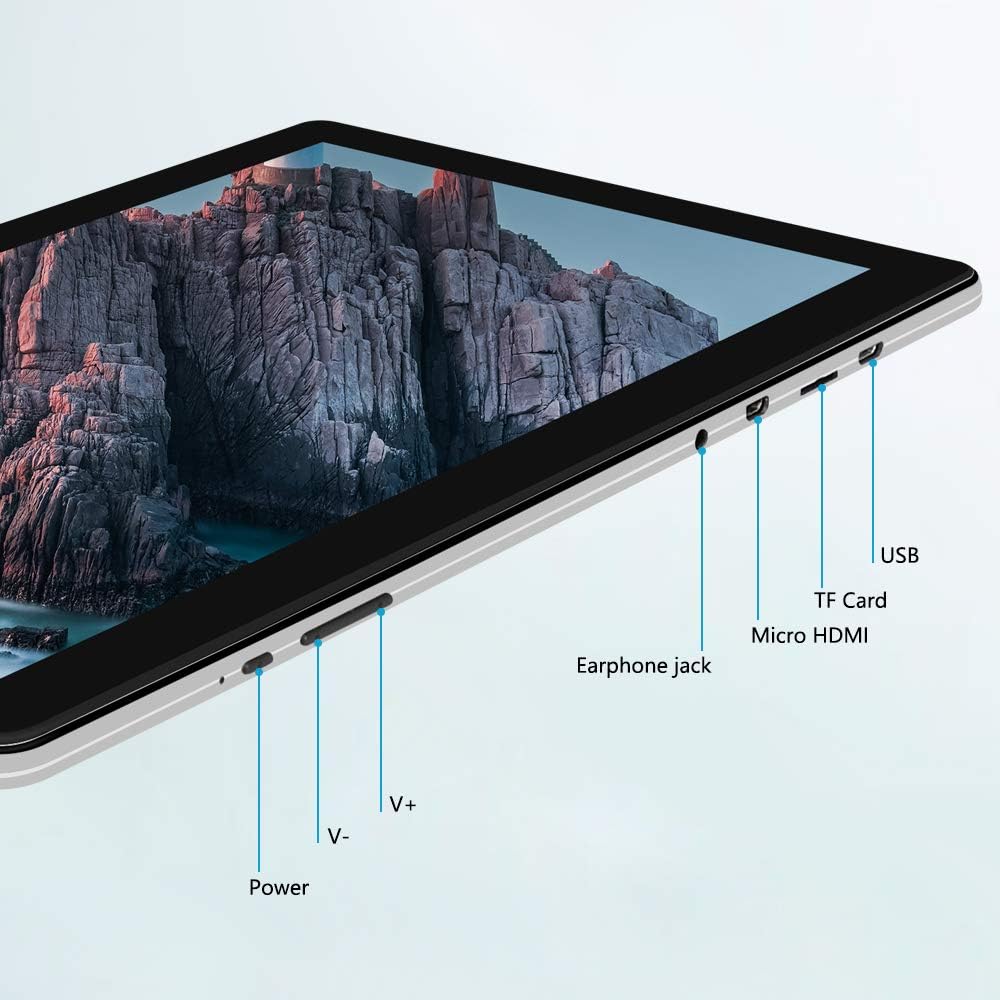
Mynd: Hlið view of the iProda T1045A tablet highlighting port locations.
- Aflhnappur: Press and hold to power on/off or restart the tablet. Short press to turn the screen on/off.
- Volume Buttons (V+, V-): Stilltu hljóðstyrkinn.
- Heyrnartólstengi: Tengdu 3.5 mm heyrnartól.
- TF kortarauf: Insert a microSD card for expandable storage (up to 128GB).
- Micro HDMI tengi: Connect to an external display using a Micro HDMI to HDMI cable.
- USB tengi: Connect to a computer for data transfer or for charging the device.
3. Uppsetning
3.1 Upphafshleðsla
Before first use, fully charge the tablet. Connect the provided USB cable to the tablet's USB port and the power adapter, then plug the adapter into a wall outlet. The charging indicator will typically illuminate. A full charge may take several hours.
3.2 Kveikt/slökkt
- Til að kveikja á: Haltu inni Power hnappinum þar til skjárinn logar.
- Til að slökkva á: Ýttu á og haltu inni aflrofanum þar til aflgjafavalmynd birtist á skjánum. Veldu „Slökkva“ og staðfestu.
- Til að endurræsa: Í aflgjafavalmyndinni skaltu velja „Endurræsa“.
- Kveikt/slökkt á skjánum: Briefly press the Power button to turn the screen off (sleep mode) or wake it up.
3.3 Uppsetningarhjálp
The first time you power on the tablet, you will be guided through an initial setup process. Follow the on-screen prompts to:
- Veldu tungumálið sem þú vilt.
- Tengstu við Wi-Fi net.
- Set up your Google account (optional, but recommended for app downloads).
- Stilltu dagsetningar- og tímastillingar.
3.4 Inserting a TF Card (MicroSD)
To expand the tablet's storage:
- Finndu TF-kortaraufina á hlið spjaldtölvunnar.
- Carefully insert a microSD card (up to 128GB) into the slot with the gold contacts facing down until it clicks into place.
- Til að fjarlægja, ýttu kortinu varlega inn á við þar til það flýgur út.
4. Notkunarleiðbeiningar
4.1 Grunnleiðsögn
The iProda T1045A uses a touch-sensitive screen for navigation:
- Bankaðu á: Veldu hlut eða opnaðu forrit.
- Haltu inni: Opnaðu samhengisvalmyndir eða færðu tákn.
- Strjúktu: Fletta í gegnum lista eða skipta á milli heimaskjáa.
- Klípa: Aðdráttur eða minnkun á myndum og web síður.
4.2 Wi-Fi tenging
Til að tengjast þráðlausu neti:
- Farðu til Stillingar > Net og internet > Wi-Fi.
- Kveikja á Wi-Fi On.
- Veldu netið sem þú vilt af listanum.
- Sláðu inn lykilorðið ef beðið er um það og pikkaðu síðan á Tengdu.
The tablet supports both 2.4G and 5G dual-band Wi-Fi for faster and more stable connections.
4.3 Bluetooth pörun
To pair with Bluetooth devices (e.g., headphones, speakers):
- Farðu til Stillingar > Tengd tæki > Bluetooth.
- Kveiktu á Bluetooth On.
- Gakktu úr skugga um að Bluetooth-tækið þitt sé í pörunarstillingu.
- Select your device from the list of available devices and follow any on-screen prompts to complete pairing.
4.4 Notkun myndavélanna
The tablet is equipped with a 2MP front camera and a 5MP rear camera.
- Opnaðu Myndavél application from the app drawer.
- Ýttu á myndavélartáknið til að skipta á milli fram- og aftari myndavélar.
- Ýttu á lokarahnappinn til að taka myndir eða hefja/stöðva myndbandsupptöku.

Image: Tablet in use, showcasing its camera capabilities.
4.5 Connecting to an External Display (HDMI)
To display your tablet's screen on a larger monitor or TV:
- Connect one end of a Micro HDMI cable to the tablet's Micro HDMI port.
- Connect the other end of the cable to an HDMI input on your external display.
- Select the correct HDMI input source on your external display.
- The tablet's screen content should now be mirrored on the external display.
4.6 Forritastjórnun
The tablet runs Android 9 Pie and supports applications from the Google Play Store.
- Að setja upp forrit: Opnaðu Play Store app, search for your desired application, and tap Settu upp.
- Að fjarlægja forrit: Tap and hold an app icon on the home screen or in the app drawer, then drag it to "Uninstall" or select "App info" and choose "Uninstall". Alternatively, go to Stillingar > Forrit og tilkynningar, veldu forritið og pikkaðu á Fjarlægðu.
5. Viðhald
5.1 Þrif á tækinu
Til að þrífa spjaldtölvuna þína:
- Slökktu á spjaldtölvunni áður en þú þrífur hana.
- Notið mjúkan, lólausan klút, örlítið þurranampened with water or a screen cleaner, to wipe the screen and body.
- Forðist að nota sterk efni, slípiefni eða mikinn raka.
5.2 Hugbúnaðaruppfærslur
Periodically check for software updates to ensure optimal performance and security:
- Farðu til Stillingar > Kerfi > Ítarlegri > Kerfisuppfærsla.
- Fylgdu leiðbeiningunum á skjánum til að hlaða niður og setja upp allar tiltækar uppfærslur. Gakktu úr skugga um að spjaldtölvan þín sé nægilega hlaðin eða tengd við rafmagn meðan á uppfærslum stendur.
5.3 Geymslustjórnun
To manage internal storage and the TF card:
- Farðu til Stillingar > Geymsla.
- Hér getur þú view storage usage, free up space, and manage files on both internal storage and the inserted TF card.
6. Bilanagreining
This section addresses common issues you might encounter with your iProda T1045A tablet.
6.1 Tækið kveikir ekki á sér
- Ensure the tablet is sufficiently charged. Connect it to the power adapter and allow it to charge for at least 30 minutes before attempting to power on again.
- Prófaðu að halda inni aflræsingarhnappinum í 10-15 sekúndur til að þvinga fram endurræsingu.
6.2 Vandamál með Wi-Fi tengingu
- Verify that Wi-Fi is enabled in Stillingar.
- Gakktu úr skugga um að þú sért að slá inn rétt Wi-Fi lykilorð.
- Endurræstu Wi-Fi leiðina og spjaldtölvuna.
- Try connecting to a different Wi-Fi network to determine if the issue is with the tablet or the network.
6.3 Hæg afköst
- Lokaðu óþarfa bakgrunnsforritum.
- Clear cached data for apps in Stillingar > Forrit og tilkynningar > [Nafn forrits] > Geymsla og skyndiminni > Hreinsaðu skyndiminni.
- Ensure sufficient free storage space. Uninstall unused apps or move large files to a TF card.
- Endurræstu spjaldtölvuna.
6.4 Rafhlaða tæmist hratt
- Minnka birtustig skjásins.
- Slökktu á Wi-Fi, Bluetooth og GPS þegar þau eru ekki í notkun.
- Close background apps that consume significant power.
- Athugaðu rafhlöðunotkun í Stillingar > Rafhlaða til að bera kennsl á orkufrekar öpp.
- Ensure the tablet is not allowed to run below 15% charge frequently, as this can impact battery longevity.
6.5 Factory Reset
Ef vandamál koma upp viðvarandi gæti endurstilling á verksmiðjustillingum leyst þau. Viðvörun: Þetta mun eyða öllum gögnum á spjaldtölvunni þinni. Taktu öryggisafrit af mikilvægum gögnum áður en þú heldur áfram.
- Farðu til Stillingar > Kerfi > Ítarlegri > Endurstilla valkosti.
- Veldu Eyða öllum gögnum (endurstilla verksmiðju).
- Staðfestu ákvörðun þína og fylgdu leiðbeiningunum á skjánum.
7. Tæknilýsing
Below are the technical specifications for the iProda T1045A tablet:
| Nafn líkans | T1045A |
| Stýrikerfi | Android 9 Pie |
| Skjárstærð | 10.1 tommur |
| Skjáupplausn | 1280 x 800 pixlar (HD IPS) |
| Örgjörvi | MediaTek Quad-core 1.5Ghz |
| vinnsluminni | 3 GB |
| Innri geymsla | 64 GB SSD |
| Stækkanlegt geymsla | Up to 128 GB via TF Card (MicroSD) |
| Grafískur hjálpargjörvi | ARM Mali-T720 MP2 |
| Myndavél að aftan | 5 MP |
| Myndavél að framan | 2 MP |
| Rafhlöðugeta | 5000 mAh litíum fjölliður |
| Meðal rafhlöðuending | Allt að 8 klst |
| Þráðlaus tenging | Dual-Band Wi-Fi (802.11a/b/g/n), Bluetooth 4.0 |
| Hafnir | 1x USB 2.0, 1x Micro HDMI, 3.5mm Earphone Jack, TF Card Slot |
| Mál | 34.5 x 19.7 x 5.5 cm |
| Þyngd | 550 g |

Mynd: Helstu afköst spjaldtölvunnar.

Image: Tablet portability and battery details.
8. Ábyrgð og stuðningur
8.1 Vöruábyrgð
The iProda T1045A tablet comes with a 12 mánaða ábyrgð frá kaupdegi. Þessi ábyrgð nær yfir framleiðslugalla og bilanir við eðlilega notkun. Hún nær ekki til tjóns sem orsakast af misnotkun, slysum, óheimiluðum viðgerðum eða eðlilegu sliti.
8.2 Þjónustuver
If you encounter any issues not covered in the troubleshooting section or require further assistance, please contact iProda customer support. Refer to your purchase documentation or the iProda official websíða fyrir upplýsingar um tengiliði.
When contacting support, please have your tablet's model number (T1045A) and purchase details readily available.


