Inngangur
This manual provides detailed instructions for the proper use and maintenance of your Casio G-Shock DW-5610SU-3 digital watch. Designed for durability and functionality, this watch features shock resistance, 200-meter water resistance, an electro-luminescent backlight, and various timekeeping functions.

Mynd: Framan view of the Casio G-Shock DW-5610SU-3 digital watch, showcasing its square case and digital display.
Hnappar aðgerðir
Your G-Shock watch has four buttons, typically labeled as follows:
- STILLA (efst til vinstri): Notað til að fara í og hætta í stillingarham og til að staðfesta stillingar.
- HAM (neðst til vinstri): Used to cycle through the watch's various modes (Timekeeping, Stopwatch, Countdown Timer, Alarm).
- LIGHT (Top Right): Activates the electro-luminescent backlight.
- START/STOP (neðst til hægri): Used to start/stop stopwatch operations, change selections in setting modes, and activate the flash alert.

Mynd: Hlið view of the watch, highlighting the top left (ADJUST) and bottom left (MODE) buttons.

Mynd: Gagnstæð hlið view of the watch, showing the top right (LIGHT) and bottom right (START/STOP) buttons.
Setup: Setting Time and Date
- Í tímamælingarstillingu, ýttu á og haltu inni STILLA hnappinn þar til borgarkóðinn byrjar að blikka, sem gefur til kynna stillingarskjáinn.
- Notaðu BYRJA/STOPPA button to cycle through the settings (City Code, DST, 12/24-hour format, Seconds, Hour, Minute, Year, Month, Day).
- Notaðu LJÓS button to increase a value or the BYRJA/STOPPA button to decrease a value (for time/date settings).
- Þegar allar stillingar hafa verið stilltar, ýttu á STILLA hnappinn til að hætta í stillingarstillingu.
Notkunarleiðbeiningar
Leiðsagnarstillingar
Ýttu á MODE hnappinn til að fletta í gegnum eftirfarandi stillingar:
- Timekeeping Mode (current time, date, day)
- Skeiðklukkustilling
- Niðurtalningatími
- Viðvörunarstilling
- HourlTímamerkjastilling y
Notkun skeiðklukkunnar
- Farið í skeiðklukkustillingu með því að ýta á MODE hnappinn.
- Ýttu á BYRJA/STOPPA hnappinn til að ræsa skeiðklukkuna.
- Ýttu á BYRJA/STOPPA button again to stop it.
- Ýttu á STILLA hnappinn til að núllstilla skeiðklukkuna.
- The stopwatch measures up to 23 hours, 59 minutes, 59.99 seconds.
Notkun niðurteljarans
- Farið í niðurtalningarstillingu með því að ýta á MODE hnappinn.
- Ýttu á og haltu inni STILLA button until the hour setting flashes.
- Notaðu LJÓS og BYRJA/STOPPA buttons to set the desired countdown time (up to 24 hours).
- Ýttu á STILLA til að staðfesta og hætta stillingarstillingu.
- Ýttu á BYRJA/STOPPA til að hefja niðurtalninguna.
- Ýttu á BYRJA/STOPPA aftur til að gera hlé/halda áfram.
- Þegar niðurtalningin nær núlli hljómar viðvörun. Ýttu á hvaða hnapp sem er til að stöðva viðvörunina.
Stilla vekjara
- Enter Alarm Mode by pressing the MODE hnappinn.
- Ýttu á og haltu inni STILLA button until the hour setting flashes.
- Notaðu LJÓS og BYRJA/STOPPA buttons to set the alarm hour and minute.
- Ýttu á STILLA til að staðfesta og hætta stillingarstillingu.
- Ýttu á BYRJA/STOPPA button to toggle the alarm ON/OFF. An indicator will show when the alarm is active.
Electro-luminescent Backlight
Ýttu á LJÓS hnappinn til að lýsa upp skjáinn til að auðvelda notkun viewing in low-light conditions. The backlight duration is typically a few seconds.
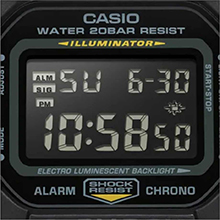
Image: Close-up of the watch display showing the electro-luminescent backlight active, illuminating the time and date.
Viðhald
Þrif
Þurrkið úrið með mjúkum, þurrum klút. Notið mjúkan klút fyrir þrjósk óhreinindi.ampÞvoið með vatni og mildu, hlutlausu þvottaefni og þurrkið síðan. Forðist að nota rokgjörn efni eins og þynningarefni eða bensín.
Vatnsþol
This watch is water resistant to 200 meters. It is suitable for showering, swimming, and shallow diving. Do not operate buttons while the watch is wet or submerged to prevent water ingress.

Image: The Casio G-Shock DW-5610SU-3 watch partially submerged in water, illustrating its 200-meter water resistance.
Skipt um rafhlöðu
The watch uses one CR2016 battery with an approximate life of 2 years. When the display becomes dim or functions malfunction, it may be time for a battery replacement. It is recommended to have the battery replaced by an authorized service center to ensure water resistance is maintained.
Úrræðaleit
- Skjárinn er auður eða dimmur: Rafhlaðan gæti verið tóm. Skiptu um rafhlöðu.
- Hnappar svara ekki: Ensure the watch is not in a locked mode (if applicable, though this model typically doesn't have a lock). If issues persist, a full reset might be needed (consult service center).
- Tíminn er ónákvæmur: Re-set the time and date as per the "Setting Time and Date" section. If inaccuracy continues, the watch may require servicing.
- Vatn inni í úrinu: Immediately take the watch to an authorized service center. Do not attempt to open it yourself.
Tæknilýsing
| Eiginleiki | Forskrift |
|---|---|
| Gerðarnúmer | DW-5610SU-3 |
| Efni kassa/ramma | Resín |
| Hljómsveitarefni | Resín |
| Glergerð | Steinefni gler |
| Vatnsþol | 200 metrar (20 bar) |
| Höggþol | Já |
| Baklýsing | Electro-luminescent backlight with Afterglow |
| Skeiðklukka | 1/100-second, measuring capacity 23:59'59.99" |
| Niðurteljari | Measuring unit 1 second, range 24 hours, auto-repeat |
| Viðvörun | Multi-function alarm, Hourly tímamerki |
| Dagatal | Fullt sjálfvirkt dagatal (til ársins 2099) |
| Tímasnið | 12/24 tíma snið |
| Nákvæmni | ±15 sekúndur á mánuði |
| Tegund rafhlöðu | CR2016 |
| Áætlaður endingartími rafhlöðu | 2 ár |
| Mál kassa (H×B×D) | 48.9 × 43.8 × 13.5 mm |
| Heildarþyngd | 52 g |

Image: Diagram showing the dimensions of the Casio G-Shock DW-5610SU-3 watch, with a credit card for scale, indicating a case height of 48.9 mm and width of 43.8 mm.
Ábyrgð og stuðningur
Your Casio G-Shock DW-5610SU-3 watch comes with a Limited Warranty. For warranty claims, service, or technical support, please contact Casio India Co Pvt Ltd.
Manufacturer/Importer Contact:
Casio India Co Pvt Ltd
A-41, 1st Floor, MCIE, Mathura Road,
Nýja Delí-110044, Indlandi
For additional information and support, please visit the official Casio website or an authorized service center.


