Inngangur
Þakka þér fyrir kaupinasing the Altec Lansing AL-5003 Multimedia DJ Trolly Speaker. This speaker is designed to deliver powerful audio for various applications, including parties and surround sound systems. Featuring wireless connectivity, a built-in trolley for portability, and multiple input options, the AL-5003 offers a versatile audio experience. Please read this manual carefully to ensure proper setup, operation, and maintenance of your speaker.
Mikilvægar öryggisleiðbeiningar
- Read these instructions thoroughly before operating the speaker.
- Geymdu þessa handbók til síðari viðmiðunar.
- Ekki láta hátalarann verða fyrir rigningu eða raka.
- Ekki loka fyrir nein loftræstiop.
- Ekki setja upp nálægt neinum hitagjöfum eins og ofnum, hitatöflum, ofnum eða öðrum tækjum (þ. amplyftara) sem framleiða hita.
- Verndaðu rafmagnssnúruna gegn því að ganga á hana eða klemma hana, sérstaklega við innstungur, innstungur og staðinn þar sem þau fara út úr tækinu.
- Notaðu aðeins viðhengi/aukahluti sem framleiðandi tilgreinir.
- Taktu þetta tæki úr sambandi í eldingum eða þegar það er ónotað í langan tíma.
- Látið alla þjónustu til hæfs þjónustufólks.
Innihald pakka
Vinsamlegast athugið hvort eftirfarandi atriði séu í pakkanum:
- Altec Lansing AL-5003 Multimedia DJ Trolly Speaker
- Rafmagnssnúra
- Fjarstýring
- Notendahandbók
- Auxiliary Cable (may vary by region)
Vara lokiðview
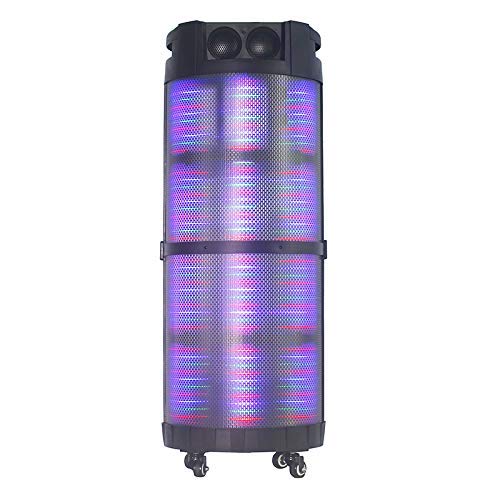
The AL-5003 speaker features a robust design with integrated wheels and a handle for easy transport. It includes a powerful 10-inch speaker and a 1-inch tweeter, providing clear and dynamic sound. The control panel is located on the top of the unit, offering easy access to various functions.
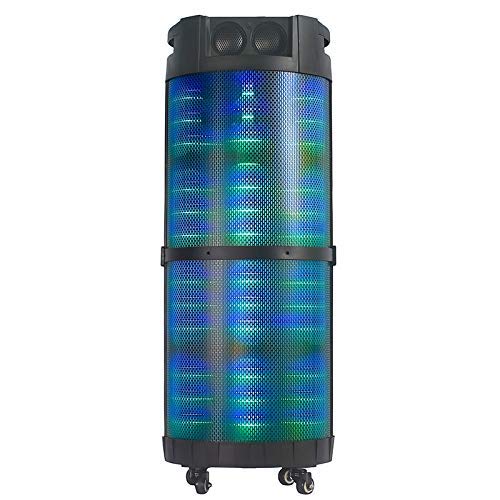
Mynd 1: Framan view of the Altec Lansing AL-5003 speaker, showcasing its cylindrical design and illuminated grille. The speaker features a sturdy build with integrated wheels at the base for portability.
Stjórnborð og tengingar
The top panel of the speaker houses the main controls and input/output ports.
Mynd 2: Að ofan view of the AL-5003 speaker, highlighting the control panel with various buttons and knobs, along with the top-mounted speakers. This view also shows the integrated handle for easy transport.
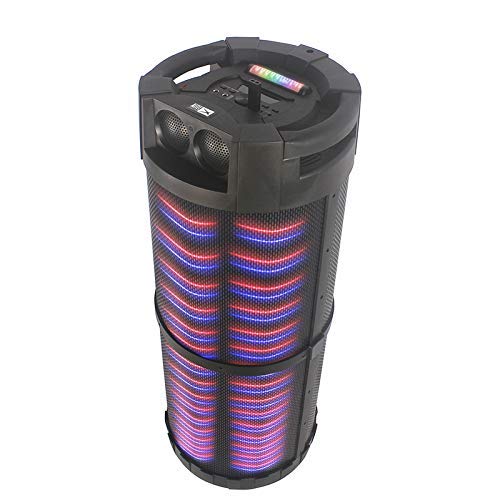
Mynd 3: Hornað view of the AL-5003 speaker, providing a perspective of its overall structure, including the side grille and the top control area. The dynamic lighting effects are visible through the mesh.
Common controls include Power, Volume, Mode selection, Play/Pause, Track Skip, and inputs for USB, Auxiliary, and potentially Microphone (if available on the model).
Uppsetningarleiðbeiningar
- Upptaka: Carefully remove the speaker and all accessories from the packaging. Retain the packaging for future transport or storage.
- Staðsetning: Place the speaker on a stable, flat surface. Ensure there is adequate ventilation around the unit. For optimal sound, position the speaker in a central location within the listening area.
- Rafmagnstenging: Connect the provided power cord to the AC input on the speaker and then plug it into a standard wall outlet (AC 100-240V, 50/60Hz).
- Initial Charge (if applicable): If the speaker has an internal battery (Lead Acid battery mentioned in specs), it is recommended to fully charge it before first use. The charging indicator light will typically show charging status.
- Kveikt á: Press the Power button on the control panel or remote control to turn on the speaker.
Notkunarleiðbeiningar
1. Bluetooth-stilling
- Virkjaðu Bluetooth: Turn on the speaker. Press the "Mode" button on the control panel or remote until "Bluetooth" or "BT" is displayed (or indicated by a blue LED). The speaker will enter pairing mode, indicated by a flashing light or audible prompt.
- Pörun við tæki: On your mobile device (smartphone, tablet, laptop), go to Bluetooth settings and enable Bluetooth. Leitaðu að available devices. You should see "AL-5003" or "Altec Lansing" in the list. Select it to pair.
- Staðfesting á tengingu: Once successfully paired, the speaker will emit a confirmation sound, and the Bluetooth indicator light will become solid.
- Spilun: Start playing audio on your connected device. Use the speaker's volume controls or your device's volume controls to adjust the sound level. Use the Play/Pause, Next, and Previous buttons on the speaker or remote to control playback.
2. Auxiliary (AUX) Mode
- Tengdu AUX snúru: Insert one end of a 3.5mm auxiliary cable into the AUX input port on the speaker. Connect the other end to the headphone jack or audio output of your external audio device (e.g., MP3 player, laptop).
- Veldu AUX-stillingu: Press the "Mode" button on the speaker or remote until "AUX" is displayed or indicated.
- Spilun: Play audio from your connected device. Adjust volume using both the speaker's controls and your device's volume.
3. USB spilunarstilling
- Settu inn USB-lykil: Settu inn USB-lykil sem inniheldur MP3 hljóð fileí USB tengið á hátalaranum.
- Veldu USB-stillingu: The speaker may automatically switch to USB mode. If not, press the "Mode" button until "USB" is displayed or indicated.
- Spilun: Hátalarinn byrjar sjálfkrafa að spila hljóð files from the USB drive. Use the Play/Pause, Next, and Previous buttons to control playback.
4. Karaoke Function (if applicable)
If your AL-5003 model includes a microphone input, you can use it for karaoke:
- Tengja hljóðnema: Plug a wired microphone into the designated microphone input jack.
- Stilla hljóðstyrk: Use the dedicated Microphone Volume knob (if present) to adjust the microphone's volume.
- Bergmálsstýring: Some models may have an Echo knob to add an echo effect to the microphone audio.
5. Fjarstýring
The included remote control provides convenient access to all major functions:
- Kraftur: Turn the speaker On/Off.
- Stilling: Switch between Bluetooth, AUX, USB, and other available modes.
- Bindi +/-: Stilltu aðalhljóðstyrkinn.
- Spila / gera hlé: Hefja eða gera hlé á spilun.
- Fyrri/Næsta: Farðu yfir í fyrra eða næsta lag.
- EQ: Select different equalizer presets (if available).
- Þagga: Mute or unmute the audio.
Viðhald
- Þrif: Notið mjúkan, þurran klút til að þrífa ytra byrði hátalarans. Notið ekki fljótandi hreinsiefni eða slípiefni.
- Geymsla: Þegar hátalarinn er ekki í notkun í langan tíma skal geyma hann á köldum, þurrum stað, fjarri beinu sólarljósi og miklum hita.
- Umhirða rafhlöðu: If the speaker has a built-in rechargeable battery, avoid fully discharging it frequently. For long-term storage, charge the battery to approximately 50-70% every few months to prolong its lifespan.
- Loftræsting: Gakktu úr skugga um að loftræstiopin séu ekki stífluð til að koma í veg fyrir ofhitnun.
Úrræðaleit
| Vandamál | Möguleg orsök | Lausn |
|---|---|---|
| Enginn kraftur | Power cord not connected; Power outlet not working; Speaker is off; Battery drained. | Ensure power cord is securely connected. Try a different outlet. Press the Power button. Charge the battery. |
| Ekkert hljóð | Volume too low; Incorrect mode selected; Device not connected properly; Mute function active. | Increase volume on speaker and source device. Select the correct input mode (Bluetooth, AUX, USB). Reconnect device. Check if mute is active on remote. |
| Bilun í Bluetooth pörun | Speaker not in pairing mode; Device Bluetooth off; Speaker too far from device; Interference. | Ensure speaker is in Bluetooth pairing mode. Turn on Bluetooth on your device. Move device closer to speaker. Turn off other Bluetooth devices nearby. |
| USB spilun virkar ekki | USB-drif ekki rétt sett í; Ósamhæft file snið; USB-drif skemmd. | Reinsert USB drive. Ensure fileeru á MP3 sniði. Prófaðu aðra USB-lykil. |
| Fjarstýring virkar ekki | Batteries drained; Obstruction between remote and speaker; Remote not pointed at sensor. | Replace remote control batteries. Remove any obstructions. Point remote directly at the speaker's IR sensor. |
Tæknilýsing
| Eiginleiki | Smáatriði |
|---|---|
| Nafn líkans | Altec Lansing AL-5003 Multimedia DJ Trolly Speaker |
| Tegund hátalara | Surround Sound |
| Sérstakur eiginleiki | Þráðlaust |
| Mælt er með notkun | For Surround Sound Systems, Party |
| Samhæf tæki | Gaming Console, Karaoke Machine, Laptop, MP3 Player, Smartphone, Tablet |
| Surround Sound Channel Stilling | 1.0 |
| Eftirlitsaðferð | Fjarstýring |
| Þráðlaus samskiptatækni | Bluetooth |
| Stærð hátalara | 10 tommur |
| Aflgjafi | Rafmagn með snúru |
| Þvermál tweeter | 1 tommur |
| Hljóðinntak samhæft | Aukabúnaður, USB |
| Hátalaratenging | Wired (for power), Wireless (Bluetooth) |
| Hljóð Wattage | 100 Watt |
| Samsetning rafhlöðunnar | Blýsýra |
| Gerð uppsetningar | Gólf standandi |
Ábyrgð og stuðningur
Altec Lansing products are manufactured to the highest quality standards. For information regarding warranty coverage, technical support, or service inquiries, please refer to the warranty card included with your product or visit the official Altec Lansing website. Please have your model number (AL-5003) and purchase details ready when contacting support.
Websíða: www.alteclansing.com (This is a generic link, actual link might vary by region)


