1. Inngangur
This manual provides detailed instructions for the installation, operation, and maintenance of your CHORTAU B-T25 Dual Dash Cam. Please read this manual thoroughly before using the device to ensure proper functionality and safety. This dash cam is designed to record video footage while driving, offering features such as GPS tracking, G-sensor emergency recording, and parking monitoring.
2. Innihald pakka
Gakktu úr skugga um að allir hlutir sem taldir eru upp hér að neðan séu innifaldir í pakkanum þínum:
- 1 x CHORTAU B-T25 Dual Dash Cam
- 1 x Car Charger (with integrated GPS module)
- 2 x Adjustable Mounts (Suction Cup Mount)
- 1 x USB snúru
- 1 x Notendahandbók

Mynd: Yfirview of the CHORTAU B-T25 Dual Dash Cam, including the main unit, suction cup mount, and the separate GPS module integrated into the car charger.
3. Vörueiginleikar
The CHORTAU B-T25 Dual Dash Cam offers a range of features to enhance your driving safety and recording capabilities:

Image: Visual representation of key features including dual recording, Full HD 1080P, GPS, reverse car assistance, G-sensor, motion detection, parking mode, and support for up to 32GB Micro SD card.
Full HD 1080p Recording
The dash cam records in stunning 1920 x 1080p Full HD resolution, capturing clear and detailed video footage of your journey. This ensures that important details, such as license plates, are visible day and night.
170 ° gleiðhornslinsa
Equipped with a 170-degree wide-angle lens, the camera provides an expansive view of the road, covering multiple lanes and minimizing blind spots. This broad perspective helps capture more of the environment around your vehicle.

Image: Demonstrates the wider field of view provided by the 170° lens compared to narrower angles, and the superior clarity of Full HD 1080p video over 720p.
Integrated GPS Module
The car charger includes a GPS module that records your vehicle's speed, location, date, and time directly onto the video footage. This data can be reviewed using a PC video player software, allowing you to track your route on maps like Google Maps or OpenStreetMap.
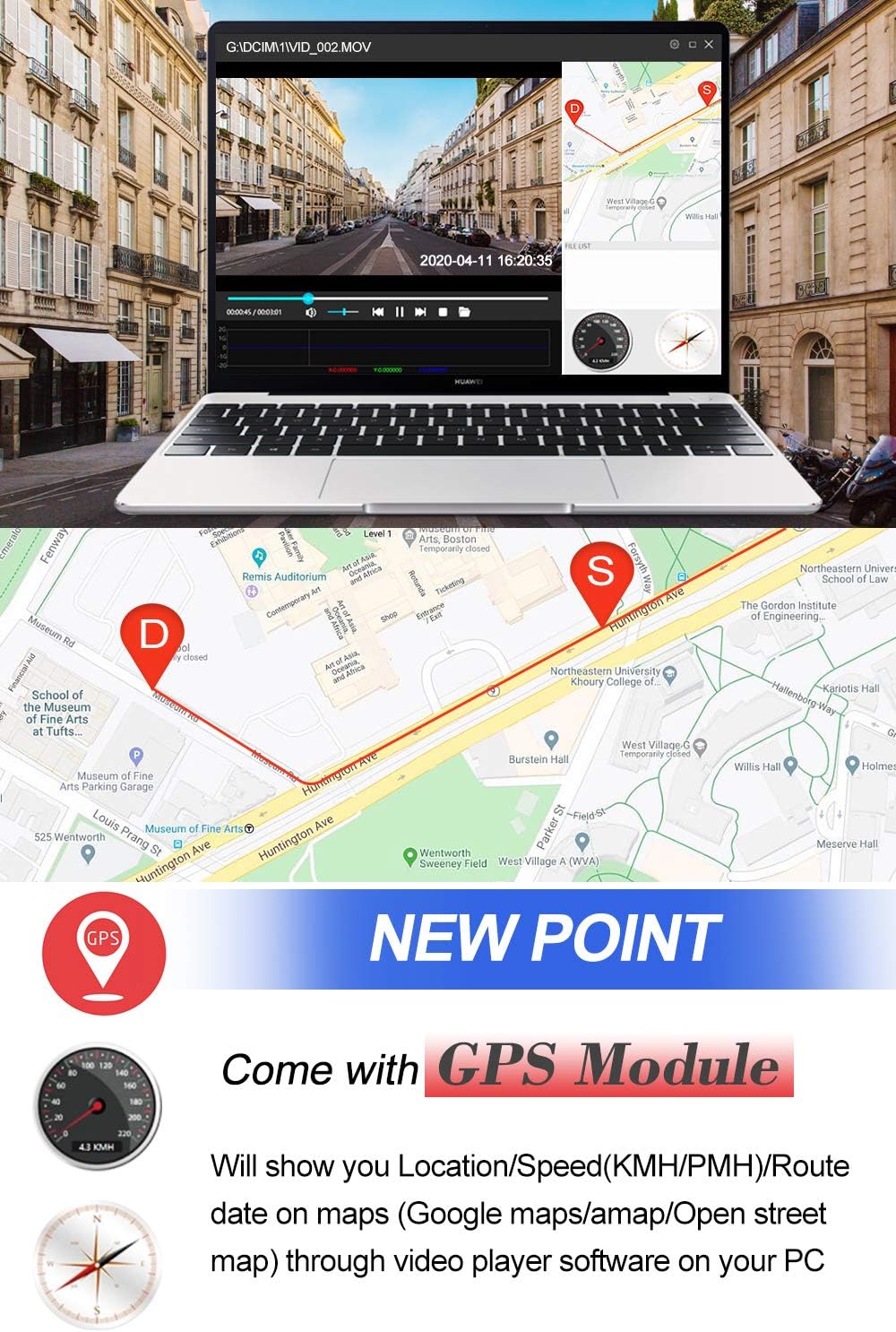
Image: Illustrates how the GPS module integrates with video playback software on a computer to display location, speed, and route information on a map.
G-skynjari (neyðarupptaka)
The built-in G-sensor automatically detects sudden impacts or collisions. In such an event, it locks the current video footage to prevent it from being overwritten, securing critical evidence.
Loop Recording
Seamless loop recording ensures continuous video capture. When the memory card is full, the system automatically overwrites the oldest unlocked files with new footage, so you never miss a moment.
Bílastæði Monitor
When enabled, the parking monitor feature automatically turns on the dash cam and records if it detects a collision or shaking while your vehicle is parked, providing surveillance even when you're away.
Hreyfiskynjun
This function triggers recording automatically when movement is detected in front of the camera, serving as an additional security measure for your parked vehicle.

Image: Depicts the G-sensor locking files during an incident, the parking monitor recording impacts while parked, and motion detection activating recording when movement is sensed.
Háhitaþol
Designed to withstand extreme temperatures, the dash cam operates reliably in conditions ranging from -86°F (-65.5°C) to 158°F (70°C), ensuring performance in various climates.
Sjálfvirk kveikja / slökkva á
The dash cam automatically powers on and begins recording when your car engine starts, and powers off shortly after the engine is turned off, simplifying operation.
4. Uppsetning og uppsetning
Follow these steps to properly install your CHORTAU B-T25 Dual Dash Cam:
- Undirbúðu Micro SD kortið: Insert a Class 10 or higher Micro SD card (up to 32GB, not included) into the dash cam's SD card slot. Format the card within the dash cam's settings before first use.
- Festið mælaborðsmyndavélina: Attach the suction cup mount to the dash cam. Clean a spot on your windshield, preferably near the rearview spegil, og gætið þess að hann skyggi ekki á view. Press the suction cup firmly against the glass and lock it into place.
- Tengdu rafmagn: Plug the car charger (with integrated GPS module) into your vehicle's cigarette lighter socket. Connect the mini USB end of the charger cable to the dash cam's power input port. Route the cable neatly along the windshield and dashboard to avoid interference with driving.
- Position the GPS Module: For optimal GPS signal reception, install the GPS module as close as possible to the top of the windshield. The GPS module is integrated into the car charger cable, so ensure the charger is positioned correctly.
- Stilla myndavélarhorn: Power on the dash cam and adjust the lens angle to ensure it captures the road ahead clearly, with the horizon in the middle of the screen.

Image: Illustrates the easy installation process, showing the dash cam mounted on the windshield with a suction cup and the recommended placement for the GPS module near the top of the windshield.
5. Notkunarleiðbeiningar
Kveikt/slökkt
- Sjálfvirkt: The dash cam will automatically power on and start recording when your vehicle's ignition is turned on. It will power off automatically a few seconds after the ignition is turned off.
- Handbók: To manually power on/off, press and hold the Power button (usually located on the side or back of the unit) for a few seconds.
Upptökustillingar
- Venjuleg upptaka: Once powered on, the dash cam automatically begins continuous loop recording.
- Neyðarupptaka (G-skynjari): If the G-sensor detects a sudden impact, the current video segment will be automatically locked and saved in a separate folder to prevent overwriting.
- Bílastæðastilling: Activate this feature in the settings. When enabled, the dash cam will automatically record if it detects impact or motion while the vehicle is parked.
Valmyndarleiðsögn
Use the physical buttons on the dash cam (e.g., Menu, Up, Down, OK) to navigate through the settings menu. Refer to the on-screen prompts for specific options such as video resolution, loop recording duration, G-sensor sensitivity, and date/time settings.
Myndspilun
Þú getur afturview recorded videos directly on the dash cam's 3-inch screen or by connecting the Micro SD card to a computer. For GPS data playback, use the dedicated PC video player software provided or recommended by CHORTAU.

Image: Illustrates parking assistance features, showing a dash cam display with parking guidelines and a simulated rear camera view, useful for safe parking maneuvers.
6. Viðhald
- Þrif: Notið mjúkan, þurran klút til að þrífa myndavélarlinsuna og skjáinn. Forðist að nota slípiefni eða leysiefni.
- Stjórnun SD-korts: Regularly format your Micro SD card (at least once a month) within the dash cam's settings to maintain optimal recording performance and prevent data corruption. Back up any important files fyrir snið.
- Hitastig: Avoid exposing the dash cam to prolonged direct sunlight in extreme heat when not in use, as this can affect battery life and component longevity.
7. Bilanagreining
If you encounter issues with your CHORTAU B-T25 Dash Cam, refer to the following common problems and solutions:
- Mælaborðsmyndavélin kveikir ekki á sér:
- Ensure the car charger is securely plugged into the cigarette lighter and the dash cam.
- Check if your vehicle's cigarette lighter socket is receiving power.
- The internal battery might be depleted; try charging it for a while.
- Upptaka stöðvast eða frýs:
- Format the Micro SD card within the dash cam's settings.
- Gakktu úr skugga um að þú notir Micro SD kort af flokki 10 eða hærra. Kort af lægri flokki eru hugsanlega ekki nógu hröð fyrir samfellda upptöku.
- The SD card might be full; enable loop recording or manually delete old files.
- Léleg myndgæði:
- Hreinsaðu myndavélarlinsuna.
- Gakktu úr skugga um að verndarfilman hafi verið fjarlægð af linsunni.
- Check video resolution settings in the menu; ensure it's set to 1080p.
- GPS merki fannst ekki:
- Ensure the GPS module (integrated into the car charger) is positioned correctly, ideally high on the windshield with a clear view himinsins.
- It may take a few minutes for the GPS to acquire a signal, especially after initial setup or in areas with poor satellite coverage.
8. Tæknilýsing
| Eiginleiki | Forskrift |
|---|---|
| Skjástærð | 3 tommu LCD |
| Linsa | 170° gleiðhorn |
| Myndbandsupplausn | Full HD 1080p |
| GPS virka | Supported (via car charger module) |
| G-skynjaralás | Stuðningur |
| Innra vald | Innbyggð Li-ion rafhlaða |
| Ytra vald | DC 5V/1.5A |
| Rekstrarhitastig | -86°F til 158°F (-65.5°C til 70°C) |
| Minniskort | Micro SD Card, up to 32GB (Class 10 or higher, not included) |
| Sérstakir eiginleikar | Motion Detection, Audio Recording, Emergency Recording, Loop Recording, Auto On/Off, Parking Monitor, Photo/Video Mode, Screen Saver |
9. Ábyrgð og stuðningur
CHORTAU offers lifetime customer service for this dash cam. If you have any questions or require technical assistance, please contact our customer service team. We are available 7 days a week, 24 hours a day to provide support.