1. Inngangur
The Metrel MI 2885 Master Q4 is a sophisticated 3-phase power quality analyzer designed for comprehensive electrical system analysis. This instrument is engineered to automatically record critical data and waveforms related to voltage events such as dips and swells. It also supports user-defined triggers for capturing specific quantities. This manual provides essential information for the proper setup, operation, and maintenance of your MI 2885 Master Q4 device.
For detailed analysis and reporting, the included PC software PowerView3 enables advanced data processing and professional report generation. The device is compliant with power quality standard IEC 61000-4-30 Class S (0.1%) and performs complete power quality analysis according to EN 50160.
2. Vöru lokiðview
2.1 Helstu eiginleikar
- Three-Phase Power Quality Analysis: Ráðstafanir Voltage/Current TRMS, Peak, and Crest Factor across 4 channels.
- Breitt mælisvið: 4-voltage channels (0 to 1000 Vrms, CAT III / 1000 V) and 4-current channels with automatic clamp viðurkenningu.
- Fylgni: Adheres to IEC 61000-4-30 Class S (0.1%) and EN 50160 for complete power quality analysis, including signaling and interharmonics.
- Upptaka viðburða: Captures and records power supply events such as shutdowns, interruptions, swells, and dips.
- Harmonic Analysis: Performs harmonic and interharmonic analysis up to the 50th harmonic, including THD measurement.
- Inrush Current Monitoring: Records and displays inrush currents.
- Gagnageymsla: Utilizes a microSD memory card (8GB included) for extensive data logging.
- PC hugbúnaður: Includes PowerView3 for advanced data analysis, reporting, and remote control.
2.2 Innifalinn búnaður
The MI 2885 Master Q4 package typically includes the following components:
- MI 2885 Master Q4 Instrument
- 1-phase flexible current clamps 3000 / 300 / 30 A (A 1502), 4 pieces
- Test probes (brown, black, grey, green, blue), 5 pieces
- Crocodile clips (brown, black, grey, green, blue), 5 pieces
- Voltage measurement leads (brown, black, grey, green, blue), 5 pieces
- Labels for color coding
- microSD memory card 8.0GB
- microSD kortalesari
- PC SW PowerView3
- RS232, USB, and Ethernet patch cables
- Rafmagns millistykki
- 1.2 V NiMH rechargeable batteries, 6 pieces
- Mjúk burðartaska
- Notkunarhandbók (þetta skjal)
- Kvörðunarvottorð
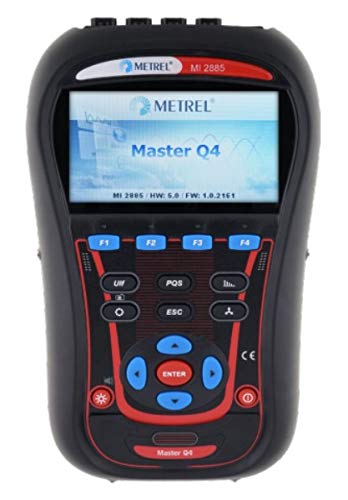
Mynd 1: Framan view of the Metrel MI 2885 Master Q4 Power Quality Analyzer, showing the display and control buttons.
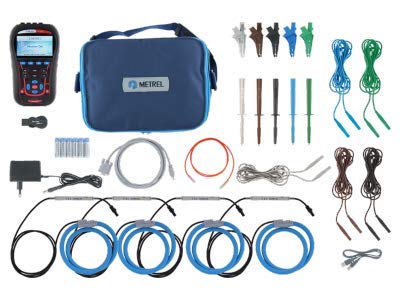
Figure 2: The Metrel MI 2885 Master Q4 instrument displayed with its full set of included accessories, including current clamps, test leads, and carrying bag.
3. Uppsetning
3.1 Uppsetning og hleðsla rafhlöðu
- Open the battery compartment cover located on the rear of the instrument.
- Insert the 6 provided 1.2 V NiMH rechargeable batteries, ensuring correct polarity.
- Lokaðu rafhlöðuhólfinu tryggilega.
- Connect the power supply adapter to the instrument and a suitable power outlet to charge the batteries before first use. The charging indicator on the device will confirm charging status.
3.2 Connecting Measurement Leads and Clamps
- Þekkja voltage input terminals and current clamp inputs on the instrument.
- Tengdu voltage measurement leads to the appropriate voltage input terminals. Use the provided color-coding labels for clear identification (brown, black, grey, green, blue).
- Attach the crocodile clips or test probes to the ends of the voltage measurement leads.
- Connect the flexible current clamps (A 1502) to the current input terminals. The instrument supports automatic clamp viðurkenningu.
- Gakktu úr skugga um að allar tengingar séu öruggar áður en mælingar hefjast.
3.3 Fyrsta ræsing og grunnleiðsögn
- Press and hold the power button (usually marked with a red circle and line) to turn on the instrument.
- The device will perform a self-test and display the main menu.
- Use the arrow keys (Up, Down, Left, Right) to navigate through menu options.
- Ýttu á ENTER hnappinn til að velja valkost eða staðfesta stillingu.
- Ýttu á ESC button to go back to the previous menu or cancel an operation.
- Aðgerðarlyklar F1, F2, F3, F4 provide context-sensitive options displayed on the screen.
4. Notkunarleiðbeiningar
4.1 Mælingarföll
The MI 2885 Master Q4 offers a wide array of measurement capabilities:
- Voltage: TRMS, peak, crest factor (4-channels).
- Núverandi: TRMS, peak, crest factor (4-channels).
- Kraftur: Active, reactive, apparent.
- Power Measurements: Fully compliant with IEEE 1459 (active, non-active, fundamental, harmonic, load unbalance).
- VFD (Variable Frequency Drives) mælingar.
- Unbalance, Flicker Measurement.
- Harmonic and Interharmonic Analysis: Up to 50th harmonics, THD measurement.
- Orka: Active, reactive, generated, consumed.
- Capturing and Recording of Power Supply Events: Shutdowns, interruptions, swells, dips.
- Inrush Currents: Monitoring and recording, waveform/inrush displaying, snapshot and recording.
- Power Quality Analysis: According to EN 50160.
- Hitamæling.
- Photo-Voltaic Inverter Efficiency Measurements.
- Power Factor, cos φ.
4.2 Performing a Measurement
- Ensure the instrument is properly connected to the electrical system to be measured. Refer to Section 3.2 for connection details.
- From the main menu, navigate to the desired measurement function (e.g., "Power Quality," "Harmonics," "Event Recording").
- Select the measurement type and configure any necessary parameters (e.g., recording interval, trigger levels).
- Initiate the measurement. The instrument will begin collecting and displaying data.
- To stop a measurement or recording, press the ESC button or follow on-screen prompts.
4.3 Gagnaskráning og útflutningur
The MI 2885 Master Q4 automatically records important data to the inserted microSD card. Recorded data can be reviewed on the instrument or exported for detailed analysis.
- On-Instrument Review: Navigate to the "Recorded Data" or "History" section in the menu to view past measurements and events.
- PC Software PowerView3: Connect the instrument to a PC using the provided USB, RS232, or Ethernet cable. Use the PowerView3 software to download, analyze, and generate reports from the recorded data. PowerView3 offers advanced features like data filtering, trend analysis, and graphical representation of measurements.

Figure 3: Screenshot illustrating the Metrel PowerView3 PC software interface, showing various graphs and data analysis capabilities for power quality measurements.
5. Viðhald
5.1 Þrif
Regularly clean the instrument's casing and display with a soft, damp cloth. Do not use abrasive cleaners or solvents, as these can damage the device. Ensure the instrument is powered off and disconnected from all power sources before cleaning.
5.2 Umhirða rafhlöðu
- Charge the NiMH batteries fully before extended storage to prolong their lifespan.
- If the instrument will not be used for a long period, remove the batteries to prevent leakage.
- Replace batteries when their performance degrades significantly. Use only recommended NiMH rechargeable batteries.
5.3 vélbúnaðaruppfærslur
Periodically check the Metrel website or use the PowerView3 software for available firmware updates. Firmware updates can introduce new features, improve performance, or address known issues. Follow the instructions provided with the update package carefully.
6. Bilanagreining
This section addresses common issues you might encounter with the MI 2885 Master Q4. For problems not listed here, contact Metrel technical support.
6.1 Algeng vandamál og lausnir
- Tækið kveikir ekki á sér:
- Gakktu úr skugga um að rafhlöður séu rétt settar í og hlaðnar.
- Verify the power supply adapter is functioning if attempting to power via external source.
- No measurement readings:
- Check all measurement lead and current clamp connections for proper seating.
- Ensure the correct measurement function is selected on the instrument.
- Verify that the current clamps are correctly positioned around the conductors.
- Data not saving to microSD card:
- Gakktu úr skugga um að microSD-kortið sé rétt sett í.
- Athugaðu hvort nægilegt laust pláss sé á microSD-kortinu.
- Try formatting the microSD card (Note: This will erase all data on the card. Back up important data first.).
- Communication issues with PC (PowerView3):
- Verify the USB, RS232, or Ethernet cable is securely connected to both the instrument and the PC.
- Ensure the correct communication port is selected in the PowerView3 hugbúnaður.
- Restart both the instrument and the PC.
7. Tæknilýsing
The following tables provide detailed technical specifications for the Metrel MI 2885 Master Q4 Power Quality Analyzer.
7.1 Almennar upplýsingar
| Parameter | Gildi |
|---|---|
| Vörumerki | Metrel |
| Fyrirmynd | MI 2885 Master Q4 |
| Aflgjafi | Battery Powered (1.2 V NiMH rechargeable batteries) |
| Skjár | 4.3 inch color TFT (480 x 272) |
| Samskipti | USB, RS232, Ethernet |
| Minni | 8GB microSD, up to 32GB supported |
| Yfirvoltage Flokkur | CAT IV / 600V or CAT III / 1000V |
| Þyngd | 0.9 kg |
| Mál | 230 x 140 x 80 mm |
7.2 binditage Inputs (AC+DC)
| Parameter | Gildi |
|---|---|
| Nafnbinditage range (L-N) | 1000 Vrms |
| Mælisvið | 10% ... 150% of nominal voltage |
| Nákvæmni | 0.2% of nominal voltage |
| Samplanggengi | 5 kSamples per sec @ 50/60 Hz, sync with mains freq. |
| Nettíðnisvið | 42.5 ... 69.0 Hz ± 10 mHz |
7.3 Current Inputs (AC+DC)
| Parameter | Gildi |
|---|---|
| Measuring range (with A1502 clamps) | 3 ... 6000 Arms ± 1.5% of m.v. |
| Measuring range (with A1281 clamps) | 50 m ... 1200 Arms ± 0.5% of m.v. |
7.4 Functions and Accuracy
| Virka | Mælisvið | Nákvæmni |
|---|---|---|
| Power (P, Q, S) | Fer eftir voltage and selected clamps | IEC 61000-4-30 Class S (0.1%) |
| Orka | Fer eftir voltage and selected clamps | IEC 62053-21 Class 1, IEC 62053-23 Class 2 |
| Harmonics (DC ... 50th) @ 50/60 Hz | 0 ... 20% of nom. voltage | IEC 61000-4-7 flokkur 1 |
| Flikka | 0.2 ... 10 | IEC 61000-4-15 Class F3 |
| Ójafnvægi | Voltage: 0 ... 5%, Current: 0 ... 20% | IEC 61000-4-30 Class S |
| Hitastig | -10 ... +85 °C | ±0.5 °C |
| Dips, Swell | 10 ... 150% of nom. voltage | ±0.2% af nafnrúmmálitage, ±1 cycle |
| Truflar | 0 ... 10% of nom. voltage | ±1 cycle |

Figure 4: A page from the technical specifications document, detailing various measurement parameters, ranges, and accuracies for the MI 2885 Master Q4.
8. Ábyrgð og stuðningur
8.1 Vöruábyrgð
The Metrel MI 2885 Master Q4 Power Quality Analyzer comes with a 2-year (24-month) warranty frá framleiðanda. Þessi ábyrgð nær til galla í efni og framleiðslu við eðlilega notkun. Vinsamlegast geymið kaupkvittunina vegna ábyrgðarkröfu.
8.2 Tæknileg aðstoð
For technical assistance, troubleshooting, or service inquiries, please contact Metrel customer support. Refer to the official Metrel website for the most current contact information, including phone numbers and email addresses for your region.
Additional resources, such as FAQs, software downloads, and updated manuals, may also be available on the Metrel websíða: www.metrel.si


