1. Inngangur
The Celly FLIP1 True Wireless Bluetooth Earbuds provide a wireless audio experience with Bluetooth 5.0 connectivity. Designed for portability and convenience, these earbuds feature a compact charging case with a lanyard and support both stereo and mono audio modes. They are suitable for various activities, including sports, and offer integrated controls for music and call management.
This manual provides instructions for setting up, operating, and maintaining your Celly FLIP1 earbuds.
2. Innihald pakka
Gakktu úr skugga um að allir hlutir séu til staðar í pakkanum:
- Celly FLIP1 True Wireless Earbuds (Left and Right)
- Portable Charging Case with Lanyard
- MicroUSB hleðslusnúra
- Notendahandbók (þetta skjal)
3. Vöru lokiðview
The Celly FLIP1 earbuds and charging case are designed for ease of use and portability. The earbuds fit securely in the ear, and the charging case protects them while providing additional battery life.

Image 3.1: Celly FLIP1 earbuds removed from the open charging case. The earbuds are white with a small blue indicator light on one, and the charging case is white and silver with battery indicator icons.
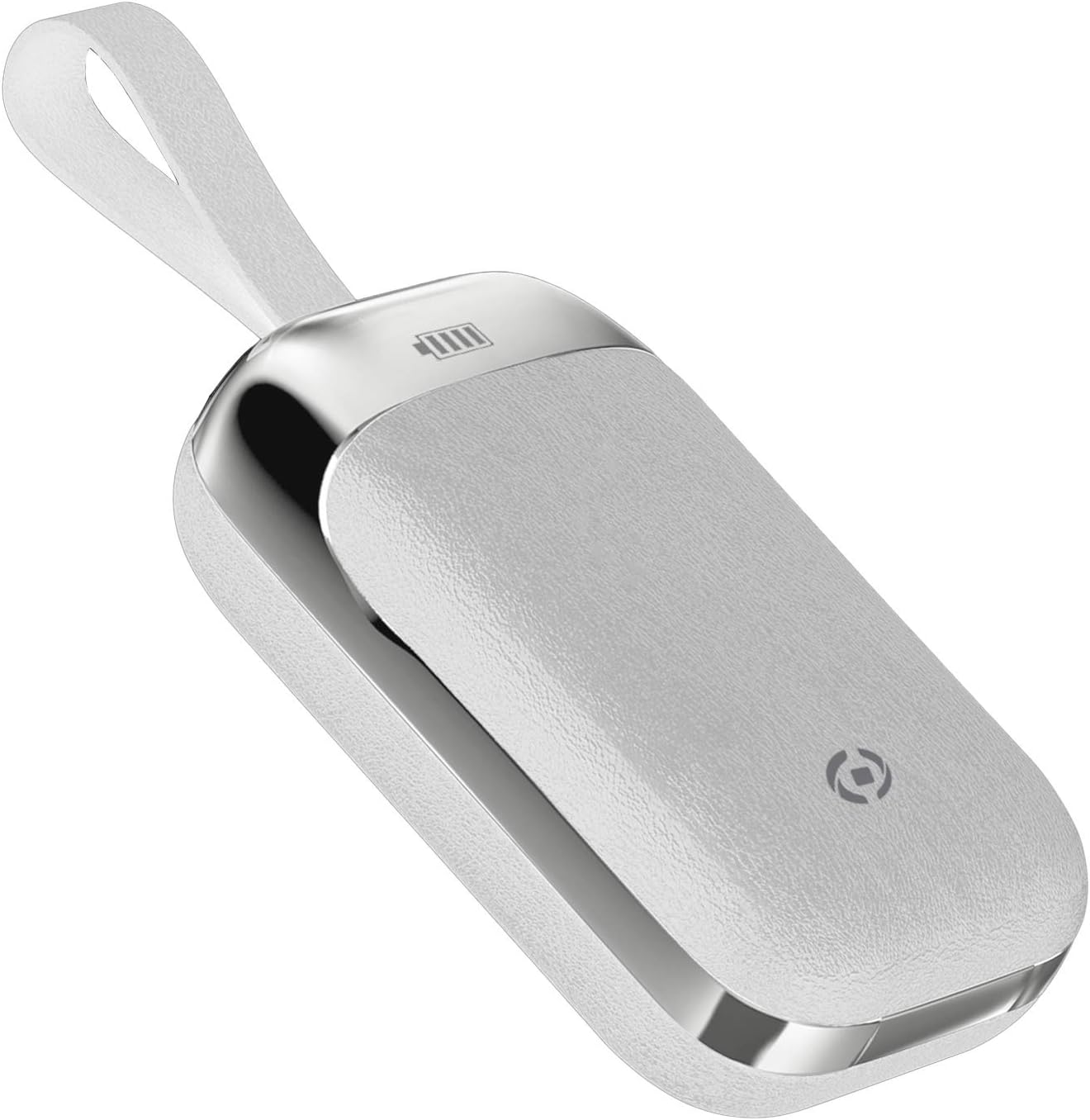
Image 3.2: The Celly FLIP1 charging case in a closed position, showing its compact design and integrated lanyard for easy carrying.

Mynd 3.3: Sprenging view illustrating the internal components of a Celly FLIP1 earbud, including the Bluetooth 5.0 chip, battery, and speaker driver.
4. Uppsetning
4.1 Hleðsla eyrnatólanna og hulstrsins
Áður en eyrnatólin eru notuð í fyrstu umferð skal hlaða þau að fullu og hleðsluhulstrið.
- Settu eyrnatólin í hleðsluhulstrið. Gakktu úr skugga um að þau séu rétt sett í viðeigandi raufar.
- Connect the MicroUSB charging cable to the charging port on the case and the other end to a USB power source (e.g., computer USB port, wall adapter).
- The indicator lights on the case and/or earbuds will show the charging status. Refer to the case for battery level indicators.
- A full charge typically takes approximately 1.5 hours. The charging case has a 400mAh capacity, and each earbud has a 50mAh battery.
Once fully charged, the earbuds provide approximately 4 hours of continuous music playback or talk time.
4.2 Pörun við Bluetooth tæki
To connect your Celly FLIP1 earbuds to your smartphone or other Bluetooth-enabled device:
- Gakktu úr skugga um að heyrnartólin séu hlaðin.
- Open the charging case and remove both earbuds. They will automatically power on and enter pairing mode. You may hear an audio prompt indicating they are ready to pair.
- Farðu í Bluetooth-stillingarnar í tækinu þínu.
- Leitaðu að new devices. Select "Celly FLIP1" (or similar name) from the list of available devices.
- Þegar tengingin er komin upp heyrist staðfestingartónn og vísirljós eyrnatappa gætu breyst.
- Ef pörunin mistekst skaltu setja eyrnatólin aftur í hulstrið, loka því og endurtaka skrefin.
The earbuds have a wireless range of up to 10 meters (33 feet) from your connected device.
5. Notkunarleiðbeiningar
The Celly FLIP1 earbuds feature multifunction keys for controlling audio playback and calls.
5.1 Kveikt/slökkt
- Kveikt á: Remove earbuds from the charging case. They will power on automatically. Alternatively, press and hold the multifunction button on each earbud for a few seconds.
- Slökkva á: Place earbuds back into the charging case. They will power off automatically. Alternatively, press and hold the multifunction button on each earbud for several seconds until the indicator light turns off.
5.2 Tónlist spilun
- Spila / gera hlé: Ýttu einu sinni á fjölnotahnappinn á hvorum eyrnatólinu sem er.
- Næsta lag: Ýttu tvisvar á fjölnotahnappinn á hægri eyrnatólinu.
- Fyrra lag: Ýttu tvisvar á fjölnotahnappinn á vinstri eyrnatólinu.
- Hljóðstyrkur: Hljóðstyrkurinn er venjulega stýrður í gegnum tengda tækið þitt.
5.3 Símtalsstjórnun
- Svara/slíta símtali: Ýttu einu sinni á fjölnotahnappinn á hvorum eyrnatólinu sem er.
- Hafna símtali: Ýttu á fjölnotahnappinn á hvorum eyrnatólinu sem er og haltu honum inni í um það bil 2 sekúndur.
- Raddaðstoðarmaður: Triple-press the multifunction button on either earbud to activate your device's voice assistant (e.g., Siri, Google Assistant).
5.4 Mono/Stereo Mode
The Celly FLIP1 earbuds support both stereo (using both earbuds) and mono (using a single earbud) modes. Each earbud has an integrated microphone.
- To use in mono mode, simply remove one earbud from the case and leave the other in the case. The single earbud will connect to your device.
- To switch back to stereo, remove the second earbud from the case. It will automatically connect to the first earbud and your device.

Image 5.1: A user wearing Celly FLIP1 earbuds while interacting with a smartphone, demonstrating typical use.
6. Viðhald
Rétt viðhald tryggir endingu og bestu mögulegu virkni eyrnatappa.
- Þrif: Notið mjúkan, þurran og lólausan klút til að þrífa eyrnatólin og hleðsluhulstrið. Notið ekki slípiefni, alkóhól eða efnafræðileg leysiefni.
- Geymsla: When not in use, always store the earbuds in their charging case to protect them from dust, scratches, and damage.
- Forðastu raka: Do not expose the earbuds or charging case to water, rain, or excessive humidity.
- Hitastig: Avoid storing or using the device in extreme temperatures (hot or cold).
7. Bilanagreining
If you encounter issues with your Celly FLIP1 earbuds, refer to the following common solutions:
| Vandamál | Lausn |
|---|---|
| Eyrnatólin kveikja ekki á sér. | Gakktu úr skugga um að eyrnatólin séu hlaðin. Settu þau í hleðsluhulstrið og tengdu hulstrið við rafmagn. |
| Eyrnatólin parast ekki við tækið. | 1. Ensure Bluetooth is enabled on your device. 2. Place earbuds back in the case, close, then reopen and remove to re-enter pairing mode. 3. Forget/remove "Celly FLIP1" from your device's Bluetooth list and try pairing again. 4. Ensure earbuds are within 10 meters of your device. |
| Aðeins eitt heyrnartól virkar. | 1. Ensure both earbuds are charged. 2. Place both earbuds back in the charging case, close the lid, wait a few seconds, then open and remove both simultaneously. 3. Re-pair the earbuds with your device. |
| Lágt hljóðstyrkur eða léleg hljóðgæði. | 1. Adjust the volume on your connected device. 2. Ensure earbuds are clean and free of debris. 3. Check the fit of the earbuds in your ears. |
| Hleðsluhólfið hleðst ekki. | 1. Ensure the MicroUSB cable is securely connected to both the case and the power source. 2. Try a different MicroUSB cable or power adapter. |
8. Tæknilýsing
| Eiginleiki | Smáatriði |
|---|---|
| Nafn líkans | FLIP1 |
| Tegundarnúmer vöru | FLIP1WH |
| Tengitækni | Þráðlaust (Bluetooth 5.0) |
| Wireless Range | Allt að 10 metrar (33 fet) |
| Eyrnalokkarafhlaða | 50 mAh (hvert) |
| Hleðsluhylki Rafhlöðugeta | 400 mAh |
| Hleðslutími | U.þ.b. 1.5 klukkustundir (heyrnartól og hulstur) |
| Music Playback / Talk Time | U.þ.b. 4 klst |
| Efni | Plast |
| Litur | Hvítur |
| Þyngd hlutar | 50 g |
| Vöruvídd (kassa) | 10 x 17 x 3.5 cm |
| Innifalið íhlutir | Charging box, Headphones, MicroUSB Cable |
9. Öryggisupplýsingar
Vinsamlegast lestu og fylgdu þessum öryggisleiðbeiningum til að koma í veg fyrir skemmdir á tækinu þínu eða meiðsli á þér:
- Ekki taka í sundur, gera við eða breyta vörunni.
- Haldið tækinu frá miklum hita, beinu sólarljósi og opnum eldi.
- Forðist að útsetja tækið fyrir vatni eða öðrum vökva.
- Do not use the device at high volume for extended periods to prevent hearing damage.
- Geymið þar sem börn og gæludýr ná ekki til.
- Fargið vörunni og rafhlöðum hennar á ábyrgan hátt í samræmi við gildandi reglugerðir.
10. Ábyrgð og stuðningur
Celly products are designed and manufactured to the highest quality standards. For information regarding warranty coverage, technical support, or service, please refer to the warranty card included with your purchase or visit the official Celly websíða.
Vinsamlegast geymið kaupkvittunina vegna hugsanlegra ábyrgðarkrafna.


