Inngangur
This manual provides essential information for the proper installation, operation, and maintenance of your Zebronics Zeb-D370S DVD Player. Please read this manual thoroughly before using the device to ensure safe and efficient operation. Keep this manual for future reference.
Mikilvægar öryggisupplýsingar
- Ekki láta tækið verða fyrir rigningu eða raka til að koma í veg fyrir eld eða raflosti.
- Ekki opna casing. Látið hæft starfsfólk sjá um alla þjónustu.
- Tryggið góða loftræstingu í kringum tækið. Ekki loka fyrir loftræstiop.
- Use only the power adapter supplied with the unit or specified by the manufacturer.
- Forðist að setja tækið á óstöðugt yfirborð.
- Aftengdu rafmagnssnúruna í þrumuveðri eða þegar tækið er ekki notað í langan tíma.
Innihald pakka
Gakktu úr skugga um að allir hlutir séu til staðar í pakkanum:
- Zebronics Zeb-D370S DVD Player Unit
- Fjarstýring
- AV Cable
- Rafmagnssnúra
- Leiðbeiningarhandbók
Vara lokiðview
The Zebronics Zeb-D370S is a versatile DVD player featuring a built-in stereo speaker and amplifier, HDMI, USB, and SD card support, and dual karaoke microphone inputs. It supports multiple formats and offers 5.1 channel, coaxial, and optical audio outputs.
Stjórntæki og tengi á framhliðinni
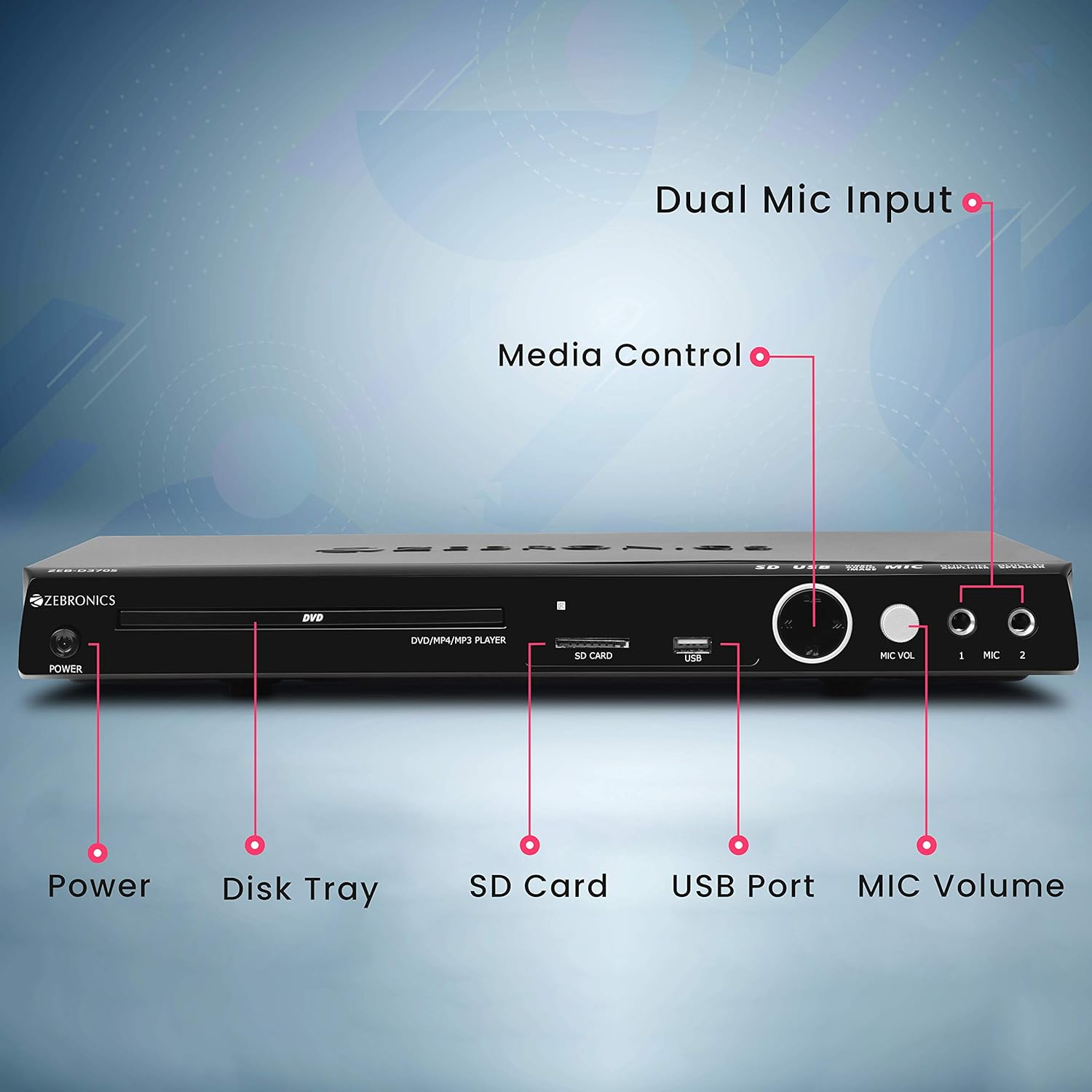
Front panel of the Zebronics Zeb-D370S DVD Player, showing the Power button, Disk Tray, SD Card slot, USB Port, MIC Volume control, and two Microphone inputs (MIC 1, MIC 2).
- Aflhnappur: Kveikir eða slekkur á tækinu.
- Disk Tray: For inserting DVDs, CDs, VCDs, and SVCDs.
- SD kortarauf: Til að spila fjölmiðla files frá SD korti.
- USB tengi: Til að spila fjölmiðla files frá USB drifi.
- MIC hljóðstyrk: Stillir hljóðstyrk tengdra hljóðnema.
- MIC 1 & MIC 2: Inputs for connecting microphones for karaoke.
- Miðlunarstýringarhnappar: Play/Pause, Stop, Skip, etc.
Tengingar að aftan

Rear panel of the Zebronics Zeb-D370S DVD Player, detailing the Coaxial Output, Optical Output, 5.1 Channel Output, HDMI port, Composite video output, Component video output, S-Video output, and Ext-Audio Output.
- HDMI úttak: For high-definition video and audio connection to a TV or display.
- Samsett myndbandsúttak: Staðlað myndbandsúttak.
- Úttak í samsettri myndbandsúttaki: Higher quality analog video output (YPbPr).
- S-myndbandsúttak: Improved analog video output.
- Digital Audio Output (Optical & Coaxial): For connecting to external audio receivers or sound systems.
- Analog 5.1 Channel Output: For connecting to a 5.1 channel speaker system.
- Ext-Audio Output: Additional audio output connections.
- Hátalaraúttak: Terminals for connecting external speakers, utilizing the built-in amplíflegri.

Aftan view of the Zebronics Zeb-D370S DVD Player highlighting the built-in amplifier, built-in speaker, and speaker output terminals.
Uppsetningarleiðbeiningar
1. Rafmagnstenging
- Ensure the DVD player is placed on a stable, flat surface with adequate ventilation.
- Connect the power cable to the AC input on the rear of the DVD player.
- Plug the other end of the power cable into a standard electrical outlet (110V - 260V AC).
2. Video Connection to TV/Display
Veldu eina af eftirfarandi tengiaðferðum:
- HDMI (Recommended for best quality): Connect an HDMI cable from the HDMI output on the DVD player to an HDMI input on your TV.
- Hlutamyndband: Connect component video cables (Red, Green, Blue) from the DVD player's component outputs to the corresponding inputs on your TV.
- Samsett myndband: Connect a composite video cable (Yellow) from the DVD player's composite output to the yellow video input on your TV.
- S-myndband: Connect an S-Video cable from the DVD player's S-Video output to the S-Video input on your TV.
3. Hljóðtenging
Veldu eina af eftirfarandi hljóðtengingaraðferðum:
- HDMI: If using HDMI for video, audio will also be transmitted via the HDMI cable.
- 5.1 Channel Analog Output: Connect RCA cables from the 5.1 channel outputs (Front Left, Front Right, Center, Subwoofer, Surround Left, Surround Right) on the DVD player to a compatible 5.1 channel amplyftara eða hátalarakerfi.
- Stafrænt hljóð (sjónrænt/koaxial): Connect an optical or coaxial cable from the respective output on the DVD player to a digital audio input on your amplifier or home theater system for surround sound.
- Built-in Speaker Output: If using the built-in speakers, ensure no external speakers are connected to the 5.1 channel outputs unless desired.
4. Microphone Connection (Optional)
- Plug your microphones into the MIC 1 and/or MIC 2 inputs on the front panel.
- Adjust the MIC Volume knob to control microphone audio levels.
Notkunarleiðbeiningar

Zebronics Zeb-D370S DVD Player with a disc inserted, remote control, and a visual representation of content playing on a screen, illustrating its multimedia capabilities.
1. Spilun disks
- Ýttu á Kraftur hnappinn til að kveikja á DVD spilaranum.
- Ýttu á Opna/loka button (usually on the remote or front panel) to open the disc tray.
- Place a compatible disc (DVD Video, DVD+RW/-RW/+R/-R, Dual Layer Disc, CD Audio, CD-R/-RW, VCD, SVCD) onto the disc tray with the label side facing up.
- Ýttu á Opna/loka button again to close the tray. The player will automatically begin playback or display a menu.
- Use the remote control for playback functions such as Play, Pause, Stop, Fast Forward, Rewind, and Chapter Skip.
2. USB/SD Media Playback
- Insert a USB drive into the USB port or an SD card into the SD card slot on the front panel.
- The player should automatically detect the media and display a menu to browse files. If not, select the USB or SD source using the remote control's Heimild or Inntak hnappinn.
- Fletta í gegnum þinn files (VOB, MP4, DIVX, AVI, MPEG-1, MPEG-2, 3GP, MP3, WMA, AAC, JPEG, TXT) using the remote control and press Spila til að hefja spilun.
3. Karaoke-virkni
- Connect one or two microphones to the MIC 1 and MIC 2 inputs.
- Play a karaoke disc or a media file with instrumental tracks.
- Adjust the MIC Volume knob on the front panel to control the microphone audio level.
4. Ítarlegar aðgerðir
- CD Ripping: Convert audio CDs to digital formats (refer to on-screen menu for options).
- Picture Slideshow: View JPEG images from disc, USB, or SD card as a slideshow.
- Progressive Scan: Provides a smoother, flicker-free image on compatible displays.
- Zoom IN/OUT: Magnify or reduce the displayed image during playback.
- High Speed Search: Quickly scan through disc or media content.
- Foreldralás: Restrict playback of certain content based on ratings.
- Augnablik endurspilun: Hoppa aftur í nokkrar sekúndur á meðan spilun stendur.
- Disc Resume: Resume playback from where it was last stopped on a disc.
Viðhald
- Þrif á einingunni: Use a soft, dry cloth to clean the exterior of the DVD player. Do not use liquid cleaners or abrasive materials.
- Umhirða diska: Haltu diskunum á brúnunum. Haltu þeim hreinum og rispuðum. Notaðu mjúkan, lólausan klút til að þurrka diskana frá miðjunni og út.
- Loftræsting: Gakktu úr skugga um að loftræstiopin séu ekki stífluð til að koma í veg fyrir ofhitnun.
Úrræðaleit
If you encounter issues with your DVD player, refer to the table below for common problems and solutions:
| Vandamál | Möguleg orsök | Lausn |
|---|---|---|
| Enginn kraftur | Rafmagnssnúra ekki tengd; Rafmagnsinnstungan virkar ekki | Athugaðu tengingu rafmagnssnúrunnar; prófaðu aðra innstungu |
| Ekkert myndbandsúttak | Incorrect video cable connection; Incorrect input selected on TV | Ensure video cables are securely connected; Select the correct input source on your TV (e.g., HDMI 1, AV) |
| Ekkert hljóðúttak | Incorrect audio cable connection; TV/amplifier volume too low; Mute activated | Check audio cable connections; Increase volume; Deactivate mute function |
| Diskurinn spilar ekki | Disc is dirty or scratched; Disc format not supported; Disc inserted incorrectly | Clean the disc; Ensure disc is compatible; Insert disc with label side up |
| USB/SD media not detected | USB drive/SD card not inserted correctly; Incompatible file format; Corrupted media | Reinsert USB/SD; Check supported file formats; Try a different USB/SD device |
Tæknilýsing

Dimensions of the Zebronics Zeb-D370S DVD Player: 360mm (width), 220mm (depth), and 50mm (height).
| Eiginleiki | Smáatriði |
|---|---|
| Nafn líkans | Zeb D370S |
| Vörumerki | SJÁLFRÆÐI |
| Vörumál | 28 x 39 x 82 mm (1.4 kg) |
| Upplausn | 1920 x 1080 (Supported resolutions: 480i/576i/480p/576p/720p/1080i/1080p) |
| Sérstakir eiginleikar | Surround Sound, Built-in Amplifier, Built-in Stereo Speaker, Karaoke Mic Input |
| Hljóðútgangsstilling | Stereo, Surround (2CH / 5.1CH / Virtual Surround Sound) |
| Stillingar fyrir rás umgerð hljóðs fyrir hátalara | 5.1 |
| Stutt hljóðsnið | Dolby Digital, MP3, WMA, AAC |
| Video Playback System | NTSC / PAL / AUTO |
| Tegund tengis | HDMI, USB, SD Slot, MIC 1 & MIC 2, Composite, Component, S-Video, Digital Audio Output (Optical & Coaxial), Analog 5.1Ch Output, Ext-Audio Output x 2 |
| Media Type (Playback Disc) | DVD Video, DVD+RW/-RW/+R/-R, Dual Layer Disc, CD Audio, CD-R/-RW, VCD, SVCD |
| Fjölmiðlar Files Stuðningur | VOB, MP4, DIVX, AVI, MPEG-1, MPEG-2, 3GP, MP3, WMA, AAC, JPEG, TXT |
| Operation Voltage | 110V - 260V riðstraumur |
| Aðgerðir | CD Ripping, Picture SlideShow, Progressive scan, Zoom IN/OUT, High speed search, Parental lock, Instant replay, Disc resume |
Ábyrgð og stuðningur
For warranty information, technical support, or service inquiries, please refer to the warranty card included with your product or visit the official Zebronics websíðuna. Reynið ekki að gera við tækið sjálfur.


