1. Inngangur
This manual provides essential information for the safe and efficient operation of your iProda 2 in 1 Laptop, Model M1169YM. Please read this manual thoroughly before using the device and retain it for future reference. This convertible laptop features an 11.6-inch touchscreen, powered by an Intel N4100 processor, and runs on Windows 10 Pro.

Image: The iProda 2 in 1 Laptop can be used in multiple configurations, including traditional laptop, tent, stand, and tablet modes, showcasinfjölhæfni þess.
2. Öryggisupplýsingar
Fylgdu eftirfarandi öryggisráðstöfunum til að koma í veg fyrir skemmdir á tækinu þínu eða meiðsli á þér:
- Ekki láta tækið verða fyrir miklum hita, beinu sólarljósi eða miklum raka.
- Forðist að láta tækið detta eða verða fyrir miklum höggum.
- Use only the provided or approved power adapter for charging.
- Haltu tækinu í burtu frá vatni og öðrum vökva.
- Reynið ekki að taka tækið í sundur eða gera við það sjálfur. Leitið til hæfs þjónustuaðila.
3. Innihald pakka
Gakktu úr skugga um að allir hlutir séu til staðar í pakkanum þínum:
- iProda 2 in 1 Laptop (Model M1169YM)
- Rafmagns millistykki
- Notendahandbók (þetta skjal)
4. Vöru lokiðview
The iProda 2 in 1 Laptop is designed for versatility, offering multiple usage modes and essential connectivity options.
4.1. Helstu eiginleikar
- 11.6 tommu IPS snertiskjár: A responsive 10-point precision touchscreen with 1920x1080 resolution for interactive use.
- Breytanleg hönnun: 360-degree hinge allows seamless transition between laptop, tablet, tent, and stand modes.
- Intel N4100 Processor: Provides efficient performance for daily tasks.
- Windows 10 Pro: Pre-installed operating system for productivity and security.
- Stækkanlegt geymsla: Supports M.2 2242 SSD for additional storage capacity.

Image: Key features of the iProda laptop, including its touchscreen, operating system, display specifications, and camera resolution.

Image: The laptop's 360-degree hinge allows it to convert into a tablet, enabling direct interaction via its precision touchscreen.
4.2. Port og hnappar
Familiarize yourself with the various ports and buttons on your laptop:
- Type-C höfn: Used for power supply and data transfer.
- Micro HDMI: Til að tengjast við ytri skjái.
- Ör USB: Til að tengja USB tæki.
- TF kortarauf: For expanding storage with a TF (MicroSD) card.
- Aflhnappur: Til að kveikja/slökkva á tækinu eða setja það í dvala.
- Hljóðstyrkshnappar: Til að stilla hljóðútgang.
- Heyrnartólstengi: Til að tengja heyrnartól eða ytri hátalara.

Mynd: Ítarleg view of the laptop's side panels, indicating the location and function of each port and button for easy identification.
5. Uppsetning
5.1. Hleðsla rafhlöðunnar
Before first use, fully charge the laptop's battery. Connect the provided power adapter to the Type-C port on the laptop and plug it into a power outlet. The charging indicator light will illuminate.
5.2. Fyrsta ræsing og uppsetning Windows
- Press and hold the Power Button until the screen turns on.
- Fylgdu leiðbeiningunum á skjánum til að ljúka upphaflegri uppsetningu Windows 10 Pro, þar á meðal vali á tungumáli, nettengingu og stofnun notandareiknings.
6. Notkun fartölvunnar
6.1. Notkun snertiskjás
The 10-point precision touchscreen allows for intuitive interaction with Windows 10 Pro. Use gestures such as tapping, swiping, pinching, and stretching to navigate, zoom, and interact with applications.
6.2. Lyklaborð og snertiflötur
The integrated keyboard and touchpad provide traditional input methods. The touchpad supports multi-touch gestures for scrolling, zooming, and switching applications.

Image: The laptop's full-size American keyboard and responsive touchpad, designed for comfortable typing and navigation.
6.3. Convertible Modes
The 360-degree hinge allows you to switch between various modes:
- Fartölvustilling: Staðlaðar stillingar fyrir vélritun og framleiðni.
- Spjaldtölvuhamur: Fold the screen back completely for a tablet experience, ideal for browsing or drawing.
- Tjaldstilling: Position the laptop like a tent for media consumption or presentations.
- Standa stilling: Flip the keyboard face down to use the screen as a display, suitable for watching videos.

Image: The laptop configured in tent mode, demonstrating its flexibility for viewað lesa efni án þess að lyklaborðið sé í veginum.
7. Stækkun geymslu
The laptop comes with 64GB eMMC storage. You can expand the storage capacity by installing an M.2 2242 SSD (128GB/256GB/512GB, not included).
7.1. Installing an M.2 2242 SSD
To install an M.2 2242 SSD:
- Power off the laptop and disconnect the power adapter.
- Carefully open the back cover of the laptop.
- Locate the M.2 slot.
- Insert the M.2 2242 SSD into the slot and secure it with the appropriate screw (if provided).
- Settu afturhlífina á.
- Upon booting, you may need to initialize and format the new SSD through Windows Disk Management.
Note: If you are unsure about this procedure, it is recommended to seek professional assistance.

Image: Visual representation of the M.2 SSD slot, illustrating how additional storage can be integrated into the laptop.
8. Tengingar
8.1. Wi-Fi tenging
The laptop supports dual-frequency 2.4GHz/5GHz Wi-Fi. To connect to a wireless network:
- Smelltu á Wi-Fi táknið í kerfisbakkanum.
- Veldu netið sem þú vilt af listanum.
- Sláðu inn lykilorðið fyrir netið ef beðið er um það og smelltu á „Tengjast“.
8.2. External Display (Micro HDMI)
Connect an external monitor or TV using a Micro HDMI to HDMI cable. Once connected, you can configure display settings (duplicate, extend, second screen only) through Windows display settings.
8.3. USB tæki
Use the Micro USB port or the Type-C port (with an appropriate adapter) to connect peripherals such as a mouse, keyboard, or external storage devices.
9. Viðhald
9.1. Þrif
To clean the laptop, power it off and disconnect the power adapter. Use a soft, lint-free cloth slightly dampÞvoið með vatni eða skjáhreinsiefni fyrir skjáinn. Forðist sterk efni eða slípiefni.
9.2. Umhirða rafhlöðu
Til að lengja líftíma rafhlöðunnar:
- Forðastu að tæma rafhlöðuna alveg oft.
- Do not expose the laptop to high temperatures.
- Ef fartölvan er geymd í langan tíma, vertu viss um að rafhlaðan sé hlaðin um 50-70%.
10. Bilanagreining
Hér eru lausnir á algengum vandamálum sem þú gætir lent í:
| Vandamál | Lausn |
|---|---|
| Tölvan kviknar ekki á. | Ensure the battery is charged. Connect the power adapter and try again. If still unresponsive, perform a hard reset by holding the power button for 10-15 seconds. |
| Skjárinn er tómur eða blikkar. | Restart the laptop. Check if an external display is connected and interfering. Update display drivers if possible. |
| Vandamál með Wi-Fi tengingu. | Gakktu úr skugga um að Wi-Fi sé virkt. Endurræstu leiðina og fartölvuna. Athugaðu netstillingar í Windows. |
| Snertiskjárinn svarar ekki. | Restart the laptop. Ensure the screen is clean. Check for any pending Windows updates or driver updates for the touchscreen. |
11. Tæknilýsing
Technical specifications for the iProda 2 in 1 Laptop (Model M1169YM):
| Eiginleiki | Smáatriði |
|---|---|
| Vörumerki | iProda |
| Gerðarnúmer | M1169YM |
| Stýrikerfi | Windows 10 Pro |
| Skjástærð | 11.6 tommur |
| Skjáupplausn | 1920 x 1080 pixlar (1080p) |
| Örgjörvi | Intel N4100 (up to 2.4 GHz Burst Frequency) |
| vinnsluminni | 4 GB DDR4 |
| Harður diskur | 64 GB eMMC |
| Skjákort | Integrated (UHD 600 Graphics) |
| Þráðlaus gerð | 2.4 GHz / 5 GHz Dual-frequency Wi-Fi |
| Meðal rafhlöðuending | 8 Hours (3500mAh, 27Wh) |
| Þyngd hlutar | 3.63 pund |
| Vörumál | 11.99 x 11.6 x 0.5 tommur |
| Tengitækni | HDMI, USB Type-C, Micro USB |
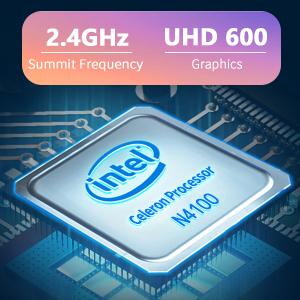
Image: The Intel Celeron N4100 processor, central to the laptop's performance, highlighting its clock speed and integrated graphics capabilities.

Image: The laptop's battery specifications, indicating its power capacity for extended use.
12. Ábyrgð og stuðningur
For warranty information and technical support, please refer to the documentation included with your purchase or visit the official iProda website. Contact information for customer service can typically be found on the manufacturer's support page.


