Inngangur
Þakka þér fyrir kaupinasing the Bytech True Wireless Bluetooth Boost Link True Speaker. This manual provides essential information for setting up, operating, and maintaining your new speakers. Please read this manual thoroughly before use to ensure proper operation and to maximize your listening experience. These speakers feature True Wireless Stereo (TWS) functionality, Bluetooth connectivity, FM Radio, and Bass Boost for rich audio.
Öryggisupplýsingar
- Do not expose the speakers to extreme temperatures, humidity, or direct sunlight.
- Forðist að láta hátalarana detta eða verða fyrir hörðum höggum.
- Do not disassemble, repair, or modify the speakers yourself. Refer all servicing to qualified personnel.
- Haldið hátalarunum frá vatni og öðrum vökvum.
- Notið aðeins tilgreinda hleðslusnúru og straumbreyti.
- Þrífið hátalarana með mjúkum, þurrum klút. Notið ekki slípiefni eða leysiefni.
- Hlustaðu á miðlungsmiklum hljóðstyrk til að forðast heyrnarskaða.
Innihald pakka

Image: The Bytech Boost Link True Wireless Speakers shown in their retail packaging, highlighting the two speakers and the Bluetooth connectivity feature.
Vinsamlegast athugið hvort allir hlutir séu til staðar og í góðu ástandi:
- 2 x Bytech Boost Link True Wireless Speakers
- 1 x hleðslusnúra (USB)
- 1 x Notendahandbók (þetta skjal)
Vara lokiðview

Mynd: Nærmynd að framan view of the two Bytech Boost Link True Wireless Speakers, showing the speaker grilles and control buttons at the bottom.
Kynntu þér íhluti og stjórntæki hátalarans:
- Hátalaragrill: Protects the speaker driver.
- Stjórnhnappar:
- Aflhnappur: Power On/Off, Play/Pause.
- Hnappur fyrir ham: Switch between Bluetooth, FM Radio, etc.
- Fyrra lag/hljóðstyrkshnappur: Stutt ýting til að ýta á fyrra lag, lengi ýting til að lækka hljóðstyrkinn.
- Hnappur fyrir næsta lag/hljóðstyrk: Stutt ýting fyrir næsta lag, lengi ýting til að hækka hljóðstyrkinn.
- Hleðsluport: Til að tengja USB hleðslusnúruna.
- LED vísir: Shows power status, charging status, and pairing status.
Uppsetning
Að hlaða hátalarana
Before first use, fully charge both speakers. Connect the supplied USB charging cable to the charging port on each speaker and plug the other end into a USB power adapter (not included) or a computer's USB port. The LED indicator will show charging status and turn off or change color when fully charged.
Kveikt/slökkt
- Til að kveikja á: Press and hold the Power button on each speaker until the LED indicator lights up and you hear a power-on prompt.
- Til að slökkva á: Press and hold the Power button on each speaker until the LED indicator turns off and you hear a power-off prompt.
Notkunarleiðbeiningar
Bluetooth-pörun (stilling fyrir einn hátalara)
- Gakktu úr skugga um að hátalarinn sé kveikt á og í Bluetooth-pörunarstillingu (LED-ljósið blikkar).
- Virkjaðu Bluetooth í tækinu þínu (snjallsíma, spjaldtölvu, fartölvu) og leitaðu að tiltækum tækjum.
- Select "BYTECH BOOST LINK" (or similar name) from the list.
- Þegar parað er við mun LED-ljósið hætta að blikka og vera stöðugt og þú munt heyra staðfestingarhljóð.
True Wireless Stereo (TWS) pörun (tveir hátalarar)
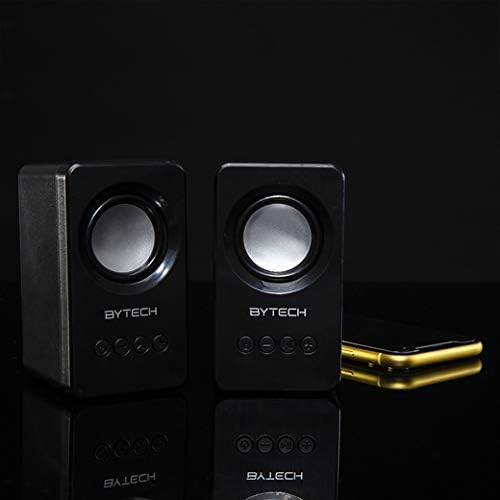
Image: The two Bytech Boost Link True Wireless Speakers positioned next to a smartphone, symbolizing their ability to connect wirelessly to each other and a device for stereo sound.
For a true stereo sound experience, you can pair both speakers together:
- Power on both Bytech Boost Link speakers. Do not connect them to your Bluetooth device yet.
- The speakers will automatically attempt to pair with each other. You will hear a confirmation sound when they are successfully linked for TWS. One speaker will become the master (left channel) and the other the slave (right channel).
- Once TWS paired, the master speaker will enter Bluetooth pairing mode (LED flashing).
- On your device, enable Bluetooth and search for "BYTECH BOOST LINK". Connect to this single entry.
- Báðir hátalararnir munu nú spila hljóð í stereó.
- Athugið: If the speakers do not automatically pair, try double-pressing the Mode button on one of the speakers to initiate TWS pairing.
Rekstur FM útvarps
- Power on the speaker(s).
- Ýttu á Mode hnappinn endurtekið þar til þú heyrir FM útvarpsboð.
- Til að skanna sjálfvirkt og vista stöðvar skaltu halda inni Spila / gera hlé button. The speaker will scan and store available FM stations.
- Notaðu Fyrra lag og Næsta lag hnappar til að fletta á milli vistaðra stöðva.
Hljóðspilun og hljóðstyrksstýring
- Spila / gera hlé: Stutt stutt á Power takkann.
- Næsta lag: Short press the Next Track/Volume Up button.
- Fyrra lag: Short press the Previous Track/Volume Down button.
- Hækka: Long press the Next Track/Volume Up button.
- Hljóðstyrkur niður: Long press the Previous Track/Volume Down button.
Viðhald
- Þrif: Use a soft, dry, lint-free cloth to clean the surface of the speakers. Do not use liquid cleaners, aerosols, or solvents.
- Geymsla: Þegar hátalararnir eru ekki í notkun í langan tíma skal geyma þá á köldum, þurrum stað fjarri beinu sólarljósi og miklum hita.
- Umhirða rafhlöðu: To prolong battery life, avoid fully discharging the battery frequently. Charge the speakers regularly, even if not in use.
Úrræðaleit
| Vandamál | Möguleg orsök | Lausn |
|---|---|---|
| Hátalarinn kviknar ekki. | Lítið rafhlaða. | Hladdu hátalarann að fullu. |
| Ekki er hægt að para í gegnum Bluetooth. | Speaker not in pairing mode; Device Bluetooth off; Too far from device. | Ensure speaker LED is flashing; Turn on Bluetooth on your device; Move speaker closer to device (within 10 meters). |
| Ekkert hljóð. | Volume too low; Speaker not connected; Incorrect mode. | Increase volume on speaker and device; Re-pair Bluetooth; Ensure correct mode (Bluetooth/FM). |
| TWS-tenging mistekst. | Speakers already connected to a device; Speakers too far apart. | Disconnect speakers from any device; Power off and on both speakers, then try TWS pairing again; Ensure speakers are close to each other. |
| Léleg FM útvarpsmóttaka. | Veikt merki; Truflanir. | Relocate the speaker to an area with better reception; Extend the charging cable (can act as an antenna). |
Tæknilýsing
- Gerð: BY-AU-BS-152-BK
- Vörumerki: Bytech
- Tengingartækni: Þráðlaust (Bluetooth)
- Hljóðútgangsstilling: Umhverfi
- Gerð hátalara: Surround Sound
- Sérstakir eiginleikar: Wireless Bluetooth, Bass Boost, FM Radio, True Wireless Stereo (TWS)
- Mælt er með notkun: Fyrir tónlistarspilara
- Samhæf tæki: Fartölva, spjaldtölva, snjallsími
- Stjórnandi gerð: Hnappar á tækinu
- Stærðir pakka: 20.7 x 16 x 9 cm
- Þyngd: 560 g
Ábyrgð og stuðningur
Bytech products are designed and manufactured to the highest quality standards. For information regarding warranty coverage, technical support, or service inquiries, please refer to the warranty card included with your purchase or visit the official Bytech websíða. Vinsamlegast geymið kaupkvittunina vegna ábyrgðarkröfu.
For further assistance, please contact Bytech customer support.


