Inngangur
This manual provides essential information for the proper setup, operation, and maintenance of your SPRT POS58 IVU Receipt Thermal Printer. Please read this manual thoroughly before using the printer to ensure optimal performance and longevity.
The SPRT POS58 IVU is a compact and efficient thermal receipt printer designed for various point-of-sale applications. It features USB connectivity and is compatible with 5.7 cm wide thermal paper.
Uppsetning
1. Upptaka og skoðun
- Takið prentarann og allan fylgihluti varlega úr umbúðunum.
- Verify that all components are present: printer unit, power adapter, USB cable.
- Inspect the printer for any visible damage. If damaged, contact your supplier immediately.
2. Tenging prentarans
- Tengdu rafmagn: Insert the power adapter cable into the printer's power port and plug the other end into a suitable power outlet.
- Tengdu USB: Tengdu annan endann á USB snúrunni við USB tengi prentarans og hinn endann við lausa USB tengi á tölvunni þinni eða sölustaðarkerfi.
- Kveikt á: Locate the power switch on the printer (typically on the side or front) and turn it to the 'ON' position.
3. Hleðsla á hitapappír
The SPRT POS58 IVU printer uses standard 5.7 cm wide thermal paper rolls.
- Open the paper cover by pressing the release button or lifting the latch (location may vary slightly).
- Insert the thermal paper roll with the printing surface facing the thermal head. Ensure the roll is seated correctly in the paper compartment.
- Dragðu lítið magn af pappír út framhjá skurðarvélinni.
- Lokaðu pappírslokinu vandlega þar til það smellpassar.
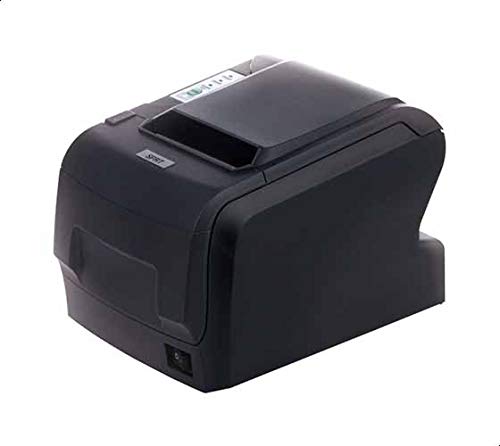
Figure 1: SPRT POS58 IVU Receipt Thermal Printer. This image displays the compact black thermal printer from an angled view, highlighting its paper output slot and the power switch located on the side.
Notkunarleiðbeiningar
Grunnprentun
- Gakktu úr skugga um að prentarinn sé kveikt á og tengdur við tölvuna þína/sölukerfið.
- Install the necessary printer drivers on your operating system if not already installed. Refer to the driver installation guide provided separately or available from the manufacturer's websíða.
- From your application (e.g., POS software, word processor), select the SPRT POS58 IVU as your printer.
- Initiate the print command. The printer will automatically feed and print the receipt.
- Tear off the receipt against the serrated edge of the paper output slot.
Gaumljós
Prentarinn hefur venjulega vísiljós sem sýna stöðu hans:
- Kraftljós: Gefur til kynna að prentarinn sé kveiktur.
- Villuljós: Illuminates or blinks to indicate an error condition (e.g., paper out, print head overheat).
- Pappírsljós: Indicates that the paper roll is empty or incorrectly loaded.
Viðhald
Þrif á hitahausnum
Regular cleaning of the thermal head ensures clear print quality and extends printer life. Clean the thermal head after every 50-100 km of printing or if print quality degrades.
- Slökktu á prentaranum og aftengdu rafmagnssnúruna.
- Opnaðu pappírshlífina.
- Wait a few minutes for the thermal head to cool down if the printer has been recently used.
- Gently wipe the thermal head surface with a cotton swab lightly moistened with absolute alcohol (ethanol).
- Allow the alcohol to evaporate completely before closing the cover and reconnecting power.
Hreinsun að utan
Þurrkaðu ytra byrði prentarans með mjúkum klút.amp klút. Notið ekki sterk leysiefni eða slípiefni.
Meðhöndlun pappírs
- Use only high-quality thermal paper to prevent damage to the thermal head and ensure optimal print quality.
- Store thermal paper in a cool, dry place away from direct sunlight and heat.
Úrræðaleit
| Vandamál | Möguleg orsök | Lausn |
|---|---|---|
| Prentarinn kviknar ekki á. | Power cable not connected; power outlet faulty; printer switch off. | Athugaðu tengingu rafmagnssnúrunnar; prófaðu aðra innstungu; vertu viss um að rofinn sé kveikt. |
| No printing / Blank output. | Paper loaded incorrectly (upside down); paper out; driver not installed/configured; printer not selected. | Reload paper correctly (printing side facing thermal head); replace paper roll; install/reinstall drivers; select printer in application. |
| Léleg prentgæði. | Thermal head dirty; low-quality paper; paper stored improperly. | Clean thermal head; use recommended thermal paper; store paper correctly. |
| Pappírsstopp. | Paper not loaded straight; foreign object in paper path. | Open cover, remove jammed paper carefully, reload paper straight; inspect for obstructions. |
Tæknilýsing
| Eiginleiki | Smáatriði |
|---|---|
| Vörumerki | SPRT |
| Gerðarnúmer | POS58 IVU |
| Printer Type | Kvittunarhitaprentari |
| Tengitækni | USB |
| Prentmiðlar | Labels (commonly used for receipts) |
| Pappírsbreidd | 5.7 cm |
| Litur | Svartur |
| Þyngd hlutar | 1.82 kíló |
| Stærðir pakka | 28 x 21.4 x 17.8 cm |
Ábyrgð og stuðningur
Specific warranty terms and detailed support contact information are not provided within the available product data. For warranty claims, technical support, or service inquiries, please refer to the documentation included with your purchase or contact your point of sale or the manufacturer directly.
You may find additional resources and contact details on the official SPRT websíða.