1. Inngangur
The Rigol DS2302A is a high-performance digital oscilloscope designed for precise signal analysis and measurement. It features a 300 MHz bandwidth, 2 analog channels, a 2 GSa/s real-time sampling rate, and a deep memory depth of 56 Mpts. This manual provides essential information for setting up, operating, and maintaining your DS2302A oscilloscope.

Mynd 1.1: Framan view of the Rigol DS2302A Digital Oscilloscope, showing the display, control panel, and input channels.
2. Helstu eiginleikar
The DS2302A incorporates several advanced features to enhance measurement capabilities and user experience:
- High Bandwidth and Sampling hlutfall: 300 MHz analog bandwidth and 2 GSa/s real-time sampling rate for capturing fast signals.
- Deep Memory Depth: Up to 56 Mpts memory depth allows for longer waveform captures with high resolution.
- UltraVision Technology: Features like multi-level intensity grading display (up to 256 levels) and real-time ceaseless waveform recording, playback, and analysis functions.
- Ítarleg kveikja: Supports various trigger types including Edge, Pulse, Runt, Windows, Nth Edge, Slope, Video, Pattern, Delay, Timeout, Duration, Setup/Hold, RS232, I2C, SPI, and CAN.
- Serial Bus Decoding: Built-in decoding functions for common serial protocols such as Parallel, RS232, I2C, SPI, and CAN.
- Stór skjár: An 8-inch display provides clear viewing of waveforms and measurement data.
- Built-in 50Ω Adapters: Improves signal integrity for higher speed signals.
Myndband 2.1: Yfirview of the Rigol DS2000 Series Digital Oscilloscopes, highlighting key features such as large display, high sampling rate, deep memory, and advanced triggering and decoding capabilities.

Figure 2.1: The oscilloscope display demonstrating its wide vertical range (500 µV/div to 10 V/div) and low noise floor, which is beneficial for capturing small signals accurately.

Figure 2.2: Illustration of the UltraVision deep memory feature, allowing for up to 56 Mpts of memory depth on analog channels for extended waveform capture.
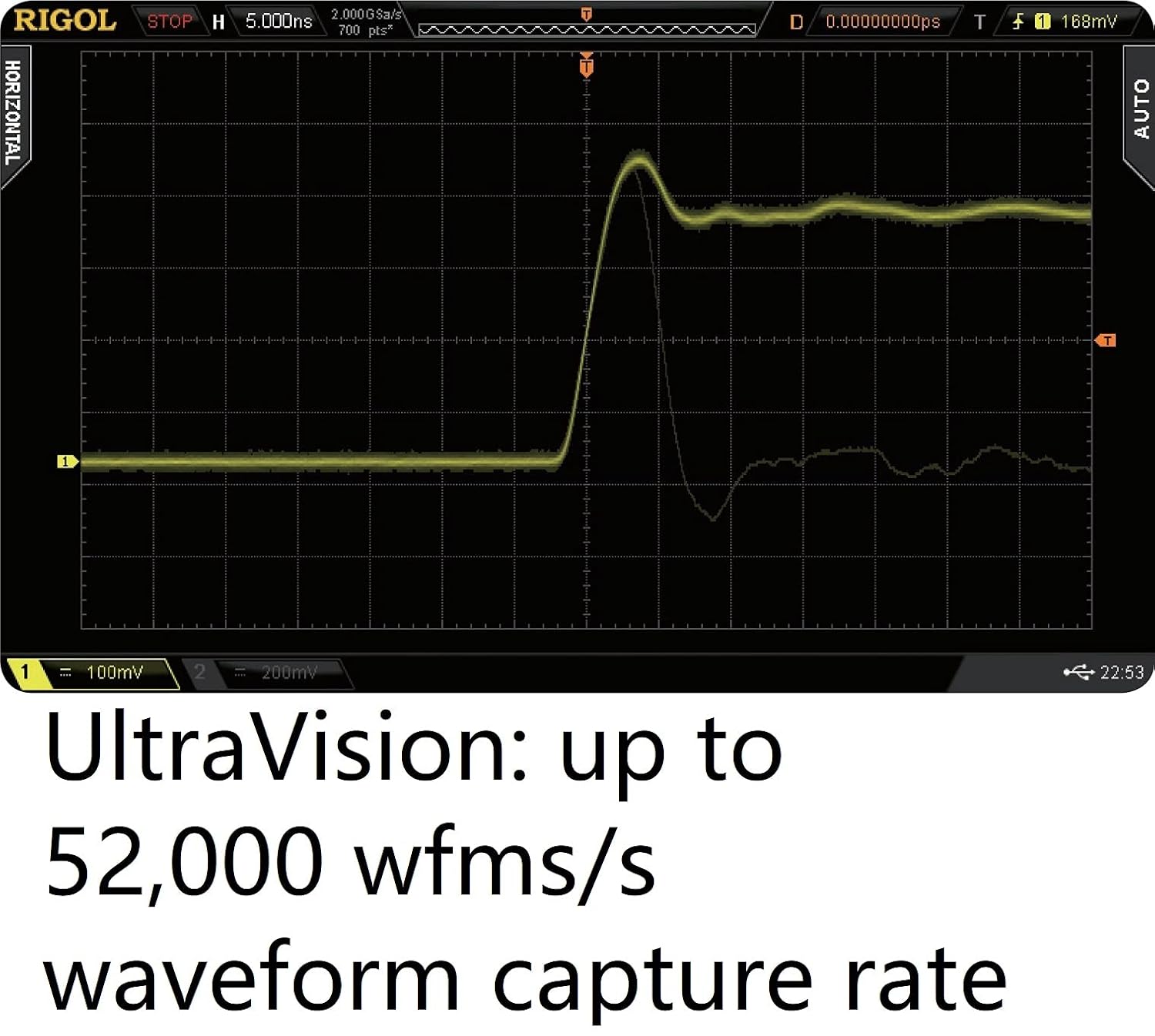
Figure 2.3: The oscilloscope's display showcasing the UltraVision technology's high waveform capture rate of up to 52,000 waveforms per second, enabling the observation of transient events.
3. Uppsetning
Follow these steps to set up your Rigol DS2302A oscilloscope:
- Upptaka: Carefully remove the oscilloscope and all accessories from its packaging. Inspect for any signs of damage.
- Rafmagnstenging: Connect the provided power cable to the power input on the rear panel of the oscilloscope and then to a suitable AC power outlet.
- Upphafleg kveikt á: Press the power button on the front panel to turn on the oscilloscope. Allow a few moments for the system to boot up.
- Kannatenging: Connect the oscilloscope probes to the BNC input connectors (CH1, CH2) on the front panel. Ensure a secure connection.
- Jarðtenging: Always ensure the oscilloscope is properly grounded to prevent electrical shock and ensure accurate measurements.

Figure 3.1: The packaging box for the Rigol DS2302A oscilloscope, indicating proper handling and recycling symbols.
4. Notkunarleiðbeiningar
This section covers basic operation and common functions of the DS2302A oscilloscope.
4.1. Basic Waveform Display
- Lóðréttar stýringar: Use the vertical position and scale knobs for each channel (CH1, CH2) to adjust the vertical position and voltage per division of the waveform.
- Lárétt stýringar: Use the horizontal position and scale knobs to adjust the time base and horizontal position of the waveform.
- Sjálfvirkur hnappur: Ýttu á AUTO button for automatic setup of vertical, horizontal, and trigger systems to display a stable waveform.
4.2. Trigger Functions
The oscilloscope offers various trigger modes to stabilize and capture specific events.
- Edge Trigger: Triggers on the rising or falling edge of a signal.
- Pulse Trigger: Triggers on pulses of specific width or polarity.
- Serial Bus Triggering: Utilize dedicated trigger types for serial protocols like I2C, SPI, and CAN to isolate specific data packets or events.

Figure 4.1: The oscilloscope's trigger menu, illustrating the wide array of trigger functions available, including Runt, Setup/Hold, and Nth Edge, for precise signal capture.
4.3. Serial Bus Decoding
The DS2302A can decode and display data from various serial buses.
- Accessing Decode: Farðu í Afkóða menu to select the desired protocol (e.g., RS232, I2C, SPI, CAN).
- Stillingar: Configure the bus parameters such as clock source, data lines, and bit rates as required by your specific bus.
- Viewing Decoded Data: The decoded data will be displayed on the screen, often in a tabular or packet-based format, alongside the analog waveforms.

Figure 4.2: The oscilloscope's display demonstrating its serial bus trigger and decoding functions for protocols like RS232, I2C, SPI, and CAN, showing both the analog signal and the decoded data.
4.4. Waveform Recording and Analysis
Utilize the UltraVision features for in-depth waveform analysis.
- Upptaka: Access the recording function to capture long durations of waveform data into the deep memory.
- Spilun: Review recorded waveforms frame by frame or continuously to identify anomalies.
- Greining: Apply various measurement and analysis tools to the recorded data for detailed characterization.

Figure 4.3: The oscilloscope's display showcasing UltraVision's real-time ceaseless waveform recording, playback, and analysis functions, allowing users to capture and examine transient events.
5. Viðhald
Rétt viðhald tryggir endingu og nákvæmni sveiflusjásins.
- Þrif: Use a soft, dry cloth to clean the exterior of the instrument. For stubborn dirt, a slightly damp cloth with mild detergent may be used. Avoid abrasive cleaners or solvents.
- Loftræsting: Ensure the ventilation openings on the instrument are clear and unobstructed to prevent overheating.
- Geymsla: When not in use, store the oscilloscope in a clean, dry environment away from direct sunlight and extreme temperatures.
- Rannsakendur: Handle oscilloscope probes with care. Avoid bending or stressing the probe tips. Store them properly to prevent damage.
6. Bilanagreining
This section addresses common issues you might encounter with your DS2302A oscilloscope.
| Vandamál | Möguleg orsök | Lausn |
|---|---|---|
| Engin skjár eftir að kveikt er á honum | Power cable not connected; Power switch off; Fuse blown | Check power cable connection; Ensure power switch is ON; Replace fuse (refer to back panel for fuse specifications). |
| Engin bylgjuform birtist | Probe not connected; Input signal too small/large; Incorrect trigger settings | Connect probe securely; Adjust vertical scale (Volts/Div); Press AUTO button or adjust trigger level/mode. |
| Óstöðug bylgjuform | Incorrect trigger source/mode/level; Signal noise | Verify trigger settings; Adjust trigger level; Use averaging acquisition mode to reduce noise. |
7. Tæknilýsing
Detailed technical specifications for the Rigol DS2302A Digital Oscilloscope:
| Eiginleiki | Forskrift |
|---|---|
| Analog bandbreidd | 300 MHz |
| Fjöldi hliðrænna rása | 2 |
| Max. Real-time Sample Verð | 2 GSa/s (single channel), 1 GSa/s (dual channel) |
| Hámarksdýpt minnis | 56 Mpts (single channel), 28 Mpts (dual channel) |
| Hámarks bylgjuformsupptökuhraði | 50,000 wfms/s |
| Vörumál | 14.17 x 7.09 x 5.12 tommur |
| Þyngd hlutar | 8.36 pund |
| Framleiðandi | RIGOL |
| Tegundarnúmer vöru | DS2302A |
8. Ábyrgð og stuðningur
For warranty information, technical support, or any further inquiries regarding your Rigol DS2302A Digital Oscilloscope, please contact Rigol directly.
You can also visit the official Rigol North America website for more details and resources: www.rigolna.com


