Inngangur
This manual provides detailed instructions for the installation, operation, and maintenance of your DALY Smart Battery Management System (BMS) for Li-ion 20S 72V 120A battery packs. The DALY Smart BMS is designed to protect your lithium battery by monitoring its status and managing charging and discharging processes, ensuring safety and extending battery life. It features a programmable Bluetooth module for remote monitoring and parameter adjustment via a mobile application.

Image: DALY Smart BMS 120A with integrated cooling fan.
Öryggisráðstafanir
- Always disconnect the charger and load before performing any maintenance or wiring changes.
- Ensure correct polarity when connecting the BMS to the battery pack and external devices. Incorrect wiring can cause damage to the BMS and battery.
- Wear appropriate personal protective equipment (PPE), including insulated gloves and eye protection, when working with high-voltage rafhlöðukerfi.
- Avoid short-circuiting battery terminals or BMS connections.
- Install the BMS in a well-ventilated area, away from flammable materials.
- If the BMS shows signs of damage or malfunction, discontinue use immediately and consult a qualified technician.
Uppsetning
1. Wiring the BMS
Careful wiring is crucial for the proper function and safety of your battery system. Follow these steps precisely:
- Undirbúið rafhlöðupakkann: Ensure all individual cells in your 20S Li-ion battery pack are balanced and at a safe voltage level before connecting the BMS.
- Tengdu jafnvægisvírana: Connect the balance wires from your battery pack to the BMS balance port. Ensure the wires are connected in the correct sequence, starting from the lowest cell voltage (B-) to the highest (B+). Mikilvægt: Do not connect the main B- wire to the BMS yet.
- Verify Balance Wire Voltages: Before connecting the BMS, use a multimeter to measure the voltage between adjacent balance cables. The reading should approximate the nominal voltage of a single cell. This confirms correct wiring.
- Connect Main Wires: Connect the main negative battery terminal (B-) to the corresponding B- terminal on the BMS. Connect the main positive battery terminal (B+) to the P+ terminal on the BMS.
- Connect Load/Charger: Connect your load and charger to the P- terminal on the BMS. The DALY Smart BMS uses a common port for both charging and discharging.

Image: Wiring diagram for the DALY Smart BMS, illustrating connections for a 20S Li-ion battery pack, motor, and charger.
2. Bluetooth Module Connection and App Setup
The DALY Smart BMS includes a Bluetooth module for wireless communication with your smartphone. This allows for real-time monitoring and parameter adjustments.
- Connect Bluetooth Module: Plug the Bluetooth module into the designated port on the BMS.
- Virkjaðu BMS: Press the button on the Bluetooth module or the BMS to activate the smart BMS.
- Sækja forrit: Download the "Smart BMS" application from your device's app store (available for iOS and Android).
- Tengjast í gegnum Bluetooth: Open the Smart BMS app on your phone. The app will scan for available Bluetooth devices. Select the corresponding Bluetooth ID of your BMS to connect.

Image: DALY Smart BMS connected to a Bluetooth module, with the mobile app interface visible on a smartphone.
Video: This video demonstrates the connection process of the DALY Smart BMS, including balance wire verification, Bluetooth module activation, and initial app connection for monitoring battery parameters.
3. Initial Parameter Settings
Upon first power-on and connection, it is essential to configure the BMS parameters via the app or PC software. The initial password for parameter changes is 123456.
- Set Rated Capacity: Adjust the "rated capacity" (e.g., 10.0AH) to match the actual capacity of your battery pack. Incorrect capacity settings will lead to inaccurate State of Charge (SOC) readings.
- Verify Cell Type: Ensure the "type of battery" is correctly set to Li-ion.
- Review Verndarstillingar: Check and adjust protection parameters such as cell over-voltage, undir-binditage, total pack over-voltage, undir-binditage, and over-current limits according to your battery specifications.
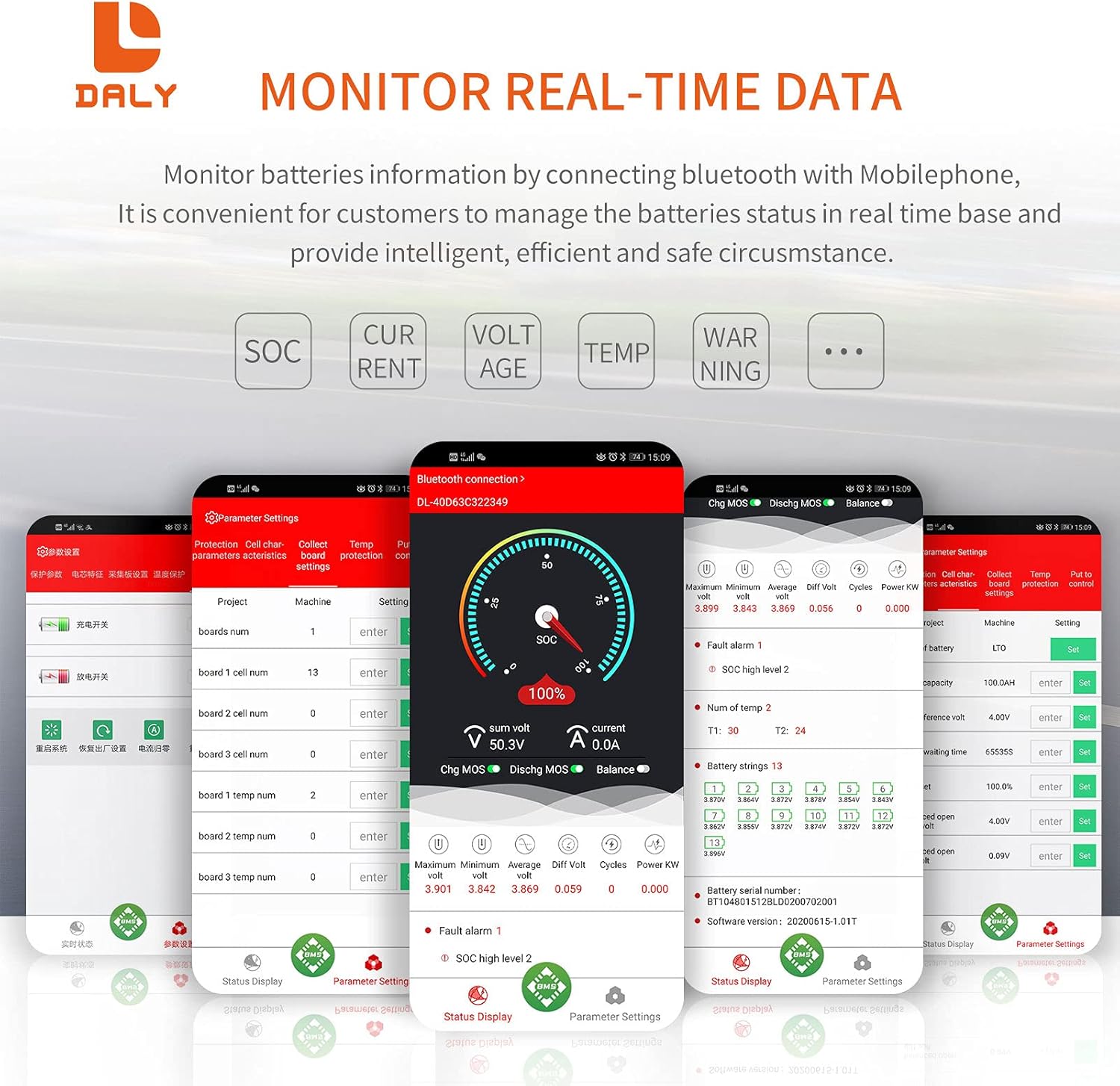
Image: Smart BMS app interface for configuring battery parameters and protection settings.
Notkunarleiðbeiningar
1. Rauntíma eftirlit
The DALY Smart BMS allows for comprehensive real-time monitoring of your battery pack's status through the mobile app or PC software.
- Stöðuskjár: View current State of Charge (SOC), total voltage, current, and individual cell voltages.
- Vöktun hitastigs: Monitor the temperature of the battery pack and the BMS itself.
- Viðvörunarskilaboð: The app will display alarm messages for any detected faults, such as over-voltage eða ofstraumsaðstæður.

Image: Real-time battery data display on the Smart BMS mobile application.
2. Programmable Protection Functions
The BMS is equipped with various programmable protection features to safeguard your battery:
- Ofhleðsluvörn: Stops charging when the battery voltage reaches a set limit.
- Ofhleðsluvörn: Stops discharging when the battery voltage drops to a set limit.
- Yfirstraumsvörn: Stops charging or discharging if the current exceeds the programmed limit.
- Hitavörn: Disables current flow if the battery temperature exceeds or falls below safe operating limits.
- Voltage Jafnvægi: The BMS features an automatic balancing function to equalize cell voltages, which is crucial for battery longevity.

Mynd: Yfirview of the 12 protection functions integrated into the DALY Smart BMS.
Viðhald
Regular maintenance helps ensure the longevity and optimal performance of your DALY Smart BMS and battery pack.
- Reglulegt eftirlit: Periodically check the battery parameters via the Smart BMS app to ensure all cells are balanced and operating within safe limits.
- Tengingarheilindi: Inspect all wiring connections, especially the balance wires and main power cables, for any signs of corrosion, looseness, or damage. Ensure they are securely fastened.
- Umhverfisvernd: The BMS is designed to be waterproof, moistureproof, fireproof, and dustproof. However, avoid exposing it to extreme conditions or direct water immersion. Keep the cooling fan free from obstructions to ensure proper heat dissipation.
- Hugbúnaðaruppfærslur: Check the DALY website or app for any available firmware updates for the BMS to ensure you have the latest features and bug fixes.
Úrræðaleit
This section addresses common issues you might encounter with your DALY Smart BMS.
- BMS virkjast ekki:
- Ensure all balance wires are correctly connected and the main B- and P+ connections are secure.
- Press the activation button on the Bluetooth module or the BMS itself.
- If the battery pack has been deeply discharged, connecting a charger might activate the BMS.
- Vandamál með Bluetooth-tengingu:
- Ensure the Bluetooth module is properly plugged into the BMS.
- Gakktu úr skugga um að Bluetooth sé virkt í snjallsímanum þínum.
- Restart the Smart BMS app and try reconnecting.
- If issues persist, try restarting your phone or the BMS.
- Inaccurate SOC Readings:
- Check if the "rated capacity" in the app's parameter settings matches the actual capacity of your battery pack. Adjust if necessary (initial password: 123456).
- The BMS performs SOC calculation with automatic learning. Over time, it should become more accurate.
- Protection Triggered (e.g., Over-voltage, Undir-bindtage, Over-current):
- The app will display specific alarm messages. Identify the triggered protection.
- Fyrir yfir-voltage, stop charging. For under-voltage, stop discharging and charge the battery. For over-current, reduce the load or charging current.
- Review your parameter settings in the app to ensure they are appropriate for your battery chemistry and application.
- Cell Imbalance:
- The DALY Smart BMS has an active balance function. Ensure it is enabled in the app settings.
- Allow the BMS sufficient time to balance the cells, especially after initial setup or deep cycles.
Tæknilýsing
| Eiginleiki | Forskrift |
|---|---|
| Vörumerki | DAGLEG |
| Fyrirmynd | 120A FAN Li-ion 20S 72V BT |
| Tegund rafhlöðu | Li-ion (20 Series) |
| Nafnbinditage | 72 volt |
| Stöðugur losunarstraumur | 120A |
| Stöðug hleðslustraumur | 60A |
| Kæliaðferð | Fan-based |
| Samskiptaviðmót | Bluetooth (Mobile APP IOS & Android), UART (PC screen) |
| Vörumál | 8.27 x 4.72 x 1.97 tommur |
| Þyngd hlutar | 2.65 pund |
| Verndunaraðgerðir | Over-charge, Over-discharge, Over-current, Short-circuit, Over-voltage, Cell Balancing, NTC Temperature Protection, Low Temperature Charging Protection |

Image: Detailed specifications and dimensions of the DALY Smart BMS 120A.
Ábyrgð
Specific warranty details for this DALY Smart BMS are not provided in the product information. Please refer to the seller's or manufacturer's official website for warranty terms and conditions. Keep your purchase receipt as proof of purchase.
Stuðningur
For technical assistance, troubleshooting beyond this manual, or inquiries regarding your DALY Smart BMS, please contact DALY customer support or visit the official DALY website. You can often find additional resources, FAQs, and contact information on their support pages.
Visit the DALY Store on Amazon: DALY Store


